CD (Continuous Delivery) — Part 6: Final validations, Manual Approval, and Deploy to Production
📚 Series: CI/CD and AI: From Theory to Practice
This is the final part of the CD block. It covers the consolidation of all pipeline results, informed human approval, and progressive deployment to production with minimum-risk strategies.
Parts of this block:
- Part 1 — Docker Packaging, SBOM, and remediation
- Part 2 — Image Scan and Service Tests
- Part 3 — Deploy to Dev and Smoke Tests
- Part 4 — Deploy to Staging and Performance Smoke Tests
- Part 5 — LCA: Load, Stress, and Chaos Engineering
- Part 6 — Final validations, Manual Approval, and Deploy to Production ← you are here
Final validations (E2E + Performance + Compliance + Security + Observability) and aggregated reports
This stage does not run new tests, but rather aggregates, correlates, and evaluates the results of all previous phases to decide whether the release is “promotable” (whether a version has sufficient quality to advance to the next level).
The goal is to make an automatic and objective decision about whether the release is fit for production, based on:
- E2E results in staging.
- Performance smoke metrics.
- Load/stress/chaos results (if they are blocking for this release).
- Security status (CVE, dependencies, container, IaC).
- Compliance (corporate policies, auditing, SBOM, signature).
- Observability (errors, saturation, anomalous logs, traces).
This stage generates a unified report that feeds the Manual Approval step.
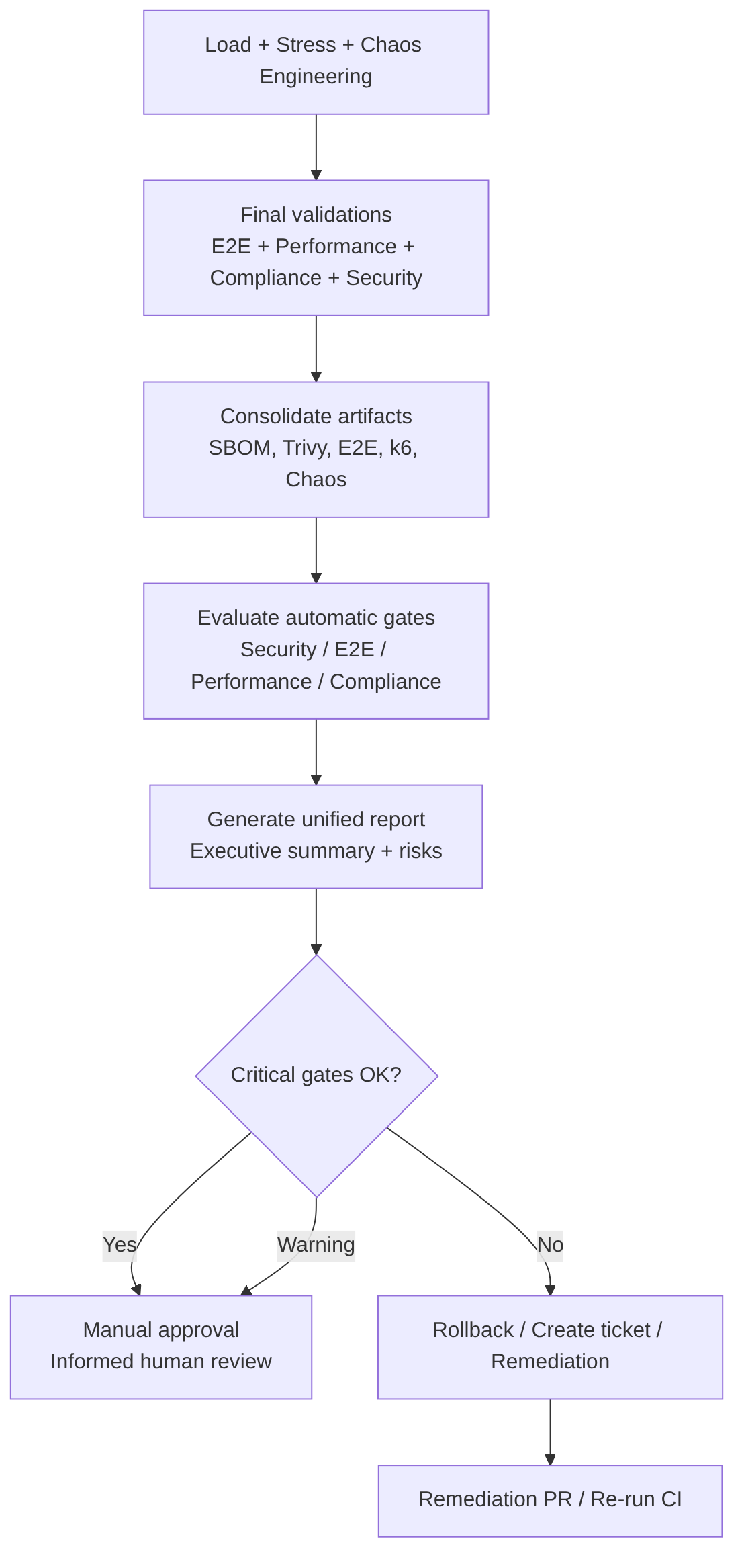
This stage includes
1. Result consolidation. Collects artifacts from:
- Trivy / Grype / Snyk
- SBOM (CycloneDX)
- E2E (JUnit/HTML)
- k6 (JSON)
- Chaos Mesh (logs, events)
- Application logs
- Prometheus metrics (p95, error rate, CPU/memory saturation)
2. Automatic gate evaluation. Each gate has clear rules:
| Gate | Criterion | Action |
|---|---|---|
| Security | 0 CRITICAL CVEs, HIGH reviewed | Blocks |
| E2E | 100% critical flows OK | Blocks |
| Performance | p95 < SLA, error rate < 1% | Blocks |
| Load/Stress | No severe degradation | Warning or blocks depending on release |
| Chaos | Automatic recovery | Warning or blocks depending on policy |
| Compliance | Valid signature, SBOM present | Blocks |
| Observability | No critical anomalies | Warning or blocks |
3. Generation of a unified report. The pipeline produces an executive summary with:
- Status of each gate
- Key metrics
- Detected risks
- Recommendations
- Links to artifacts
4. Automatic decision:
- If all critical gates are OK → advances to Manual Approval
- If there are critical failures → rollback + ticket
- If there are warnings → mandatory Manual Approval with risk note
Best practices
- Define clear and versioned gates: criteria must be in code (policy-as-code).
- Do not mix functional validations with resilience validations: each has its own weight and policy.
- Maintain full traceability: each release must have commit SHA, image tag, signature, SBOM, E2E reports, k6 reports, chaos logs.
- Automate 90%: manual approval must be informed, not a blind “yes/no”.
- Integrate with observability: correlate p95, CPU/memory saturation, 5xx errors, DB latency, MQ queues, GC (Garbage Collector).
Examples
Unified Validation Report (markdown generated by the pipeline):
## **Unified Validation Report – Release `<VERSION>`**
**Date:** `<DATE>`
**Commit SHA:** `<SHA>`
**Image:** `<REGISTRY>/<APP>:<TAG>`
**Environment:** Staging
**Generated by:** CD Pipeline
---
## 1. Artifact summary
- **SBOM (CycloneDX):** ✔️ Generated
- **Image signature (cosign):** ✔️ Verified
- **Image Scan (Trivy/Grype/Snyk):**
   - CRITICAL: `<N>`
   - HIGH: `<N>`
   - MEDIUM: `<N>`
   - LOW: `<N>`
- **E2E Tests:** `<PASSED>/<TOTAL>`
- **Performance Smoke:**
   - p95: `<X ms>`
   - Error rate: `<Y %>`
- **Load Test:**
   - Throughput: `<RPS>`
   - p95: `<ms>`
   - Error rate: `<%>`
- **Stress Test:**
   - Breaking point: `<VU>`
   - Recovery: `<seconds>`
- **Chaos Engineering:**
   - Experiments executed: `<N>`
   - Automatic recovery: ✔️ / ❌
- **Compliance:**
   - Signature policies: ✔️
   - SBOM policies: ✔️
   - Security policies: ✔️ / ❌
---
## 2. Security validation
### 2.1 Image scan
- CRITICAL: `<N>` — Result: **OK / FAIL**
### 2.2 Dependencies (SCA)
- Blocking vulnerabilities: `<N>` — Result: **OK / FAIL**
### 2.3 Compliance
- Signature verified: ✔️ | SBOM present: ✔️ | Approved licenses: ✔️ / ❌
---
## 3. Functional validation (E2E)
- Total tests: `<N>` | Passed: `<N>` | Failed: `<N>`
- Critical flows: ✔️ / ❌ — Result: **OK / FAIL**
---
## 4. Performance validation
### 4.1 Performance Smoke
- p95: `<X ms>` | p99: `<Y ms>` | Error rate: `<Z %>` — **OK / WARNING / FAIL**
### 4.2 Load Test
- Throughput: `<RPS>` | p95: `<ms>` | Error rate: `<%>` — **OK / WARNING / FAIL**
### 4.3 Stress Test
- Breaking point: `<VU>` | Recovery: `<s>` — **OK / WARNING / FAIL**
---
## 5. Resilience validation (Chaos Engineering)
- Experiments: `<N>` | Automatic recovery: ✔️ / ❌ — **OK / WARNING / FAIL**
---
## 6. Observability
- 5xx errors: `<N>` | CPU saturation: `<%>` | Memory saturation: `<%>`
- DB latency: `<ms>` | Anomalous logs: `<yes/no>` — **OK / WARNING / FAIL**
---
## 7. Pipeline automatic conclusion
**Final status:**
- ✔️ Fit for Manual Approval
- ⚠️ Fit with warnings
- ❌ Not fit (remediation required)
---
## 8. Links to artifacts
- SBOM | E2E Reports | k6 Reports | Chaos Logs | Application Logs | Prometheus/Grafana Dashboard | Release Notes
Example gate policy (Policy-as-Code YAML):
policies/gates.yaml
version: 1.0
gates:
  security:
    critical: 0
    high: 5
    fail_on_critical: true
    fail_on_high: false
  e2e:
    required_pass_rate: 1.0
    allow_flaky: false
    critical_flows_must_pass: true
  performance_smoke:
    p95_ms: 500
    error_rate: 0.01
    fail_on_threshold: true
  load_test:
    p95_ms: 800
    error_rate: 0.02
    fail_on_threshold: false
  stress_test:
    allow_breaking_point: true
    max_recovery_seconds: 30
    fail_on_recovery_violation: true
  chaos:
    require_recovery: true
    max_recovery_seconds: 60
    fail_on_recovery_violation: false
  compliance:
    require_sbom: true
    require_signature: true
    allowed_licenses:
      - MIT
      - Apache-2.0
      - BSD-3-Clause
  observability:
    max_5xx: 5
    max_cpu_pct: 85
    max_mem_pct: 90
    fail_on_anomaly: false
decision:
  promote_if:
    - security
    - e2e
    - performance_smoke
    - compliance
  warn_if:
    - load_test
    - stress_test
    - chaos
    - observability
AI
AI contributes:
- Automatic correlation between metrics, logs, and traces.
- Anomaly detection (spikes, patterns, regressions).
- Executive summary for the approver.
- Risk prioritization.
- Automatic ticket generation with suggested root cause.
- Mitigation recommendations (timeouts, pool sizes, caching, retries).
AI DOES NOT:
- Replace the final human decision.
- Approve or reject a release on its own.
- Run tests or manipulate environments.
Manual Approval: critical, human, and informed decision
This stage converts all the technical evidence generated by the pipeline into an informed human decision, with traceability, governance, and risk control.
It is the last step of CD before production. It is based on the automatically generated executive summary that consolidates security, performance, resilience, compliance, and risks. The approval is recorded for auditing and governance. If rejected, a remediation flow is activated.
The goal of Manual Approval is to allow a responsible person (PO, Tech Lead, SRE, Security, Compliance, etc.) to make a final decision based on:
- Consolidated technical evidence
- Known risks
- Security, performance, resilience, and compliance status
- Business context (deployment windows, impact, dependencies)
It is the last control before production and must not be a formality, but a well-founded decision.
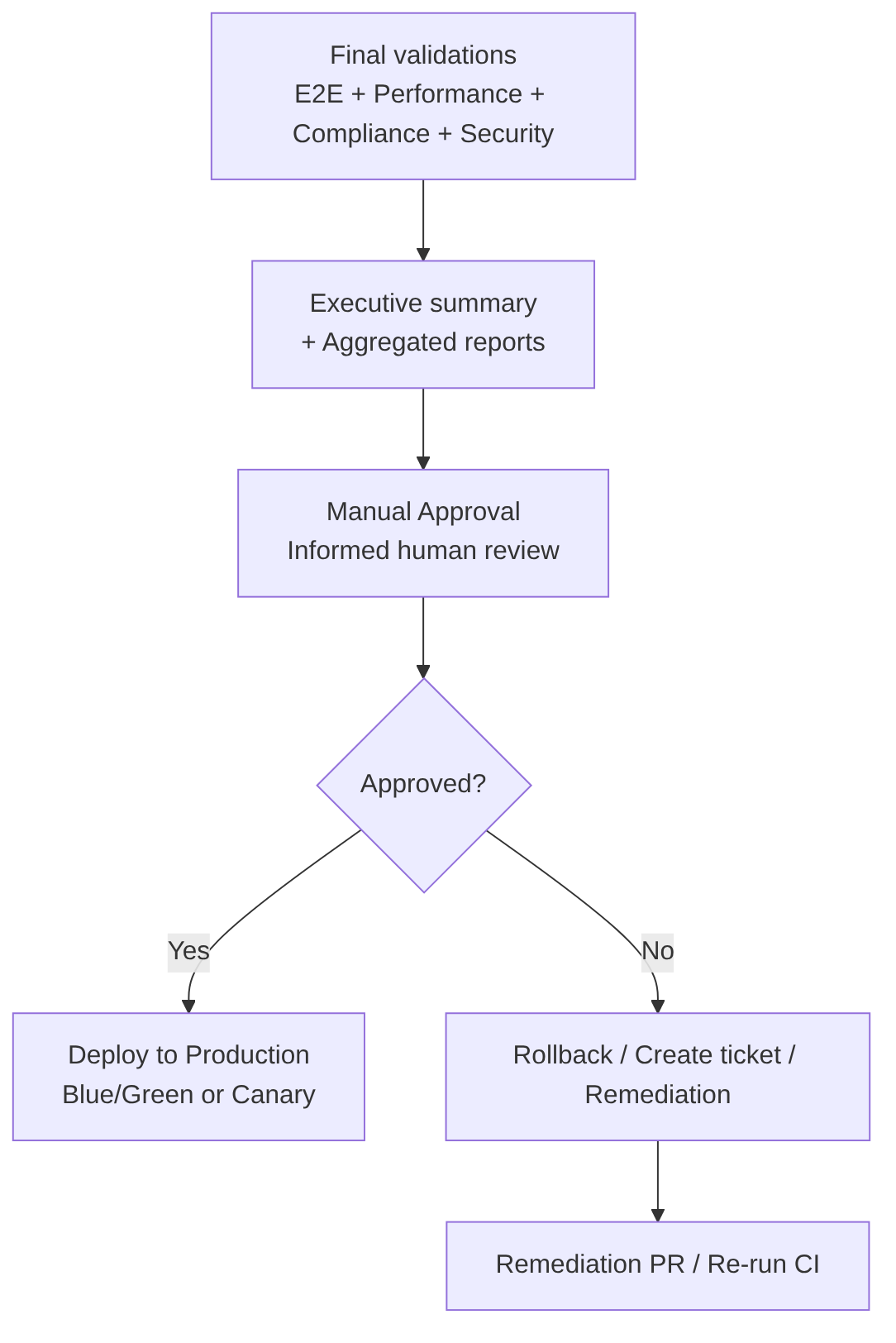
This stage includes
-
Executive Summary presentation: the pipeline shows the approver a clear and actionable summary with the status of all gates, detected risks, technical recommendation, links to artifacts, runbook, and rollback.
-
Human review: the approver reviews security results, critical E2E, performance, load/stress, chaos, logs/metrics, compliance, and business risks.
-
Decision: the approver can:
- Approve → the Deploy to Production job is executed
- Reject → rollback, ticket creation, and pipeline re-execution after remediation
- Request changes → an issue is generated and the release is blocked
-
Auditing: the decision is recorded with who approved, when, which version, which risks were accepted, and which evidence was reviewed (essential for compliance and traceability).
Best practices
- Require multiple approvers depending on criticality:
- Minor releases → 1 approval (Tech Lead)
- Major releases → 2 approvals (Tech Lead + Security)
- Critical releases → 3 approvals (Tech Lead + Security + PO)
- Show only relevant information: no noise. Only key metrics and links.
- Include a mandatory checklist: prevents “blind” approvals.
- Set a timeout: if not approved within X hours → the release expires.
- Integrate with runbooks: the approver must have immediate access to rollback, mitigations, and on-call contacts.
- Keep the decision in the release system for auditing and compliance.
Advantages
- Risk control: allows reviewing technical and business evidence before executing an irreversible change in production.
- Alignment between technology and business: the approver can evaluate whether the timing is appropriate (maintenance windows, campaigns, traffic spikes).
- Auditing and regulatory compliance: essential in regulated sectors (finance, insurance, health, public administration).
- Contextual validation: the pipeline does not know business priorities, reputational risks, or external dependencies. The approver does.
Disadvantages
- Can introduce friction or delays: unavailable approvers or accumulated releases.
- Risk of “blind” approvals: if the executive summary is not clear or the evidence is not reviewed.
- Does not scale well without prior automation: if automatic gates do not filter correctly, the approver receives too much information.
- Single point of failure: if only one person approves, it becomes a bottleneck.
AI
AI can:
- Generate the executive summary synthesizing security results, metrics, logs, traces, chaos, and risks.
- Correlation of weak signals: detect progressive degradations, correlation between latency spikes and GC, log anomalies.
- Risk prioritization according to potential impact (availability, security, performance, compliance).
- Generation of recommendations (mitigations, configuration adjustments, preventive actions).
- Preparation of audit evidence (links, metrics, artifacts, relevant logs).
What it CANNOT do:
- Cannot approve or reject a release.
- Cannot make risk decisions.
- Cannot replace human judgment.
- Cannot execute changes in production on its own.
- Cannot interpret business context (campaigns, dependencies, reputational impact).
Deploy to Production: Blue/Green, Canary, Progressive Delivery, and extreme risk control
The goal is to promote the same signed artifact that has passed all previous validations and deploy it to the production environment minimizing risk, maximizing observability, and guaranteeing immediate reversibility.
It is the final stage of CD and the point where governance, engineering, business, reliability, and user experience converge.
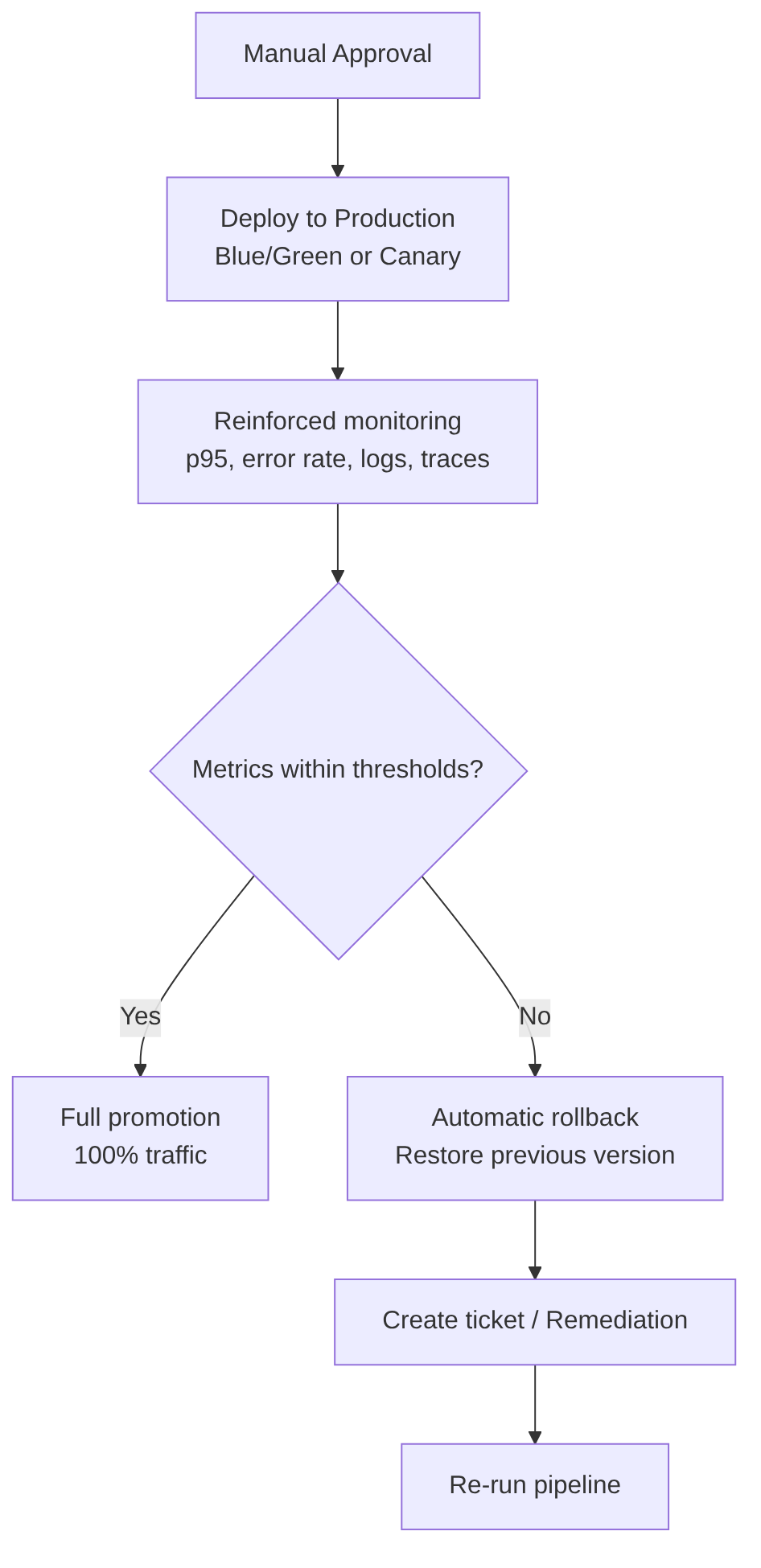
This stage includes
-
Final artifact selection: signed image (cosign), associated SBOM, release metadata (commit, tag, date, approvers).
-
Deployment strategy (see detail below): Blue/Green, Canary, Rolling Update, Feature Flags.
-
Reinforced observability: during deployment, p50/p95/p99, error rate, CPU/memory saturation, DB latency, anomalous logs, distributed traces, and impact on real users are monitored.
-
Production gates (example):
- Error rate > X% → rollback
- p95 > Y ms → rollback
- 5xx > Z → rollback
- CPU saturation > 90% → rollback
-
Automatic rollback: must be immediate, safe, reproducible, and without data loss.
Deployment strategies
Blue/Green:
- Two identical environments (Blue and Green).
- Deployed to the inactive one.
- Instantaneous traffic switch.
- Immediate rollback by switching back to the previous environment.
Canary:
- Deployed to a small percentage of users (1–5%).
- Latency, errors, and saturation are monitored.
- Progressively increased to 100%.
- Automatic rollback if anomalies are detected.
Rolling Update:
- Gradual pod replacement.
- Less control than Canary, but simpler.
Feature Flags:
- Progressive feature activation.
- Allows logical rollback without redeployment.
Best practices
- Always promote the same signed artifact: never rebuild images for production.
- Use progressive strategies (Canary > Rolling): reduces risk and allows fast rollback.
- Activate advanced observability: specific dashboards for the deployment.
- Automate rollback: must not depend on human intervention.
- Maintain parity with staging: resources, sidecars, limits, configuration.
- Integrate feature flags: allows enabling/disabling features without redeployment.
- Run smoke tests post-deploy: quick validation in production after the switch.
- Record the release: approvers, metrics, artifacts, accepted risks, date and time, strategy used.
Advantages
- Extremely controlled risk: with Blue/Green or Canary, the impact of a failure is minimal.
- Immediate reversibility: rollback in seconds without affecting users.
- Real observability on real traffic: allows detecting issues that do not appear in staging.
- Integration with feature flags: allows activating features safely.
- Full traceability: each deployment is recorded with technical and business evidence.
Disadvantages
- Operational cost: Blue/Green requires duplicating infrastructure; Canary requires more routing complexity.
- Dependency on mature observability: without reliable metrics, Canary is dangerous.
- Rollback not always trivial: if there are irreversible data migrations, rollback becomes complicated.
- Requires strict discipline: no manual changes in production. Everything must be declarative and immutable.
AI
- Real-time analysis during canary: AI can detect latency anomalies, error spikes, saturation, degradation patterns, and correlations between logs and metrics.
- Rollback or promotion recommendations based on trends, comparisons with previous releases, and historical patterns.
- Dashboard and summary generation: temporary panels, impact summaries, Blue vs Green comparisons.
- Detection of invisible regressions: slow degradation, memory leaks, latency in non-critical endpoints.
What AI CANNOT do:
- Cannot execute the deployment on its own.
- Cannot make decisions about business risks.
- Cannot manipulate real traffic without supervision.
- Cannot replace human governance.
