
Android Error – Errors on Methods with @Override Annotations, Listener Types or Overridden Methods
Getting errors on every @Override annotation after importing or copying code into your workspace? Find out why it happens and how to fix it.
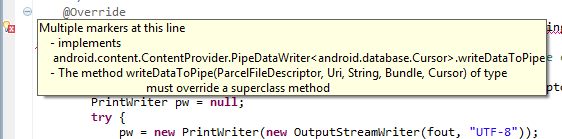
When we import or copy code from somewhere else into our workspace, we may get an error on all the @Override annotations. If we hover the mouse cursor over the error, we will see the following message:
Multiple markers at this line
– implements
android.content.ContentProvider.PipeDataWriter<android.database.Cursor>.writeDataToPipe
– The method writeDataToPipe(ParcelFileDescriptor, Uri, String, Bundle, Cursor) of
type NotePadProvider must override a superclass method
This is caused by the different versions of the JRE and Java installed on your computer. Newer versions no longer use @Override
Depending on whether you have updated to the latest version of both the JRE and Java, there is one solution or another.
Solution if you are already up to date
Remove all the @Override annotations one by one and save everything.
Solution if you are not up to date
Once updated, the @Override annotations will no longer be used.
“Android Error – Errors on Methods with @Override Annotations, Listener Types or Overridden Methods” by Ramón Invarato at jarroba.com, licensed under Creative Commons Attribution-NonCommercial-ShareAlike 3.0. Registered at Safe Creative.

You may also like


Android Error – Eclipse Throws an Error That Doesn’t Exist Anywhere
Eclipse shows a red X on your Android project but no error anywhere? Follow these step-by-step solutions to fix the phantom error and the R.java problem.
Android Error – Higher Compiler Compliance Level Required
Getting the Android error "requires compiler compliance level" in Eclipse? Here are three simple solutions to fix it step by step.
Android Error – Lost References
Getting errors across your whole Android project and "The type java.lang.String cannot be resolved"? Here's a quick fix using Organize Imports in Eclipse.
Android Error – Error in Imported Libraries
Getting "Conversion to Dalvik format failed with error 1" in your Android project? Here's how to fix the error caused by imported libraries, step by step.
Leave a comment