
Android Error – Problems with an Imported or Sample Android Project
Getting a FileNotFoundException on AndroidManifest.xml with an imported or sample Android project in Eclipse? Here is how to fix it step by step.
The terminal shows the following error with an imported or sample Android project:
Unable to read C:android-sdk-windowsAndroidManifest.xml: java.io.FileNotFoundException: C:android-sdk-windowsAndroidManifest.xml (El sistema no puede encontrar el archivo especificado)
Solution
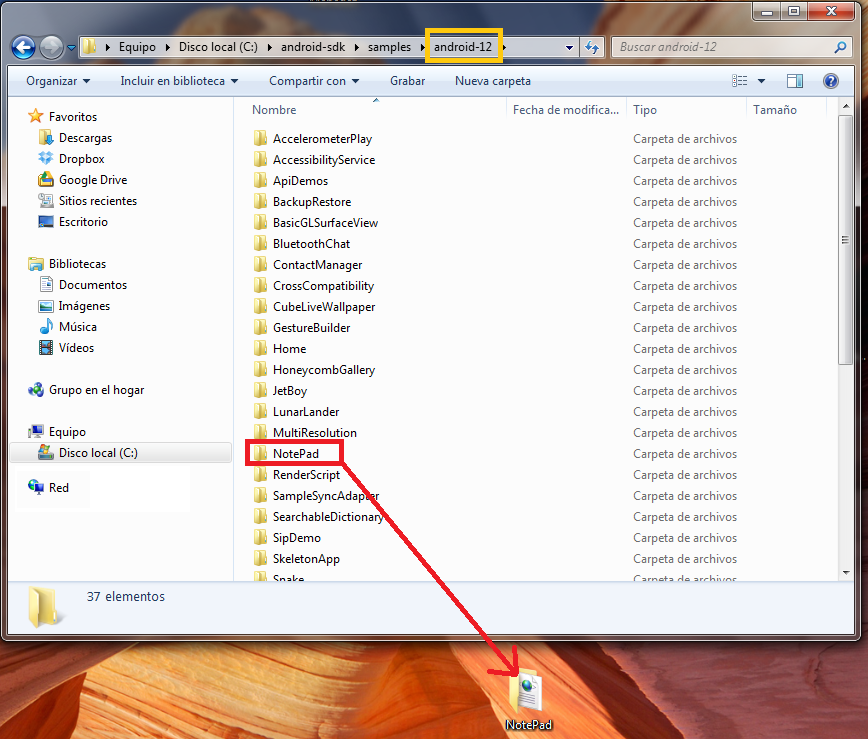
Close Eclipse. Copy the problematic project to your desktop, for example. If it is an Android sample, you will find them in: "C:android-sdksamples". Go in there, enter the folder for the operating system version you want (see the page with the Android API levels) and copy the whole sample project folder to your desktop. It is important to make the copy in a directory outside your workspace.
In the following screenshot we copy, as an example, from the "android-12" samples folder. It is important to remember the operating system version level, which in this case is 12.
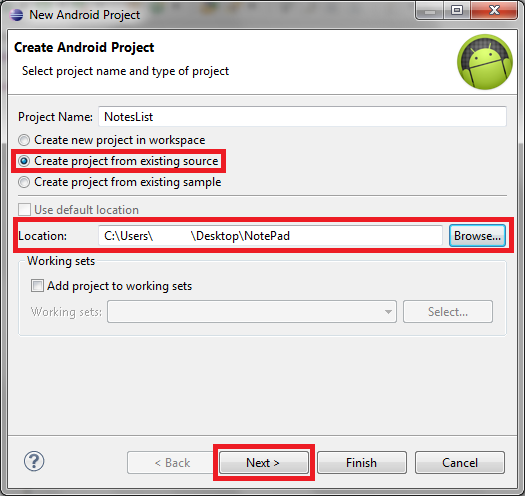
Start Eclipse. Create a new project from an existing one. To do that, go to the "Package Explorer", right-click, and under "New", click "Android Project".

In the window that opens, select "Create project from existing source". In "Location", browse to the sample project on your desktop. Then click "Next".
“Android Error – Problems with an Imported or Sample Android Project” by Ramón Invarato at jarroba.com, licensed under Creative Commons Attribution-NonCommercial-ShareAlike 3.0. Registered at Safe Creative.

You may also like


Android Error – Error in Imported Libraries
Getting "Conversion to Dalvik format failed with error 1" in your Android project? Here's how to fix the error caused by imported libraries, step by step.
Android Error – Eclipse Throws an Error That Doesn’t Exist Anywhere
Eclipse shows a red X on your Android project but no error anywhere? Follow these step-by-step solutions to fix the phantom error and the R.java problem.
Android Error – Skipping an Indexed File
Getting the "skipping index file" error in your Android project? Learn how to fix it by removing the file, cleaning the project and restoring the file.
Android Error – Lost References
Getting errors across your whole Android project and "The type java.lang.String cannot be resolved"? Here's a quick fix using Organize Imports in Eclipse.