
Android Error – Lost References
Getting errors across your whole Android project and "The type java.lang.String cannot be resolved"? Here's a quick fix using Organize Imports in Eclipse.
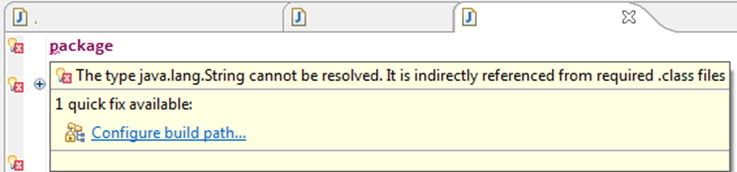
If almost your whole project is showing errors, and hovering the mouse over “package” shows the following message:
The type java.lang.String cannot be resolved. It is indirectrly referenced from required .class files
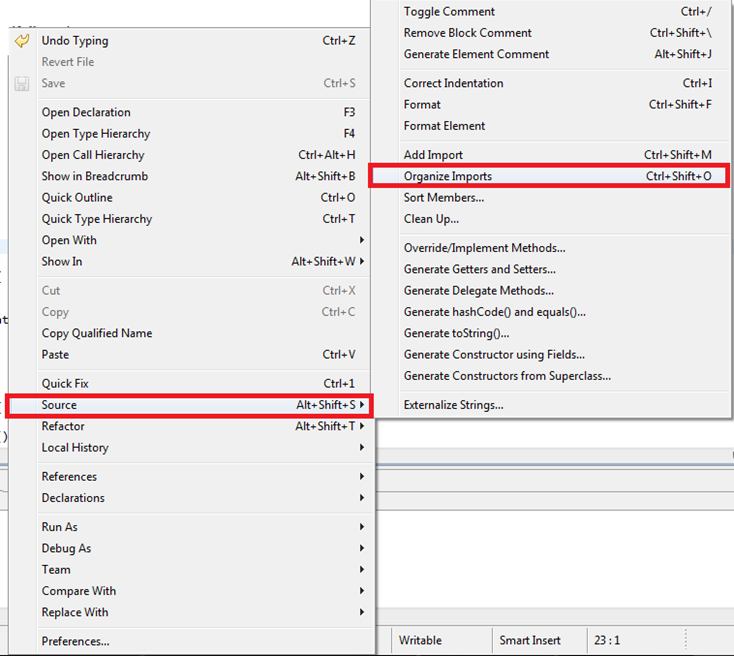
It’s easy: just remove all the “imports” in this class, save, and press “control+shift+O”, which organizes the imports automatically (right-clicking the project and choosing "Source / Organize Imports" also works). The rest of the classes in the package will repair themselves.
“Android Error – Lost References” by Ramón Invarato at jarroba.com, licensed under Creative Commons Attribution-NonCommercial-ShareAlike 3.0. Registered at Safe Creative.

You may also like


Android Error – Eclipse Throws an Error That Doesn’t Exist Anywhere
Eclipse shows a red X on your Android project but no error anywhere? Follow these step-by-step solutions to fix the phantom error and the R.java problem.
Android Error – Error in Imported Libraries
Getting "Conversion to Dalvik format failed with error 1" in your Android project? Here's how to fix the error caused by imported libraries, step by step.
Android Error – Problems with an Imported or Sample Android Project
Getting a FileNotFoundException on AndroidManifest.xml with an imported or sample Android project in Eclipse? Here is how to fix it step by step.
Android Error – Errors on Methods with @Override Annotations, Listener Types or Overridden Methods
Getting errors on every @Override annotation after importing or copying code into your workspace? Find out why it happens and how to fix it.
Leave a comment