
Android Error – Skipping an Indexed File
Getting the "skipping index file" error in your Android project? Learn how to fix it by removing the file, cleaning the project and restoring the file.
You get the following error:
…skipping index file…
Solution
First, fix it by completely removing the file that causes the error from the project.
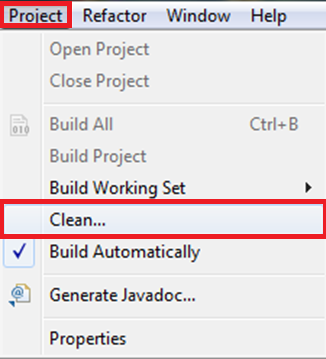
Then clean the project with “Project/Clean…”.
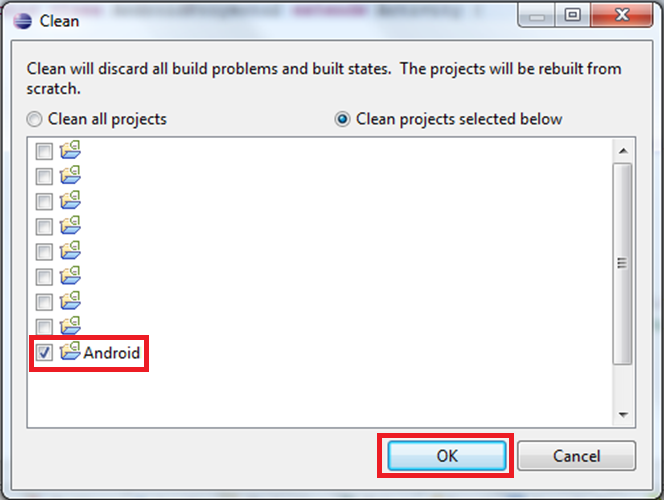
Select only the project you want to clean.
Finally, copy the file that caused the error back to where it was (you can try copying the file that caused the error to the desktop and then restoring it).
“Android Error – Skipping an Indexed File” by Ramón Invarato at jarroba.com, licensed under Creative Commons Attribution-NonCommercial-ShareAlike 3.0. Registered at Safe Creative.

You may also like


Android Error – Problems with an Imported or Sample Android Project
Getting a FileNotFoundException on AndroidManifest.xml with an imported or sample Android project in Eclipse? Here is how to fix it step by step.
Android Error – Error in Imported Libraries
Getting "Conversion to Dalvik format failed with error 1" in your Android project? Here's how to fix the error caused by imported libraries, step by step.
Android Error – Eclipse Throws an Error That Doesn’t Exist Anywhere
Eclipse shows a red X on your Android project but no error anywhere? Follow these step-by-step solutions to fix the phantom error and the R.java problem.
Android Error – Errors on Methods with @Override Annotations, Listener Types or Overridden Methods
Getting errors on every @Override annotation after importing or copying code into your workspace? Find out why it happens and how to fix it.
Leave a comment