
Hamming Code: Error Detection and Correction
Hamming code to detect and correct errors. Step-by-step examples for fixing errors using redundancy bits and the syndrome matrix. Learn how it works.
Who would have thought that the Hamming algorithm, which is all about correcting errors, could be a game -yes, a game, you read that right- a deduction game like Cluedo or Sudoku, where we get a series of initial clues and need to figure out who the culprit is, or which number goes in each position, by process of elimination.
It sounds like a dream: we send some bits (an image, an audio file, a text, whatever) over the Internet. When they reach their destination, and they arrive damaged (bits randomly flipped; where there used to be a “1” there is now a “0”, and vice versa) for some reason -like an electromagnetic storm somewhere between the computer that sends them and the one that receives them- we can correct, at the destination, the errors that happened along the way.
This algorithm is, so to speak, a detective game. We have several suspects (the bits), and among them there are one, several or no culprits (erroneous bits). We also have several clues that will let us rule out the innocent ones until we are left with the guilty ones; but watch out, there can also be clues that lie. It’s actually pretty simple.
Tool
Free online Hamming calculator
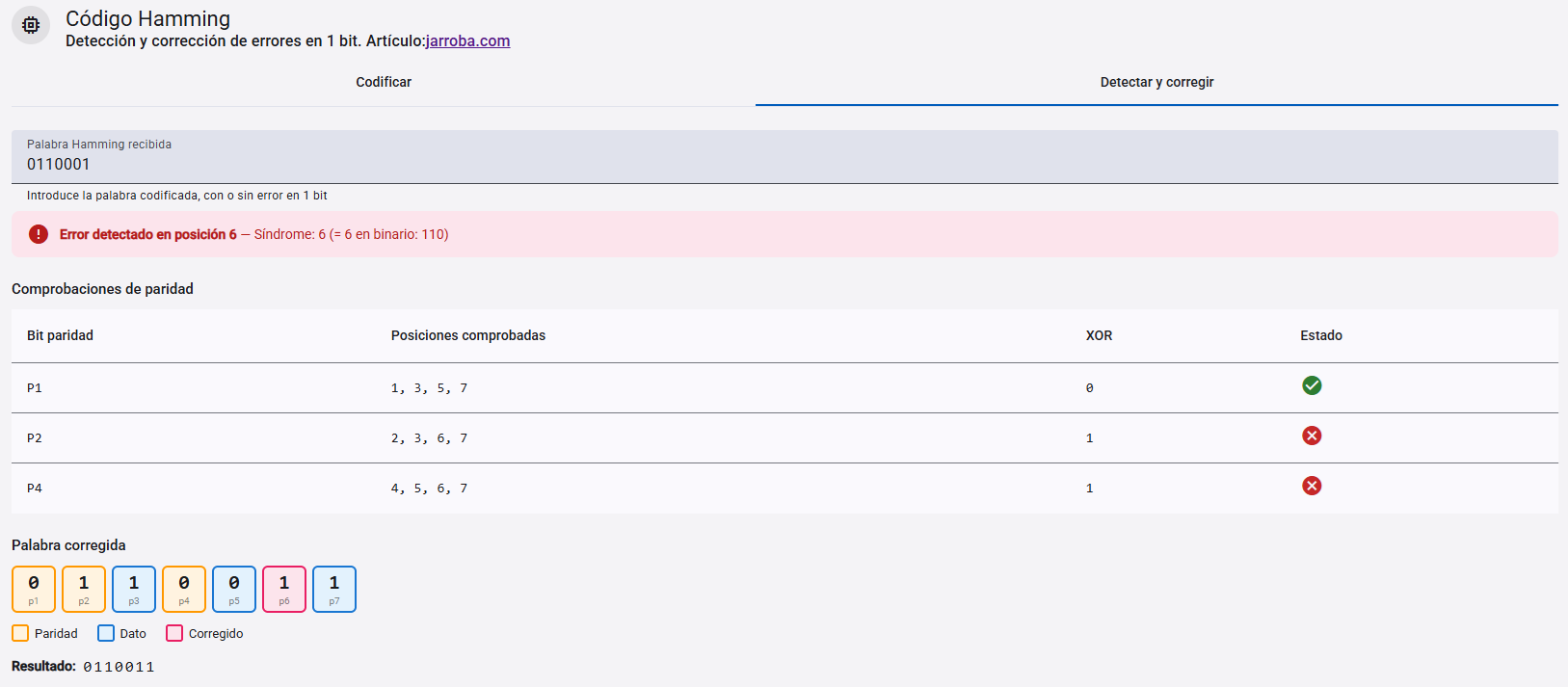
In other words, there are some bits that correct other bits. These bits that correct others are called “redundancy bits”, because they are extra bits added to the information to try to correct errors, or at least to check that everything is correct. An example in the physical world would be having a text on a piece of paper, such as “Mi mamá me mima”, and further down on the same paper the count of all the letters in the text “M=6, I=2, A=3, E=1” (it’s repeated/redundant information, since it’s already contained in the data). That way, if liquid is spilled on the ink and some words become illegible, like “Xi XaXá me Xima” (the “X”s represent illegible text), we can still recover the original text using the letter count: we know there are 6 “M”s and we can only read 2, so we deduce that the illegible letters must be “M”s too (the same would happen if the “X”s above were letters and not smudges: the letter “X” doesn’t exist in the letter count, so it is an erroneous letter). The original data plus the “redundancy bits” are known as the “Block Code”.
The “Hamming minimum distance” is very interesting for correcting bit errors (more information in the Hamming article; I recommend reading it right after this one). It can actually be used to correct any type of file (audio, image, etc.) in computing, since bits are the basis of every file, and if the bits are correct, then the file should be correct (should, because if, for example, with a “man in the middle” attack, a third party modifies the file along the way during transmission; this method will correct the errors if the file arrives damaged at the destination between the third party and the destination, but it won’t detect whether the content has been deliberately modified).
Hamming Code
To start any game we need rules. And Hamming’s rules are the following three (if these instructions don’t make it clear, look at the image that comes next, and then come back; you’ll get it right away):
- As “redundancy bits” we will use what are known as “parity bits” to check whether there are errors or not (they will be our clues): “1” means “odd”, and “0” means “even” (the “Parity Bit” is the sum of the “1s”; for example, for the bit string “1011” the sum of the “1s” is 3, which is odd, so the parity bit is “1”. If you’re curious, you can find more information about “parity bits” in this other article about “Check digits” by clicking here).
- Each “parity bit” will check certain specific bits, depending on the position it occupies and following the rules in the next example. For instance, if the position is 4, starting from that very position 4 bits are selected, then 4 are skipped, the next 4 are selected, then the next 4 are skipped, and so on forever. The same goes for all positions that are powers of two (for position 1 it’s one yes, one no, one yes, one no, etc.; and for position 2? Two yes, two no, two yes, two no; I already told you about four, and for the next ones, 8, 16, 32, etc.? It’s very easy).
- Of the selections above, the “parity bit” is the one in the lowest position (obviously, because if the parity bit says whether the sum of the “1s” is even or odd, and it checked itself, we’d end up in a pointless infinite loop); the rest are the bits it checks (the ones that get added up to find out whether the sum is even or odd).
Following these instructions we could draw an infinite matrix forever. But we’ll cut it off at position 20, which you can see in the following image (the rest, out to infinity, works the same way 😉 ).
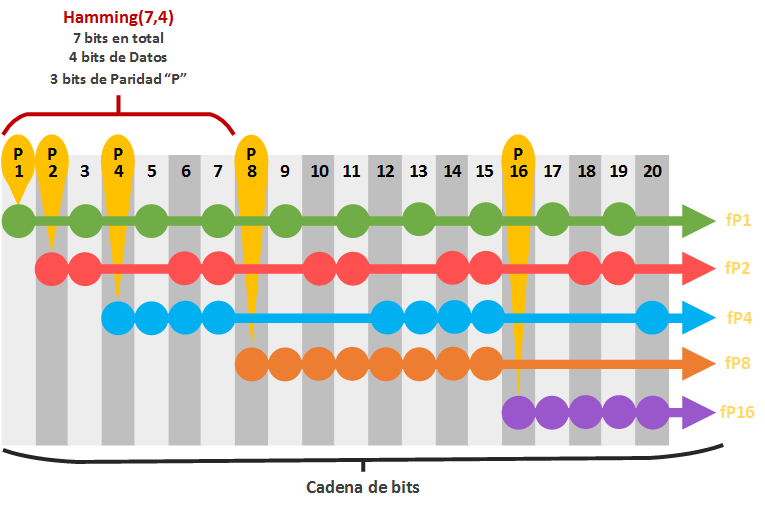
You’ll see that the bit string is made up of data bits and parity bits mixed together (but not scrambled 😉 ). We know that the parity bits are the powers of two: 1, 2, 4, 8, 16 (the next one is 32, and the example only has 20 bits, so I’ll stop counting here). In the image I’ve called the “parity bit” itself “P” followed by the position it occupies (for example, the one in position 4 I’ve called “P4”). Don’t confuse it with the rows of bits that each “parity bit” checks, including itself; I’ve named each of these rows in the image “fP” followed by the position where it starts (like “fP4”, which is the row checked by the “parity bit” called “P4”, including itself). This is just an ordinary matrix, only a little more exciting. This matrix is called the “Parity-check Matrix” or “Syndrome Matrix”; I like to call it the “Deduction matrix”, which sounds much more mysterious, and because this matrix will help us use the clues to deduce which bits are wrong so we can correct them, or simply detect whether there are errors.
I’m sure you noticed that above the previous “syndrome matrix” the text “Hamming(7,4)” appears. I wanted to point it out because it’s the most typical Hamming code. There are infinitely many, always following the rules; others could be:
- Hamming(3,1)
- Hamming(15,11): in the matrix from the previous image it would go right up to just before position 16
- Hamming(31,26): it would go right up to the position before 32
- etc…
Let’s focus on “Hamming(7,4)”, which means that for every 7 bits, 4 are data bits and the remaining (7 – 4 =) 3 are “parity bits”. In other words, if we split a video/photo/audio/text into chunks of 4 bits, we would get, for example, a piece that could be “1011”.
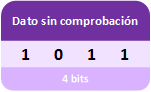 To this chunk of 4 bits we add 3 more bits that will be used to check the data (the “parity bits”). To do that, we place them by reserving slots for the “parity bits” at positions 1, 2 and 4 (as in the “syndrome matrix” we saw above).
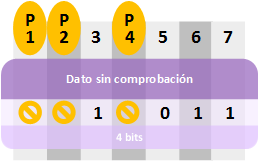 We fill in the rows that each “deduction bit” will check in the “syndrome matrix” (up to position 7, we don’t need more) using the rules described above. As you can see in the next image (I recommend you glance at the next image as you read this paragraph), we have 3 rows: “fP1”, “fP2” and “fP4”. These rows can also be represented as sets (since each row contains a set/group of bits), and we can see that some rows have bits in the same position (don’t confuse the “parity bit” such as “P4” with the row it checks, “fP4”, which includes “P4” itself as well as the data in positions 5, 6 and 7; so the positions of the “parity bits” will never overlap, but the bits they check will, and we’ll see later why that is). This way, we see these are sets that I represent with the same colors (or same “fP”) both as rows (in the image, the “syndrome matrix” on the left) and as circles (in the image, the colored circles):
- fP1 or Green: with the “parity bit” P1, and data positions 3, 5 and 7
- fP2 or Red: with the “parity bit” P2, and data positions 3, 6 and 7
- fP4 or Blue: with the “parity bit” P4, and data positions 5, 6 and 7
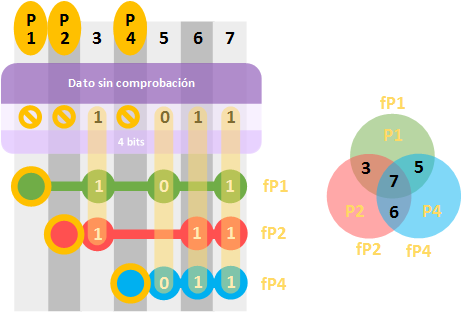 All that’s left is to calculate the “parity bits”. We simply add up the “1s” in each row, check whether the sum is even or odd (reminder: “even” = “0”, and “odd” = “1”), and fill in the “parity bit”. In the circular sets I’ve replaced the positions from the previous image with the actual bits.
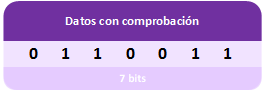
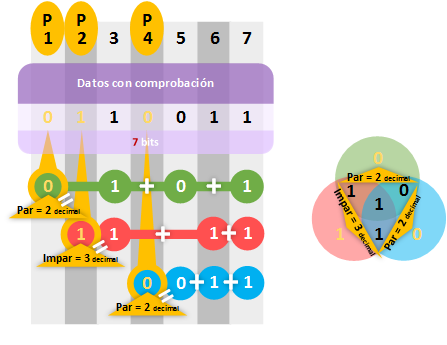 We now have the bit string that includes the data and the “check bits” following “Hamming(7,4)”.
Note
Names of the bit groups
I didn’t want to introduce new names during the explanation so as not to complicate it (and I’ll keep doing that for a good while so the article reads smoothly). The data that gets sent is actually called a “Message” or “Data Sequence”, which is converted by the “Hamming Code” into a “Block Code”.
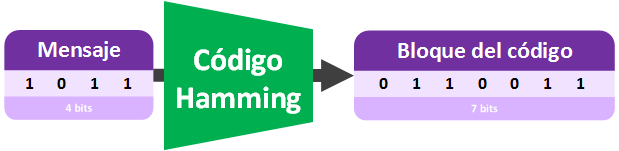 If we want to send the “Block Code” over the Internet to, say, a friend’s computer, it will no longer be called a “Block Code” but a “Code Word”, because it will be prepared (by adding other bits with a meaning that depends on the communication protocol) to enter a communication channel, which in this case is the Internet.
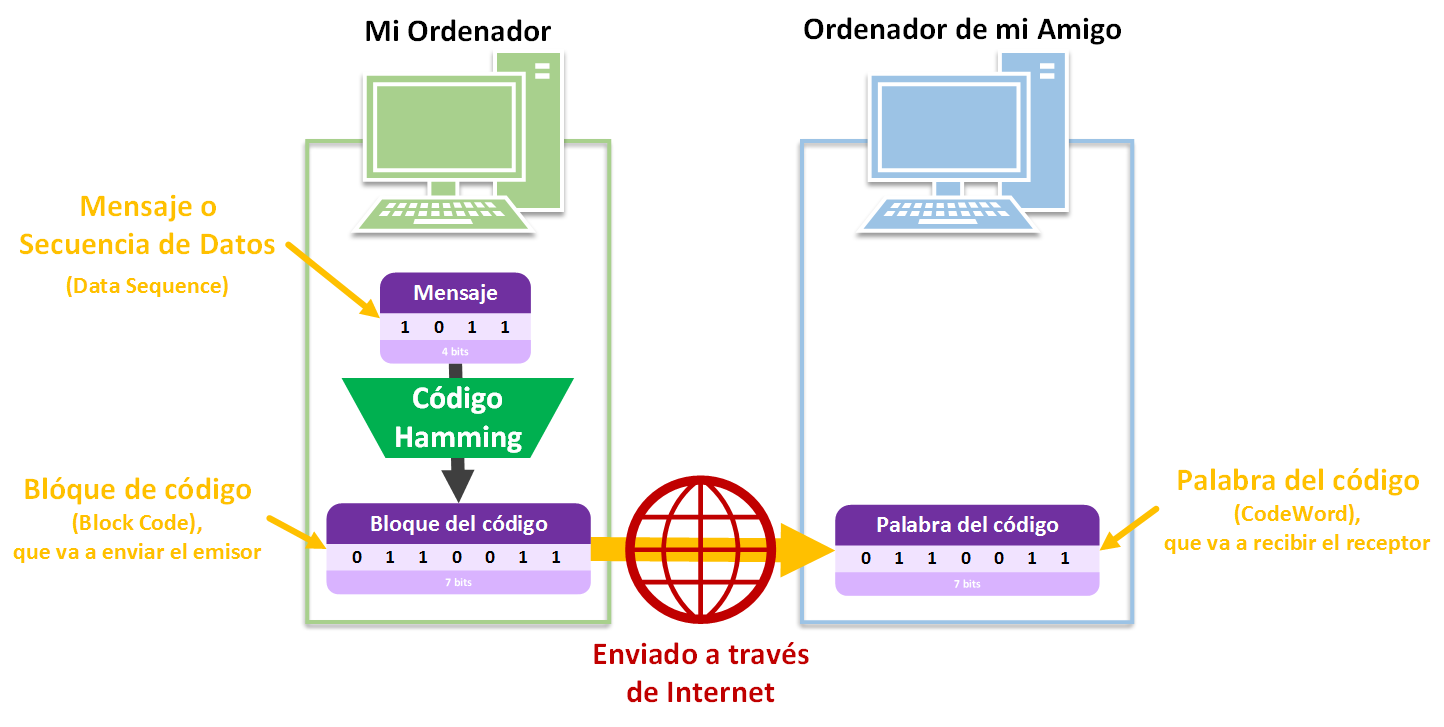 Summary of the terms:
- “Message” or “Data Sequence”: normally the piece of what we want to send (for example, a large file split into small pieces, which are the messages)
- “Block Code”: In coding theory, the result of applying an encoder (such as the Hamming code) to the message so that it adds redundancy bits (such as parity bits). (Note on the translation: in the original Spanish, “Block Code” is rendered as “Bloque del código” rather than “Código del Bloque”, because an “error-correcting code” encodes data in blocks, so each of these blocks belongs to a “Code” that created it, and we can say it is a “block of the code”)
- “Code Word”: In communication theory, what we want to send over a communication channel (such as the Internet), which will normally be a “Block Code” so that whoever receives the “Code Word” can correct errors (The “Code Word” could also be a “Message”, although if erroneous bits reach the receiver there will be no way to correct them since there are no redundancy bits).
Finding and correcting errors
Now the same thing, but in reverse. Let the deduction game begin!
Suppose the following bit string, with data bits and “parity bits”, arrives over the Internet (or is read from a hard drive). We have to check that the data is correct before using it, in case some bit got flipped over the Internet due to interference (or, if it were on our platter hard drive, a bit might have been demagnetized; for SSDs, a memory cell might be defective and not store a bit properly, for example). In short, we want to use the following bit string and we don’t know whether it’s correct, so let’s check it!
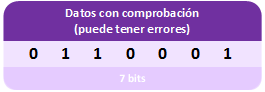
We don’t know whether it has any errors or not: it may be correct, or it may have some flipped bits; we also don’t know whether the wrong bits are data bits or the “parity bits” themselves. So if a “parity bit” is wrong, can we no longer correct or check anything? We can also tell whether a “parity bit” is wrong and even correct it, let’s see how.
The first thing we have to do is fill in the “syndrome matrix”. We don’t fill in the “parity bits”, since they’re what we use to run the checks; they’re what we have to recalculate just like before.
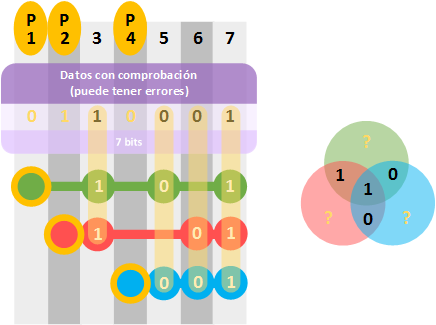 Just as we did before, we calculate the “parity bits”. Once calculated, we compare them with the ones the full bit string already had and see whether they match.
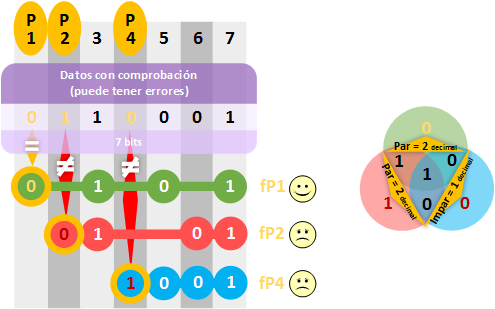 In the example we can see that there are 2 “parity bits” that don’t match, in rows “fP2” (red) and “fP4” (blue), so something is definitely wrong. But which bit is wrong? We deduce that the erroneous bit must belong to both rows (in this deduction game, with the evidence we’ve managed to identify the culprit). So, if the erroneous bit isn’t “0”, it must be “1”, and we correct it.
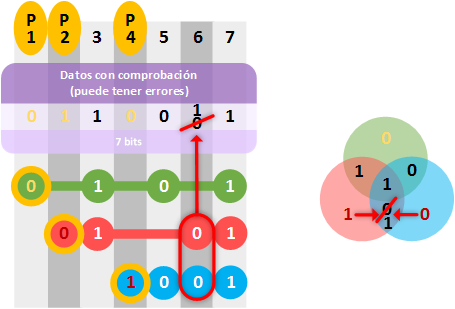
Isn’t the bit at position 7 also part of both rows marked as wrong? Keep in mind that the “1” at position 7 is already being declared fine by row “fP1” (green). Only the “0” at position 6 belongs to rows “fP2” (red) and “fP4” (blue) exclusively; and it’s the one that’s wrong.
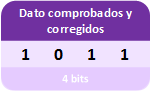
Once corrected, we can remove the “parity bits” and get the data in perfect condition, so we can use it. If it was a piece of an image, for example, after checking the remaining chunks and assembling all the bits of the image, we can finally view it without any problem.
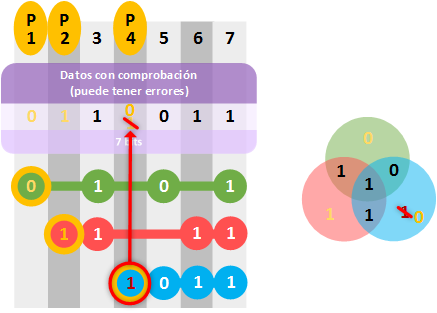
And what if the wrong one was a “parity bit”? Like the following one:
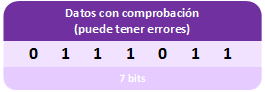 Its “syndrome matrix” will reveal that the only thing wrong is the “parity bit” itself. As we said above, “parity bits” don’t overlap with bits from other rows, so if the error is in the “parity bit”, it will always be alone. Once we know it’s wrong we can correct it or not; what really matters is that the data is correct.
How many bits can the Hamming code correct? Obviously, if all of them are wrong, it’s impossible to correct anything, since it would be something else entirely that would be validated as correct (If we have a door that’s missing a hinge, we can fix it; what we can’t do is assume that an apple is a damaged door and try to “fix” it by attaching a hinge, because an apple is something else, not a door). To know how many bits can be corrected, you need the “Hamming Distance” (we’ll cover it in another article)
Extended Hamming
“Extended Hamming” is also used to ensure better detection. It simply consists of adding one extra full row and a new parity bit in the first position.
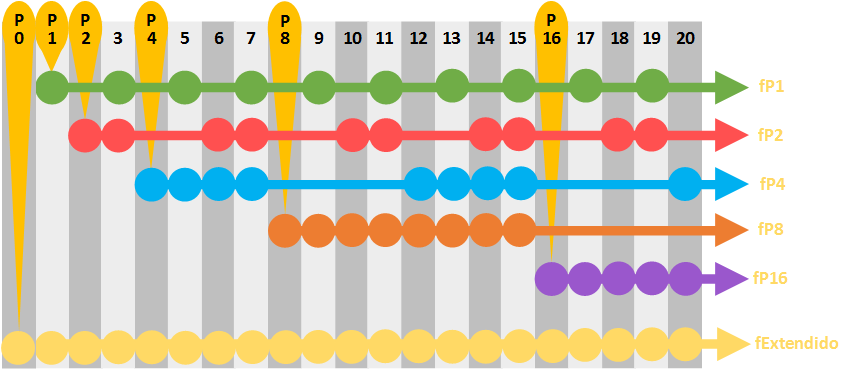 Note about the previous syndrome matrix: You can use it to practice the Hamming code by printing it (in black and white if possible) and writing on top of it.
An example of the Extended Hamming code applied with what we’ve seen so far would be:
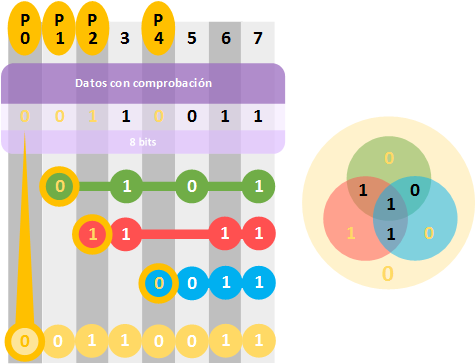 Finally, notice that it would no longer be “Hamming(7,4)” but “Hamming(8,4)” (4 data bits plus 4 parity bits).
If you’re curious to learn more, I recommend you take a look at the Hamming article, where we explain the different capabilities of an error-correcting code, including this one, the “Hamming Code”!
References
“Hamming Code: Error Detection and Correction” by Ramón Invarato at jarroba.com, licensed under Creative Commons Attribution-NonCommercial-ShareAlike 3.0. Registered at Safe Creative.

You may also like
Hamming Distance, Weight, Space and Spheres Explained
Learn Hamming distance, Hamming weight, Hamming space and spheres, plus how error-correcting codes detect and fix errors, with Hamming(7,4) as the example.
Fault-Tolerant, Highly Available Apache Kafka Cluster
Learn how to set up a Kafka cluster with multiple brokers, distributed across several real cloud servers, step by step.
Leave a comment