
Hamming Distance, Weight, Space and Spheres Explained
Learn Hamming distance, Hamming weight, Hamming space and spheres, plus how error-correcting codes detect and fix errors, with Hamming(7,4) as the example.
Hamming distance, Hamming weight, Hamming space, Hamming spheres, minimum Hamming distance, Hamming, Hamming… Hamming everywhere! These are essential concepts for understanding how an error-correcting code works, whichever one it is, and not just the “Hamming Code” itself (article about the “Hamming Code” that I recommend you read before this one, you can click here to see it). Like a good movie, it will surely draw you in and surprise you in more than one detail.
Note about how this article is written: It is not meant to be a mathematical or scientific paper; it only aims to explain, in simple terms, “complex” concepts about the topics this article covers.
Hamming Distance
The “Hamming distance” is the number of steps needed to turn something into something else.
For example, to turn the word “Casa” into a different word:
- “Casa” into “Masa” changes one letter (one step), so the Hamming distance is 1.
- “Casa” into “Mapa”, the Hamming distance is 2.
- “Casa” into “Mopa”, the Hamming distance is 3.
- “Casa” into “Mopx”, the Hamming distance is 4.
For binary, the “Hamming distance” is the number of bits that change from one group of bits to another group of bits.
Let’s start from less to more. If we have one bit, say 0, and it changes to 1, the Hamming distance is 1; the same distance applies if it changes from 1 to 0.
Note about the following images: In the following images I draw the table with the sorted bits on the left, and on the right, in blue, the graph with the spatial representation of the bits as they change into one another.
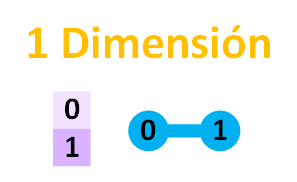 You will have noticed that I drew a blue line from 0 to 1. Each blue line represents 1 change or 1 step of distance (strictly speaking, in graph theory this is counted in edges; that is, the straight lines that go from one point/node to another it connects. To avoid confusion, I want to call edges steps to represent distance, since when we walk as people, the more steps we take, the greater the distance from the origin. So here: 1 step = 1 edge).
Now let’s see the same thing, but with 2 bits. We would have the following:
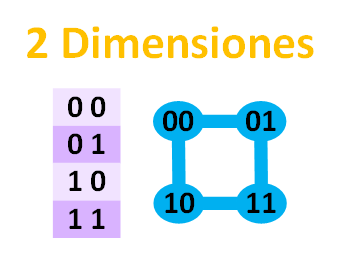 With this, the blue connections between the bits have drawn a square for us.
First a line, now a square… will 3 bits draw a cube? Let’s see:
 Note about the blue colors of the nodes and edges: The dark blue is meant to help you visualize the parts of the cube that are hidden in dimensions beyond the ones drawn on the screen (on paper, or on the screen where you are looking at this drawing, we can only draw in 2 Dimensions, but we can represent as many as we want). Although the three-dimensional drawing of the cube could be interpreted from another perspective, I wanted to help the eye get a quick mental picture of the cube in 3D (3 Dimensions); so the dark blue is the hidden part of the cube, and the light blue is the part you see directly. And for the next image in 4D (4 Dimensions), which represents a tesseract (we could say it is a cube of 4 Dimensions) drawn on a sheet of 2D (2 Dimensions) paper, I wanted to make the visualization a little easier, since it is already hard to imagine, being one dimension above the 3D we are used to.
And for 4 bits, we move up one dimension beyond ours, to 4 dimensions, and we would draw a tesseract (if you picture a real cube in 3D, no edge actually crosses another even though it is drawn in 2D on paper; the tesseract doesn’t have any edge crossing another either, even though its 2D and 3D representations do cross. And like the cube, the area enclosed by four edges forms a flat square that is always the outer face of the geometric figure):
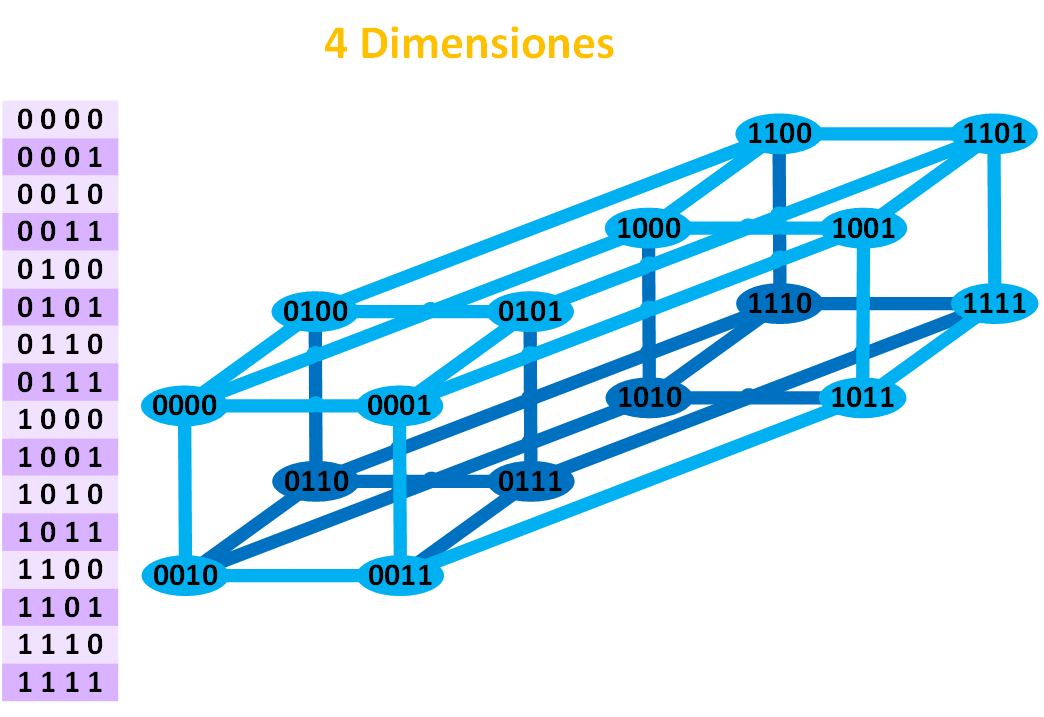 Despite the curiosity of lines, squares, cubes, tesseracts and other hypercubes (any cube of N Dimensions is a hypercube; that is, a point is a hypercube of 0 Dimensions, a line is a hypercube of 1 Dimension, a square is a hypercube of 2 Dimensions, and so on indefinitely), for the Hamming distance what interests us most is the graph that gets drawn and the edges/steps between nodes/points; and to understand at least the basics of the concept of dimensions.
The beauty of bit combinations is that they represent N-Dimensional cubes. That is, the formula would answer: how many points (“intersections of the edges”) does a cube, line, square, etc. have? The answer is 2N, where N is the number of Dimensions. So for 1 bit there are 21 = 2 bit combinations, for 2 bits there are 22=4 bit combinations, for 3 bits there are 23=8 bit combinations, etc.
As you can see, the steps that define the “Hamming distance” can be represented in dimensional space. So the number of digits of the word (the number of bits) is the number of “Dimensions” of the space we work with (this is the so-called “Hamming Space”, but we will see it later). By the way, if you look closely, each group of bits sits at a blue point, and each different combination in the space is precisely called a “Point” (in the dimension images above, the table on the left contains all the points of the N-Dimension space).
Hamming distance between two points
Let’s stay in the 2-Dimension space (2 bits). If we want to go from point 00 to point 01, what is the Distance (“Hamming distance”)?
The Distance from point 00 to point 01 is 1 (1 edge traveled).
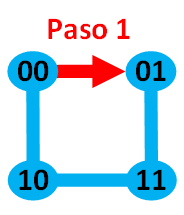
And what is the “Hamming distance” from point 00 to point 11?
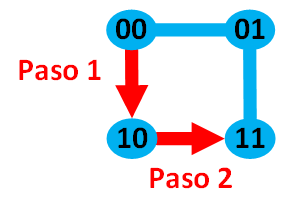
The Distance from point 00 to point 11 is 2 (2 edges traveled).
Now I can ask you: with 3 Dimensions, what is the “Hamming distance” from point 100 to point 011?
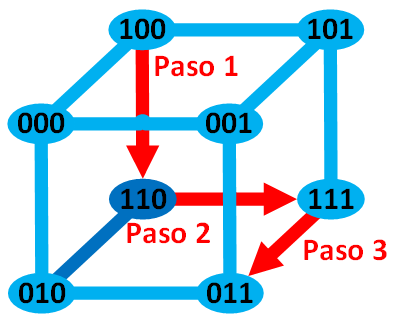 The Distance from point 100 to point 011 is 3 (3 edges traveled).
Minimum Hamming distance
In the 3-Dimension cube, it occurs to me that we could take a longer path and travel more edges/steps than just 3. Here it depends on whether we want the “Maximum Hamming Distance”, “Any Hamming Distance” or the “Minimum Hamming Distance”.
It doesn’t matter which path we choose in the graph, but what truly interests us is the “Minimum Hamming Distance“, which is always the shortest path between two points/nodes. That is, the “Minimum Hamming Distance” measures the smallest number of substitutions (of the symbols we work with; in the images of the last examples the symbols are 0 and 1) required to change something into something else (to go from one point to another).
The maximum “Minimum Hamming Distance” of N Dimensions; that is, going from a point to its farthest one in however many dimensions, its shortest path will correspond to the number of dimensions (for example, in the previous cube image, the point farthest from 100 was 011, and its shortest path connecting both points was 3 edges, which matches the 3 Dimensions we work with).
It depends on our needs whether we want to know the minimum distance, the maximum distance, or an intermediate distance. Normally we care about the “minimum Hamming distance“, that is, how many symbols (by symbols I mean “letters” between two words; or “0s” or “1s” between two binary codes; hieroglyphs between two sentences in ancient Egyptian; etc.) is the minimum that must be changed so that we can NEITHER detect NOR correct errors.
The “Hamming distance” is used to know the efficiency of both error-detecting codes and error-correcting codes, or up to what distance we can correct an error or simply detect it. We can always guarantee a “minimum Hamming distance” for correcting or detecting errors. Beyond this minimum, correction or detection can no longer be guaranteed (we will see examples of this later).
Hamming Weight
By the way, the “Hamming distance” between two points A and B is also known as the “Hamming Weight” of the difference between two points (A – B). It is another way of determining the length of the path (the number of edges) between two nodes/points. But it’s the same thing: it gives the “Hamming distance” as a result (for example, the “Hamming distance” between an object that weighs 7 kilograms and another that weighs 2 kilograms is 5 kilograms, which is the same as the “Hamming Weight” 7 – 2 = 5).
To calculate the weight difference between two binary numbers, the weight is the number of ones in each binary number. To calculate the weight between two points, the XOR function is applied (as a subtraction of weights) to the weights of those two points.
For example, in the previous 3-Dimension example we want to know the weight between any two of its points. We calculate the weight of each point by adding up the number of 1s in that point (I represent the weight of each point with a gray weight symbol next to it; remember that decimal 3 in binary is 11, 2 in binary is 10, 1 in binary is 01 and 0 in binary is 00):
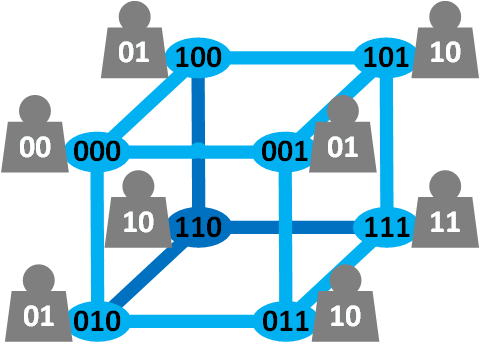 Now we want to know the weight between points 100 and 011. The weight of 100 is 01 (1 in decimal), and the weight of 011 is 10 (2 in decimal).
We subtract their weights with XOR (more XOR examples in the article on Check Digit – Error Detection):
01 XOR 10 = 0 XOR 1 and 1 XOR 0 = 11
11 in binary is 3 in decimal, so the “Hamming Weight” is 3 (the same as the “Hamming distance” we saw earlier).
Hamming Space
The Hamming space is all the combinations of bit strings of the same size (“linear block codes” because they are all the same size). That is, it is all the points of a dimension N (for example, for binary there would be a total of 2N points/combinations in the “Hamming Space”).
Why is it called “Space”? Think of the planets, the stars, everything around us: they are in “Space”. Now suppose we live in a finite space that has only a few planets, and nothing else but those few planets. These planets, which are elements of the Space, we will call “Points”, which are finite points. Then, any group of planets in this space we will call a code, and the elements of each code we will call “Codewords”. Now replace the planets with the bits generated by applying the “Hamming Code” to each message of all the possibilities with the same “message length” (strange? keep reading).
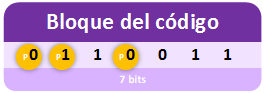
Let’s take the example from the previous article on Hamming codes of “Hamming(7,4)“, where each possible “Message” takes up 4 bits of “Message Length”. As we saw before, we can pick one of those “Messages” and turn it into a “Code block” that will have a “Block Length” of 7 (by adding the 3 parity bits).
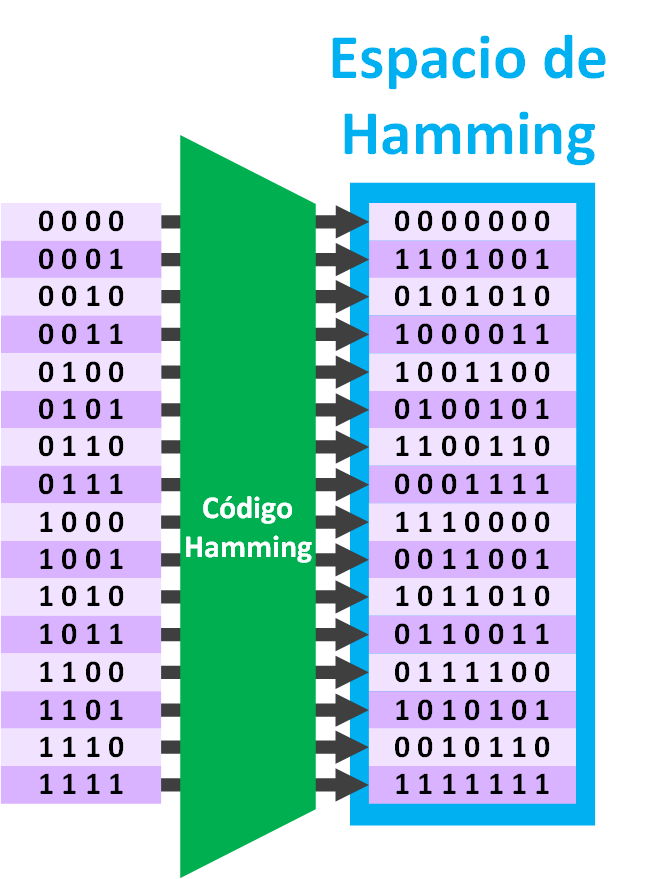
 Now if we do this with all the possible Messages of “Hamming(7,4)” we get (in the following image, where I write “Hamming Code” it means that I have applied the “Hamming Code” to each “Message” on the left, to obtain the “Code block” on the right):
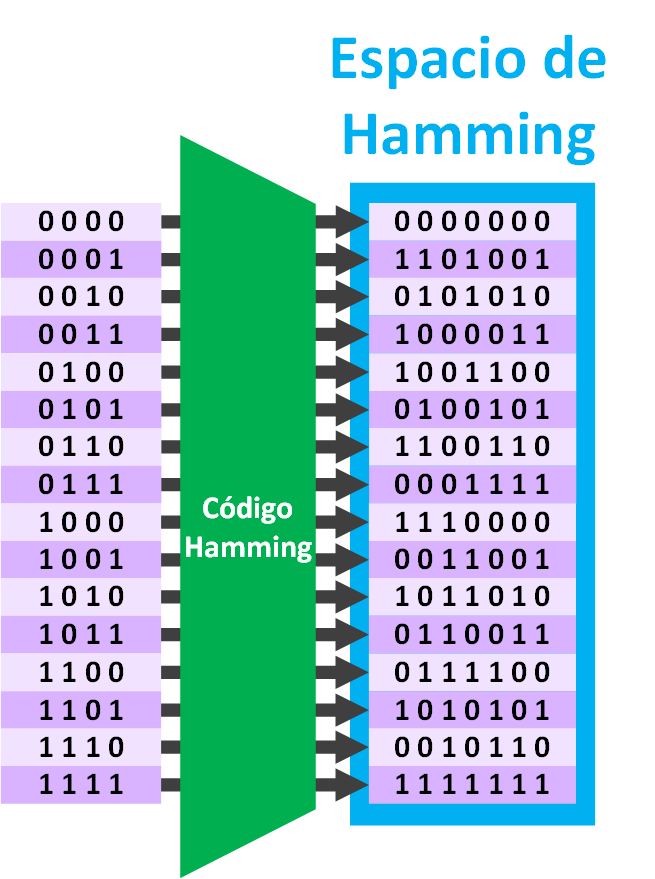 Easy and simple, we already know how to do it with ease, so much so that we can extract the following properties from the example (the way I write the formulas is: first the title, then I set it equal to the variable name, which is usually a letter, then I set it equal to the formula or formulas, and finally I set it equal to the value for this example; if you’ve understood up to here, I assure you the formulas are very simple and so logical that you could easily deduce them, I promise 😉 ):
- Parity bits = r = 3 parity bits
- Block length (the size of the Message together with the parity bits needed to satisfy the “Hamming code”) = n = 2r – 1 = 23 – 1 = 7
- Message length (the size of the Message) = k = n – r = 2r – r – 1 = 23 – 3 – 1 = 4
Length of each part
We distinguish two types of lengths: that of the data not yet processed by the encoder (an encoder is, for example, the “Hamming code”) and the length of the data already processed by the encoder.
When we say, for example, Hamming(7, 4), we indicate first the length of the “Code block” (we will call it with the letter “n”) and then the “Message Length” (we will distinguish it with the letter “k”). So for any “Hamming(n, k)” we will have a block length “k” and a message length “n” that will hold for “r” “Parity Bits”.
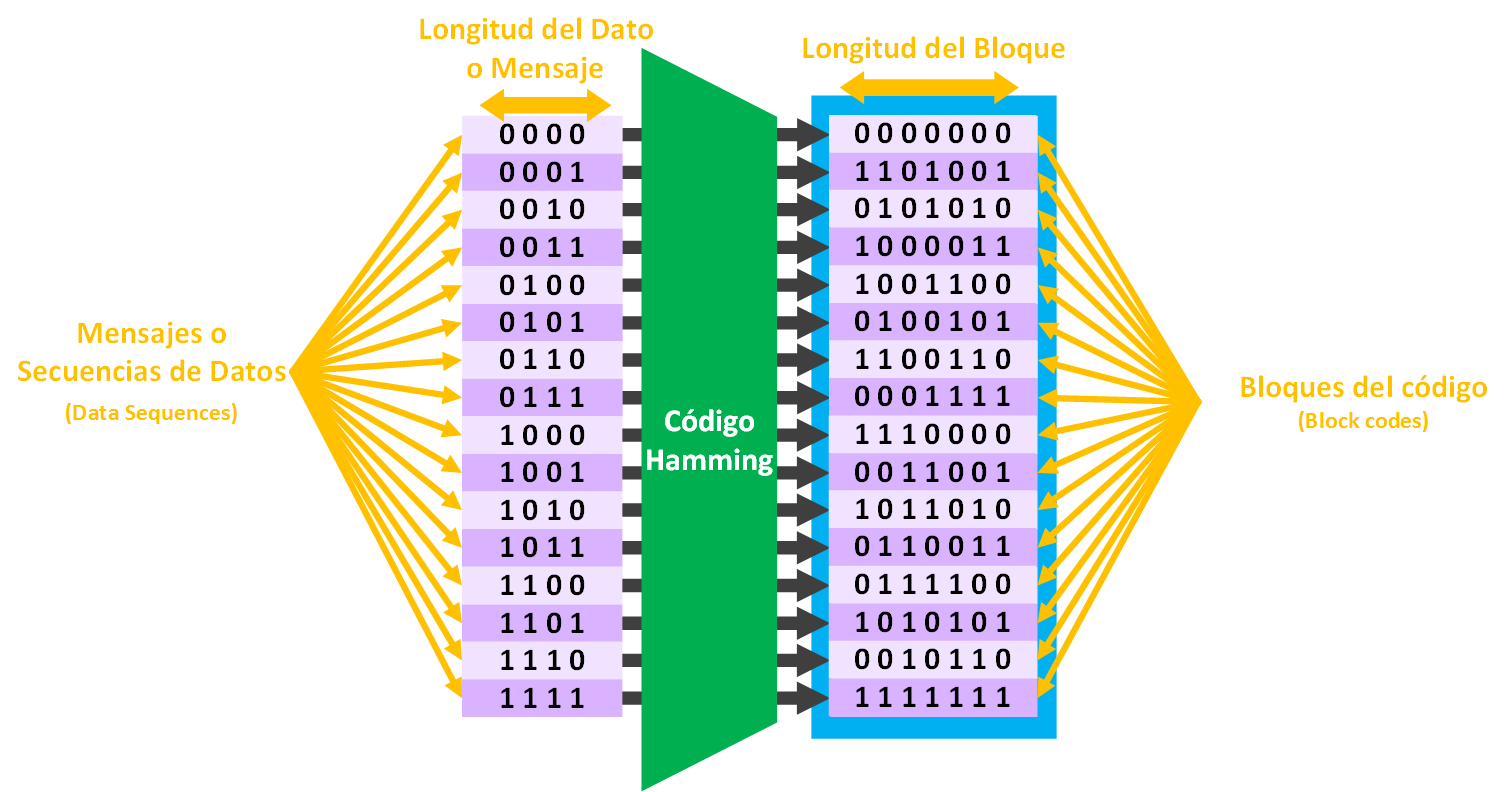 I summarize everything we have and give a data example for Hamming(7, 4) given the parity bits:
- Parity bits = r = 3 parity bits
- “Message” or “Data Sequence“: normally the piece of what we want to send
- Message length (the size of the Message) = k = n – r = 2r – r – 1 = 23 – 3 – 1 = 4
- “Code block” (“Block Code”): The result of applying an encoder to the message so that it adds redundancy bits to it
- Length of the “Code block” (the size of the Message together with the parity bits needed to satisfy the “Hamming code”) = n = 2r – 1 = 23 – 1 = 7
Remember that when we send the “Code block” through any medium to somewhere else, it is then called a “Codeword”, which should be equal to the “Code block” (except for transformations/errors introduced along the way). In the end they are called “Codewords” for two reasons: the main one is that it has been sent through the medium (for example, the Internet); and second, because what arrives at the destination can be different from what it was when the “Code block” was generated (due to errors introduced along the way/medium).
So far I haven’t said anything strange.
In the “Hamming space” all the “codewords” are the same size (they have the same number of bits; in this example all the words have 7 bits, and algebraically this is said to be a “linear subspace”), so the “Hamming code” is said to be a linear code. Since all the words have the same size, each word is called a “Block code”; they are called this to distinguish them from variable-length codes/words.
Now an interlude to rest a bit from so many numbers.
A clarifying example with the Spanish language
The elements of the alphabet are: A, B, C, D, E, F, G, H, I, J, K, L, M, N, Ñ, O, P, Q, R, S, T, U, V, W, X, Y, Z.
Counting the total number of elements we get the size of the alphabet, which is: 27
The “codewords” of the Spanish language will be all those that exist in the RAE dictionary (the dictionary of Spanish words; if you are curious you can check it at Real Academia Española). We could start listing every word in the dictionary up to the last one: A, AD, AH, AJ, <…Approximately 93,000 more words…>, ZUZÓN. So the set of words, or “codewords”, written with the symbols of the alphabet, will be all the words we will work with; it will be our dictionary of words, our space.
For this example we would have the following properties:
- Alphabet = 27
- Elements = A, B, C, D, E, F, G, H, I, J, K, L, M, N, Ñ, O, P, Q, R, S, T, U, V, W, X, Y, Z
- “Codewords” = approximately 93,000
- Length of the words (number of letters in the word) = variable, between 1 (for example, the word “a”) and 23 (the word “electroencefalografista”)
Fun fact: The words in the RAE dictionary do not form a “linear subspace”, since not all words have the same number of letters.
After the interlude, I think you can deduce the following properties of the “Hamming Space” for this example:
- Alphabet = Q = 2 (because we are working with binary, which has two symbols, 1 and 0). Also called “Binary block code”
- Elements = q = 0 and 1
- “Codewords” (Number of block codes in the Hamming Space) = C = 2k = 24 = 16
Logically, the number of “Codewords” and “Messages” coincide, since one “Message” generates a single “Code block” (see previous image).
Let’s analyze a bit more, using our friend as a guinea pig. If we send a “Code block” to our friend over the Internet with “Hamming(7,4)”, a 7-bit code has to arrive, which may or may not have had errors introduced, and one of these possibilities would arrive:
- Number of possibilities with 7 bits = 2n = 27 = 128
That’s a lot compared to the 16 “Code blocks” that we consider “good”, although really, if we have sent a message to our friend, there is only 1 good possibility (if I send the word “Hello” I want my friend to receive “Hello”, not some other valid word).
The valid or correct codes are called “Code block”. If we send any “Code block” to another computer and the other computer receives an invalid code, it will be recognized as erroneous. However, if we send any valid “Code block”, and along the way it turns into another valid one, our friend’s computer will recognize it as a correct code.
Hamming distance with the “Hamming Code”
I recall the question asked earlier: “Up to how many bits can the Hamming code correct?”. We can understand that the “Hamming distance” is the difference between a code that is validated as a correct code and another correct code. That is, starting from a correct code, we change the correct bits to wrong bits -and recalculate with the previous formula (the Hamming code)- until the formula tells us again that it is a correct code.
Note about the “Syndrome Matrices”: the explanations are an extension of the previous Hamming article; I use my own “Syndrome Matrices”, which were already explained in that other article.
Let’s take a quick example. We want to send our friend’s computer the following sequence of bits (the data with the parity bits included).
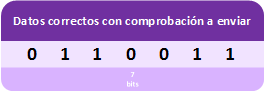 But our friend’s computer receives the wrong/corrupted data. What our friend’s computer doesn’t know is how many errors there are, or whether there is any error at all (in the image I have marked the errors in red; our friend’s computer won’t see anything marked in any color, that is, for their computer all the bits could be right or wrong).
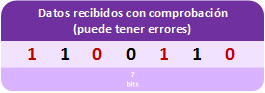 So our friend’s computer checks with the Hamming code whether there are errors.
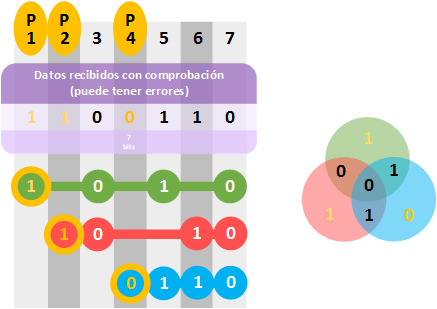 Our friend’s computer concludes that the bit sequence is correct, completely convinced, since it detects no error (so no attempt is made to correct it, nor is the bit string requested again, since that bit sequence is accepted as good).
If the data mistaken for correct were part of, for example, an executable file (like when we download a game or a program), when trying to run it an error would pop up telling us something like “the file is corrupt, download it again”; or if it were part of an image, that part of the image accepted as correct would look wrong. This is because a bit sequence that is not the one that was sent has been taken as correct.
With the previous example, the Hamming distance for “Hamming(7,4)” is as follows: put in one wrong bit and check with the Hamming method, it will tell us it’s not correct; add one more wrong bit next to the previous one, check again and it will tell us it’s incorrect; a third wrong bit, and the check will tell us it’s not correct either; and the fourth wrong bit we put in, we will see that indeed, the Hamming method tells us it’s “correct” (this last step is the one we already saw in the previous image). We had to change 4 bits, so the distance of “Hamming(7,4)” is 4 (not to be confused with the 4 in the name “Hamming(7,4)”).
Therefore, the greater the “Hamming distance”, the greater the possibility of detecting and correcting errors.
Let’s analyze Hamming(7,4)
For “Hamming(7,4)”, the second number is the dimensions before applying Hamming and the first number is the dimensions after applying Hamming.
If we want to send any message over the Internet to our friend’s computer, we would split the message into 4-bit pieces (“Code Sequence”). Each of these 4 bits can only correspond to one of the entries in the following 4-Dimension table (4 data bits):
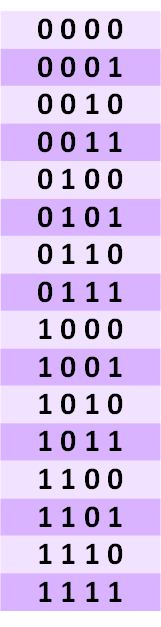 With 4 bits there are 24 = 16 possible combinations.
Before sending any message to our friend, we have to apply the “Hamming Code” to the chosen “Code Sequence”.
For any combination after applying the “Hamming Code” we would have 7-bit strings (data bits plus parity). Each 4-data-bit “Code Sequence” becomes a 7-bit “Code Block”.
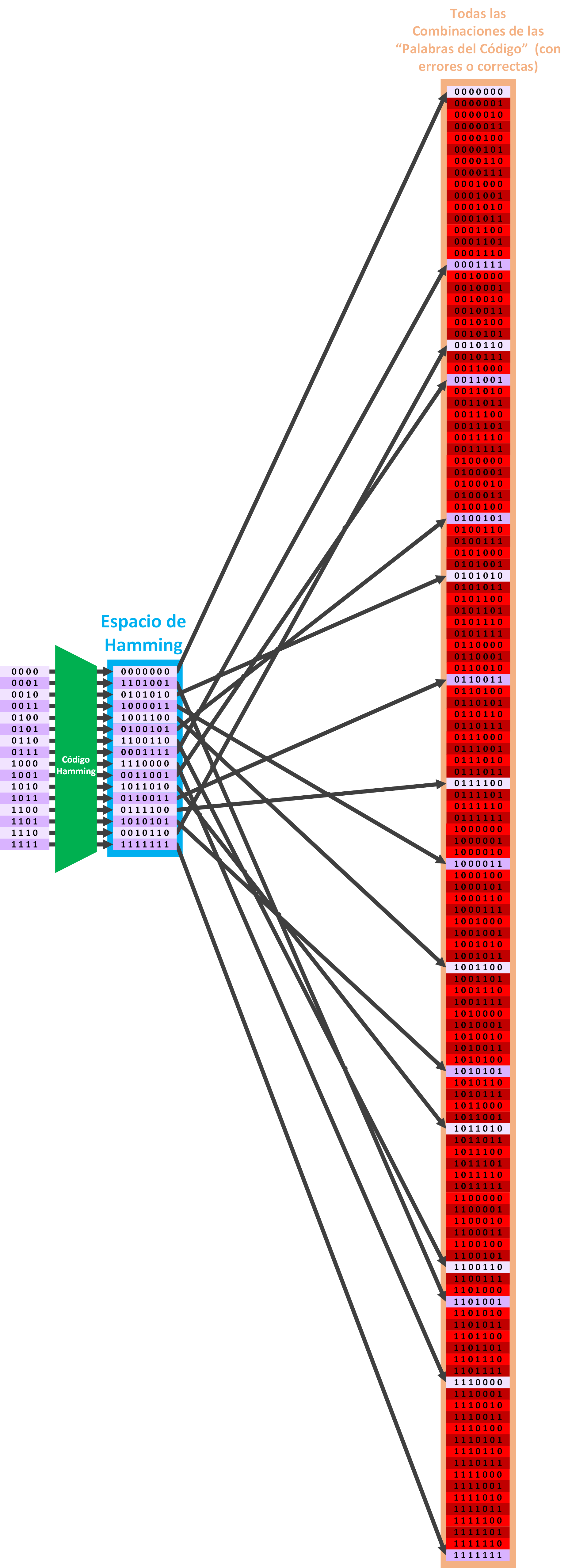
 When our friend receives any “Codeword”, it may have been transformed along the way (by anything, like a storm, or the quality of the cables it was carried over, etc.).
That is, our friend can receive any of the following combinations on the right, of 7 Dimensions (7 data bits). Only 16 “Codewords” correspond to the correct “Code Blocks” from before (the ones painted purple in the following image); the rest of the “Codewords”, when applying the “Hamming Code” in reverse (to find out whether there are errors or not), will give us erroneous data (the ones painted red in the following image):
Let’s play a game before continuing.
The errors game
For a better understanding, I recommend following this simulation game of what a computer does to communicate with another:
- Review the previous image.
- Choose a 4-Dimension bit “Code Sequence” (any 1 row from the column of bits on the left)
- Using the “Hamming Code” (and so you practice 😉 ) convert it to add the parity bits and get the 7-bit “Code Block” (or follow the arrow to the center column with the “Hamming Space”, and remember the bit combination it points to).
- Now imagine that you send that 7-bit “Code Block” to your friend. Our friend expects any 7-dimension code (from the right column, with or without errors).
- We are going to simulate that any number of errors can be introduced while sending the “Code Block” to our friend. To do this, close your eyes and with your finger randomly pick a 7-bit row in the giant right column. Wherever your finger lands is what has reached our friend (with more or fewer errors). Our friend will have received a “Codeword”.
If your finger landed on purple, when checking the “Codeword” for errors by applying the “Hamming Code” we will see that it flags it as correct, so we will let the “Codeword” pass as correct, even though it is not. However, if it lands on red, by applying the “Hamming Code” we will detect that there are errors and may even be able to correct them.
When correcting the erroneous code, we may end up with a different code, or the same one, or not be able to correct it, only detect it.
Note about the randomness of this example: When something is sent to our friend, they don’t really receive something completely random; I only wanted to simulate it in a quick and simple way. In this example we have chosen a completely random “Codeword”. In reality, statistically it is not a completely random event, since we start from a “Code Block” in which, along the way, one, a few or no bits may be modified; but always starting from the original “Code Block”, not randomly. So we will always be “close” to the original code and it will statistically be easy to correct. Let’s see this.
As you can see, it is very likely that we can detect received “Codewords” that are erroneous. However, not all “Codewords” will be corrected and give the original message as a result. Only the “close” ones (those that have changed few bits with respect to the original “Code Block” we sent to our friend) will be the ones that actually get corrected.
In other words, if we go back to spatial dimensions, only the words within a radius of distance can be detected and corrected.
Hamming Sphere
I put this explanation in a separate box, since I have to change the example to a simpler one (otherwise the hard part would be understanding the example 😉 ) and so as not to break its continuity.
To see the simple example, suppose that the “Codeword” has 3 bits instead of 7. 3 Dimensions that we can represent in a cube. If the “Code Block” before sending is, for example, 010, we could correct any “Codeword” within radius 1 (distance 1 at most). A radius in 3 Dimensions draws a sphere like the following one, which would enclose the “close” words of radius 1: 000, 110 and 011
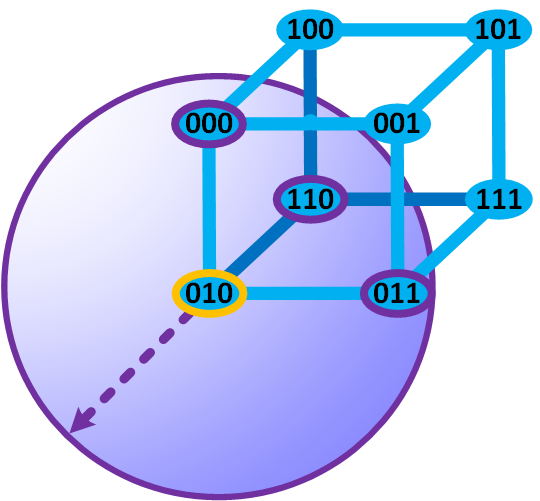 By the way, this distance from a center that traces any radius is known as a Hamming Sphere.
Error-Correcting Code
The “Hamming Code” is one of the many “Error-Correcting Codes” that exist.
For it to be an effective “Error-Correcting Code” it has to follow a series of guidelines. Let’s analyze the “Hamming Code”
Error-detection capability
Let’s choose any two “Codewords” from the “Hamming Space”. In the following example we have chosen: “0 0 0 1 1 1 1” and “0 1 1 0 0 1 1”
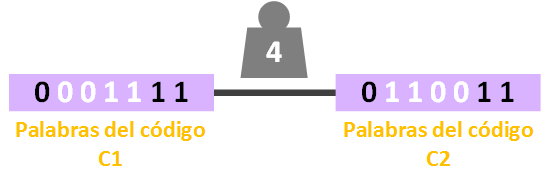
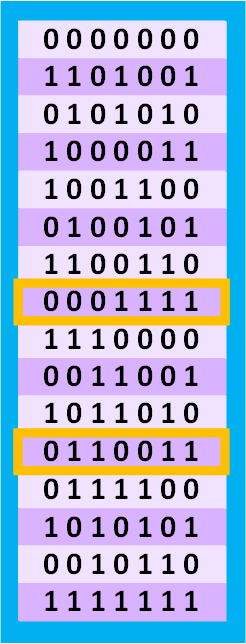 And let’s count the distance between those two words (which is nothing more than counting the bits that change). For this example we can see that it is 4 (in the following image I represent the distance with the weight, and the changed bits I have painted white):
 We can’t settle for the first match; we have to look for the “Minimum Hamming Distance”. So we choose two other “Codewords”. For this example: “0 0 0 1 1 1 1” and “0 1 0 0 1 0 1”
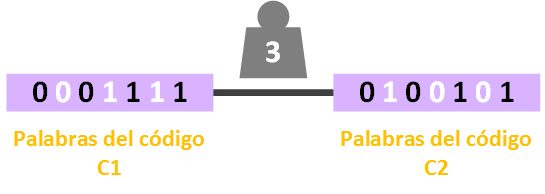 We see that this time the distance is no longer 4 but 3, which is smaller. We would repeat this with all the possible combinations until we are sure what the “Minimum Hamming Distance” is.
Clarification and summary
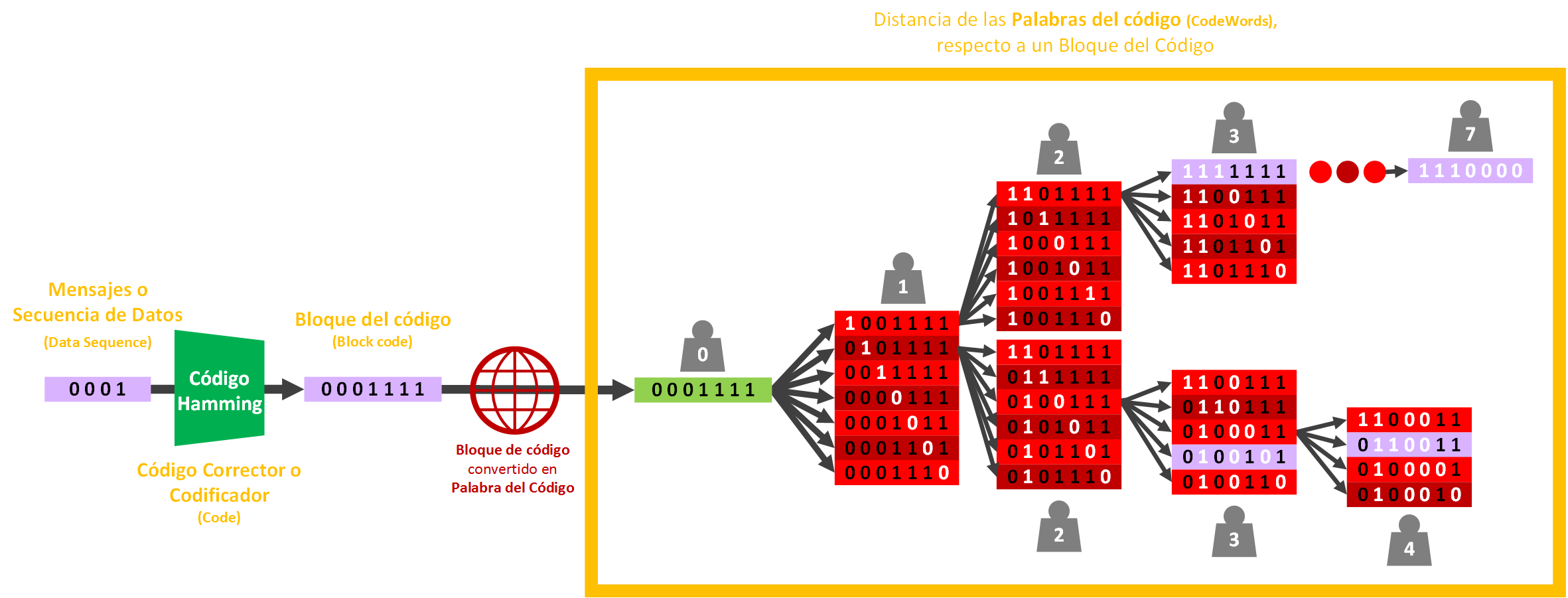
Below, I leave a summary image with everything we have done to perform this calculation (follow it along with this summary paragraph so you can see how everything fits together).
- From a message of Dimension 4 we have converted it to a “Code block” of Dimension 7 with the “Hamming Code”.
- When sending the “Code block” to a friend over the Internet, it could change along the way as errors are introduced; each error introduced moves it 1 unit of distance away.
- In the image you can see, starting from the correct “Code block” in green (which is also the same “Code block” we saw in the previous images, so you have something to link the ideas with this new image below), how we look for the “Minimum Hamming distance” by performing all the combinations of errors by distance: first one error, in the next column one more, and so on up to the maximum, which is having all the bits inverted.
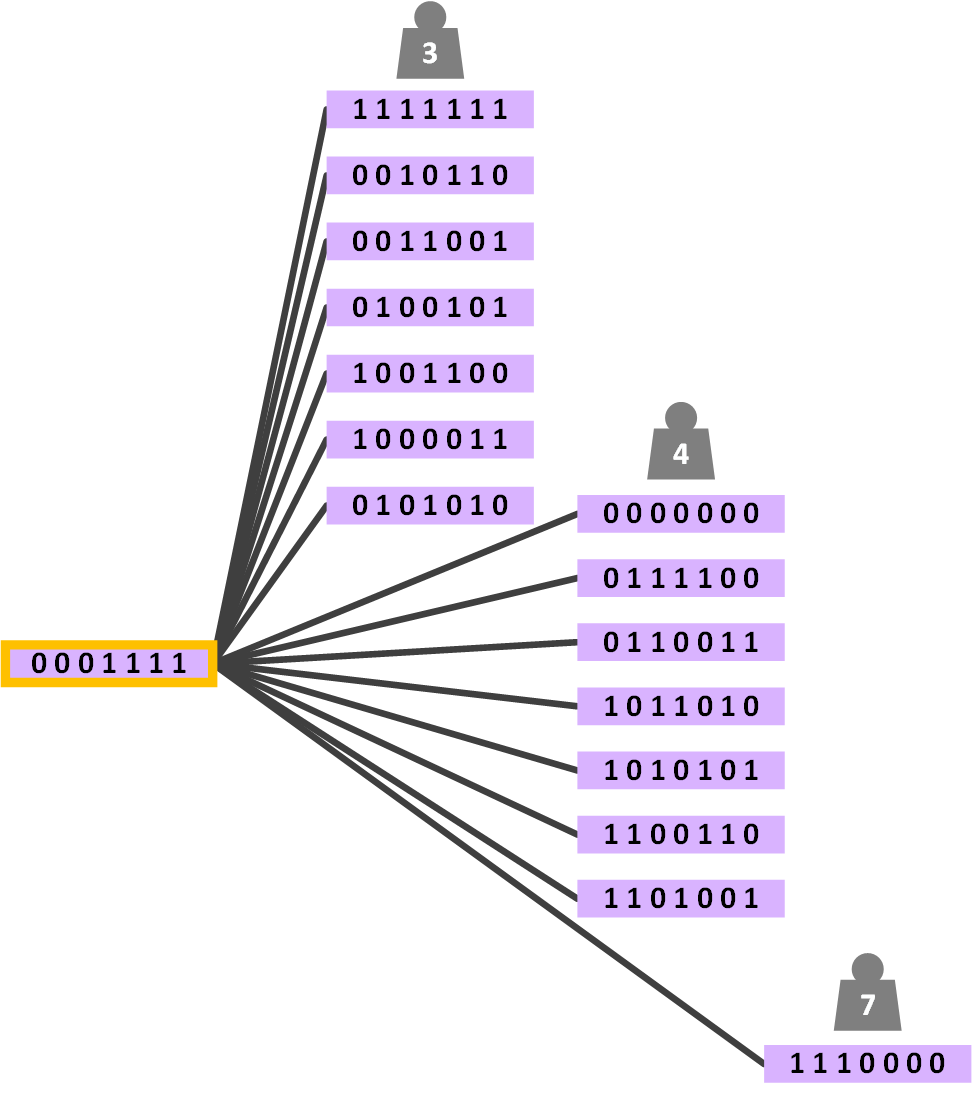
If we looked for all the shortest paths for the “Code Block” chosen for the example, “0 0 0 1 1 1 1”, with respect to the other “Code Blocks” generated by the “Error-Correcting Code”, we would have (I have summarized the following image: between the chosen “Code Block” and the others, I have painted only the “Code Blocks” with the weight/distance -the variation of 0s or 1s- and I omit the red groups of bits from the previous image for clarity, but the groups of bits the shortest path passes through are contained in the line):
If you remember when we drew the square for 2 Dimensions, the cube for 3 Dimensions, etc., this is actually a “corner” of our 7-Dimension hypercube. Looking from each corner of each “Code Block” and counting the steps to the next “Code Block”, we would verify that after doing all of them the minimum distance is 3 for Hamming(7,4).
In this case, for our Hamming(7,4) example, after doing all the combinations (which are quite a few), we find that the “Minimum Hamming Distance” for Hamming(7,4) is 3.
The distance of 3 is what guarantees that we find at least one “Code Block”, so the number of errors that Hamming(7,4) is able to detect is one less: 3 – 1 = 2. 2 is the number of errors that the Hamming(7,4) “Error-Correcting Code” is able to detect.
So an “Error-Correcting Code” detects e errors if, between any two words C1 and C2 generated by the “Error-Correcting Code”, we guarantee a “Minimum Hamming Distance” d. And from what we have seen we can relate: d = e + 1
Error-correction capability
Let’s take any two “Codewords” and check their distance. For example, for the word C1 “0 0 0 1 1 1 1” and C2 “0 1 0 0 1 0 1” their distance (as we saw earlier) is 3.
Let’s take the word C1 as a reference (the “Codeword” I take as a reference I will call “Origin”, because it’s where everything starts 🙂 ) and let’s start introducing errors that bring it “closer” to the word C2 in as few steps as possible. We introduce a first error into the word C1 (in the following image I changed a 1 to a 0, resulting in “0 0 0 1 1 0 1″), and we can verify that this new erroneous word has moved 1 step closer to the word C2. In short, the erroneous word is 1 step from C1 and 2 steps from C2.
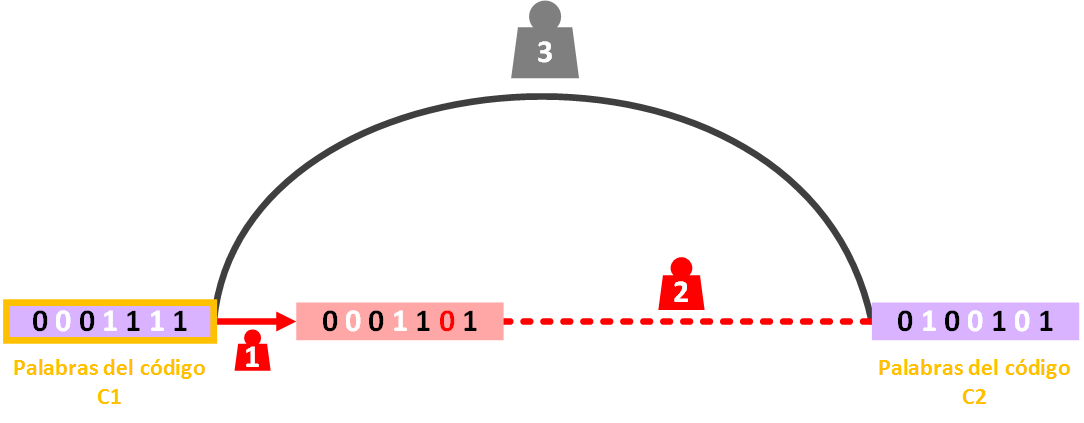 This erroneous word can be detected as erroneous (as we saw earlier), and if we correct it we can guarantee that it gives us the origin word C1 as a result. It can be corrected back to its origin word because there is no other “Codeword” that close; if two codewords are equally close, then it cannot be corrected back to its origin (let’s see this last point next).
Let’s introduce one more error into the word C1 by changing a second bit that brings it one more step closer to C2 (in the following image I changed a 0 to a 1, so we have “0 1 0 1 1 0 1″). To sum up again, the new erroneous word is 2 steps from C1 and 1 step from C2.
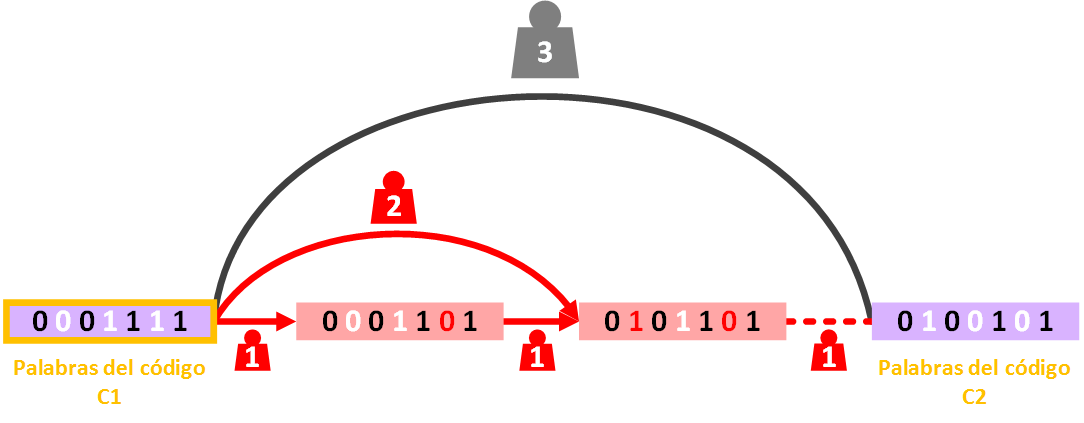 The erroneous word can’t get any closer; it is a single step from the word with errors of C2.
This new erroneous word “0 1 0 1 1 0 1″ can be detected as erroneous, but it cannot be corrected back to its origin since there is at least one “Codeword” that is closer than the origin one. This means that, if we tried to correct this last erroneous word “0 1 0 1 1 0 1″, we would not get the word C1, but the word C2.
Do you remember the “Hamming Spheres”? From each “Codeword”, the “Hamming Spheres” must not intersect, in order to guarantee that we correctly correct the word back to its origin “Codeword”.
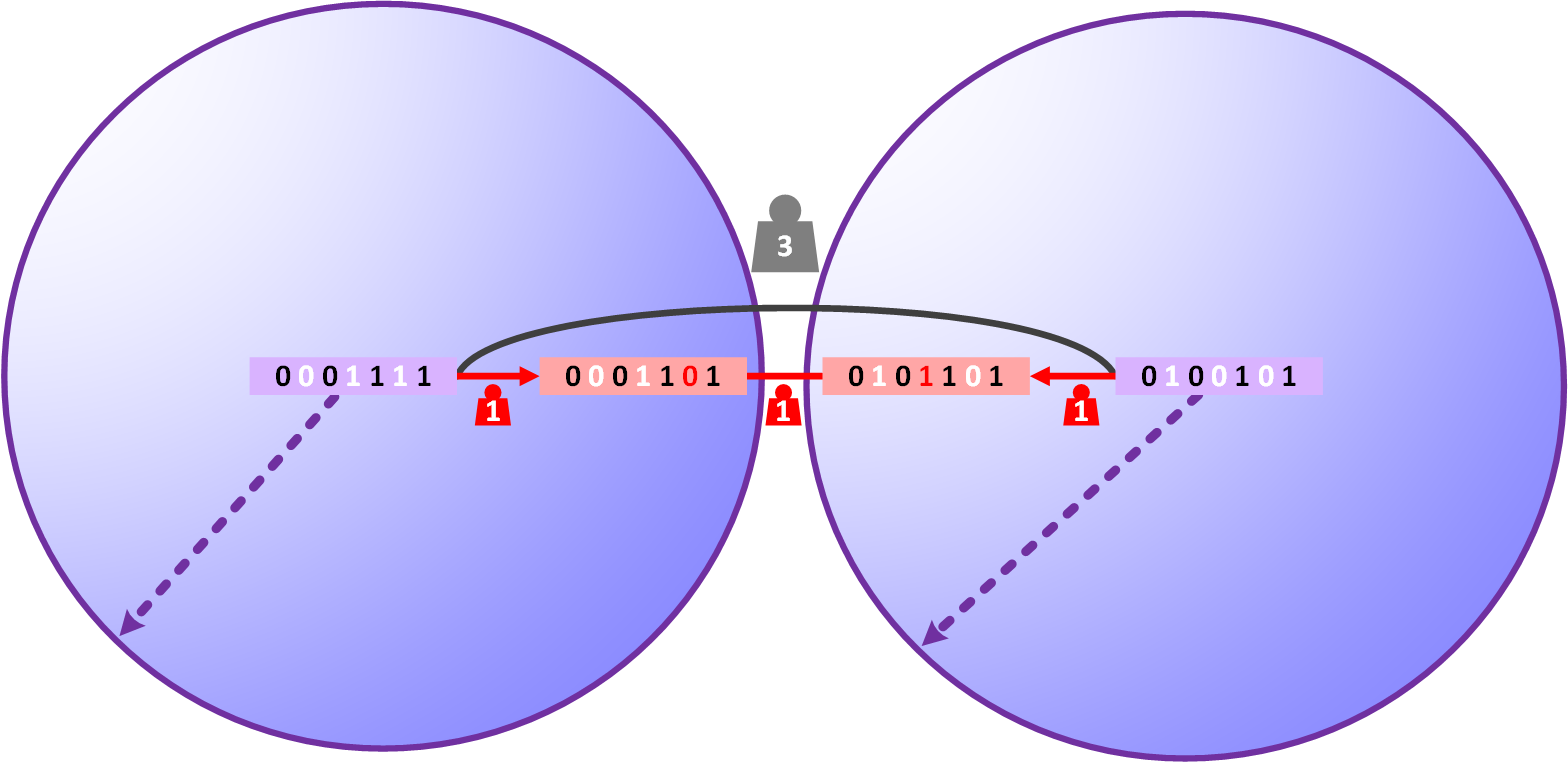 Because if two or more “Hamming Spheres” intersect, two things can happen:
- The word is corrected to another “Codeword” different from the origin one.
- It can’t be known which of the “Codewords” whose “Hamming Spheres” intersect is the origin one (I haven’t drawn an example of this case, but you can imagine what would happen if, instead of the erroneous words between two “Codewords” being an even number, they were odd; the erroneous word right in the middle is at the same distance from both “Codewords”, so it can’t be known which is its origin).
So at most we would correct up to the average of the “Codewords”. For example, the average age of a 20-year-old person and a 40-year-old person is (20+40)/2, which is 30.
So for Hamming(7,4), between the two previous “Codewords” (which meet the “minimum Hamming distance”) we can deduce that it is the average (of 2, since there are 2 words) of the “Error-detection capability” (which is the minimum number of errors between the two words; or, as we saw earlier, the “Minimum Hamming Distance” d minus 1: d – 1). So: (3 – 1) / 2 = 1.
So the “Error-Correcting Code” has the ability to correct errors if, between any two words C1 and C2 generated by the “Error-Correcting Code”, we guarantee the average of the “Error-detection capability”. So: E = (d – 1) / 2
Rate and Overhead
For example, it is not the same to send our friend a “Code block” using Hamming(7,4) as using Hamming(31,26):
- Hamming(7,4): Message length 4, “Code block” length 7, parity bits 3
- Hamming(31,26): Message length 26, “Code block” length 31, parity bits 7
At a glance you can see that for Hamming(7,4) the really useful bits (the parity bits are also “useful” for error correction; I mean “useful” to the user; the user doesn’t care about the parity bits, they probably don’t even know they exist, they want to get the maximum information at the lowest cost) send almost as many information bits as parity bits (almost 50% data vs 50% parity). However, with Hamming(31,26) you can see that the ratio of 26 information bits to 7 parity bits carries much more information and fewer parity bits (approximately 80% data vs 20% parity).
So, if we want to send our friend any message, for example of 100 bits, and we have to split it into chunks according to Hamming(7,4) or Hamming(31,26):
- Hamming(7,4): for a 100-bit message, 75 additional bits would be parity bits ( (100 / 4) * 3 = 75). We would send a total of 175 bits (we almost have to double the size of the message to send the data and be able to correct it at the destination)
- Hamming(31,26): for a 100-bit message, 27 additional bits would be parity bits ( (100 / 26) * 7 = 27). We would send a total of 127 bits (we add only a quarter of the size of the message)
If our transmission medium (cable, Wi-Fi, 4G, etc.) is, for example, 16 bits per second (I know, there’s nothing faster on the market 😛 ), that means that for:
- Hamming(7,4): we send 175 bits, so it takes 11 seconds to send all the bits (175 / 16 = 11)
- Hamming(31,26): we send 127 bits, so it takes 8 seconds to send all the bits (127 / 16 = 8)
Therefore, to measure transmission speed we use the Rate. To calculate the Rate we divide the message length by the length of the “Code block”. The Rate = R = k/n
For our examples we would have:
- Hamming(7,4): Rate = R = k/n = 4/7 = 0.57
- Hamming(31,26): Rate = R = k/n = 26/31 = 0.84
A large Rate means that the number of message bits per transmitted “Code block” is high. That is, the more data a “Code block” has and the fewer parity bits (redundant bits) there are, the greater the Rate will be.
The Rate cannot exceed 1 since the data is compressed without loss. So the more data it has and the fewer parity bits, the closer it will get to 0; conversely, the more parity bits, the closer it will get to 1. We call this 1 – R the Overhead, which is produced by the encoding of the “Code Block”. If everything is data (without any parity bit), for example for Hamming(7,7) it will be 7/7 = 1 and the Overhead will be 1 – 1 = 0. On the contrary, if everything is parity data, for example Hamming(7,0), it will be 0/7 = 0 and the Overhead will be 1 – 0 = 1. That is, the more redundant bits, the more overloaded our “Code block” will be.
In our previous examples we can calculate the Overhead in a very simple way:
- Hamming(7,4): Overhead = 1 – R = 1 – 0.57 = 0.43
- Hamming(31,26): Overhead = 1 – R = 1 – 0.84 = 0.16
Complete example with all the properties and summary
I summarize all the properties we have seen for the “Hamming(7,4)” example:
- Alphabet = Q = 2
- Elements = q = 0 and 1
- “Codewords” = C = 2k = 24 = 16
- Parity bits = r = 3
- Message Length = k = n – r = 2r – r – 1 = 23 – 3 – 1 = 4
- Length of the “Code Block” = n = 2r – 1 = 23 – 1 = 7
- Hamming(n, k) = Hamming(7, 4)
- “Minimum Hamming Distance” = d = 3
- Error-detection capability of the “Error-Correcting Code” = e = d – 1 = 2
- Error-correction capability of the “Error-Correcting Code” = E = (d – 1) / 2 = (3 – 1) / 2 = 1
- Rate = R = k/n = 4/7 = 0.57
- Overhead = 1 – R = 1 – 0.57 = 0.43
- Relative distance = ẟ = d/n = 3/7 = 0.43
Extras
Hamming distance and minimum Hamming distance with text (Strings)
The “Hamming distance” can be applied to many other things (to other error detection and correction algorithms different from the “Hamming algorithm”), even to yourself.
For example, how many letters do you have to change in the word “Pasajero” for it to mean something different to you?
If we change a single letter, “Pasajiro”, since it looks like the word “Pasajero” you can still understand the word. You can detect that there is an error and even correct it!
If we change one more letter, like “Pasajizo”, it may already be harder and we don’t have certainty about which word it comes from, but we can guarantee that some letters are wrong (because that word doesn’t exist in the dictionary; we know it’s wrong, but we can’t correct it, since correcting it could lead us to the mistake of thinking it’s another word that it isn’t, like the words “Posadero” or “Forajizo” that do exist in the dictionary)
Changing a third letter, “Pasadizo”, the word already changes completely into a word that actually exists. Since it’s a word that exists, we would take it as good. Therefore, our “Hamming distance” from the word “Pasajero” to “Pasadizo” is 3.
Other letters and a different order of modification with this word may shorten or lengthen the “Hamming distance”.
Like “Pasajera“, changing the last letter of the original message “Pasajero”: it still exists and we couldn’t detect errors, so the “Hamming distance” would be 1. We can say this distance is the minimum, which is why it is called the “minimum Hamming distance”.
But didn’t we say that the “Hamming distance” for the word “Pasajero” was 3 in the previous example?
Let’s not confuse the “Hamming distance” with the “MINIMUM Hamming distance”.
We would have to do it with all the possible combinations; I’ll do the following few to illustrate the example:
- From “Pasajero” to “Pasadizo” there is a “Hamming distance” of 3
- From “Pasajero” to “Posadero” there is a “Hamming distance” of 2
- From “Pasajero” to “Pasajera” there is a “Hamming distance” of 1
Of all the “Hamming distances” (of all the possible combinations that give us valid words) we keep the smallest one (the minimum). So the “minimum Hamming distance” for the word “Pasajero” is 1. This way we guarantee the minimum number of letters that must be modified for us to stop detecting and correcting (to be more certain, you have to do all the combinations to deduce the “minimum Hamming distance”). As you can see, we humans ourselves would not be a good error detection and correction algorithm, since we couldn’t guarantee a “minimum Hamming distance” greater than 1 (let’s not get sad as humans for not being good enough as an algorithm; it’s just an example to understand the concept; a human is fortunately not an algorithm, a human designs algorithms to do this tedious work, and our language was not designed to meet a large “minimum Hamming distance”, but the binary messages we design afterward are 🙂 )
Method for calculating the parity bits from the “Message length”
The “Parity Bits” can be calculated from the “Message length”, although not with a direct formula, but with a function. We know that each parity bit is in a position 2X (1, 2, 4, 8, 16, etc.), and in the spaces between them we will add the data bits (of the “Message length”). So if we have a “Message length” of, for example, 4, by iterations we can do:
- [4 Data (message bits left to distribute)] 1st pos (position): Parity (Parity Bit).
- [4 Data] 1st pos: Parity. 2nd pos: Parity.
- [3 Data] 1st pos: Parity. 2nd pos: Parity. 3rd pos: Data (Data bit).
- [3 Data] 1st pos: Parity. 2nd pos: Parity. 3rd pos: Data. 4th pos: Parity.
- [2 Data] 1st pos: Parity. 2nd pos: Parity. 3rd pos: Data. 4th pos: Parity. 5th pos: Data.
- [1 Data] 1st pos: Parity. 2nd pos: Parity. 3rd pos: Data. 4th pos: Parity. 5th pos: Data. 6th pos: Data.
- [0 Data] 1st pos: Parity. 2nd pos: Parity. 3rd pos: Data. 4th pos: Parity. 5th pos: Data. 6th pos: Data. 7th pos: Data.
With this we get not only the placement of the bits (data and Parity), but also the number of Parity bits: 3 for 4 Data bits.
Bibliography
- Hamming(7,4) (Wikipedia)
- Hamming code (Wikipedia)
- Hamming distance (Wikipedia)
- Parity-check matrix (Wikipedia)
- List decoding (Wikipedia)
- Block code (Wikipedia)
- Linear code (Wikipedia)
- https://books.google.es/books?id=7KBYOt44sugC&pg=PA1&redir_esc=y#v=onepage&q=hamming%20space&f=false
- https://books.google.es/books?id=2eHFTkoUjg4C&pg=PT110&lpg=PT110&dq=tcp+ip+codeword&source=bl&ots=l7G1dvYB2Y&sig=gmp8dZA3FKc-Fxk1iuJ6UxmgD_k&hl=es&sa=X&ved=0ahUKEwjrhsCa17zPAhVErB4KHZyzByQQ6AEIJzAC#v=onepage&q=tcp%20ip%20codeword&f=false
“Hamming Distance, Weight, Space and Spheres Explained” by Ramón Invarato at jarroba.com, licensed under Creative Commons Attribution-NonCommercial-ShareAlike 3.0. Registered at Safe Creative.

You may also like
Hamming Code: Error Detection and Correction
Hamming code to detect and correct errors. Step-by-step examples for fixing errors using redundancy bits and the syndrome matrix. Learn how it works.
Fault-Tolerant, Highly Available Apache Kafka Cluster
Learn how to set up a Kafka cluster with multiple brokers, distributed across several real cloud servers, step by step.
Leave a comment