
Multitasking and Threads in Java with Examples (Thread & Runnable)
Learn how multitasking works in Java with threads. Step-by-step examples using the Thread class and the Runnable interface, with a supermarket checkout demo.
Series: Multithreading in Java part 1 of 2
You can download the project for this post by clicking HERE.
In this post we are going to look at the different ways of working with Threads in Java. If you are not very clear on the concept of multitasking, we recommend that you first read the post Multitasking and Threads, easy and with many advantages although in this post we will also see (in less detail) the concepts and advantages of multitasking.
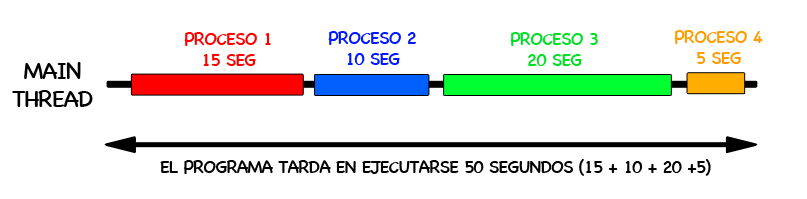
In essence, multitasking lets us run several processes at the same time; that is, concurrently, and that allows us to build programs that run in less time and are more efficient. Obviously we can’t run infinite processes concurrently, since hardware has its limits, but it is rare nowadays to find a computer that doesn’t have more than one core. So on a two-core processor, two processes could run at the same time, and our program would make the most of the hardware resources. To show you the difference in a couple of images, suppose we have a sequential program in which 4 processes have to run, one after another, and each takes a few seconds:
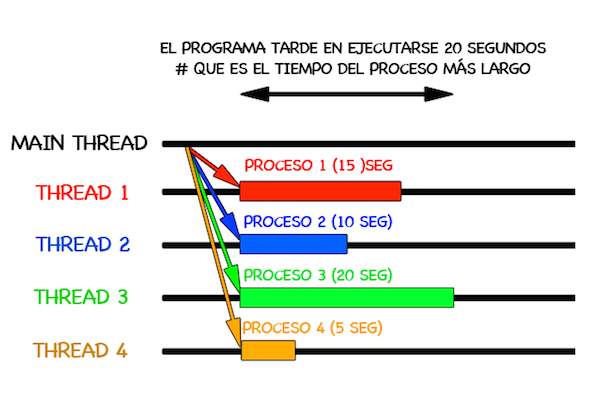
If instead of running them sequentially we used 4 threads, the program would take only 20 seconds to run, that is, the time taken by the longest process. This would obviously be the ideal case, but the reality is that not everything can be parallelized, and you have to know how many processes you can efficiently launch in parallel. For now we won’t talk about that in this post, since its goal is to show how threads are used in Java with a relatively simple and instructive example.
In Java, to use multitasking we must use the Thread class (that is, the class we implement must inherit from the Thread class), and the Thread class implements the Runnable Interface. In the following class diagram we show the Runnable interface and the Thread class with their main methods:
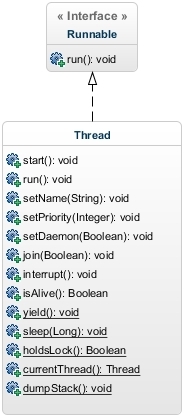
In this post we won’t see how to use all the methods of the Thread class, but we show them so you know they exist, and you can guess what they do from their names.
In this post we are going to give an example so you can see the advantages of multitasking, looking at how a program would run without multitasking and how it would run using it.
In this example we are going to simulate the checkout process at a supermarket; that is, some customers come with a cart full of products and a cashier charges them for the products, passing them one by one over the register’s scanner. Here the cashier must process the purchases customer by customer: first she charges customer 1, then customer 2, and so on. To do this we will define a "Cajera" (cashier) class and a "Cliente" (customer) class, which will have an "array of integers" representing the products the customer has bought and the time the cashier will take to pass each product over the scanner; that is, if we have an array with [1,3,5], it means the customer has bought 3 products and the cashier will take '1 second' to process product 1, '3 seconds' for product 2 and '5 seconds' for product 3, so it will take her '9 seconds' to charge the customer for the whole purchase.
Now that the example is explained, let’s see how we have defined these classes:
Class "Cajera.java":
public class Cajera {

	private String nombre;

	// Constructor, getter y setter

	public void procesarCompra(Cliente cliente, long timeStamp) {

		System.out.println("La cajera " + this.nombre +
				" COMIENZA A PROCESAR LA COMPRA DEL CLIENTE " + cliente.getNombre() +
				" EN EL TIEMPO: " + (System.currentTimeMillis() - timeStamp) / 1000	+
				"seg");

		for (int i = 0; i < cliente.getCarroCompra().length; i++) {
				this.esperarXsegundos(cliente.getCarroCompra()[i]);
				System.out.println("Procesado el producto " + (i + 1) +
				" ->Tiempo: " + (System.currentTimeMillis() - timeStamp) / 1000 +
				"seg");
		}

		System.out.println("La cajera " + this.nombre + " HA TERMINADO DE PROCESAR " +
				cliente.getNombre() + " EN EL TIEMPO: " +
				(System.currentTimeMillis() - timeStamp) / 1000 + "seg");

	}


	private void esperarXsegundos(int segundos) {
		try {
			Thread.sleep(segundos * 1000);
		} catch (InterruptedException ex) {
			Thread.currentThread().interrupt();
		}
	}

}
Class "Cliente.java":
public class Cliente {

	private String nombre;
	private int[] carroCompra;

	// Constructor, getter y setter

}
If we ran this program with two Customers and a single process (which is what is normally done), the purchase of Customer 1 would be processed first and then that of Customer 2, so the total time would be the time of Customer 1 + Customer 2. Next we are going to see how we program the Main method to launch the program. CAREFUL: Even though we have created two objects of the Cajera class (cajera1 and cajera2), that doesn’t mean we have two independent cashiers. What we are saying is that, within the same thread, the methods of cajera1 run first and then the methods of cajera2, so in terms of processing it is as if we had a single cashier:
Class "Main.java":
public class Main {

	public static void main(String[] args) {

		Cliente cliente1 = new Cliente("Cliente 1", new int[] { 2, 2, 1, 5, 2, 3 });
		Cliente cliente2 = new Cliente("Cliente 2", new int[] { 1, 3, 5, 1, 1 });

		Cajera cajera1 = new Cajera("Cajera 1");
		Cajera cajera2 = new Cajera("Cajera 2");

		// Initial reference time
		long initialTime = System.currentTimeMillis();

		cajera1.procesarCompra(cliente1, initialTime);
		cajera2.procesarCompra(cliente2, initialTime);
	}
}
If we run this code we get the following:
La cajera Cajera 1 COMIENZA A PROCESAR LA COMPRA DEL CLIENTE Cliente 1 EN EL TIEMPO: 0seg
Procesado el producto 1 ->Tiempo: 2seg
Procesado el producto 2 ->Tiempo: 4seg
Procesado el producto 3 ->Tiempo: 5seg
Procesado el producto 4 ->Tiempo: 10seg
Procesado el producto 5 ->Tiempo: 12seg
Procesado el producto 6 ->Tiempo: 15seg
La cajera Cajera 1 HA TERMINADO DE PROCESAR Cliente 1 EN EL TIEMPO: 15seg
La cajera Cajera 2 COMIENZA A PROCESAR LA COMPRA DEL CLIENTE Cliente 2 EN EL TIEMPO: 15seg
Procesado el producto 1 ->Tiempo: 16seg
Procesado el producto 2 ->Tiempo: 19seg
Procesado el producto 3 ->Tiempo: 24seg
Procesado el producto 4 ->Tiempo: 25seg
Procesado el producto 5 ->Tiempo: 26seg
La cajera Cajera 2 HA TERMINADO DE PROCESAR Cliente 2 EN EL TIEMPO: 26seg
As we can see, customer 1’s purchase is processed first and then customer 2’s, taking a total of 26 seconds to process both purchases.

¿What if, instead of processing one customer first and then the other, we processed both at the same time? How long would the program take to run? Well, if instead of just one Cashier (that is, a single thread) there were two Cashiers (that is, two threads), we could process both customers at the same time and the program would take less time to run. To do this we must modify the "Cajera.java" class and make it inherit from the Thread class, so we can inherit and override some of its methods. First let’s see how we code this new "CajeraThread.java" class, and then we’ll explain its characteristics.
public class CajeraThread extends Thread {

	private String nombre;

	private Cliente cliente;

	private long initialTime;

	// Constructor, getter & setter

	@Override
	public void run() {

		System.out.println("La cajera " + this.nombre + " COMIENZA A PROCESAR LA COMPRA DEL CLIENTE "
					+ this.cliente.getNombre() + " EN EL TIEMPO: "
					+ (System.currentTimeMillis() - this.initialTime) / 1000
					+ "seg");

		for (int i = 0; i < this.cliente.getCarroCompra().length; i++) {
			this.esperarXsegundos(cliente.getCarroCompra()[i]);
			System.out.println("Procesado el producto " + (i + 1)
			+ " del cliente " + this.cliente.getNombre() + "->Tiempo: "
			+ (System.currentTimeMillis() - this.initialTime) / 1000
			+ "seg");
		}

		System.out.println("La cajera " + this.nombre + " HA TERMINADO DE PROCESAR "
						+ this.cliente.getNombre() + " EN EL TIEMPO: "
						+ (System.currentTimeMillis() - this.initialTime) / 1000
						+ "seg");
	}

	private void esperarXsegundos(int segundos) {
		try {
			Thread.sleep(segundos * 1000);
		} catch (InterruptedException ex) {
			Thread.currentThread().interrupt();
		}
	}

}
The first thing we see, and which we’ve already mentioned, is that the "CajeraThread" class must inherit from the Thread class: "extendsThread".
Another important thing we see is that we have overridden the method "run()" (hence the @Override annotation). It is essential to override this method (since it is a method that lives in the Runnable interface, and the Thread class implements that interface) because the functionality that has to run in a thread is coded in it; that is, whatever you program in the "run()" method will run sequentially in a thread. In this "CajeraThread" class you can override more methods to perform actions on the thread, such as stopping the thread, putting it to sleep, etc. Next we are going to see how we program the Main method so that it processes the customers in parallel, and see how it takes less time to process everything. The Main method is in the "MainThread.java" class, which has the following content:
public class MainThread {

	public static void main(String[] args) {

		Cliente cliente1 = new Cliente("Cliente 1", new int[] { 2, 2, 1, 5, 2, 3 });
		Cliente cliente2 = new Cliente("Cliente 2", new int[] { 1, 3, 5, 1, 1 });

		// Initial reference time
		long initialTime = System.currentTimeMillis();
		CajeraThread cajera1 = new CajeraThread("Cajera 1", cliente1, initialTime);
		CajeraThread cajera2 = new CajeraThread("Cajera 2", cliente2, initialTime);

		cajera1.start();
		cajera2.start();
	}
}
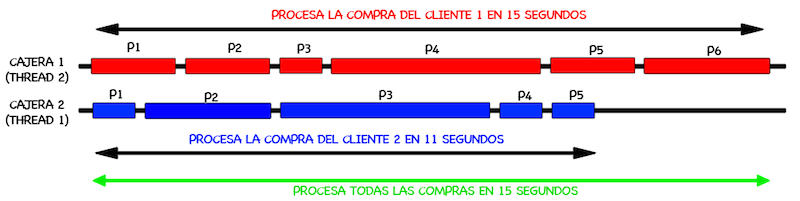
Now let’s see what the result of this run would be, and check how the program does indeed run in parallel and takes only 15 seconds to finish:
La cajera Cajera 1 COMIENZA A PROCESAR LA COMPRA DEL CLIENTE Cliente 1 EN EL TIEMPO: 0seg
La cajera Cajera 2 COMIENZA A PROCESAR LA COMPRA DEL CLIENTE Cliente 2 EN EL TIEMPO: 0seg
Procesado el producto 1 del cliente Cliente 2->Tiempo: 1seg
Procesado el producto 1 del cliente Cliente 1->Tiempo: 2seg
Procesado el producto 2 del cliente Cliente 2->Tiempo: 4seg
Procesado el producto 2 del cliente Cliente 1->Tiempo: 4seg
Procesado el producto 3 del cliente Cliente 1->Tiempo: 5seg
Procesado el producto 3 del cliente Cliente 2->Tiempo: 9seg
Procesado el producto 4 del cliente Cliente 2->Tiempo: 10seg
Procesado el producto 4 del cliente Cliente 1->Tiempo: 10seg
Procesado el producto 5 del cliente Cliente 2->Tiempo: 11seg
La cajera Cajera 2 HA TERMINADO DE PROCESAR Cliente 2 EN EL TIEMPO: 11seg
Procesado el producto 5 del cliente Cliente 1->Tiempo: 12seg
Procesado el producto 6 del cliente Cliente 1->Tiempo: 15seg
La cajera Cajera 1 HA TERMINADO DE PROCESAR Cliente 1 EN EL TIEMPO: 15seg
In this example we see how the effect is as if two cashiers were processing the customers’ purchases in parallel, without the final result of the application changing at all, which is to process all the customers’ purchases independently. Graphically, the program has done the following in two different threads:
Another way to do the same thing without inheriting from the "Thread" class is to implement the "Runnable" interface. In this case we won’t have, and won’t be able to override, the methods of the Thread class, since we aren’t going to use it, and we only have to override the "run()" method. Here it is only necessary to implement the "run()" method so that the processes implemented in it run in a different thread. Let’s see an example of how, using objects of the "Cliente.java" and "Cajera.java" classes, we can implement multitasking in the same class where the application’s Main method is called. Below is the code of the "MainRunnable.java" class:
public class MainRunnable implements Runnable{

	private Cliente cliente;
	private Cajera cajera;
	private long initialTime;

	public MainRunnable (Cliente cliente, Cajera cajera, long initialTime){
		this.cajera = cajera;
		this.cliente = cliente;
		this.initialTime = initialTime;
	}

	public static void main(String[] args) {

		Cliente cliente1 = new Cliente("Cliente 1", new int[] { 2, 2, 1, 5, 2, 3 });
		Cliente cliente2 = new Cliente("Cliente 2", new int[] { 1, 3, 5, 1, 1 });

		Cajera cajera1 = new Cajera("Cajera 1");
		Cajera cajera2 = new Cajera("Cajera 2");

		// Initial reference time
		long initialTime = System.currentTimeMillis();

		Runnable proceso1 = new MainRunnable(cliente1, cajera1, initialTime);
		Runnable proceso2 = new MainRunnable(cliente2, cajera2, initialTime);

		new Thread(proceso1).start();
		new Thread(proceso2).start();

	}

	@Override
	public void run() {
		this.cajera.procesarCompra(this.cliente, this.initialTime);
	}

}
Here we implement the "run()" method inside the same class where the Main method lives, and in it we call the "procesarCompra()" method of the Cajera class. Inside the Main method, we create two objects of the same class we are in ("new MainRunnable") and we create two objects of the Thread class to launch the processes so they run in parallel. The result of this run is the same as in the previous case:
La cajera Cajera 2 COMIENZA A PROCESAR LA COMPRA DEL CLIENTE Cliente 2 EN EL TIEMPO: 0seg
La cajera Cajera 1 COMIENZA A PROCESAR LA COMPRA DEL CLIENTE Cliente 1 EN EL TIEMPO: 0seg
Procesado el producto 1 del cliente Cliente 2->Tiempo: 1seg
Procesado el producto 1 del cliente Cliente 1->Tiempo: 2seg
Procesado el producto 2 del cliente Cliente 2->Tiempo: 4seg
Procesado el producto 2 del cliente Cliente 1->Tiempo: 4seg
Procesado el producto 3 del cliente Cliente 1->Tiempo: 5seg
Procesado el producto 3 del cliente Cliente 2->Tiempo: 9seg
Procesado el producto 4 del cliente Cliente 2->Tiempo: 10seg
Procesado el producto 4 del cliente Cliente 1->Tiempo: 10seg
Procesado el producto 5 del cliente Cliente 2->Tiempo: 11seg
La cajera Cajera 2 HA TERMINADO DE PROCESAR Cliente 2 EN EL TIEMPO: 11seg
Procesado el producto 5 del cliente Cliente 1->Tiempo: 12seg
Procesado el producto 6 del cliente Cliente 1->Tiempo: 15seg
La cajera Cajera 1 HA TERMINADO DE PROCESAR Cliente 1 EN EL TIEMPO: 15seg
CONCLUSIONS AND CLARIFICATIONS:
The concept of multitasking or multiprocessing is quite easy to understand, since it just means doing several things at the same time without altering the final result. As we said earlier in the post, not everything can be parallelized, and it is often hard to find a way to parallelize processes within an application without affecting its result. So even though the concept is easy to understand, applying it to a real case can be tricky if you want the application’s result to remain unaffected.
On the other hand, for those of you just starting with concurrency, multitasking and so on, don’t worry at first if you struggle to program problems like these. Besides multitasking, they mix in things like inheritance and interfaces, which are hard to absorb at the beginning. So take it step by step, but keep it very clear that multitasking is very useful and should be applied to make applications more efficient and give them better performance.
“Multitasking and Threads in Java with Examples (Thread & Runnable)” by Ricardo Moya at jarroba.com, licensed under Creative Commons Attribution-NonCommercial-ShareAlike 3.0. Registered at Safe Creative.

You may also like


Multitasking and Threads: Easy, With Lots of Benefits
Learn what multitasking and threads are, how concurrency and parallelism differ, and why cores matter, explained with simple comic-style examples.


Multitasking in Android
Learn how multitasking and threads work in Android: the main thread, background threads, event-driven programming and why you should never block the UI.
Leave a comment