
Streaming Tricks: Generators, Buffers, and Caches
Learn how to build a data stream by balancing memory use and processing time: buffer data for a steady flow, generate data on demand, and cache results.
Streaming is pretty simple if we know how to play with the different data structures.
For simplicity, the most common approach is to use lists to keep sets of data in memory and then loop over them to use them one by one. Imagine the list is huge, so huge we could call it “Big data” (for example several Gibibytes or Tebibytes in the same list; for more information on information units of measurement see https://jarroba.com/unidades-medida-la-informacion/ ). We might not have enough RAM (main memory) to hold a list that size. Or another case: lines of data may arrive over the Internet, with some time between each line (a few seconds, for example) until the next one arrives, so waiting for all the lines to arrive before processing them is a waste of time; it would be wonderful to process each line of data as it arrives without waiting for the rest. That is what we call “data Streaming” (or “data flow”, although the word “Stream” is commonly used to refer to the “flow”). The solution? “Generators” (we could call them the creators of “data Streaming”).
When you start programming, you usually use simple data structures like lists (you may know them as “arrays”) to store data, such as a list of text lines, numbers, etc. These data structures (lists) consume memory and have to be filled before you can get the data out (I use a representation similar to the one in the multitasking article, which I recommend reviewing first: https://jarroba.com/multitarea-e-hilos-facil-y-muchas-ventajas/).
In the following example I will show different moments in time (one moment per image, comic-style).
From somewhere like the Internet (or even from another function, or from the processing of another list) we receive data that we process first (for example, checking that the data downloaded from the Internet contains no errors) and we store it in a list (the data is stored as “elements” of a “list”) that takes up memory space; and someone will be waiting to consume that data (it could be another Internet server, another function, or even another list).
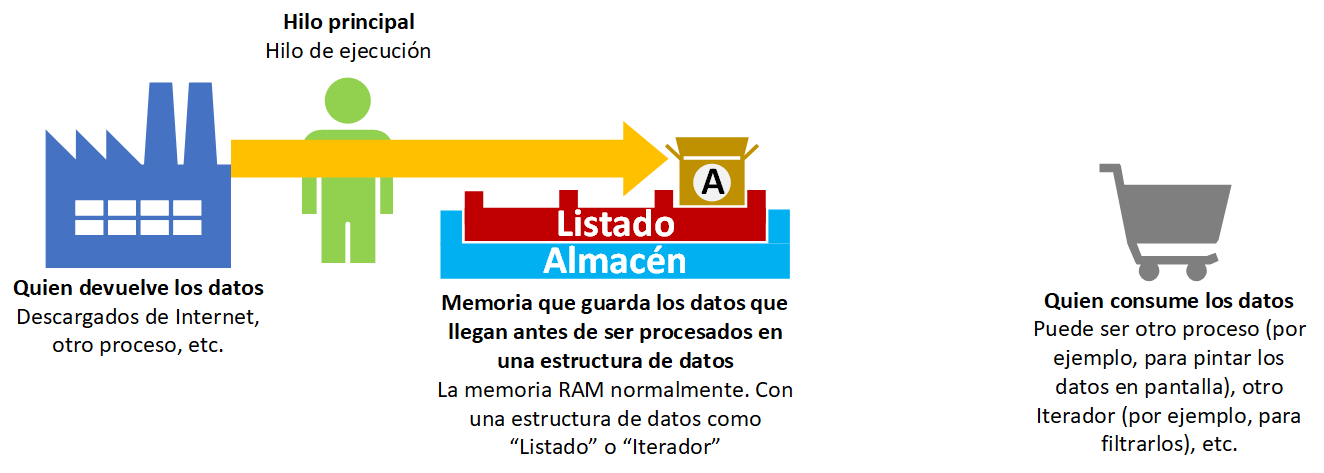
More data keeps arriving, we process it and keep adding it to the list, taking up more memory.

Can’t you just add a single element at one position in a list and then read that position? Yes, there are tricks, but often a list is needed and sometimes it isn’t. Also, a single variable would be enough (no list needed) since the program is read linearly. Either way, the list position holding the element is already taking up memory before the element is retrieved (that is, if the element is stored and read an hour later, that memory is occupied for an hour). However, as we will see later, a generator creates and returns an element directly at the moment it is requested.
Anyway, if we need a list, it is more efficient to process all the data, fill the list, and then read the data in a loop. So we keep processing and filling the list until data stops arriving.

Once we have the desired data in the list, we can process it (for example, in a loop) to hand it to the next part of the program (such as the next line of execution, which could be another function “set(list)”, or the return of a function “return list”, etc.).

As we can see, the list can take up a lot of memory. Also, we have to wait until the list of processed data is filled before we can iterate over it or get any of its data to hand it over.
Generator
The beauty of the generator is precisely that it takes care of “generating” the data as if it were a “list” but doesn’t keep it in memory.

It generates the data and hands it over. For example, it downloads the data from the Internet and checks that it has no errors (it generates it in the previous image), then immediately gets the generated data and uses it, for example by printing it to the screen.

The generator behaves “like” a list, but without storing anything in memory and without having to wait for the whole list to be processed.

This way we get final data very quickly and with minimal memory consumption.

Therefore, a “generator” and a “list” are both “iterables”.
Iterable
Although I’ve already pointed out some differences, I want to make it very clear that a “generator” is NOT a “list” (a “generator” may generate a list or not; I mention this because when you write a “generator” you will use it just like a list, and when you print the result of the “generator” you will see that it returns elements just like a list, but it is not a list). And a “generator” is an “iterable” but not the other way around (“iterable” is the base of “generator”; it’s like “addition” being the base of “multiplication”, but not “multiplication” being the base of “addition”); “iterable” and “generator” must not be confused.
An “Iterable” is any object that can be iterated (that can be looped over), for example:
- The elements of a “list” (List)
- Each key-value pair of a “dictionary” (Dict)
- The elements of a “set” (Set)
- The letters of a “text” (String)
- The lines of a “file” (File)
- A “generator” of elements
- An object of a class that we create ourselves and that is iterable (for example, we could create our own object that behaves like a list, but only returns the even positions of the elements added).
Note
What about a function assigned to a variable?
A function is the data structure it returns. That is, if it returns a list it will behave like a list; if it returns some other “thing”, it will behave like that “thing”.
Cache
If we already have the list with the previously processed elements, getting them from the list is very fast, but at the cost of memory consumption.
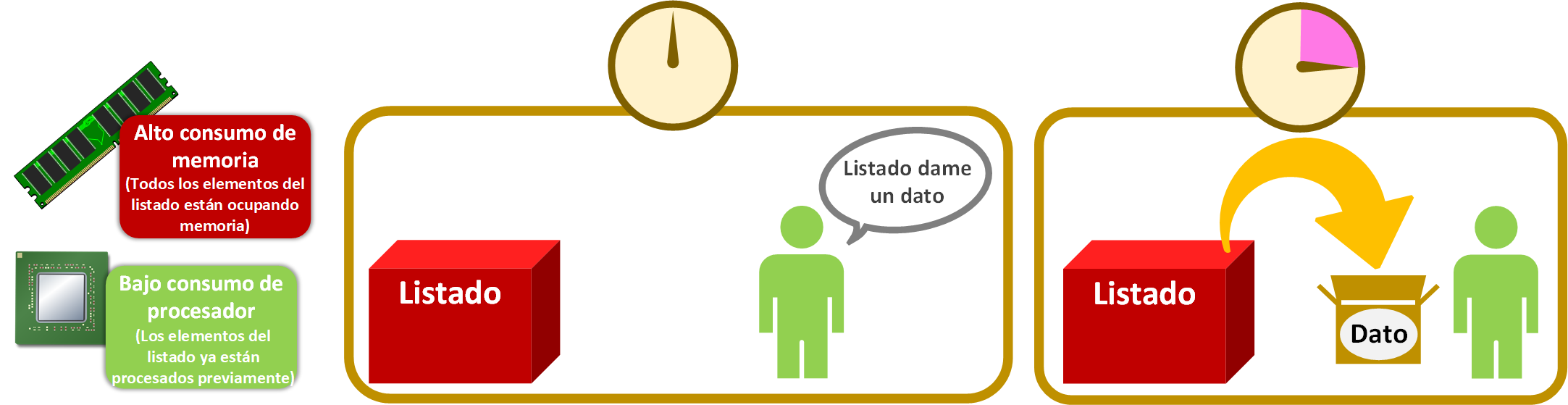
The generator, however, generates each piece of data at the moment it is requested, so it takes longer to return each one. Thanks to this it uses very little memory, since it only takes up the size of the data being returned.

A middle-ground solution to use minimal memory while returning data faster is to mix data structures. For each piece of data processed by the generator, we store it in a structure such as a list (or a dictionary, depending on our needs) that we will call the “cache memory”. The “cache memory” is the structure that stores an already processed piece of data so it can be returned immediately in future requests. The beauty is that whoever asks for the data doesn’t know who returns it (the generator or the list); they don’t care, they just want the data, as soon as possible and in the most efficient way.

The “cache memory” will fill up with data; ideally it has a limit so it doesn’t fill up our RAM (otherwise we’d be in the same situation as with the simple list). When a new piece of data is generated and doesn’t fit in the “cache memory”, we’ll have to make room for it. Which data gets removed from the “cache memory” depends on the eviction policy we need, for example:
- Remove the oldest data (FIFO, for “First In First Out”, that is, a typical “queue”).
- Remove the data that was requested longest ago (LRU, for “Least Recently Used”).
- Remove the data that has been requested the fewest times (LFU, for “Least Frequently Used”).
- Remove a random piece of data.
- Remove the data that meets certain conditions (for example, the data itself has an expiration date).
The eviction policy of the “cache memory” needs to be thought through carefully. For example, if the policy is “Remove the oldest data” and a piece of data that is requested a lot gets removed, we’ll have to generate it again many times, which isn’t very efficient. Or the other way around: if the policy is “Remove the least requested data”, and all the data is requested with the same frequency (suppose each is requested an exact number of times, like ten times), the data that arrives in the “cache memory” a bit later would be removed practically as soon as it enters and would be requested the same number of times as the rest, so we wouldn’t be fair to the new data by favoring the oldest (which, if they have already been requested the ten times we used as an example, will never be requested again and would be uselessly taking up space).
Streaming (Buffer)
I don’t know if you are familiar with the word “Stream” (“Flow”), although you have surely heard it dozens of times, especially with videos or video games on the Internet. In short, “Stream” means having a piece of data, processing it, and handing it over (the value of the data to return is kept in main memory and discarded once delivered; then whoever receives it may keep it in main memory, for example by putting it in a list, or not keep it, for example by printing it to the screen); it is NOT “Stream” to wait until you have a list of data, process it all one by one, and return a list with all the processed data (that keeps the entire list in main memory in order to return it).
To make sense of this with “videos on the Internet”, “Stream” is being able to watch the video without having to wait for it to download completely (as platforms like YouTube or Netflix do), and it would NOT be “Stream” to download the whole video and only then watch it (for example, if you download a compressed video you have to download all of it; downloading a piece to watch it doesn’t work. Once it’s fully downloaded you have to decompress it and only then can you watch it).
We know that a “generator” generates an uninterrupted flow of data (a data Stream). But it isn’t an ideal “Stream”, since nobody wants to watch a YouTube video in fits and starts: if we only used the generator and the Internet connection dropped for a second, the video would freeze for that same amount of time, until we received data to process and hand over again.
To do things right, we need to store data (the so-called “buffer”) whenever we get the chance, so that if the Internet connection drops, the generator can keep drawing from the data store while the store waits for the Internet connection to be available again (this is why some online video or audio players show something like “buffering”).
The buffer is an intermediate data store fed by one or several processes and consumed by one or several processes (in this definition I used “processes” because each process has at least one thread of its own; they could be “threads within the same process” instead of “separate processes”). The ideal is to add a generator that takes data from the buffer whenever there is any, and waits if there isn’t. It’s also better to do this with two threads for speed: one thread takes care of putting things in the buffer, and the buffer, acting as a generator, lets us iterate over the buffer’s own elements.
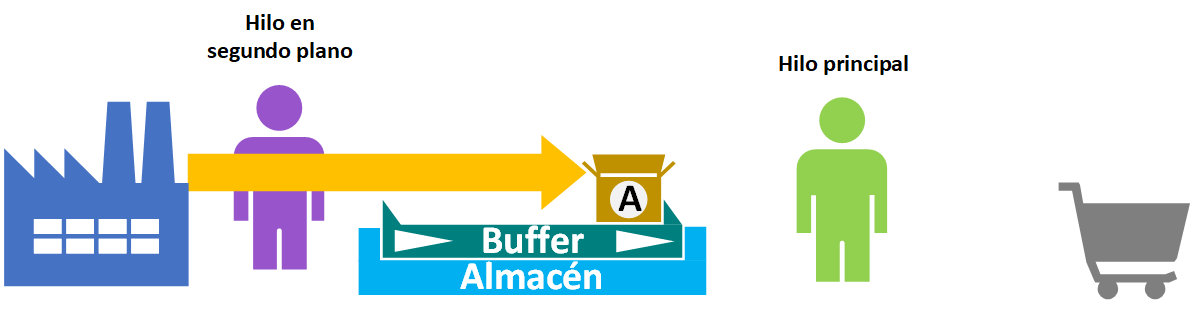
This way, if for whatever reason the thread that stores data in the buffer is faster than the one that iterates (with the generator) over the buffer’s data, there will be more stored data available in the buffer for future retrieval without interruptions.
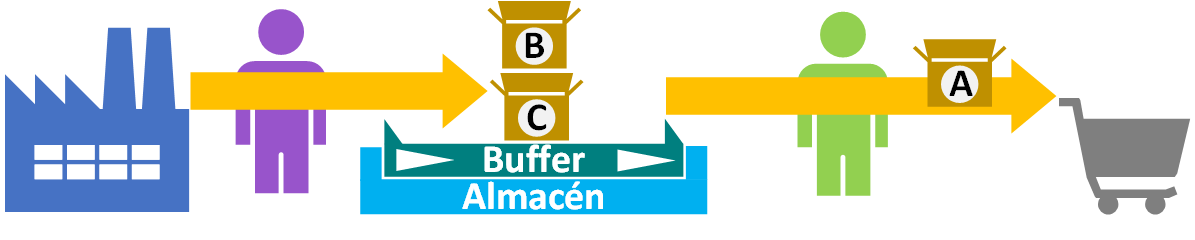
The buffer thread may finish storing data in the buffer, or there may have been a problem (such as an Internet connection drop) and it has no more data to store. Either way, there will be no interruption in data generation for the data consumer (for example, the frames wouldn’t stop being displayed on the screen of the person watching a YouTube video) from the buffer, because there was already data stored beforehand to avoid this.
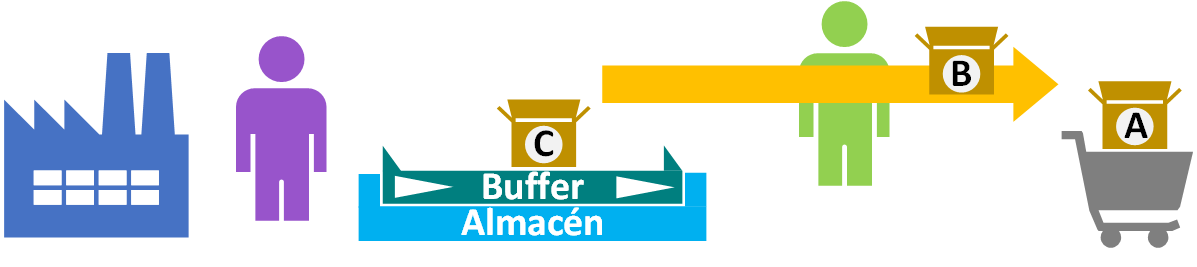
If data later starts being stored in the buffer again, the thread that gets it from the generator won’t even notice.
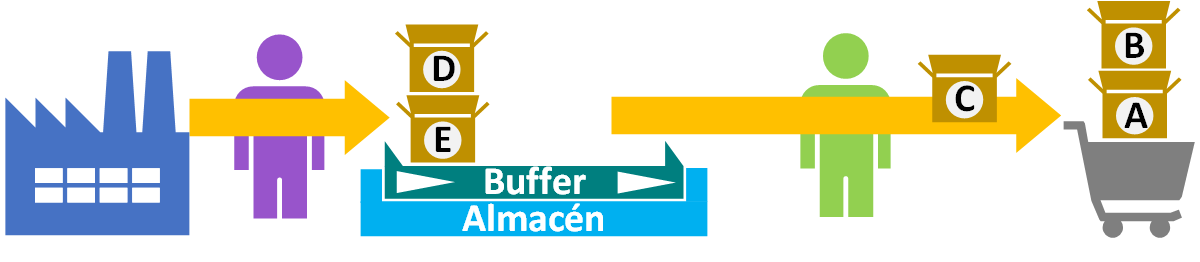
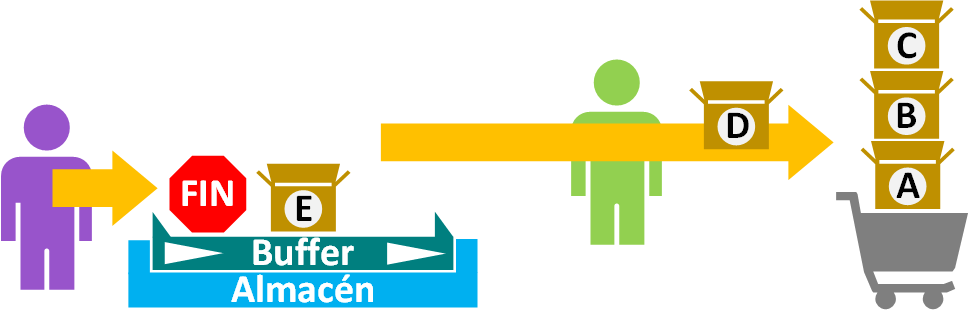
That said, if we finish sending data we must send an “End signal” (“Signal”) so that the process that gets the data from the buffer (with the generator) knows that no more data will ever come after the last one (for example, so that the player showing a video tells the user that the video has finished playing; or in a music program, so it knows when a song has ended and it can move on to the next one). Obviously, the “End signal” is not handed over; it is only for the internal use of the buffer’s data consumer (so it knows when all the buffer’s data has really been consumed). If this signal isn’t sent, the thread consuming the generator’s data will never know when the data ends, since it will think the data is just delayed and will keep waiting (for example, if it doesn’t receive the “End signal”, it will think the buffer of a video we were watching has run dry and the video stopped halfway, so it will wait for the next frames).
Warning
What is the “End signal”?
Whatever we want. Some examples:
- If the data sent through the buffer is of type “String”, we could use a text as the “End signal”, for example: “=#=This is the end signal=#=”. This method has a problem: what happens if the same text is sent to us from the Internet? The thread that collects the generated data will think it’s the end and will stop asking for more. Is it ever fine? Yes, if we know 100% that nothing can introduce the same text we use as the “End signal”.
- Use the “Null” value (“None” or “Null”) as the “End signal”. If data with values always arrives, the “Null” value is not data that can be repeated, so it’s perfect as an “End signal”. And what if we are sent a “Null” from the Internet? First we need to be sure that Null values can reach us; if they can, we have to check that it isn’t the text “Null” (that is, the letters “N” “u” “l” “l” in a row, looking like the Null value but really being a String) or “None”; otherwise, we still have more options.
- If you program in a weakly typed language (like Python) or using data types that allow multiple types (like in Java, typing with Object or <?>), we can use a different data type to send the “End signal”. For example, if the buffer’s data is text, and we send an integer as the “End signal”, the consuming thread would have to check whether the data’s value is an instance of Text or an integer to decide whether it’s data or the “End signal”. It’s not the best option, it’s very inefficient; the last one is better.
- Use a channel other than the buffer itself to send the “End signal”. If the previous, more immediate solutions aren’t good, you can always use another variable shared between the threads (such as another channel between threads, like a “Pipe”) to send an “End signal”. The thread that consumes the buffer’s data, upon receiving the “End signal”, will know that once it consumes the last piece of data in the buffer there will be no more. In this case two conditions must be met for this thread to stop: that it consumes all the data in the buffer, and that the “End signal” arrives from the thread that adds data to the buffer.
In upcoming articles we will show examples with real working code.
Another example in favor of Streaming
The previous example emphasized not having to wait for data arriving from the Internet. We can equally apply Streaming when processing our own data.
As an example, imagine we have infinite data (an extremely large amount of data) spread across several hard drives; that is, we have so much data that it doesn’t all fit together in your computer’s RAM. Our goal, or just because we feel like it, is to get the data that contains the word “pastel” (cake), for example. That means we’ll have to go through the hard drives piece of data by piece of data looking for the word “pastel”, and looking at each piece of data requires copying it into RAM. To do this we’ll consider one of the following cases:
- Searching and waiting to store all the data containing “pastel” in a list to return it is not viable, since we’d run out of main memory (remember we have infinite data; even if the data containing the word “pastel” is smaller than the total, it most likely won’t fit in RAM).
- A generator alone, without a buffer in between, is inefficient because every time a piece of data containing the word “pastel” is requested, that is exactly when the search through the data for one with the word “pastel” is carried out, stopping the program until one is found.
- A background thread or process that stores the data containing the word “pastel” in a generator buffer so another thread consumes the data with the word “pastel” whenever it wants. If there is data in the buffer it will be consumed immediately, and if there isn’t, the consumer will have to wait (as in the previous point). But if there is data and it takes one, it can work with it while the buffer keeps filling up. Compared with the previous point, the consumer won’t have to stop and wait for data to be generated as long as there is data in the buffer.
Programming Generators in Python
To learn how to use and program Generators in Python, we have a detailed article, just click here, with tricks and everything you need to know about data Streaming.
Bibliography
- Personal experience
- Cache (computing) (Wikipedia)
- Algoritmo de caché (Wikipedia)
“Streaming Tricks: Generators, Buffers, and Caches” by Ramón Invarato at jarroba.com, licensed under Creative Commons Attribution-NonCommercial-ShareAlike 3.0. Registered at Safe Creative.

You may also like

Generators in Python – The Foundation of Streaming
Python generators let you stream data in real time and get each item only when it's consumed. A great balance between processing and memory. Learn them here.

Advanced Dockerfile: Multi-Stage Builds, Registries, and Tricks
Free Docker course. Expert Docker tricks: multi-stage builds, optimizing images, faster build times, and distributing images through Docker registries.
Leave a comment