
Multitasking in Android
Learn how multitasking and threads work in Android: the main thread, background threads, event-driven programming and why you should never block the UI.
Series: Multitasking in Android part 1 of 2
In this article we are going to cover multitasking, or multi-threading, in Android, which is the way of handling threads so you can run several tasks at the same time. I invite you to take a look at this earlier article where we explain what multitasking is and all its advantages, whether or not you already have some experience with multitasking.
When an application starts on Android, the Android operating system creates a new Linux process (that is, the application running in main memory) with a single thread of execution, called the “main thread” or also the “UI thread” (User Interface thread). Why is it called the “UI thread”? Let’s look at the following graphical example.
So we don’t start with the not-so-fun theory, let’s go with a few very illustrative examples.
Suppose we have an application with two buttons. One button downloads data from the Internet (images, text, etc.) and the other one does something else. Now, we have several jobs (a set of code with a specific function, such as the code in charge of downloading data from the internet) that have to be processed and take some time. For this example they are:
- Screen touch: that is, calculating the position where the finger touched the screen and giving the order to do whatever has to be done because that part of the screen was touched.
- Drawing on screen: refreshing what is on the screen in order to change it. For example, when you press a button and its color changes to a pressed color, that had to be drawn on the screen so the user could see it.
- Downloading data from the Internet: it could be a file, an image, some text, all at once, whatever. What is certain is that it will take some time to complete the whole processing.
- And there would also be “do something else”; in the examples we’ll stop there so we don’t make them needlessly long. In fact, I’ll leave it to you as an exercise: once you know how the “Download data from the Internet” job is processed, think for a while about how it would work if “do something else” were, for example, “Search a database” or anything else we want to be able to do in the background.
Example of working only on the main thread
Let’s suppose we do everything on the main thread. In the following image, we represent the main thread over time with the green arrow. Inside the main thread, from left to right, you can see how time advances and what our application does as the device is used (each drawn smartphone is a complete step that corresponds to what the main thread is processing right below it).
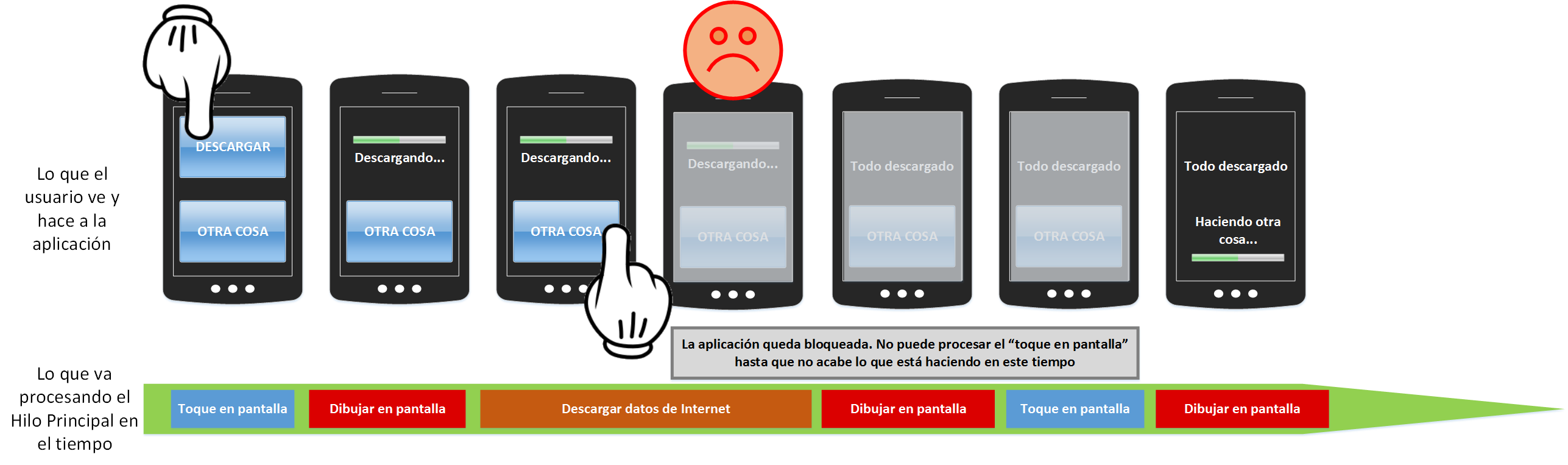
As we can see in the image above, the user taps download. But the Internet data download is processed on the same thread that is in charge of processing what we see on the screen and of processing the finger touch on the glass. The user gets blocked, because the main thread can’t keep up with all the work it has to do; it first has to finish what it started. Any other job, such as the screen touch, gets queued, and the user is left waiting (see the user’s sad face, which means uninstalling the app and giving it a bad rating on Google Play in 3, 2, 1…). This is something you must never do: the user should never have to wait; in other words, the main thread must never be blocked with a heavy workload.
Example of using the main thread only for the UI and everything else in the background
Then a question comes up: can I do something concurrently and in parallel? (In short, those terms mean doing several things at the same time. I recommend you read this tutorial where we explain it in detail in the article about multitasking that we recommended earlier.) The answer is that we could run the “Download data from the Internet” job on a different thread and thus free the main thread from that workload.
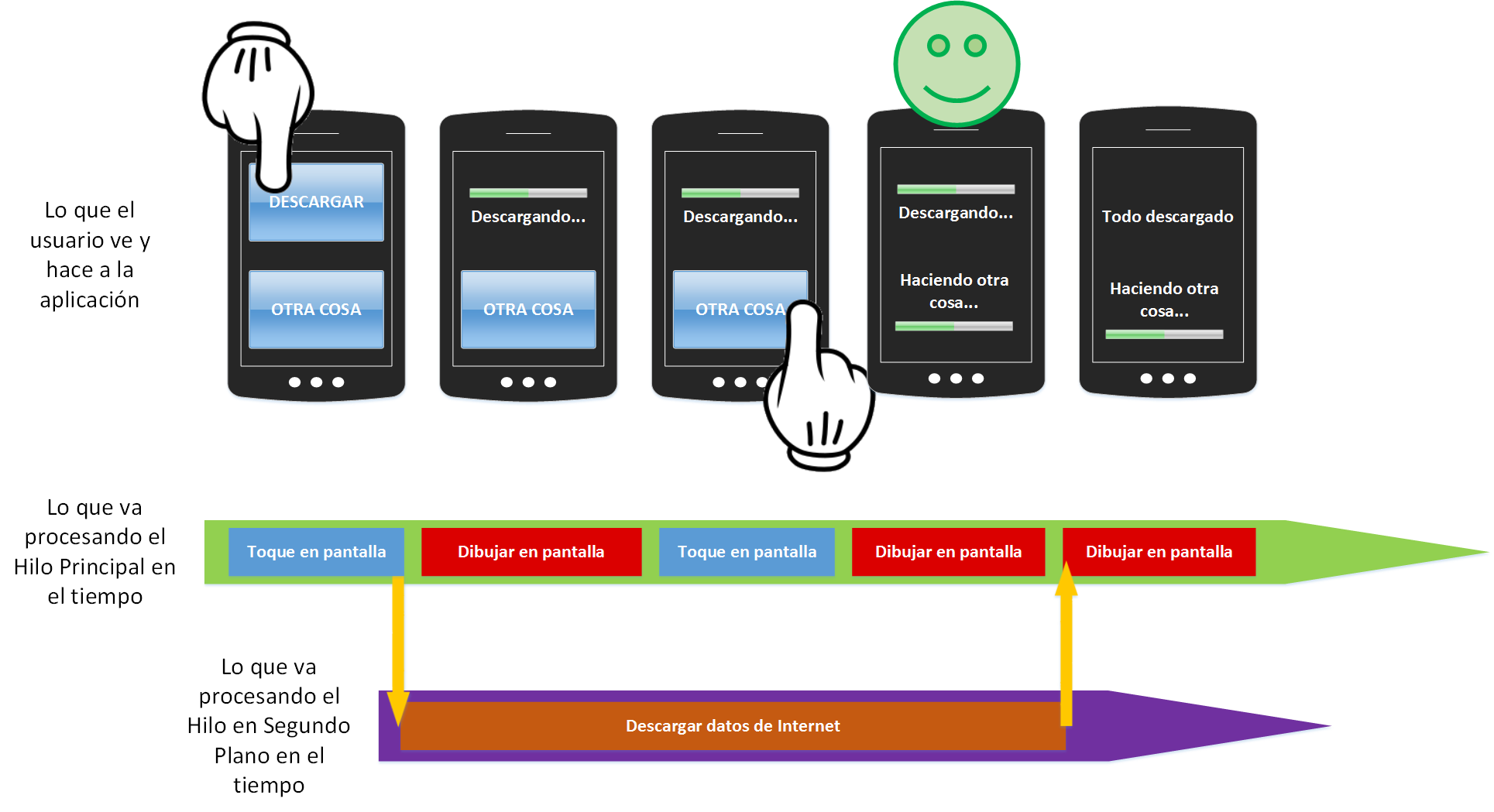
We can see that we don’t block the user, since they can press the “do something else” button and it works while the Internet data is being downloaded. In the example we don’t get to see what the “Something else” button does, but its function could also run on a separate thread.
You have surely realized why the main thread is also called the UI thread. It’s because it should only be in charge of picking up the commands the user gives to the device (screen touch, microphone, gyroscope, etc.) and giving information back (drawing it on screen, vibration, sound, etc.).
Therefore, for good programming, the main thread should only be in charge of:
- Listening to user interface events. That is, doing whatever needs to be done the moment a button is pressed, or the moment the device is rotated, or the moment an Activity is created, etc.
- Drawing views or widgets on screen. That is, showing everything to the user on screen, such as buttons, images, texts, etc. Everything that belongs to the “Android UI toolkit”.
We’ve already seen one, but there are two rules when working with this main thread:
- Do not block the main thread under any circumstances (if it is blocked for more than 5 seconds, Android will show an error called the ANR dialog, for Application Not Responding, which usually says “Sorry! Activity X is not responding” and lets you choose between force closing the application or waiting for it to finish processing). Besides, blocking this thread makes the user hate the application, since they will see it frozen and won’t be able to do anything at all.
- Do not access anything drawn on screen from outside the main thread (for example, changing the color of a text from a background thread will throw an error; everything that affects what is seen has to be touched from the main thread).
And the background threads should take care of everything else. We can classify it into:
- Determinate logic that can be done in the background and may be slow. For example, changing the color of all the pixels of an image in the background. Since we know the number of pixels in the image beforehand (we know how many pixels wide and tall it is, so width x height gives us the number of pixels), we can set a start and an end. And since it runs on our device, we know the processor speed, so we can estimate how long it will take to process before starting. This logic is shown to the user as a progress bar that fills up.

- Indeterminate logic, by which we mean that we know nothing beforehand about what we are going to process. For example, if in the background we want to download an image from the internet. In this scenario we don’t know the size of the image beforehand, nor how long it will take to connect to the server, nor the speed at which the server will send us the image, nor anything at all. We will only know all this after the image has been completely downloaded. It is shown to the user as an animation that spins around its center (like an hourglass, a colored circle, a ring, etc.).

Many things are already clear. Note that we can have several threads that create other threads, and different threads that wait for data from other threads. Let’s look at the following image to see how many things we can do in the background. We’ll see how to keep all of this under control in a very simple way.
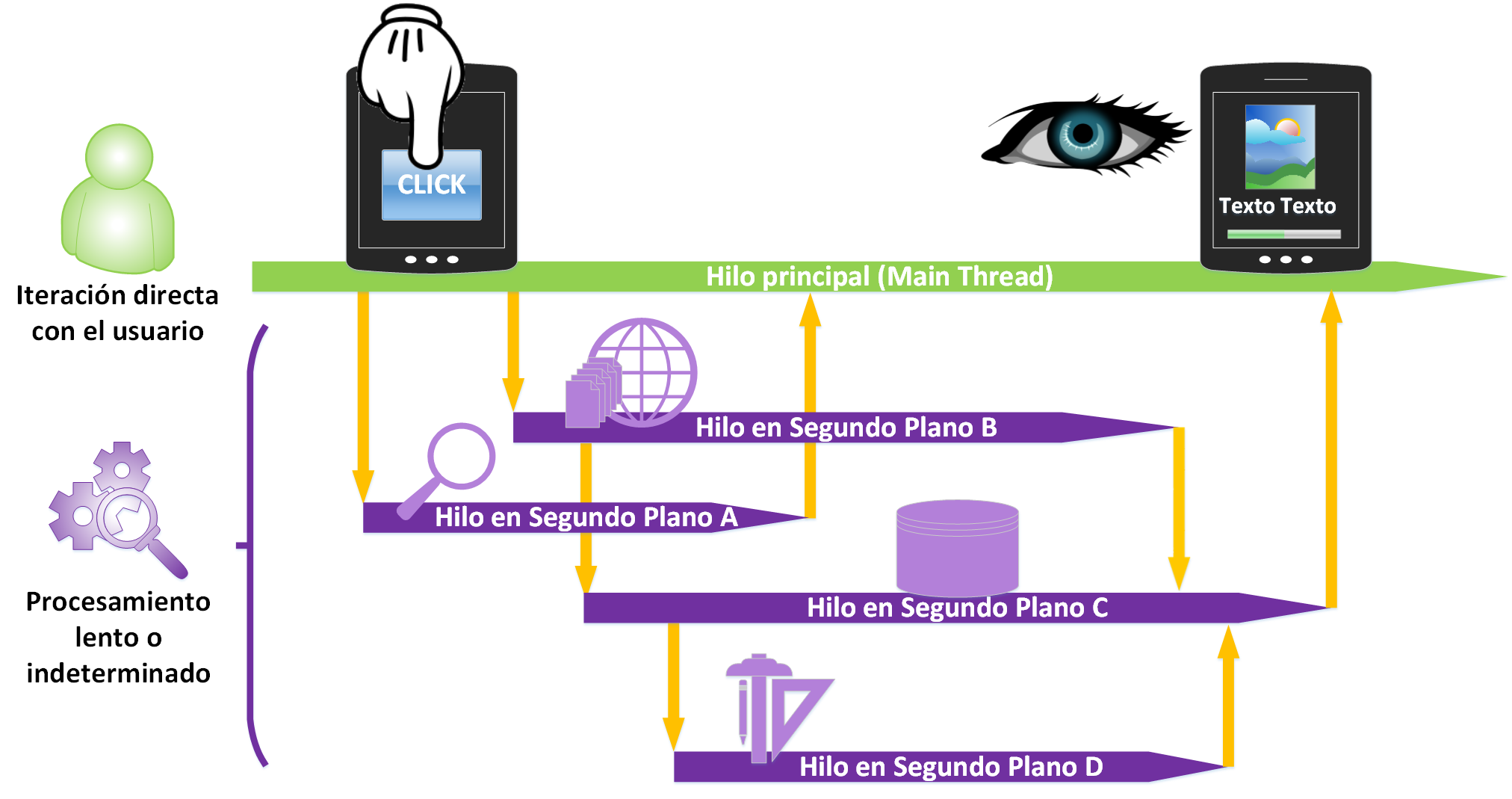
The main thread launches several background threads and some of those threads create other threads. Of course, since some need data from other threads, in the end some have to wait for certain events performed by others and be notified through them. With this we introduce how to communicate between threads using event-driven programming.
The best thing about event-driven programming or event-oriented programming is that we don’t have to keep asking whether an event has happened; instead, we leave programmed what we want to happen when that event occurs. To put it as an analogy, say we order a cake from the baker. We have two options:
A) Programming without event-driven design. Being a pest, wasting our energy and time, and the baker’s too, by asking every second whether our cake is ready: Is it ready? No. Is it ready? No. Is it ready? No. Is it ready? No. Is it ready? No. Is it ready? No. Is it ready? Yes, finally…
B) Programming with event-driven design. Doing whatever else we want, and waiting for the baker to finish the event of making the cake and notify us.
Obviously the second option is the better one. In programming, option A is running a “while” loop until something happens; for example, constantly asking whether a certain file has been downloaded, so that when it finishes you do whatever comes next (gotcha, I’ve caught you doing this more than once, haven’t I? 😉 ). Compare that with option B, which in the programming example would be downloading a certain file and, when it finishes, signaling to do whatever has to be done next (if as a developer you did option A, you will never do it again once you know event-driven programming).
I’ve used the word events without explaining it, but I’m sure you’ve picked up a good part of its meaning from context. When something we are waiting for happens (for example, we expect the user to press a particular button and something to happen only if that exact button is pressed), events (for example, pressing the button described above is an event; it waits to be fired when the user presses it) notify other classes or objects that what they were waiting for has happened. You don’t need to memorize the names, but in case you see them elsewhere, the class that produces the event is called the publisher (it’s the one in charge of publishing it, the one that decides that when the button is pressed it will notify anyone subscribed to its notifications), and the one that handles it is the subscriber (like with magazines: you subscribe to whoever has events so they let you know every time someone clicks the button. With the same magazine analogy, you can think of the publisher as a magazine publisher, who tells you when issues hit the market).
The beauty of this event-driven programming is that it doesn’t follow a single flow of code execution (sequential code); instead, code runs every time something happens.
In Android, you have surely used event-driven programming without being aware of it. Every time you use a method that starts with “on” you are using this paradigm. Like the very commonly used overridden method “onClick()”, where the code inside waits so that it runs when a certain element is pressed.
Also, by convention, these prefixes are used in overridden methods (I don’t need to recommend that you follow them if you are going to create events with event-driven programming):
- ON: to indicate that the event will be handled on the main thread. For example: onClick().
- DO: to indicate that the event will be handled on a background thread. For example: DoInBackground().
We’ve gotten through the hardest part, which is also so easy. Now all that’s left is to program with what we’ve learned. Let’s immediately learn in full detail how to program with AsyncTask in Android.
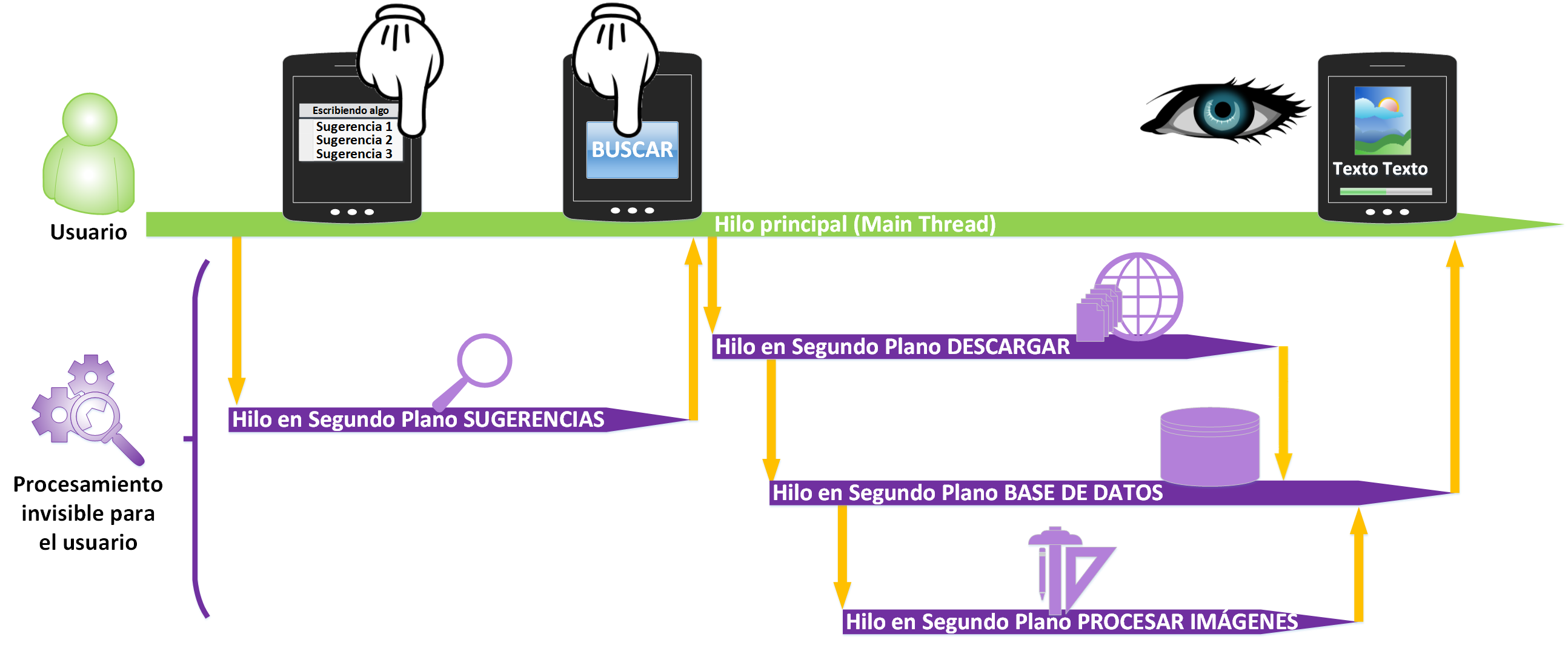
Example and exercise on how to use it: If you have already worked for a while with threads, event-driven programming, and Android, I recommend you skip this note, since I don’t want you to waste time on things you already know. Otherwise, read it to check that you have the concepts clear and to review the ones you don’t. It may seem complicated, but it’s far from the truth; with a complete understanding everything is much easier. So there are no gaps, I think the following story may be worth it. As you read it, I recommend you look at the following image, since I’ll refer to parts of the image in parentheses. Take a quick look at it, draw your conclusions in a few seconds, and start with the story.
STORY:
Once upon a time there was a user who had a smartphone.
The user installs an encyclopedia application on their device. When they click on the search box and start typing, a background thread is launched that shows suggestions (in the previous image this corresponds to the SUGGESTIONS Background Thread).
When they finish typing the word they wanted, which was “birds”, the application launches another background thread that connects to the internet and downloads whatever it needs (DOWNLOAD Background Thread).
The first thing this thread does is download the images of the birds and store them in the phone’s memory by launching a third background thread (DATABASE Background Thread).
Also, while it downloads and stores the images, it makes them smaller so they take up less space, in a fourth background thread (PROCESS IMAGES Background Thread).
When the images finish downloading, the text is downloaded and, when the download thread finishes (SUGGESTIONS Background Thread), it is sent to the thread that stores it in the database (DATABASE Background Thread), so the latter had to wait for the previous one to finish before it could continue and finish.
The thread that saves the information (DATABASE Background Thread) has a second problem: it also has to wait for the thread that shrinks the images (PROCESS IMAGES Background Thread) to finish, so it has to wait for that one too.
Finally, we have all the necessary data downloaded, saved in the database, and the images shrunk so they don’t take up so much space. We send it all neatly arranged to the user, so they can see it on screen, and we’re done.
And they all lived happily ever after…
It’s one of those stories that makes you tear up and think; I hope above all that it makes you think 🙂
See if you can tell where there would be methods starting with “on” or “do”, what could be determinate or indeterminate logic, where we draw on screen, who listens to the user’s events, etc.
“Multitasking in Android” by Ramón Invarato at jarroba.com, licensed under Creative Commons Attribution-NonCommercial-ShareAlike 3.0. Registered at Safe Creative.

You may also like


Multitasking and Threads in Java with Examples (Thread & Runnable)
Learn how multitasking works in Java with threads. Step-by-step examples using the Thread class and the Runnable interface, with a supermarket checkout demo.
Multitasking and Threads: Easy, With Lots of Benefits
Learn what multitasking and threads are, how concurrency and parallelism differ, and why cores matter, explained with simple comic-style examples.
Leave a comment