
Generators in Python – The Foundation of Streaming
Python generators let you stream data in real time and get each item only when it's consumed. A great balance between processing and memory. Learn them here.
The Generator lets you have a data flow (or Streaming) in real time and have each piece of data only when it needs to be consumed (processed or used by a person). It is also very important for achieving an optimal balance between data processing (the processor) and main memory (RAM) on any machine (desktop computer, laptop, tablet, etc.).
As a simple introduction, we wrote a general article about Streaming that I recommend reading first (you can read it in a few minutes without writing any code). On the other hand, you can see how using Generators greatly improves performance. In this Python article, however, we will learn to use generators in code from the ground up until we become experts.
A Generator may seem like something strange, but in reality it is used exactly like other data structures in Python (such as list, dict or set); so we can get the data from a Generator using a “for” loop:
for elemento in mi_generador:
    print(elemento)
You can find the code for this article on Github: View on GitHubInvarato/JarrobaPython / generadores
Simple. However, there is one quite notable difference, so notable that you have to understand it well so you don’t fall into its trap.
Unlike other data structures, a Generator doesn’t have its data stored anywhere; instead, it generates each piece of data as it is requested (“something pulls on the Generator’s flow to attract a piece of data”). And this subtle difference is what makes the Generator so important (at the end of the article I’ll explain why the Generator is more important than the data structures list, dict and set; besides, knowing how to create Generators will show a deep knowledge of Python).
We can imagine the Generator as an object (because it really is an object in programming) with a conveyor belt coming out of it. If nothing pulls on this conveyor belt, it doesn’t move; but if someone (in the following image represented by the pink person) pulls on the conveyor belt, that someone will get each piece of data (represented by the blue box).
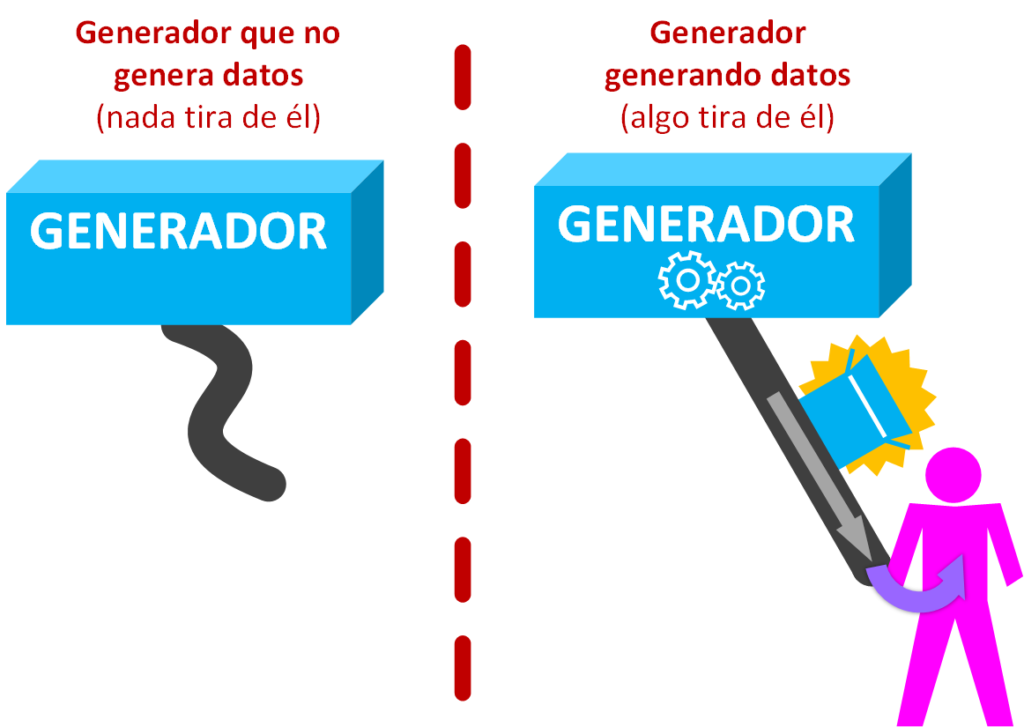
In other words, the data in a Generator doesn’t exist until a consumer requests it.
That’s all very nice, but what is a Generator for? Suppose we have a pile of white boxes (unprocessed data), and we create a Generator that paints them blue (the processing of each piece of data). So every time we pull on the conveyor belt, a white box will enter through the input conveyor belt, be painted inside the Generator, and the box, now painted blue (the processed data), will be returned to us through the output conveyor belt.
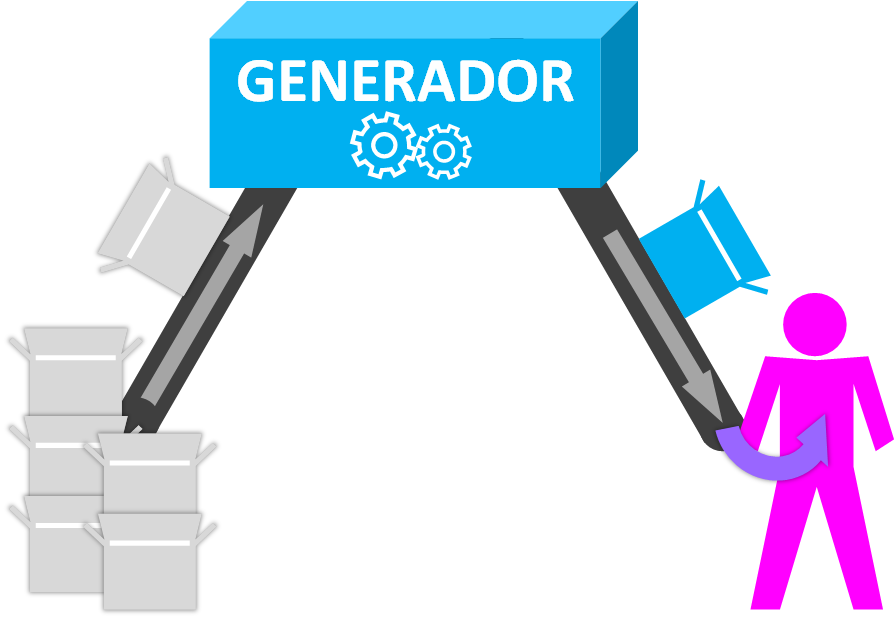
And how do you create/program a Generator? A Generator is programmed with a “Generator Function”, which is almost the same as writing a regular function (the kind you pass parameters to and that returns data with a “return”).
For this example we’ll write a “Generator Function” that takes white boxes and paints each of them blue (in the next image it’s represented by a paintbrush).
Also, to make it a bit more fun, if the incoming box is red, it will also be painted blue, so it will return a purple box; and if a box of any other color comes in, it will be returned as is.
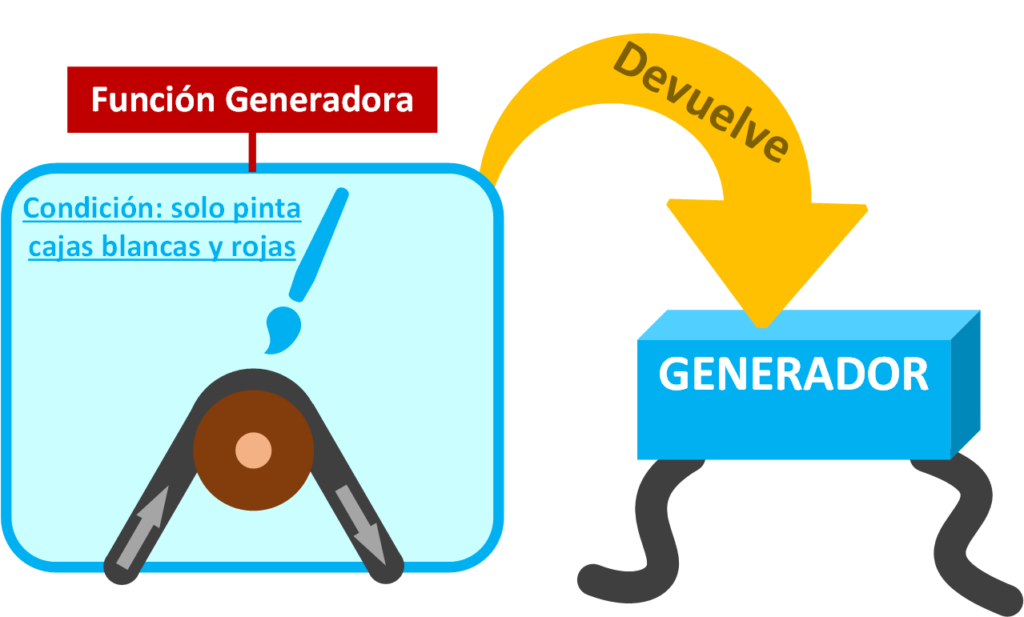
So a “Generator Function” returns a Generator.
generador = funcion_generadora()And how do we write the “Generator Function” in code? Before I tell you: would you know how to write a function that, given a list of colors (for example, [“BLANCO”, “ROJO”, “NEGRO”], and we’ll call this list “ristra_de_cajas”), goes through the list and prints blue if it was white and purple if it was red? If you’ve programmed before, a way to do this may come to mind quickly; well, a “Generator Function” is written in a very similar way:
def funcion_generadora(ristra_de_cajas):
    for caja in ristra_de_cajas:
        if caja == "BLANCO":
            yield "AZUL"
        elif caja == "ROJO":
            yield "MORADO"
        else:
            yield caja
I hope you noticed that instead of “print” there is a strange word in the “Generator Function”: Yield
And before explaining “yield” in detail, try the code above to see that it works just like other data structures:
ristra_de_cajas = ["BLANCO", "ROJO", "NEGRO"]

generador = funcion_generadora(ristra_de_cajas)

for caja_pintada in generador:
    print(caja_pintada)
It will print what we wanted:
AZUL
MORADO
NEGRO
Yield
A “Generator Function” is created as soon as the reserved word “yield” is used at least once (which we could translate as “produce/generate”) inside a Python “function”, since the “Generator Function” is going to return a “Generator”. “Yield” is placed at the point where we want to return a single piece of data “completely produced and ready to be returned” (this data can be of any type: string, int, list, tuple, dict, etc.). Take a look at the following example (I’ve called this new “Generator Function” “funcion_generadora_prints” to tell it apart from the other “funcion_generadora”):
def funcion_generadora_prints():
    print("GENERADOR: Se va a generar un PRIMER dato")
    yield "valorGenerado1"

    print("GENERADOR: Se va a generar un SEGUNDO dato")
    yield "valorGenerado2"

    print("GENERADOR: Se va a generar un TERCER dato")
    yield "valorGenerado3"

    print("GENERADOR: Termina y lanzará automáticamente la excepción StopIteration")
“Yield” vs “return”? Watch out: even though you don’t see a “return” written in the “Generator Function” above, that doesn’t mean a “Generator Function” doesn’t use one; what’s more, “yield” does NOT replace “return”. Every function always uses a “return” even if it isn’t written (more about ReturnS in Python by clicking here). In a “Generator Function” you can only use the “empty return” (“return void”); when a “return” is found in a “Generator Function”, it raises the StopIteration exception (since Python 3 you don’t have to declare it, as it’s raised automatically), in addition to ending the execution of the function. As in any function, you can declare a “return” or not; if you don’t, an “empty return” will be executed automatically when all the code in the function body finishes running. We could have added the “empty return” at the end of the previous function, but it isn’t needed:
def funcion_generadora_prints():
    # …

    print("GENERADOR: Termina y lanzará automáticamente la excepción StopIteration")

    return
    # The return void in a “Generator Function” raises a StopIteration
Using the “empty return”
The “empty return” is usually used inside a “Generator Function” to avoid writing extra conditionals to end the code (and to keep the code more readable); for example, writing a “return” inside a loop that is inside the function so that it ends both the loop (it acts as a “break”) and the function.
For example, for the “Generator Function” that paints boxes, if any color other than “BLANCO” or “ROJO” arrives, it immediately ends the loop and the function:
def funcion_generadora(ristra_de_cajas):
    for caja in ristra_de_cajas:
        if caja == "BLANCO":
            yield "AZUL"
        elif caja == "ROJO":
            yield "MORADO"
        else:
            return
A Pointer to a Generator
As we said before, to get the Generator object you just call our “Generator Function”:
generador = funcion_generadora_prints()At this point we have a “Generator” object but it does NOT execute the code inside the “Generator Function” (that is, none of the “print” statements above that say “GENERADOR: Se va a generar un X dato” will have run). If nothing “pulls” on the Generator, the code inside the “Generator Function” will never run; this is very important and the cause of a lot of confusion when programming with Generators and debugging code, so keep it in mind.
And if you try to print the “generador” variable:
print(generador)You won’t get the generated data, but the “generator” object.
<generator object funcion_generadora at 0x00000123456789ABCDEF>This is because you get a pointer to the function, but it is NOT invoked, so you don’t get the Generator object. This behavior is the same with any “function” that isn’t invoked (invoking a function requires the parentheses “funcion()”, parentheses that are also used to pass parameters “funcion(parametro1)”).
To get the values from a Generator, you just iterate over it in a loop:
generador = funcion_generadora()

for elemento in generador:
    print(elemento)
Parts of a Generator
With what we’ve seen so far you can already guess the parts of a Generator. To illustrate each part I’m going to reuse the code of the “paint boxes” “Generator Function”:
def funcion_generadora(ristra_de_cajas):
    for caja in ristra_de_cajas:
        if caja == "BLANCO":
            yield "AZUL"
        elif caja == "ROJO":
            yield "MORADO"
        else:
            yield caja
Now let’s get to know each of the parts of a Generator:
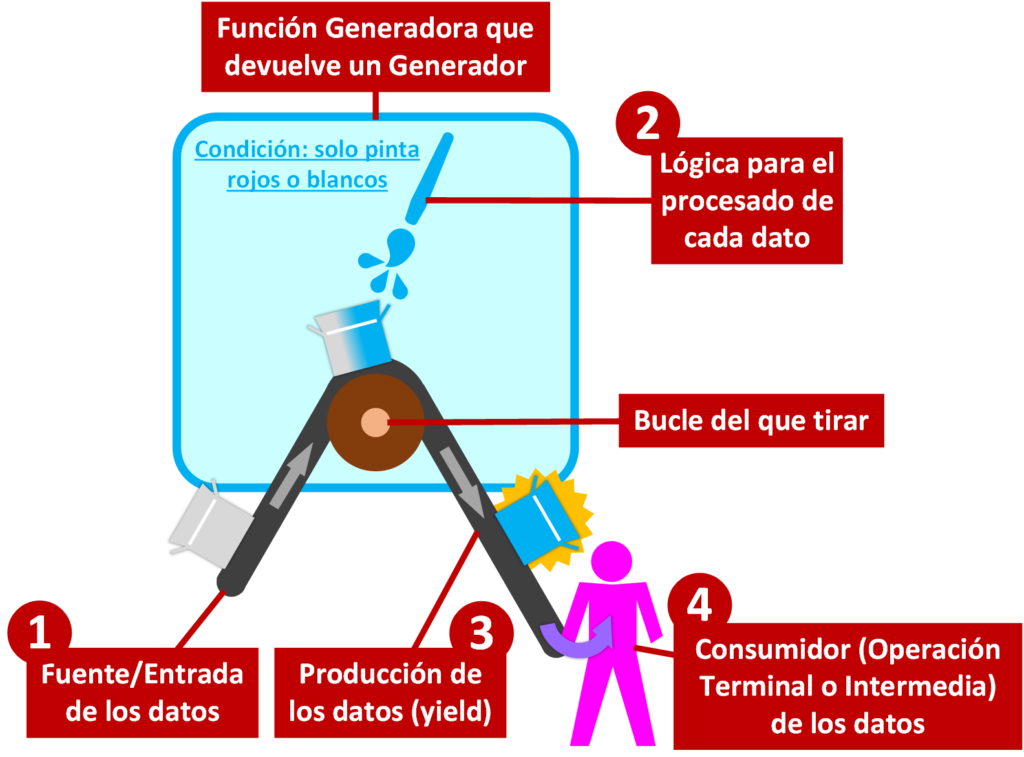
- Generator Function: it has some “yield” declared, and calling the “Generator Function” returns an object of type Generator. In the example: it’s the whole function I called “funcion_generadora”, which when invoked returns the Generator object.
- Data source (Input): the data that will be handled inside the “Generator Function”. Its use is optional, since the Generator may produce data by itself without needing a data source. It’s the first thing [1 in the image] to be called since it’s passed as a parameter to the “Generator Function”; it could be a list or another Generator (any “iterator”; the full explanation about “iterators” is at https://jarroba.com/nuestra-propia-coleccion-en-python/), so one Generator would pull from another; and of course other parameters or data sources could be passed to the “Generator Function”. In the example: it’s “ristra_de_cajas”.
- Logic to process each piece of data: It’s what we want to happen to each piece of data. It runs second [2] with the input data flow. In the example: the act of painting the data, with the decisions to paint only “BLANCO” and “ROJO” boxes.
- Loop to pull from: This loop (or nested loops) inside the “Generator Function” will run each iteration every time “something pulls” on it (this “something” is the “Consumer” of the data). This loop is optional, but it’s used a lot with “Generator Functions”; it can exist whether or not there is a data source, and in some cases it isn’t used, as in the earlier example with the “print” statements (the “Generator Function” we called “funcion_generadora_prints”). This loop is part of the “logic to process each piece of data”, but it’s important enough to deserve its own point. In the example: it’s the loop “for caja in ristra_de_cajas”
- Data production (yield): Every time a “yield” is reached inside the “Generator Function”, the already processed data is returned, and control of the program flow goes outside the Generator being iterated. It would run after the “Logic to process each piece of data” [3], although if there are more “yields” or a “Loop to pull from”, it will repeat every time someone iterates the Generator. In the example: every time there is a “yield” (for example: yield “AZUL”).
And, without being part of the “Generator Function”, it’s also important to know the role of the:
- Data Consumer: It’s whoever is “pulling the data” from the Generator object. A Generator’s Consumer can be a “Terminal operation” (consumes the data and ends) or an “Intermediate operation” (consumes the data and returns it to another consumer). Every time a Consumer “pulls” a piece of data from the Generator, control of the program flow is passed to the Generator, and when the Generator produces a piece of data (reaches a “yield”), the consumer takes back control of the program flow [4] to use that data; and it will pull from the Generator as many times as it needs or until the Generator produces no more. In the example it would be the “for” that iterates over the Generator returned by the “Generator Function”:
ristra_de_cajas = ["BLANCO", "ROJO", "NEGRO"]

generador = funcion_generadora(ristra_de_cajas)

for caja_pintada in generador:
    print(caja_pintada)
Reasons to Use a Generator
We might have reasons to doubt whether it’s a good idea to make the effort to learn and use “Generator Functions”. The short answer: the Generator is the most important programming structure (much more than list, dict, set, files, etc.). The long answer, I detail in the following paragraphs.
Remember when I asked you above whether you’d know how to write a function that, given a list of colors, goes through it and returns blue if the item was white and purple if it was red? Well, that’s what we’re going to do now. Suppose we want to write the “paint boxes blue” “Generator Function” as a function that is NOT a “Generator Function”. We could do something like this:
def pinta_de_azul(ristra_de_cajas):
    ristra_de_cajas_de_retorno = list()

    for caja in ristra_de_cajas:
        if caja == "BLANCA":
            caja = "AZUL"
        elif caja == "ROJA":
            caja = "MORADA"
        ristra_de_cajas_de_retorno.append(caja)

    return ristra_de_cajas_de_retorno
Here we receive the boxes in the list “ristra_de_cajas”, we iterate over each box with a “for” loop, and we modify each box according to our conditions (if the variable caja receives “BLANCA” I replace its value with “AZUL”; if it receives “ROJA”, with “MORADA”; and any other color is not modified), and we return another list with all the modifications, which we’ve called “ristra_de_cajas_de_retorno”.
This function can be invoked exactly like before:
ristra_de_cajas = ["BLANCA", "ROJA", "NEGRA"]

ristra_de_cajas_pintadas = pinta_de_azul(ristra_de_cajas)

for caja in ristra_de_cajas_pintadas:
    print(caja)
The problem with not using “Generator Functions” is that the program flow is blocked inside this function until it finishes processing all the “boxes” and returns the result list. On top of that, we have to keep a list in memory in order to return it, and only when it finishes (when the function’s value is returned) can we use the processed data.
We’re in the age of Big Data (put bluntly: massive data), so imagine this “ristra_de_cajas” list has so much data that it takes hours or days to process (these days it’s common to work with millions of items in a “list”, on the order of Gigabytes, Terabytes or Petabytes of data) or the list is infinite (can an infinite “list” really exist? Yes, for example, you query a database every five minutes so that it returns data endlessly). So, if the list is very large, we won’t have data for a long time, and if it’s infinite we’ll never have data; in the example, we won’t see a single item printed to the screen (“print”) until the function finishes processing the entire list, when we could be printing each item as soon as it’s processed (and putting a “print” inside the function doesn’t count: it adds unneeded complexity, you lose code reuse, and it needlessly slows down the loop if we want to use the function for something that doesn’t need to print anything to the screen). On the other hand, very large orders of magnitude of data (hundreds of Gigabytes, Terabytes or Petabytes) require you to have all that RAM, and I don’t know if you’ll have a machine with that much RAM available to hold such a big list (I never have, at least, and it isn’t necessary for what it costs: a hard disk is cheaper than RAM).
If instead of using this “function” we use a “Generator Function”, we get:
- Each piece of data as soon as it is processed, and the ability to use it immediately (for example, we process an item and print it to the screen right away). This is what’s called Streaming/data flow.
- Very low RAM consumption, since data that has been used is discarded (for example, after printing the processed data we’d discard it instantly); there’s no need to store the data. We get RAM optimization.
- The possibility of processing infinite data. This is an uninterrupted flow of data processing.
- And if we want, we can discard uninteresting data on the fly; that is, when a piece of data is requested for processing and it isn’t wanted, it won’t be returned in the flow (it’d be like having a list of only useful data instantly). In other words, data filtering through Streaming.
I hope we’re now more convinced of the great usefulness of Generators.
Drawbacks of a Generator
Even so, a Generator can’t escape its drawbacks:
- A Generator can only be iterated once: once it has produced its data it’s exhausted (although we could store the produced data in another data structure to reuse it if necessary, such as a file; or create the Generator again with the “Generator Function”).
- You can’t change the order in which data is returned: with a list (which is a Sequence; more information at https://jarroba.com/especializa-tu-propia-coleccion-en-python/) we can iterate in one order or the reverse.
- You can’t jump to a specific item: it has no indexes for immediate access (more information on how a hash table works at https://jarroba.com/tablas-hash-o-tabla-de-dispersion/) like a dictionary or a list; if we want the item at position one thousand of a Generator, we’ll have to go through a thousand items.
- Processing at run time: what is good for freeing RAM is bad for processor time, since each piece of data has to be processed every time it’s requested. This can be fixed by pulling the Generator in a separate process and queuing the data in a queue (which is a Buffer, as we saw in https://jarroba.com/streaming-generadores-buffer-y-cache/).
- There are operations that can’t use Generators: for example, sorting (“sorted”) needs all the data in order to sort it given the sorting criterion (you need to know all the sort keys to sort; to understand this quickly, imagine what would happen if the key that should go first is in the last item the Generator will return: until we get that last item, we couldn’t place it first).
Consumer (Pulling the Generator’s Data Flow)
I briefly mentioned the Consumer of a Generator to give a general idea; now let’s understand it in depth.
The Generator object is an Iterator (the “Generator” class inherits from “Iterator”, and remember that “Iterator” inherits from “Iterable”; more information about Iterator and Iterable by clicking here):
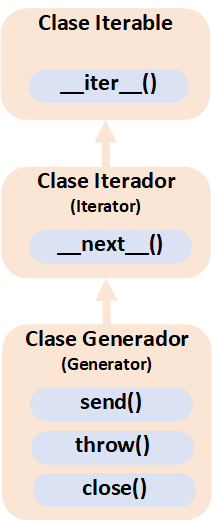
Therefore, for the “Generator” to produce data we have to use it like any other Iterator, with a “for” loop (because as an Iterable it can use “iter()”) to iterate over all its elements or use “next” (because as an Iterator it can use “next()”) to get the elements one by one (“next” after “next”).
So that the “for” loop “pulls” (gets) each piece of data from the Generator and we can use each one in Streaming (note that I’ll use the second “Generator Function” example, called “funcion_generadora_prints”):
generador = funcion_generadora_prints()

for valor_generado in generador:
    print("Valor generado y obtenido desde el generador: {}".format(valor_generado))
If we run it, it prints (pay close attention to the order of the printed messages; it’s not what you’d expect with a “function” that is NOT a “Generator Function”, where the function would run completely before returning the value in the “return”; here that doesn’t happen):
GENERADOR: Se va a generar un PRIMER dato
Valor generado y obtenido desde el generador: valorGenerado1
GENERADOR: Se va a generar un SEGUNDO dato
Valor generado y obtenido desde el generador: valorGenerado2
GENERADOR: Se va a generar un TERCER dato
Valor generado y obtenido desde el generador: valorGenerado3
GENERADOR: Se va a lanzar la excepción StopIteration
In this case, the “for” pulls a piece of data from the “Generator” (which we’ve stored in the variable “valor_generado”), gets it, and prints it to the console (with “print”); and so on, one by one, with all of them. When the Generator finishes, it raises the StopIteration exception, which the “for” loop (acting as the Consumer) catches automatically (you don’t have to do anything with the exception); the “for” loop uses this exception to stop iterating and exit the loop.
How the “for” loop works internally
A quick reminder of how the “for” loop works (this box is a summary you don’t need to understand to follow this article; if you’re more curious, you have the full explanation in the article about creating our own collection in Python by clicking here)
for elemento in iterable:
    # Body of the for loop while no “StopIteration” is detected or break
# Continuation of the code, outside the body of the for loop
The Iterable object (it can be a list, dict, set, generator, etc.) is iterated as an Iterator (“iter”) by the “for” loop, where in each iteration (call to “next”) an element of the iterator is returned to run code inside its body, as long as the “StopIteration” Exception isn’t detected; if this “StopIteration” Exception is detected, the loop will end and the code will continue running after the body of the “for” loop.
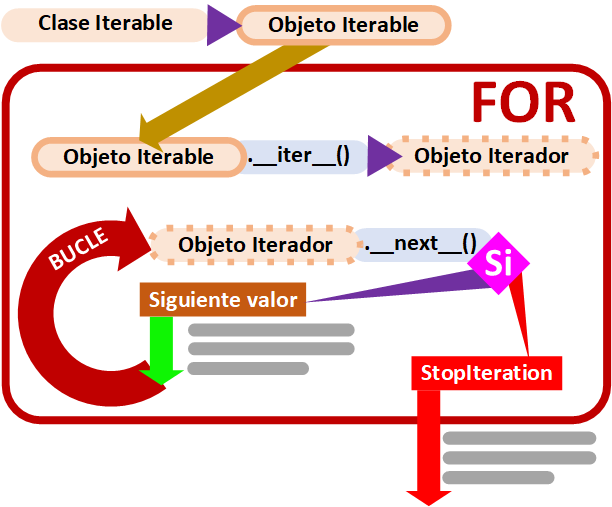
If we want to go through the generated values one by one, we can do it with next(), but here we do need to catch and handle the StopIteration exception.
generador = funcion_generadora_prints()
try:
    primer_valor = next(generador)
    segundo_valor = next(generador)
    tercer_valor = next(generador)

    # Our generator can only generate three values, so calling next a fourth time raises the StopIteration exception
    cuarto_valor = next(generador)
except StopIteration:
    print("El Generador ya ha generado todos los valores posibles")
Which will print:
GENERADOR: Se va a generar un PRIMER dato
Valor generado y obtenido desde el generador: valorGenerado1
GENERADOR: Se va a generar un SEGUNDO dato
Valor generado y obtenido desde el generador: valorGenerado2
GENERADOR: Se va a generar un TERCER dato
Valor generado y obtenido desde el generador: valorGenerado3
GENERADOR: Se va a lanzar la excepción StopIteration
EXCEPCIÓN StopIteration: El Generador ya ha generado todos los valores posibles
Summary of a Generator’s complete life cycle
Since I know it can be a lot of information at first, here is a complete summary of the steps:
- We invoke the “Generator Function” so that it creates the “Generator”.
- Something “pulls the data flow of” (“iterates”) the Generator so that it processes and returns the first piece of data. It can only be iterated in two ways: with a “for” loop or by successive calls to the “next()” method.
- The Generator processes a piece of data and stops at the first “yield” it finds.
- The “yield” returns that processed data.
- The processed data is used outside the body of the “Generator Function”.
- Control is returned to the “Generator Function” so that it continues up to the next “yield”.
- The Generator processes a piece of data and stops at the next “yield” it finds.
- Repeat from step 4 until it finishes all the “yields” it can reach (if there are conditions, some “yield” may not run) inside the body of the “Generator Function” or until it finds a “return”.
- When the end of the “Generator Function” is reached, the special StopIteration exception is raised automatically
- If the Generator was being traversed in a “for” loop, it will end automatically when it catches the StopIteration exception and the code will continue outside the “for”. Or, if the Generator was being traversed by calling the “next()” method several times, you’ll have to handle the exception with a “try … catch StopIteration …”
- The Generator can only be traversed once from start to finish, so it will be destroyed and Python’s “garbage collector” will clean it up.
Sending (send) Information to a Generator While It Is Iterated
Sending information may sound a bit odd if you confuse it with feeding parameters to a “Generator Function”:
mi_lista = [1, 2, 3]
mi_string = "un texto"
mi_booleano = True
Generador = funcion_generadora_parametros(mi_lista, mi_string, mi_booleano)
In addition to these values passed as parameters to the “Generator Function”, you can send information to the Generator while a consumer is iterating it, using the “send()” method.
It’s usually used to send signals (“flags”) to the generator to modify its behavior, or to add intermediate data for it to process before continuing.
Keep in mind that the “send()” method is like “next()”, since when it’s called it immediately jumps to the next “yield”, so it’s advisable to catch the StopIteration exception.
That is, in pseudocode you can do:
generador = funcion_generadora_send()

for valor_generado in generador:
    print("Valor generado: {}".format(valor_generado))
    try:
        valor_generado = generador.send("Información a enviar al generador")
    except StopIteration:
        pass
An example could be a generator that counts infinitely, where we want to change its “step” whenever we feel like it; that is, to be able to send it a new value to add (nuevo_valor_a_sumar). For this we use the Generator’s feedback (variable = yield …) and protect against it being fed back a None:
def funcion_generadora_contador_infinito(valor_a_sumar):
    acumulado = 0
    while True:
        acumulado += valor_a_sumar
        nuevo_valor_a_sumar = yield acumulado

        # It's important to check the value returned by the yield, since if we only pull without calling send it will return None
        if nuevo_valor_a_sumar is not None:
            valor_a_sumar = nuevo_valor_a_sumar
We’ll try it with “next()” to see each step, and whenever we want we’ll change the value to add; in this example it added 1 at a time until we wanted the count to continue but adding 10 at a time:
valor_de_inicio_a_sumar = 1
generador = funcion_generadora_contador_infinito(valor_de_inicio_a_sumar)

valor_generado = next(generador)
print("ANTES   valor generado: {}".format(valor_generado))
valor_generado = next(generador)
print("ANTES   valor generado: {}".format(valor_generado))

# Whenever we want we use send, which will return a value just like next, since the value is sent to the generator and it looks for the next yield
nuevo_valor_a_sumar_y_enviar = 10
valor_generado = generador.send(nuevo_valor_a_sumar_y_enviar)
print("ENVIAR  valor generado: {}".format(valor_generado))

valor_generado = next(generador)
print("DESPUES valor generado: {}".format(valor_generado))
valor_generado = next(generador)
print("DESPUES valor generado: {}".format(valor_generado))
It’s highly recommended to always protect the “next()” calls by catching the StopIteration exception. Here I don’t catch it mainly for clarity, but also because, since it’s an infinite loop (while True), it will never raise the StopIteration exception.
It prints:
ANTES   valor generado: 1
ANTES   valor generado: 2
ENVIAR  valor generado: 12
DESPUES valor generado: 22
DESPUES valor generado: 32
A near-real example for a Lexer and a Parser
- Lexer: produces “units of value” (tokens); that is, for a sentence in Spanish it performs the lexical analysis and returns the “units of value”, which would be each of the words of the sentence separately, recognized according to their type (example of “units of value” in Spanish for the sentence “Juan come pan”: “Juan” is “subject”, “come” is “verb”, “pan” is “subject”)
- Parser: recognizes the structure of the language; that is, for a sentence in Spanish it checks whether the sentences are well formed, i.e. whether a sentence follows the structure “subject + verb + predicate” (for example, for the sentence “come Juan pan” the Parser would indicate that the grammatical structure is incorrect; but for the sentence “Juan come pan” it would indicate that the grammatical structure is correct).
Send is usually used to feed the Lexer from the Parser, since there are some “units of value” that can’t be identified without their context.
In Spanish it’s easy to identify articles (la, los, un, una, etc.) and prepositions by having their complete lists (a, ante, bajo, cabe, con, etc.); but what about the subjects of verbs? They are countless, so it’s almost impossible to have complete lists of subjects and verbs, above all because they can mutate and new ones get added (for example, new words as subjects or verbs: youtuber, encriptar, etc.). From context you can tell whether something is a subject (for example, an article always goes before a subject, so we don’t need the subject in a list: since it comes after the article we already know it’s a subject) or a verb (if a subject has already been written, it’s quite safe to say that what comes after is a verb, as long as neither an article nor a preposition follows).
Seen this way, if we wanted to build a simple Lexer for the Spanish language, we’d create a Generator that receives a text and splits it by spaces. With the sets of prepositions and articles they’re easy to identify, but the subject and the verb aren’t; since we don’t want to put Parser logic here, we use the Generator’s feedback (variable = yield ….) and protect against it not being fed back a None.
def funcion_generadora_lexer(texto):
    articulos = {"el", "los", "la", "las", "un", "unos", "una", "unas"}
    preposiciones = {"a", "ante", "bajo", "cabe",
                     "con", "contra", "de", "desde",
                     "en", "entre", "hacia", "hasta",
                     "para", "por", "según", "sin", "so",
                     "sobre", "tras"}

    sujeto_o_verbo = "sujeto"

    palabras = texto.lower().split(" ")
    for palabra in palabras:
        if palabra in articulos:
            nuevo_sujeto_o_verbo = yield palabra, "artículo"
        elif palabra in preposiciones:
            nuevo_sujeto_o_verbo = yield palabra, "preposición"
        else:
            nuevo_sujeto_o_verbo = yield palabra, sujeto_o_verbo

        if nuevo_sujeto_o_verbo is not None:
            sujeto_o_verbo = nuevo_sujeto_o_verbo
And now the Parser, which I simplify by traversing the Generator:
- If an “article” comes, we know that what can come next is a “subject”
- If a “subject” comes, the next one has to be a “verb”, as long as it’s neither an “article” nor a “preposition” (the Lexer already handles this)
- If a “verb” comes, the next one has to be a “subject”
texto = "Juan come pan de la panadería"

generador = funcion_generadora_lexer(texto)

for palabra, tipo in generador:
    print("La palabra '{}' es de tipo '{}'".format(palabra, tipo))

    try:
        if tipo == "artículo":
            palabra, tipo = generador.send("sujeto")
            print("La palabra '{}' es de tipo '{}'".format(palabra, tipo))

        if tipo == "sujeto":
            palabra, tipo = generador.send("verbo")
            print("La palabra '{}' es de tipo '{}'".format(palabra, tipo))

        if tipo == "verbo":
            palabra, tipo = generador.send("sujeto")
            print("La palabra '{}' es de tipo '{}'".format(palabra, tipo))
    except StopIteration:
        pass
Since “send()” calls the generator’s next yield, I handle whatever it returns right away; and since it may raise StopIteration, I catch it.
If we print the execution to the console:
La palabra 'juan' es de tipo 'sujeto'
La palabra 'come' es de tipo 'verbo'
La palabra 'pan' es de tipo 'sujeto'
La palabra 'de' es de tipo 'preposición'
La palabra 'la' es de tipo 'artículo'
La palabra 'panadería' es de tipo 'sujeto'
Generator Comprehension
A generator can be written in compact form, just like lists, sets and dictionaries.
If you like using Comprehensions, it’s important to know that Generators are delimited with parentheses “(” “)”, which creates confusion with “Tuples”, which are also delimited with parentheses. On the other hand, confusing them with square brackets “[” “]” (which are for lists) or curly braces “{” “}” (which are for dictionaries) could give us unexpected results (such as running out of memory or endless iterations that never let the code continue).
If we want to generate the multiples of 10 up to a very large number:
generador = (num * 10 for num in range(1000000000))We can try it like any other generator:
for numero in generador:
    print(numero)
It will immediately show the output:
0
10
20
30
40
50
60
70
80
90
…
And it will keep showing results for quite a while before finishing.
Warning
Careful with creating unwanted structures
The code above returns data immediately.
However, if we make a mistake and create a list:
listado = [num * 10 for num in range(1000000000)]And we run it:
for numero in listado:
    print(numero)
We’ll notice that the code blocks for quite a while (minutes), and when it finishes creating the list it will start returning results; that is, if we haven’t run out of memory first and the operating system kills our process, leaving us with no results at all after the long wait.
Detecting the Closing (close) of a Generator
You don’t usually need to close a Generator, but if you need to you can do it with the “close()” method.
generador.close()We don’t really have to call “close” ourselves because it’s called automatically by Python’s “garbage collector” (Garbage Collector) when the Generator is not going to be used anymore (because it has been fully traversed or there are no more variables pointing to the Generator).
So, either by finishing traversing the Generator or by removing the pointer from all variables, “close” will be called automatically; that is, it’s enough to call “del” to remove the pointer and let the garbage collector do its job:
del generadorThe “close” method raises a “GeneratorExit” exception inside the Generator (I’ll modify the “Generator Function” we called “funcion_generadora_print”):
def funcion_generadora_print():
    try:
        print("GENERADOR: Se va a generar un PRIMER dato")
        yield "valorGenerado1"

        print("GENERADOR: Se va a generar un SEGUNDO dato")
        yield "valorGenerado2"

        print("GENERADOR: Se va a generar un TERCER dato")
        yield "valorGenerado3"
    except GeneratorExit:
        print("GENERADOR: Se ha capturado la excepción GeneratorExit")
Which we can try with:
generador = funcion_generadora_print()

print(next(generador))
print(next(generador))

print("Cerrando el generador")
del generador  # And Python's garbage collector calls generador.close()
And which prints:
GENERADOR: Se va a generar un PRIMER dato
valorGenerado1
GENERADOR: Se va a generar un SEGUNDO dato
valorGenerado2

Cerrando el generador
GENERADOR: Se ha capturado la excepción GeneratorExit
But it’s not good practice to catch the “GeneratorExit” exception if what we want is to detect the termination of the Generator, since if we had any other error inside the Generator, it would never go through the “GeneratorExit” exception catch (the “except GeneratorExit”) when “close” is called (because the Generator will no longer be available).
If we want to detect the termination of the Generator in all cases, we have to use “finally”:
def funcion_generadora_print():
    try:
        print("GENERADOR: Se va a generar un PRIMER dato")
        yield "valorGenerado1"

        print("GENERADOR: Se va a generar un SEGUNDO dato")
        yield "valorGenerado2"

        print("GENERADOR: Se va a generar un TERCER dato")
        yield "valorGenerado3"
    finally:
        print("GENERADOR: Terminando y limpiando")
If we run it, it will print:
GENERADOR: Se va a generar un PRIMER dato
valorGenerado1
GENERADOR: Se va a generar un SEGUNDO dato
valorGenerado2

Cerrando el generador
GENERADOR: Terminando y limpiando
By the way, if we exhaust the Generator (until it raises StopIteration) it will also be cleaned up automatically (and we won’t even have to delete the Generator by hand with “del”):
generador = funcion_generadora_print()

for elemento in generador:
    print(elemento)
It prints:
GENERADOR: Se va a generar un PRIMER dato
valorGenerado1
GENERADOR: Se va a generar un SEGUNDO dato
valorGenerado2
GENERADOR: Se va a generar un TERCERO dato
valorGenerado3

GENERADOR: Terminando y limpiando
Types of Generators
Generators can be classified as:
- Finite: They return a fixed number of data items; that is, at some point they stop returning data and the program flow continues past the code of the Generator function (for example, a Generator of numbers from 1 to 100000000000). This type of Generator is the one most often confused with lists (list) since it “looks like” one (a list is finite and is used the same way as a Generator).
- Infinite: They return data forever; they never stop returning data, so they don’t end and the program flow stays forever at the same point (although you could force it to end, for example, once it has returned 100 items and I don’t want any more, I force the loop traversing it to end; if the loop is a “for”, you can force it to stop with a “break”). One problem with this type of Generator is that it could stall indefinitely waiting for the next piece of data (for example, a thread that queries a server on the Internet every five seconds without interruption and returns the queried data through a Generator; this is infinite, but if the server hangs for whatever reason, the Generator hangs too, and the program will be left waiting for the Generator’s data).
- Undefined: Whether the Generator is finite or infinite will depend completely on the input parameters to the “Generator Function” (once it’s “determined”, its “undefinedness” will resolve to one of the above: finite or infinite). There are two kinds:
- By Direct definition: It is passed some parameter (int, str, bool, etc.) that defines the type of Generator that will be created (finite or infinite). For example, we could have a “Generator Function” that returned words, with a boolean parameter such that if it’s true it returns words from a dictionary from A to Z one by one until they run out (finite Generator); and if the parameter is false it returns random dictionary words forever (infinite).
- By Indirect definition (or Intermediate): They take the data flow (possibly data coming from another Generator, or from a continuous data source such as a real-time or “endless” Internet query), process it and return it, until the input flow runs out (finite) or not (infinite); and in turn the output flow could be used by another “Generator Function” and therefore by another Generator (in my opinion this type of Generator is the most interesting and the one that will help you most with processing data in flow/Streaming, especially useful at a professional level for processing large amounts of data instantly and in real time). This type of Generator is also very useful for getting data processed in another thread/process.
Types of Data Structures
In Python (and other languages) you can distinguish three types of data structures:
- Main memory (RAM): Lists (List), Dictionaries (Dict) or Sets (Set). The good thing about these structures is that they are very fast, but they have the drawback of using main memory, which is scarce (much less than secondary memory; a computer can currently have a “few” Gigabytes) and expensive. For example, a very large list could be bigger than main memory, which would push the operating system to kill the process that is overusing main memory the most, and that could be our Python process. Does anything that big really exist? Big Data: try working with several Terabytes of data in main memory (for example, ten years of weather data); it doesn’t fit.
- Secondary memory (Hard disk): Files (File) or Databases (SQLite). You usually have a lot of secondary memory (a computer can currently have several hard disks of several Terabytes each) since it’s very “cheap”, but it is extremely slow. For example, we could look for a piece of data in a tremendously large file (so main memory would be empty for this operation), but it might take forever (we’re talking about minutes to complete a search if the file is very big, and if many searches are needed, we’d be looking at hours or days).
- Processing (barely consumes RAM, but does consume a lot of processor): Generator (Generator). Since it obtains each piece of data at the moment it needs to be processed, it barely consumes main memory. What would consume memory is the processed data, which has to be left somewhere (hard disk or RAM). One advantage is being able to use each piece of data as it’s returned processed and discard it immediately to free memory; for example, it could be sent over the Internet once processed and so we get rid of it, or it’s printed to the screen (shown in the console) and we no longer need it (we free the memory); we may have to store it in a file so it wouldn’t consume main memory (although that would be slow, but there’s the trick of having another thread/process consume the processed data and be the one in charge of saving it to a file). The main drawback of the Generator is that the data doesn’t exist until it’s requested (that’s why you can’t use len(): you don’t know how many items a Generator will generate until it has processed all the data, if it’s a finite generator).
As you can see, each data structure has its advantages, but none escapes its drawbacks. For these reasons you have to understand them well, to get the most out of them and combine them wisely to get the maximum benefit from the available resources (please, don’t consume RAM until it blows up; let’s be generous with other processes that aren’t ours and also need it, or the operating system won’t hesitate to pull out the machete and kill processes that consume a lot 😉 ).
Order of importance of data structures
The “Generator” data structure is the most important one (the others are important too, but if I have to name a clear winner it’s this one, and you’ll soon understand why), and the one that’s most worth understanding so you can use it from now on. Remember, the rest of the data structures are also important, but the “Generator” is special: first, because it’s the most abstract and therefore slightly more complex (although once understood it’s simple and it’s very clear when to use it), and second, because some behaviors can’t be inferred from other structures (for example, you can’t get the number of its elements with “len()”, since in a finite Generator you won’t know how many elements it will generate until it’s been fully traversed, and if the Generator is infinite it makes no sense).
For these reasons, if we had to choose a data structure for processing data both in real time and so that the computer doesn’t run out of resources because of our process (it consumes the minimum, and only when it has to), we’d have the following order of preference (I explain in each point the reasons why we’d have to choose the next data structure, since all of them are important, but some shouldn’t be chosen before others):
- Generator: The data will be there at the moment it’s needed, consuming minimal RAM. We should choose this structure over the rest, unless we can’t (see the following points and reasons).
- Dictionary: If we can’t generate the data because we already have it (we don’t need to generate it; it’s already pre-processed or cached), then a dictionary is an ideal structure for immediate lookups. And what if I want to traverse the dictionary’s elements in insertion order, do I have to use a list? Better: we can use OrderedDict, or in Python 3 insertion order is already guaranteed in dict, so using a dictionary in a “for” loop already traverses it in insertion order.
- Set: If we don’t have a key pointing to a value and we don’t need insertion order, the set should be the next option to consider.
- List: The truth is there are few excuses to use lists (a few years ago there was no other choice, but today we have better, highly optimized data structures if you know how to use them). One of the main reasons to use lists may be to sort values, since we must have all the values in memory to sort them; because processing the data with another data structure is less efficient than with a list; or to traverse the data returned by a Generator several times (in case the Generator’s processing is heavy or one-time only, such as not being able to make more queries to a server because of the large data load it would involve).
- File (or database): If we have so much data that we have to store it in files in order to work with it (because RAM doesn’t have that much capacity); for example, to sort Terabytes of data. Or if we want to save the state of the process. Although I’ve put the file last, many times it needs to be used above any other data structure for the reasons stated before, but since it’s such a slow structure it shouldn’t be used unless there’s no other option.
Note about this order and its reasons: it’s an opinion based on professional experience handling large data structures.
As a complete example of using the different data structures, here is the free code of the Python package sorted-in-disk, by clicking here, which can be installed with PIP from: sorted-in-disk: Sort a bulk of data in disk and parallel (PyPI)
Generator vs Iterator vs Iterable
It’s easy to confuse these three words, but their definitions are very different.
Remember that Iterators are all the data structures that can be traversed in a “for” loop: dict, set, list, generator.
An Iterator (__next__) is an Iterable (__iter__); that is, the Iterator class inherits from Iterable. We saw the full explanation of “Iterator vs Iterable” in detail in the article about creating our own collection in Python, by clicking here.
A Generator (yield) is an Iterator (the Generator class inherits from Iterator), since on a Generator you can use “next()” and “iter()” to get each of its elements. And as soon as the reserved word “yield” is used, a Generator is being created. That is, “yield” can only be used by Generators.
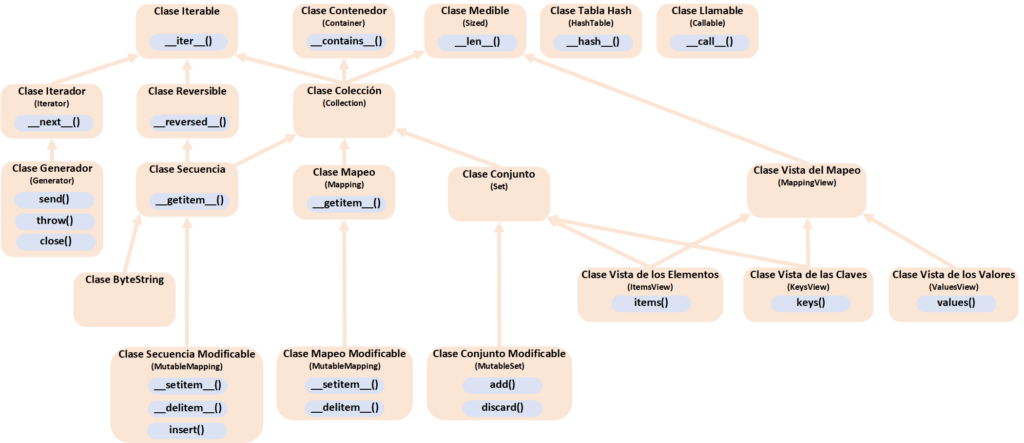
All the Classes for Data Structures in Python
After a few articles dedicated to the world of Python about how to create our own data structures and how to use them, here’s a gift: the complete class diagram (We explain step by step how to specialize your own classes in this dedicated article):
References
- PEP 342 – Coroutines via Enhanced Generators (Python PEPs)
- PEP 380 – Syntax for Delegating to a Subgenerator (Python PEPs)
- PEP 289 – Generator Expressions (peps.python.org)
- What's New In Python 3.3 (Python docs)
- What's New In Python 3.6 (Python docs)
- Functional Programming HOWTO (Python docs)
- java.util.stream (Java Platform SE 8)
- PEP 479 – Change StopIteration handling inside generators (Python PEPs)
- PEP 255 – Simple Generators (peps.python.org)
- 3. Data model (Python docs)
- Built-in Types (Python docs)
- Built-in Functions (Python docs)
- 8. Compound statements (Python docs)
- 6. Expressions (Python docs)
- Iterables vs. Iterators vs. Generators (nvie.com)
- 7 PEP 342: New Generator Features (Python 2.5 What's New)
- Cleaning Up in a Python Generator Can Be Dangerous (Amir Rachum)
- What's New In Python 3.3 (Python docs)
“Generators in Python – The Foundation of Streaming” by Ramón Invarato at jarroba.com, licensed under Creative Commons Attribution-NonCommercial-ShareAlike 3.0. Registered at Safe Creative.

You may also like
Streaming Tricks: Generators, Buffers, and Caches
Learn how to build a data stream by balancing memory use and processing time: buffer data for a steady flow, generate data on demand, and cache results.

Advanced Dockerfile: Multi-Stage Builds, Registries, and Tricks
Free Docker course. Expert Docker tricks: multi-stage builds, optimizing images, faster build times, and distributing images through Docker registries.
Leave a comment