
AJAX with JSP and Servlets
Learn how to add AJAX to JSP and Servlets with a simple example: update a table without reloading the page. Full code and project available to download.
You can download the code and the project for this post by clicking HERE.
In this post we are going to show a simple example of how to include AJAX (Asynchronous JavaScript And XML) in JSP and Servlets. AJAX will let us reload content in a "fragment" (in a "<div>") of the web page without having to reload the whole page, which allows us to build a friendlier website that is more comfortable for the user.
This example is meant to show how AJAX works, so, in order not to "clutter" the example code, we are not going to program checks to validate the form content or any other verifications. We are just doing it so you can see the flow of the program and how Servlets work here. After that, it is up to you to program the logic of your own website.
The example we are going to build consists of filling in a simple form with first name, last name and age, and when you click the "Add" button, that data will be added to a table asynchronously, without the page being reloaded, as shown below:
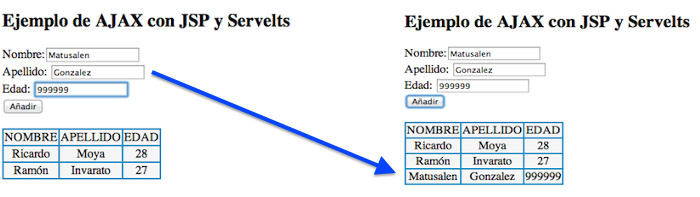
The "index.jsp" file is the following:
<%@ page language="java" contentType="text/html; charset=UTF-8"
	pageEncoding="ISO-8859-1"%>
<!DOCTYPE html PUBLIC "-//W3C//DTD HTML 4.01 Transitional//EN" "http://www.w3.org/TR/html4/loose.dtd">
<html>
<head>
<meta http-equiv="Content-Type" content="text/html; charset=ISO-8859-1">
<title>AJAX JSP Servelts</title>
<script src="http://code.jquery.com/jquery-latest.js">

</script>
<script>
	$(document).ready(function() {
		$('#submit').click(function(event) {
			var nombreVar = $('#nombre').val();
			var apellidoVar = $('#apellido').val();
			var edadVar = $('#edad').val();
			// If we want to use get instead of post, we change $.post to $.get
			$.post('ActionServlet', {
				nombre : nombreVar,
				apellido: apellidoVar,
				edad: edadVar
			}, function(responseText) {
				$('#tabla').html(responseText);
			});
		});
	});
</script>
</head>
<body>
	<h2>Ejemplo de AJAX con JSP y Servelts</h2>
	<form id="form1">
		Nombre:<input type="text" id="nombre" /> <br>
		Apellido: <input type="text" id="apellido" /> <br>
		Edad: <input type="text" id="edad" /> <br>
		<input type="button" id="submit" value="Añadir" />
	</form>
	<br>
	<!-- 	In this div we put the table content using AJAX -->
	<div id="tabla"></div>
</body>
</html>
The content of the servlet, called "ActionServlet.java", is the following:
package ajaxdemo;

import java.io.IOException;
import java.io.PrintWriter;
import java.util.ArrayList;

import javax.servlet.ServletException;
import javax.servlet.http.HttpServlet;
import javax.servlet.http.HttpServletRequest;
import javax.servlet.http.HttpServletResponse;

public class ActionServlet extends HttpServlet {

	private static final long serialVersionUID = 1L;
	private ArrayList<Persona> personas = new ArrayList<>();

	protected void doGet(HttpServletRequest request, HttpServletResponse response) throws ServletException, IOException {
		// If we want to do it through a get, we have to put the post code in this method
	}

	protected void doPost(HttpServletRequest request, HttpServletResponse response) throws ServletException, IOException {

		response.setContentType( "text/html; charset=iso-8859-1" );
		PrintWriter out = response.getWriter();

		// Get the data from the request
		String nombre = request.getParameter("nombre");
		String apellido = request.getParameter("apellido");
		String edad = request.getParameter("edad");

		// Check that the form fields have data to add to the table
		if (!nombre.equals("") && !apellido.equals("") && !edad.equals("")) {
			// Create the persona object and add it to the arrayList
			Persona persona = new Persona(nombre, apellido, edad);
			personas.add(persona);
		}

		out.println("<table style= cellspacing="1" bgcolor="#0099cc">");
		out.println("<tr>");
		out.println("<td style= rowspan="7" align="center" bgcolor="#f8f8f8"> NOMBRE </td>");
		out.println("<td style= rowspan="7" align="center" bgcolor="#f8f8f8">APELLIDO</td>");
		out.println("<td style= rowspan="7" align="center" bgcolor="#f8f8f8">EDAD</td>");
		out.println("</tr>");
		for(int i=0; i<personas.size(); i++){
			Persona persona = personas.get(i);
			out.println("<tr>");
			out.println("<td style= rowspan="7" align="center" bgcolor="#f8f8f8">"+persona.getNombre()+"</td>");
			out.println("<td style= rowspan="7" align="center" bgcolor="#f8f8f8">"+persona.getApellido()+"</td>");
			out.println("<td style= rowspan="7" align="center" bgcolor="#f8f8f8">"+persona.getEdad()+"</td>");
			out.println("</tr>");
		}
		out.println("</table>");

	}
}
The persona class is the following:
package ajaxdemo;

public class Persona {

	private String nombre;
	private String apellido;
	private String edad;

	public Persona(){
	}

	public Persona(String nombre, String apellido, String edad) {
		super();
		this.nombre = nombre;
		this.apellido = apellido;
		this.edad = edad;
	}

	public String getNombre() {
		return nombre;
	}
	public void setNombre(String nombre) {
		this.nombre = nombre;
	}
	public String getApellido() {
		return apellido;
	}
	public void setApellido(String apellido) {
		this.apellido = apellido;
	}
	public String getEdad() {
		return edad;
	}
	public void setEdad(String edad) {
		this.edad = edad;
	}

}
The "web.xml" content is the following:
<?xml version="1.0" encoding="UTF-8"?>
<web-app xmlns:xsi="http://www.w3.org/2001/XMLSchema-instance"
	xmlns="http://java.sun.com/xml/ns/javaee"
	xsi:schemaLocation="http://java.sun.com/xml/ns/javaee http://java.sun.com/xml/ns/javaee/web-app_3_0.xsd"
	id="WebApp_ID" version="3.0">

	<display-name>Ejemplo con AJAX</display-name>
	<servlet>
		<servlet-name>ActionServlet</servlet-name>
		<servlet-class>ajaxdemo.ActionServlet</servlet-class>
	</servlet>
	<servlet-mapping>
		<servlet-name>ActionServlet</servlet-name>
		<url-pattern>/</url-pattern>
	</servlet-mapping>
</web-app>
At this point, all that is left is to run the example. To do that, you need to have Tomcat installed and run the project on Tomcat. If you have any doubts about how to do it, here are two links to the tutorials on how to install Tomcat and how to set up Eclipse to work with Servlets:
“AJAX with JSP and Servlets” by Ricardo Moya at jarroba.com, licensed under Creative Commons Attribution-NonCommercial-ShareAlike 3.0. Registered at Safe Creative.

You may also like
LAMP Step by Step on Your Own Server
Learn step by step how to build a dynamic website with the full LAMP architecture: Linux, Apache, MySQL or MariaDB, and PHP, Perl or Python.

Using Servers and Building a Website
Learn what you can do with a physical server: install Apache, build your first website, edit it with Vim or an IDE, upload files over SFTP and pick a domain.