
Android Context
Learn what Android's Context is, the types that exist, how to get it, and how to avoid memory leaks, explained with a simple example and code.
At Jarroba we wanted to gather and explain in as much detail as possible the Context of Android, because Context is a fundamental part of developing Android applications (before you continue, you may want to understand some basic concepts, like Activity in this article or Intent in this other one). If you are an Android developer, you have surely noticed that understanding it is essential, but the information on the subject is scarce because the documentation is brief, or because things are taken for granted without being explained well enough. You may have a rough idea of what Context is. That is why we wanted to dedicate an article to this fascinating part of Android. So, if we go to the official documentation we can read:
Interface to global information about an application environment. This is an abstract class whose implementation is provided by the Android system. It allows access to application-specific resources and classes, as well as up-calls for application-level operations such as launching activities, broadcasting and receiving intents, etc.
(Original at http://developer.android.com/reference/android/content/Context.htm, translation by www.Jarroba.com)
Before explaining this official idea in detail (I recommend coming back to it as a summary once you have the ideas clear), it has surely happened to you what happens to many Android developers. That is, we just accept the Context thing and apply it every time we are asked for it without really knowing why, what it is really for, how many Contexts there are, or where it comes from. As a rule we know that the context is this, which is the object itself:
Context contexto = this;But if it is the object, how can it also be a context? Do all objects have a context? We will answer these questions below.
If I told you that Android’s Context is just that, a context, you might be left none the wiser. And if the idea of the word “context” isn’t very clear either, and I tell you that it fits perfectly its second meaning in the RAE dictionary (definition of contexto in the RAE):
2. m. Physical or situational environment, whether political, historical, cultural or of any other kind, in which a fact is considered.
You might even call me crazy 😛 And although I can’t prove whether I’m crazy or not, what I’m telling you is not crazy at all, and I’m going to make it clear.
About Context
To understand it we have to go back to the distant past, a few centuries ago, specifically to 1492 (this doesn’t prove I’m crazy, it’s just an example 🙂 ). The year 1492 encompassed everything at that time: houses, ships, people, culture, books, etc. If we extrapolate it to Android apps, we could say that 1492 is our application (the one that encompasses everything) and that the ships, the people and the houses are the Activities. Everything has its own context and sits inside another one. We can talk about the historical context of 1492 (watch out for the word context); so, if I asked the context of 1492 to give me a ship, it wouldn’t give me a nuclear-powered aircraft carrier, it would probably give me a caravel, a nao, or some other ship of the time. I chose the year 1492 because it seemed very global, being the year Columbus discovered America; and because it is something historical, which is where the word context is heard the most, more specifically “historical context”. As I mentioned before, everything has its own context, for example a ship has its own context, which will be different from the context of another ship, and very different from that of a book, but both are inside the same context of the year 1492 .
Let’s make the example a bit more concrete. We have created an application that we have called 1492 (in the following image you will see that we have put 1492.apk; apk is the extension of all Android applications). So far we have only had time to create 4 Activities. 3 Activities will be the ships that Christopher Columbus used for his voyage, which were: La Niña, La Pinta and La Santa María. And we add one last Activity that we have called “Cortes”.
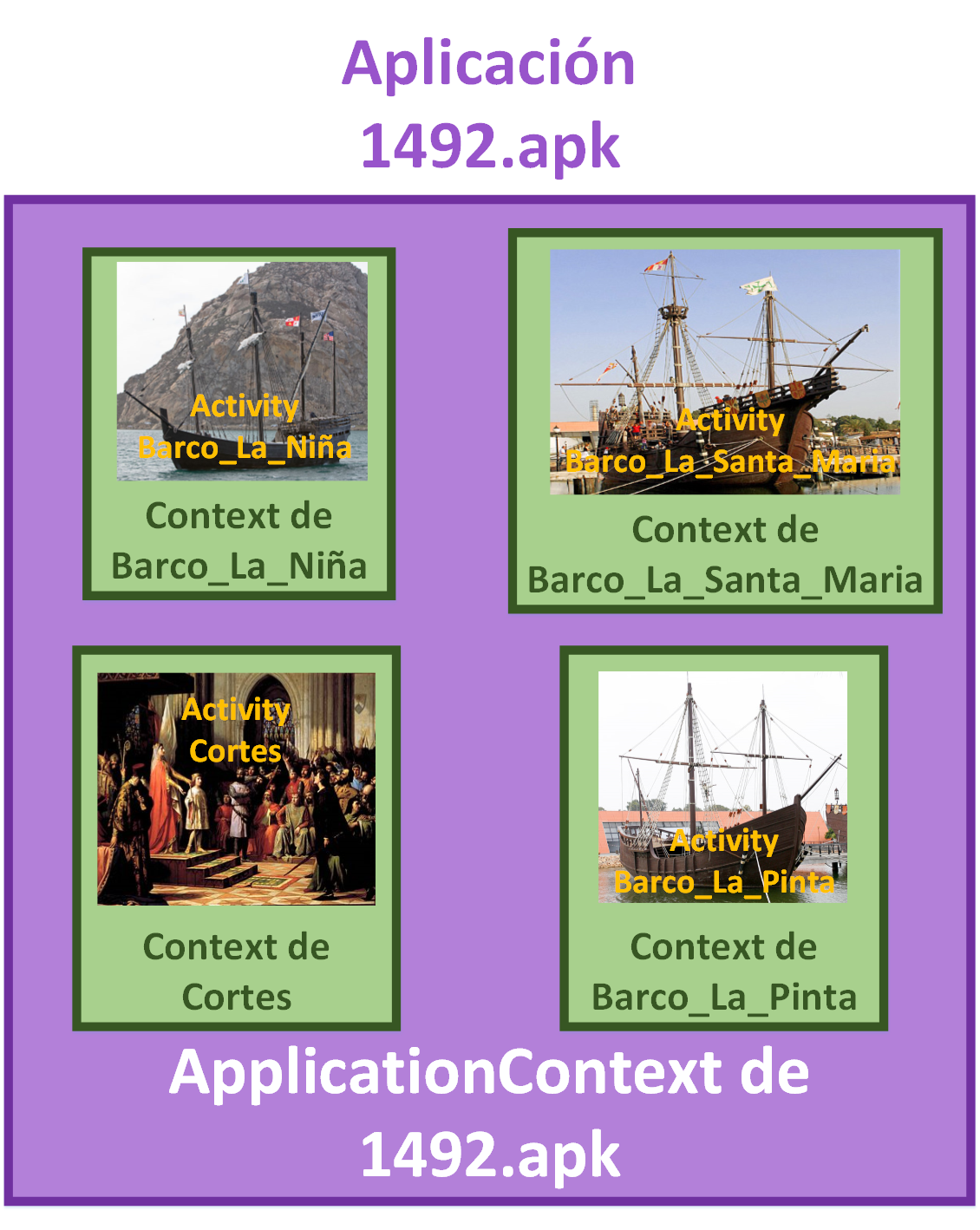
If, while in the La_Pinta Activity for example, we ask it to show us the famous paintings (imagine that what we call a “famous painting” here is an Android drawable resource, that is, an image) that are in its context, it will give us paintings from that period whether or not they are inside the ship (in Android these would be all the images in the res folder). But we can buy some painting and hang it in the captain’s cabin (for Android, “buying” would be equivalent to getting the image with getResources().getDrawable(), and “hanging it in the cabin” would be, for example, the method of a View: setBackground() ), so the painting would indeed be inside the ship even though others exist in its context.
To see this example in code, we will have the following folder structure (we will only use the class that extends Activity called “Barco_La_Pinta.java”; the rest are there to illustrate the 1492 world of the example):
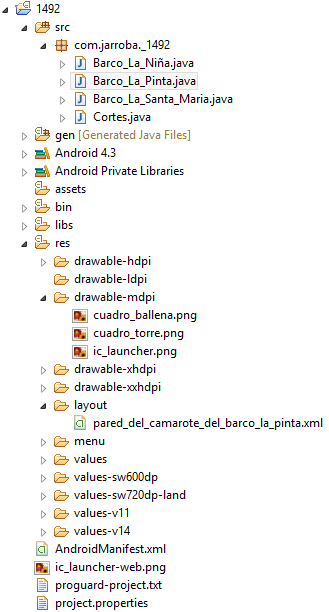
We have a layout that we have called “pared_del_camarote_del_barco_la_pinta.xml”, which contains an ImageView (the spot on the wall where the painting hangs) in the following code:
<RelativeLayout xmlns:android="http://schemas.android.com/apk/res/android"
xmlns:tools="http://schemas.android.com/tools"
android:layout_width="match_parent"
android:layout_height="match_parent"
android:paddingBottom="@dimen/activity_vertical_margin"
android:paddingLeft="@dimen/activity_horizontal_margin"
android:paddingRight="@dimen/activity_horizontal_margin"
android:paddingTop="@dimen/activity_vertical_margin"
tools:context=".Barco_La_Pinta" >

	<ImageView
	android:id="@+id/imageView_Barco_La_Pinta_lugarParaCuadro"
	android:layout_width="wrap_content"
	android:layout_height="wrap_content"
	android:layout_alignParentTop="true"
	android:layout_centerHorizontal="true"
	android:layout_marginTop="188dp"
	android:src="@drawable/ic_launcher" />

</RelativeLayout>
And the Java code of “Barco_La_Pinta.java” is:
public class Barco_La_Pinta extends Activity {

	@Override
	protected void onCreate(Bundle savedInstanceState) {
		super.onCreate(savedInstanceState);
		setContentView(R.layout.pared_del_camarote_del_barco_la_pinta);

		ImageView iv = (ImageView) findViewById(R.id.imageView_Barco_La_Pinta_lugarParaCuadro);

		Context contexto = this;

		Drawable cuadroElegido = contexto.getResources().getDrawable(R.drawable.cuadro_torre);

		iv.setBackground(cuadroElegido); //Note: If you use an API level lower than 16, use setBackgroundDrawable()
	}

}
In Android, when the official documentation refers to an “interface to global information about an application environment”, it means that it gives us developers access to methods that make our lives easier; like launching new Activities with startActivity() (you don’t code every single line needed to launch an activity, do you? You just call this method and that’s it). Or getting resources from the res folder (such as images, colors, texts, etc.) with getResources() or Strings with getString(), getting locally stored data with getSharedPreferences(), among many others.
Back to the example: but if I ask the context of 1492 for the famous paintings, wouldn’t it return the same ones? Yes, the same ones. But that is not what makes contexts different, there are things in common.
I can ask the context of any ship: how rough is the sea? and it will answer, but I will never be able to ask that question to the “court” one, it’s not at sea! (In Android, the context of an Activity, which I can ask about its associated Layout, is not the same as that of a Service, which I can’t ask about a Layout because it doesn’t have one).
So, in Android we find the following three different types of contexts:
- Application (logically, since it covers the whole life cycle of the application from when we launch it until it dies, each application has a single application context; moreover, this context encompasses all the others): It creates a Singleton instance that is created when the application process starts. It can be accessed from an Activity or a Service with getApplication(), or from anything that inherits from Context with getApplicationContext().
- Activity or Service: They inherit from ContextWrapper, which in turn inherits from Context. ContextWrapper takes over all the calls and sends them to a hidden Context instance (known as the “Base Context”)
The following fundamental Android components do not inherit from Context, but they need it, so the system passes it to them in some way:
- BroadcastReceiver: But it is given a Context in onReceive() each time a new event broadcast by the system arrives.
- ContentProvider: It can access the Context with getContext() and it will return the Context of the application that is running it (it can be the same application or a different one).
In the example, if a ship is destroyed, its context dies with it. Likewise, in Android the Context is tied to the life cycle of the element it covers, from the moment it is running until it ends.
To be a bit more technical: Context is an abstract class implemented by Android. The elements that have a Context inherit from the Context class. So, answering the questions from the beginning, not all objects have a Context, and the object is not the Context itself; it depends on whether they inherit from Context or not.
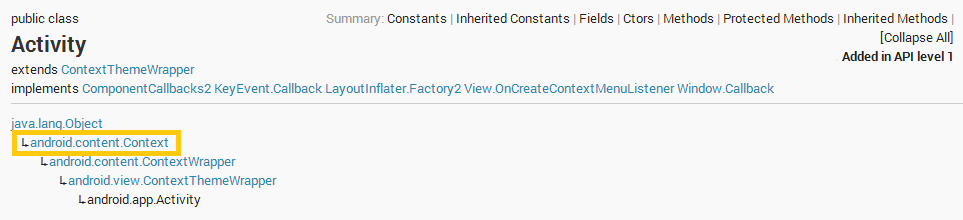
Note about inheritance: If you don’t quite understand the documentation, I recommend you take a look at the different documentation pages (to make it easier, we have put the links to the documentation in each of the elements above). For example, the Activity documentation (see the official Activity documentation). We can see in the header how it indeed inherits from Context:
When Context is usually required
Context is normally required:
- When accessing resources such as images, Strings, etc.
contexto.getResources().getDrawable(R.drawable.imagen_en_los_recursos);- When creating new Views, Listeners, Adapters, Intents, etc. For example:
TextView miTexto = new TextView(contexto);

Intent intento = new Intent(contexto, claseActivityArrancar.class);- When directly accessing components such as ActionBar, Intents, etc.
contexto.getIntent();
Getting the Context
We have explained how to get the Context depending on its type. Here is a list of the different ways to get the Context with complete examples:
- A class that inherits from Context (such as from an Activity or Service): this
public class ObtenerContexto extends Activity  {

	@Override
	protected void onCreate(Bundle savedInstanceState) {
		super.onCreate(savedInstanceState);
		Context contexto = this;
	}

}- A class that inherits from Context, from an anonymous class: ClaseActivity.this
public class ObtenerContexto extends Activity  {

	@Override
	protected void onCreate(Bundle savedInstanceState) {
		super.onCreate(savedInstanceState);

		Button boton = (Button) findViewById(R.id.button_obtenerContext_boton);
		boton.setOnClickListener(new OnClickListener() {
			@Override
			public void onClick(View v) {
				Context contexto = ObtenerContexto.this;
			}

		});

}

}- A class that does NOT inherit from Context (such as View): mi_view.getContext()
public class ObtenerContexto extends Activity  {

	@Override
	protected void onCreate(Bundle savedInstanceState) {
		super.onCreate(savedInstanceState);

		Button boton = (Button) findViewById(R.id.button_obtenerContext_boton);

		Context contexto = boton.getContext();
	}

}- The application (from any class that inherits from Context): getApplicationContext()
public class ObtenerContexto extends Activity  {

	@Override
	protected void onCreate(Bundle savedInstanceState) {
		super.onCreate(savedInstanceState);

		Context contexto = getApplicationContext();
	}

}- Another Context (from a class that inherits from ContextWrapper, such as Activity): getBaseContext()
public class ObtenerContexto extends Activity  {

	@Override
	protected void onCreate(Bundle savedInstanceState) {
		super.onCreate(savedInstanceState);

		Context contexto = getBaseContext();
	}

}- The Activity of the Fragment that contains it (from a Fragment): getActivity()
public class obtenerContextoFragment extends Fragment {

	@Override
	public void onAttach (Activity activity) {
		super.onAttach(activity);

		Context contexto = getActivity();
	}

}
Avoiding problems with Context
Now all that’s left is to avoid the memory leaks that Context can cause us. The first thing to review is that a Context lives as long as the element it belongs to, so it depends on the life cycle. Thus, the Context of an Activity will live as long as the Activity does, and the application’s Context lives until the application is completely finished (until it dies, not until it is paused).
Although it sounds a bit contradictory, as a rule you should always use the smallest Context, which is usually that of the element it belongs to; but in most cases that causes memory leaks, so using the application’s Context is highly recommended. This happens because of the double reference problem: one object points to another object and the Garbage Collector (Java’s garbage collector, for automatic memory release) cannot remove those objects, which means that memory can’t be freed even though nothing else points to those objects except each other.
Let’s imagine we want to store a background image in a static variable so we don’t have to keep accessing memory every time we rotate the device (a quick reminder: when the device is rotated the activity is destroyed and created again; if the variable is static it will always be in memory even if the activity is destroyed), and with this the code would run much faster:
public class miActivity extends Activity  {

	private static Drawable sFondoDelTexto;

	@Override
	protected void onCreate(Bundle savedInstanceState) {
		super.onCreate(savedInstanceState);

		Context contexto = this;

		TextView label = new TextView(contexto);
		label.setText("Texto con fondo");

		if (sFondoDelTexto == null) {
			sFondoDelTexto = getDrawable(R.drawable.mi_imagen);
		}

		label.setBackgroundDrawable(sFondoDelTexto);

		setContentView(label);
	}

}
The problem is that we set the Context as this for the TextView, and we assign to the TextView an image that won’t be destroyed when the device rotates. Since this image points to the TextView object, and the image won’t be destroyed, the TextView won’t be destroyed, so the Context won’t be destroyed, and therefore the Activity tied to the Context won’t be destroyed. Here we have the memory problem, because when it is created again, the image will point to another Context of another newly created Activity; and so on with every rotation of the phone, until we run out of memory and get an error.
To solve this case, the best thing is to use the application context (using Context.getApplicationContext() or Activity.getApplication() ) since it isn’t tied to the life cycle of the Activity, so when the Activity’s Context is destroyed it will be free once it has to be destroyed and it can be collected:
public class miActivity extends Activity  {

	private static Drawable sFondoDelTexto;

	@Override
	protected void onCreate(Bundle savedInstanceState) {
		super.onCreate(savedInstanceState);

		Context contexto = getApplicationContext();

		TextView label = new TextView(contexto);
		label.setText("Texto con fondo");

		if (sFondoDelTexto == null) {
			sFondoDelTexto = getDrawable(R.drawable.mi_imagen);
		}

		label.setBackgroundDrawable(sFondoDelTexto);

		setContentView(label);
	}

}
You also have to be careful when creating a Singleton class that stores our Context (at Jarroba we don’t recommend storing a Context either in a Singleton or in static variables; the Context should always be passed in so you don’t lose control of it). If the Activity is destroyed it will never be removed from memory, since, as in the previous example, there will be a double reference that doesn’t allow the Garbage Collector to free that memory, so the Activity will keep taking up all its memory despite being destroyed:
public class miSingleton {

	private static miSingleton sInstancia;

	private Context mContexto;

	public static miSingleton getInstance(Context contexto) {
		if (sInstancia == null) {
			sInstancia = new miSingleton(contexto);
		}

		return sInstancia;
	}

	private miSingleton(Context contexto) {
		mContexto = contexto;
	}

}
To fix this, you can use the application’s Context again (although remember that the application’s Context is itself stored in a Singleton class, so do we really need to store it this way, or is just getting it enough?):
public class miSingleton {

	private static miSingleton sInstance;

	private Context mContexto;

	public static miSingleton getInstance(Context contexto) {
		if (sInstance == null) {
			sInstancia = new miSingleton(contexto.getApplicationContext());
		}

		return sInstancia;
	}

	private miSingleton(Context contexto) {
		mContexto = contexto;
	}

}
We wrap up with a summary of Context: it is used to abstract away many things that the operating system does for us, making the developer’s job much simpler, as long as we understand Context and its implications.
We hope the article has helped clear up many concepts. It hasn’t been an easy article because of the scarce information that exists on the subject. For this reason we will update it over time, to make it even clearer, both thanks to the feedback you give us and to new developments in the Android world.
If you want to see some more examples where Context is used, you can check out the list article or the fragments article.
References:
- Doubleencore: http://www.doubleencore.com/2013/06/context/
- Android Developer: Context (API reference, Android Developers)
- Android Deveolper Blog: Avoiding memory leaks (Android Developers Blog)
“Android Context” by Ramón Invarato at jarroba.com, licensed under Creative Commons Attribution-NonCommercial-ShareAlike 3.0. Registered at Safe Creative.

You may also like


Activity – Understanding and Using an Android Activity
Learn what an Android Activity really is, how its lifecycle works, and how to create and launch activities with a full working example, step by step.

How to Use Multiple GitHub Accounts over HTTPS
Learn how to use several GitHub accounts over HTTPS: configure git so each repository gets its own credentials in your keychain and avoid 403 errors.
Leave a comment