
ETL: Extract, Transform, and Load
ETL is used for massive, real-time data processing (Big Data): Extract data from different sources, Transform it into a useful structure, and Load it where you can use it.
ETL is used for massive data processing (Big Data), in real time (or as close to it as possible), and it boils down to:
- Extract: get the data from different sources.
- Transform: normalize all the data into a structure that is useful to us.
- Load: put the data somewhere we can use it from.

It looks simple, but to understand the complexity of each part (the “E”, the “T” and the “L”) we could use the popular saying: <<The devil is in the details>> What really makes each part require very professional experience are the numerous details you have to understand and the many conflicts you have to resolve: such as making quick decisions or settling conflicts (some conflicts are quite paradoxical, since they are neither so quick nor so obvious); the latter will require almost clairvoyant decisions and knowing in advance much more than is really needed, which only good experience can get right more often, reducing the future changes that we will most likely have to make as the decisions we took earlier turn into reality, because it is with reality that we start running into the problems.
We will see quite a few of them and their solutions, since they are so numerous and changing that many times the only way to learn them is to face them. So working with ETL is a laborious process of constant research and negotiation between parties.
Extract: Extraction or Collection
Who?: The owner of the data
First, you have to know who we are going to extract or collect the data from.
It is not the same to extract them from my home computer, where I am probably the one with full control over the data (for example, if I have Excel files, Word files and notepad files, or if we are more of a tinkerer and set up an Arduino or Raspberry with sensors that collect information); as having knowledge of the data or free-for-all access to the data (such as the data generated by the operating system of my laptop or my phone); and I will have even more freedom if the data is created by me (that is, made up by me). In any case, if the data involves or belongs to a third party, even if it is mine, what we do with it will be our responsibility, as well as knowing the license or the legality that protects it.
Then there are public websites, such as a web page or a data repository (like Kaggle), from which we can obtain data, although limited and under a license we must respect.
On the other hand, if we extract data from an organization or a company, whether because we work for it or it is our client, we will have to pass strict security controls to extract it, learn its policies and, most importantly, learn the current laws on information handling depending on the region that applies (since nowadays European, American and Chinese laws are not the same). Even more so when the company handles sensitive data such as a bank or a hospital, so we must be very careful with the data.
One of the main paradoxical problems can arise here when dealing with client data. The client wants you to process their information, but to protect their data they don’t want to give you their information <<They want to, but they don’t>> And I understand both opposing positions, but I have to resolve this dilemma, because it’s my job. How do we resolve it? Usually by explaining to the client why we need the information, which is the next point.
Reminder note about data: Data has copyright, is subject to territorial laws and to data protection.
Why?: The reason we need the information
We must have a good reason to access someone’s information.
If we work at a company, the least effective reason is <<my boss asked me to>> It might work, but we need something more. If we ask the person in charge of the database we want to extract the information from, they will ask us: and what are you going to use it for? The boss having asked for it is not reason enough, because that person’s job is precisely to keep control of the company’s very valuable data, to safeguard it and make it hard to hand over, precisely so it isn’t given to just anyone (company data theft and leaks must be avoided; if anyone could easily reach the source of the data, it would be easy for someone with bad intentions, like a data thief). We will need to have our reasons well defined to explain what we are going to use the data for; then we shouldn’t have problems accessing it, otherwise we would have to escalate it to the person in charge so they give us permission or a way to reach the data we need.
Where?: The data source to extract from
A data source can come from a single machine or be distributed across several. In either case, we will have to make sure all the machines holding the data are available to work with it (with a single machine it is easy to notice when it is down since we would get nothing, but with distributed data we might get a portion of the data and be missing the rest; there are automatic mechanisms to prevent this, but it doesn’t hurt to know the system we work with in case something happens).
The data source can return the data in many different ways, such as:
- Files: it’s not the same if it comes as a plain text file or an Excel file that we can open and pull out what we need. Likewise, files present data in multiple types, such as JSON format, tab-separated, comma-separated or CSV, a dump from scraping a website (where we will have the HTML), compressed, encoded, encrypted, etc.
- Databases: we will have data limited to those queries and to the resources available on the machine, and it will come in whatever format is defined.
- Online services: REST operations (which usually come in JSON), SOAP, streaming (Kafka, Flume, Kinesis, etc.), TCP sockets (or other sockets, such as web sockets if you are working at the web level; you can read a step-by-step socket example and the difference with web sockets in this other dedicated article by clicking here), among others.
- Compressed: Data from any source can come compressed. This is important because in some cases we can read the data without decompressing it, and we will need to know how to decompress it; then we will have to work with the format of the data inside.
- Encrypted: we will need to decrypt the data beforehand to access it.
- Weird formats: extremely extravagant data, so much so that, even if it is clear text, we will need an expert or documentation to explain how to interpret it correctly.
How?: The way to work with the data
Once we have access to the data, we need to take a look at it. If it’s a file, open the file and see what’s inside; if it’s a database, a query may be enough.
- Analyze the data: we will notice the first details we will have to solve: one of the most visible is weird characters or diamonds with question marks. Maybe the data arrives broken for some reason, or it’s simply the character encoding. We will have to find out whether it can be repaired somehow, whether it can be received in another way, or work out its encoding if that’s the case.
- Check that the data meets what is expected of it: for example, if we are told to extract texts and there are no texts in the data, something is wrong. It can also be useful to make statistical charts and counts of the data to get a first impression of the quality of the data as a whole and to know whether we have all of what we expect.
- Size of the data and capacity of the source: The size of the data matters, because if we extract all the data from a server at once we might bring it down because it’s too much. Maybe we should look for extraction hours when the server isn’t being used, or extract the data via streaming on a limited bandwidth.
- Know the format of the data to know how to extract it: for example, if you open an Excel file as a plain file you will find it’s gibberish, but we will have to understand that gibberish to extract the data, or use some API or program that helps us.
- Dependencies between data: there may be dependencies between data, and we may have to retrieve the missing part from somewhere else to complete it or perform the relevant joins (for example, in data about books there are download links for the full text of each book, which were stored separately in the old database because there was so much of it, and now our client wants the book data together with the full text of each one).
When?: The right moment to extract the data
As mentioned before, the moment of extraction is important so servers don’t collapse, but also for other reasons, such as wanting the data to be processed periodically (For example, we work in an office where data is produced all day long and having the data at the end of the day is enough for us, so to make sure we have the day’s data we extract it every night).
Ways to run the data extraction whenever we want:
- Scheduled: CRON, loop, server, service.
- Subscribed: Push, Pull. Some services let us subscribe to receive the data via Push, that is, when it is available and the service is ready to send it to us.
- On demand: Script, application, API, Web Services. We can also extract the data by hand whenever we need it, for example by running a script, making a query or clicking a button in an application.
- Triggered: notification, database Trigger. Triggered by some event, for example, if we work for an intelligence service and an alert goes off in a search-and-capture system, then, with the information the alert gave us, we extract the data to analyze and filter the suspects.
- Streaming: continuous. It ensures we have the data immediately, so it tends to be the most interesting (although not always the most useful), but it is also the most complicated, because when the most data is generated at the source is usually when it is being used the most, and the risk of bringing the system down is greatest.
And now what?
As we can see, the ways of extracting information are broad, from database connections to downloading files, etc. So the way we extract it and the preparation we do before the next step are very necessary and come with many details to take into account. There are many more details in extraction, but as a theoretical introduction this is enough.
After extraction, we will have the data in a format ready to start the transformation process.
Transform: Transformation
In the most efficient and optimal way
We will apply the data transformations as is convenient for us, always trying to be as efficient and optimal as possible, since transformation is usually the heaviest and slowest part. “Slow” in the sense that a machine transforms a single piece of data at full speed, but if we multiply that by millions of records, then we will notice the speed, and a lot, with a difference of days versus minutes for the same data processing depending on whether it is well optimized and efficient.
At this point we are risking the real-time nature of the data, because if we don’t transform data at a decent speed, the system will queue the rest of the work, and what should have finished in the morning will still be processing in the afternoon, not to mention when the rest of the data arriving afterwards will be done. In addition, a very large queue of data may give us problems with the machine’s limits, such as hitting the maximum of the hard drive, or the transforming process being killed by the operating system if that process consumes 100% of the processor all the time.
An optimization widely used in the Big Data world is taking the transforming code to the data, instead of the data to the transforming code (before, all the data from a server was queried and transformed on another machine; this is very slow, since it requires sending all the data over a connection, for example the Internet, to be processed elsewhere; so it was decided that it was better to take the code that will transform the data to the data, that is, the code that has to transform the data is copied onto the machine where the data is and it is processed on that same machine, returning only the desired results). To do this, the most widely used strategy is to apply MapReduce.
Transformations
In general the data will come in a thousand different ways, so we will have to convert it to a data structure that is convenient for us to use, and for that we will use different transformations.
Although it can be done with traditional programming, that is, processing the data by stages and saving it to files; for Big Data and to keep the data flowing, transformations are done with MapReduce functions that let us handle the data in streaming, keeping it real time (as long as no operations that require sorting are performed) and take the processing to the data. In addition, this allows parallel data processing, preferably distributed.
Transformation functions:
- Business rules: this can be putting the data into a certain format, doing something with certain offensive words, etc.
- Filters: filtering means removing what we don’t want (or letting through what we do want); we will filter: erroneous records, noise, outliers (isolated data we know is wrong), inconsistencies, duplicates or data that won’t be needed. Certain columns that don’t need to be loaded can also be removed.
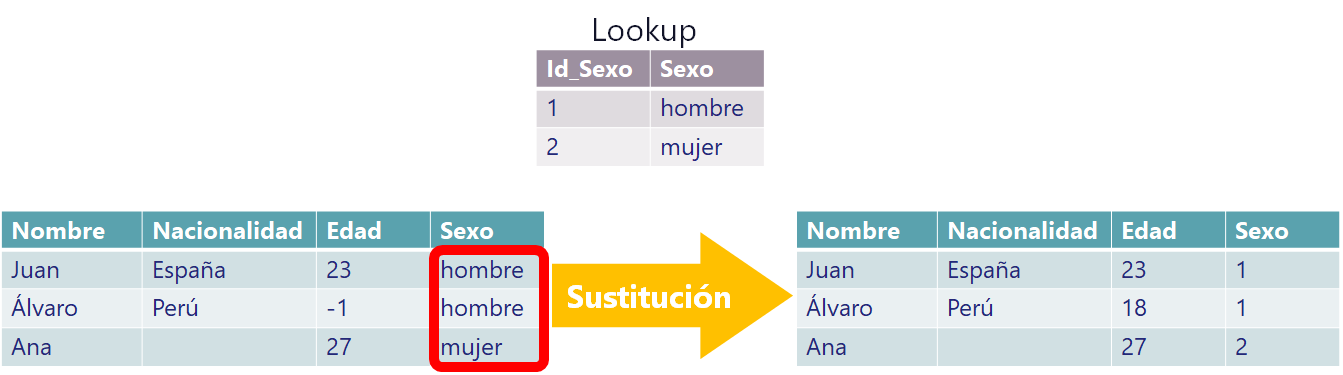
- Correctors or replacers (exception handling): such as filling null values with default data or replacing one value with another. For example, if the values Male and Female arrive, replace each with a number (Male will be the number 1 and Female will be 2) so it takes up less space, and label it to feed Machine Learning models, for instance. Another very commonly used corrector is for dates, to convert them to UTC or to a specific format compatible with the system where they will be loaded.
- Encoders: from character conversion, translators of both texts and coded values, encryptors, data anonymizers, etc.
- Mappings: a subroutine that performs a task (operation) that doesn’t require synchronization (communication) with other tasks. Mapping operations usually need to return a key and a value, since the key will be used to group afterwards. Although other times mapping is used simply to perform some of the transformations listed here.
- Joins: which can come from several sources (it is important to cache those other sources to speed up data processing).
- Sorting: this one is very heavy, since it requires the whole data set to guarantee a correct ordering, so it might not fit in memory if it is very large, or take a long time to sort if done on disk (while I’m at it, let me mention the on-disk sorter I developed, which could be useful: View on GitHubInvarato/sorted_in_disk_project ). To lighten the sorting load, we might want to map the data beforehand and keep the sort keys pointing to the full record (it’s one of the tricks I use in the project cited above). And, as you will understand, if we need to sort, data streaming is in danger (one of the paradoxes: wanting real time and also wanting to guarantee the day’s data is sorted; it’s one or the other, you can’t have both, although there are tricks to “sort of manage it”).
- Grouping: for example, grouping people by age group. Grouping has the same problem as sorting, since it requires all the data to guarantee the groups (sorting is grouping, but not the other way around).
- Transposing: converting rows to columns and vice versa.
- Operations: sums between data from two different columns, subtracting dates to get the days between them, etc. Many operations can be done in real time, but others require all the data, like arithmetic means.
- Validations: Validate the data against other sources and choose whether to correct or discard it, both for the complete data set and for the record being processed.
Data states: Although it isn’t a function as such, I think it’s worth mentioning that we can keep the states of the data, when some data depends on data that has already gone through in order to apply one of these functions (like joining data or replacing lookups) or simply to add information at transformation time.
ETL example of a transformation life cycle
Let’s look at an example to understand the transformations.
Data can come as a block, by rows, in a file, among other formats. For this example, suppose we have extracted the following file and opened it (take a moment to analyze it before you keep reading):
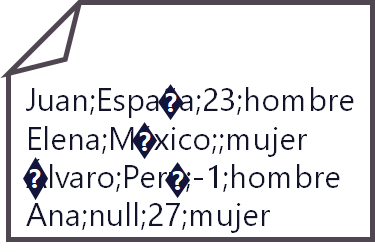
We have to think about whether it’s worth doing some global transformation that saves us processing time compared to doing it with the data split up.
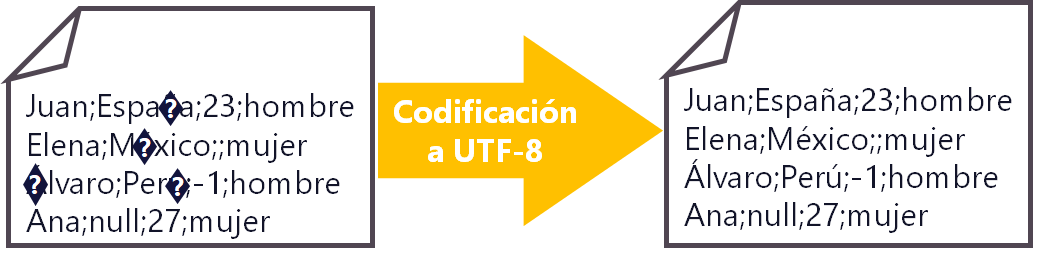
For example, the file in this example arrives with a wrong character encoding, which is very common with the language we speak, Spanish, since English-language systems often change the encoding of texts, so accents and the Ñ won’t show up correctly.
We decide to apply a “global transformation”. In this case we will want to re-encode the entire file from the unwanted encoding to UTF-8, for example.
In this example I show a CSV-like file with data separated by semicolons, which we structure into a table format if we need to. So we perform the “split”. To keep the information flowing, this is usually done in the map step (the Map operation of MapReduce), so that we have this data structured as objects, lists or dictionaries that can be used.
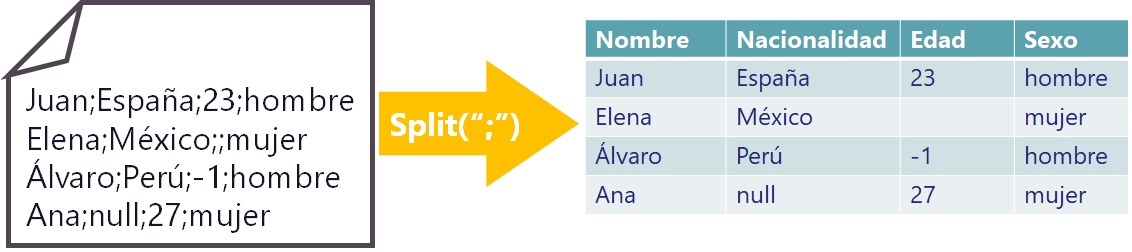
Really, at this point the structure is only there to separate the data and be able to work with it (you won’t see an Excel-like table like the one I drew in the previous image); it is usually done at a lower level (for example, in a Java object or a Python list), and this restructuring will then let us work with the data separately and prepare the format in which to load it, which could be another CSV file or a database INSERT, among many others.
We see some odd things in the table, so we have to “transform the separated data”; in this case we want to “detect and correct errors”. We still have to fix the data we have, and now that it is separated we can identify and recognize it.

First we have to detect the missing values, that is, the empty ones or nulls.
Nationality is text data, so the null might be a valid text, but let’s suppose it is a null, that is, a pointer to nothing. For texts it’s easy to fix: we can simply convert the nulls into empty strings, which in code is opening quotes and closing quotes with no space or anything inside: “”
In Age there is an empty value, and for numbers empty values or nulls are more complicated, since they distort possible calculations and we will have to think about what to do with them. Remember when I told you there were paradoxes? This is a big one: it can’t stay empty because otherwise it will give an error when doing operations (that is, you can add a number to another number, but you can’t add a number to nothing); for example, if we set a 0 by default the calculation of the average value will be distorted and give a false value; we could set the average as the default value, but that requires knowing the value of all the data, or at least of what has been processed so far, and it is just as “made up” a value as the 0; we could delete the entire row, and we’d lose Elena along with the rest of her data; although that makes us lose information, maybe a lot. What do we do? Whatever is most convenient for the company. In Big Data, with the excuse that there is a lot of data, the record we don’t know how to fix is usually deleted, but that is nothing more than an excuse and we lose data; although for this example I am going to go with that.
Now we will have to “correct the anomalies”. Anomalies are data that come from mistakes made by human beings, from the measurement of some sensor, from data transmission, etc.
In our example, the anomalies are the values that fall outside the normal range of data for a given column. In the age field there is a negative value (-1) that falls outside that range (maybe a 100 could pass, since there are centenarians; if there is a 150 in age we might wonder whether it’s the first person ever to reach that age; a 200 is impossible today, and a -1 doesn’t pass). So we call the client and ask what to do with the -1 in the age field, and they might tell us that the minimum value for that field is 18 years, because only adults can be in it, and that any negative numbers are input errors and we should set all of those to 18; so we follow the client’s advice and correct the anomalies:

In this case the client solved it for us, but it could happen that we fix it as we did before with the errors: delete the row, fix it statistically, such as with the average, etc.
Another thing we might need is to “replace data”. There may be data we want to replace as we process it, usually bounded values, like the ones you typically see in comboboxes on web pages (such as sex, country, state or region, university, brand, etc.), and they are usually replaced by a foreign key belonging to another table or reduced in size so they take up less space. It could also be that we need to work with numbers and not with texts, such as to train machine learning models, since models work with numbers.
In our example, the boss tells us that for sex we have a lookup table (correspondence table) with an id column holding the number for each sex; we check that table and see that for male its id (ID_Sexo in the gray box in the image below) is 1 and for female its id is 2. So in the sex column we replace the text values with numbers (which are the ids of the foreign Lookup table) as mentioned:
In the end we may want to “reconvert the data”, such as joining the data back together to save it to a file, converting it to another data structure (like JSON) or passing it to an object to send it in the next step of the ETL.
In our example we will suppose that we want to join them back together with a vertical bar and save them to a file that will be sent.

That would be it, but before finishing I want to mention that in this example I did it step by step for all the data, but the normal way is to do all these steps via streaming, that is, the first line is processed first and goes through all the steps until it is saved in the file or in the final object with the whole transformation done, and it would be loaded immediately (the last ETL step). So, line by line (or record by record, for the purists) in a continuous flow of data, we would have clean, ready-to-use data in real time.
Tricks and ideas to keep in mind for a good ETL
Assorted tricks to keep in mind:
- Dates: different formats can come in the same field (written out as text like “3 de enero de 2022”, Linux Epoch like “1641753566”, UTC like “2022-01-09T18:39:26Z”, etc.), so we will want to unify them into one. Also, it is a good idea to convert any time zone to UTC (Coordinated Universal Time), as long as we are aligned with wherever they will be loaded (so that whoever uses these dates later knows they are in UTC and converts them to the time zone they need); by the way, don’t confuse the UTC format (writing the date as: year-month-dayThour:minute:secondZ, for example: 2022-01-09T18:39:26Z) with the UTC time zone (for example, in Spain it is 19:00, but in UTC time it is 18:00).
- Decode/Encode: unwanted encodings can arrive that we will have to handle. For example, for texts it is usually a good idea to unify to UTF-8.
- Empty values: None (nill, null, nulo or any other way of writing “pointer to nothing”) or empty string “” (don’t confuse it with a string that says the word “None”). These will have to be handled if necessary, because an empty value in a field where a number is expected will give us problems when doing mathematical calculations. However, don’t underestimate the None value, since it can help us precisely to avoid adding default data (which falsifies the data) so that only the data that has a value is processed, although this will later require extra effort from whoever reads the data.
- Generators/Streaming (Python/Java, also others like Spark): Know how to make the data flow so as not to consume more RAM than necessary and to process data in real time (on the fly). I dedicated a full article to Python Generators, which you can see by clicking here; meanwhile, for Streaming in Java you can see the official documentation.
- Historical, real-time or window operations (window): Data can be operated on historically (selecting a block of past data), via Streaming (the moment we have the data in real time), or via window (when the window runs, the set of data that falls inside the window is selected, which could have some data or none; then the window slides to run at the next moment and select another set of data within that window, and so on). Choosing each one will depend on our needs. To say a bit more about window operations: we could almost say the window is an attempt to turn historical data into real time, since we could accumulate data produced during the last hour to process it all together on the hour (at HH:00, for example), so we would get the best of both worlds (up to a point); a window is made up of the window duration (its size) and the duration of the moment the window runs (the window slide); this window feature can be used, for example, with Spark Streaming (DStreams).
- Opening files: It is not advisable to open more than one file per thread of execution (or job) at a time, since the number of “file descriptors” in Linux or “file handles” in Windows is limited and we could have problems if we open many files at once. The right way is to open a file, read it (if possible not all at once, but line by line) and close it.
- Read the data source as little as possible (file, database query, etc.): Reading from a data source usually has a very high cost, both at the level of the server that serves it to us, and because the data is probably on disk and takes time to read, as well as the possible saturation of the network over which that data is transmitted.
- Cache reusable data (for joins, comparisons, etc.): and it’s better to store as little as possible (since it is RAM), much better if you only have to store the keys that point to the data.
- Cache the complete logs to disk in binary files and keep a cache dictionary with the keys holding a pointer to each log on disk: we must also remember to delete these temporary files when we no longer use them, since they take up quite a lot of space.
Some data validations that might interest us:
- It is not an empty record.
- New or non-duplicate record.
- Record count.
- Record length.
- Orphan records.
- Record without erroneous data.
What to do with records whose field can’t be transformed?
- Ask the stakeholder of the data and the person in charge of the data what to do with that data.
- Delete: if losing a record doesn’t matter, it can be deleted, although the result of certain operations will be false (I use the word “false” because it is clearly not “exact”, although that doesn’t mean it isn’t “approximate”).
- Add a default value: as long as it doesn’t matter to falsify a value (and the stakeholder is aware of it) of a record, at least we will keep the rest of the record’s values. When doing operations with the falsified data, they will give results that will be false (similar to Delete).
- Create statistics and reports on the data set as a whole: this way, whether we delete or add default values, we will know at all times the possible error introduced by these modifications (for example, we know we have 97 records out of the original 100, so we know 3 have been deleted).
- Save the raw data somewhere else: For example, saving all the raw data (unmodified) in another table; so we would have both the processed data and the unprocessed data (with the resulting disk usage, since it would consume double in the worst case). It can be used to produce statistics on erroneous data and run calculations with it, or if we need it in the future we could recover the modified information (deleted or with default values added).
Operations with high memory consumption (since they require going through all the data):
- Sort: to sort a data set you need to know all the values in the data set (imagine the letters of the alphabet arrive shuffled and the “A” is the last one; we need all the letters in memory to sort). So here we can forget about streaming and real time.
- Group (group or aggregation): only those that can’t be grouped on the fly (although this requires having the data sorted beforehand). To understand the implications you have to be clear that “sorting is grouping” (since with a data set sorted, all the data of the same group will be adjacent; that is: if the keys come together, they can be grouped as you iterate and the group is returned as soon as the key differs), but “grouping is not sorting” (you can group without needing the data sorted; that is: if the keys don’t come together, as you iterate you will have to accumulate the groups in cache and then return them all properly grouped).
- Join (Join, Merge, Union): Not all join operations work the same way; some don’t consume as much memory and others use various strategies, and others perform a different type of join that may not be the result we want. Also, if the data is sorted, it could be joined on the fly in certain cases.
- Compare: Since we need the data in order to compare it, we will have a problem similar to grouping. If the data is sorted, a comparison could be done on the fly.
Load: Loading or Ingestion
And at last we will have the data ready to be loaded (“ingested”) into the destination.
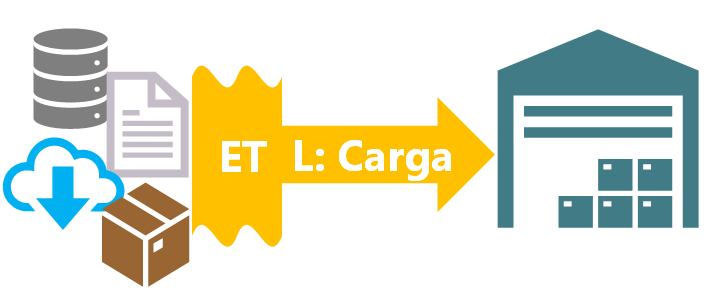
Maybe all this processing we have done is to send the data to another destination, or maybe we just wanted to overwrite the same old data because there was something to fix in it. It depends on what we need, but there are numerous places to load the data into, such as:
- Data warehouse
- Flat file
- File system (like HDFS)
- Database
- APIs
- File systems
- Service
- Cloud
- Other specialized systems
In a large company the data will normally be loaded into a Data warehouse to keep a history of records, which will allow auditing the data and its later use.
ETL Tools
I’ll finish by leaving a few tools for doing ETL (although they are useful for much more than ETL and require certain technical knowledge):
- From Apache we have quite a few: Apache Spark (I wrote an article on how to easily install Spark on any operating system and learn to use it; you can see it by clicking here), GraphX, Apache Flink, Apache Beam, Apache Kafka, etc.
- Any programming language works (Pyhton, Java, R, Scala, etc.) for doing ETL; they have methods and libraries that perform most ETL functions, although they may require more programming work, and it would get very complicated if we want to do “from scratch” not just multiprocessing but distributed processing. Batch processes (Shell Scripting) of any operating system can also be used to do some ETL.
- Tools built into each Cloud platform: AWS (AWS Glue), Azure (Azure Data Factory), Google Cloud (Data Fusion), IBM (IBM Cloud Pak for Data), etc. Each one has its own tools for doing ETL.
- Others: Oracle Data Integrator, Confluent Platform, Stich, etc.
For non-technical people who want to perform transformation operations (note that in most of them extraction and loading will have to be done separately):
- Excel: I had to include it, since Excel has transformation tools; for example, it lets you import CSV to tabulate its data and then work with it (filter, look for empty values, etc.). Although it is limited to files that aren’t very large.
- Text processing tools: Sublime text, Notepad++, VIM, etc. Although very limited to files that aren’t very large. They allow multiple edits and certain basic transformations.
- Log processing tools: EmEditor, etc. They don’t require knowing how to program (almost all of them have an interface reminiscent of Excel), they open fairly large files (but not Big Data) and allow many data transformations.
- Business Inelligence tools: Power BI, Tableau, IBM Cognos, etc. Although you will only be able to do an ETL that is very limited to the tool.
- Pandas (for Python): I’ve put it last, but it is one of the most important (especially for data analysis). This one does require you to know very basic Python (it’s accessible even for someone who doesn’t know how to program or doesn’t like it). Obviously, if you know how to program, with Pandas you will have endless more possibilities. And if you want something even more powerful, you can try Koalas, which works very similarly to Pandas but with Spark.
- The following Stack Overflow post contains many programs for editing text and doing basic transformations: https://stackoverflow.com/questions/159521/text-editor-to-open-big-giant-huge-large-text-files
Learn more
Although here I have told you a lot about ETL based on my experience and point of view, I don’t want you to stay with only this one, since ETL requires much more, not just understanding this article alone, which could be limited or even need an update depending on when you read it.
There is endless content on ETL to specialize in, so I suggest you read some of the many articles written by the big companies about ETL (many in Spanish):
“ETL: Extract, Transform, and Load” by Ramón Invarato at jarroba.com, licensed under Creative Commons Attribution-NonCommercial-ShareAlike 3.0. Registered at Safe Creative.

You may also like
Install Apache Spark on Any Operating System and Learn to Program It with Python, Scala or Java
Install and test Apache Spark step by step with Python, Scala and Java, also with Jupyter Notebook and JupyterLab. Work with Big Data the easy way.
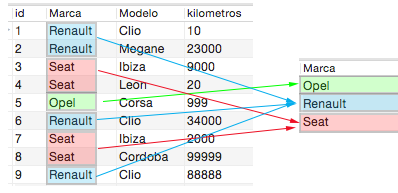
MySQL Database Course – Part V – (Video) “Group By”
The "Group By" statement groups identical values in a table. Learn how it works with COUNT, SUM, MAX and MIN in this video tutorial and step-by-step examples.
Leave a comment