
MySQL Database Course – Part V – (Video) “Group By”
The "Group By" statement groups identical values in a table. Learn how it works with COUNT, SUM, MAX and MIN in this video tutorial and step-by-step examples.
Series: MySQL Database Course part 5 of 5
This MySql database course is made up of the following posts:
- Part I: Installing MySql Server and MySql Workbench
- Part II: Creating Tables and Relationships between Tables (Entity-Relationship Model)
- Part III: Basic MySql Statements (Definition & Manipulation)
- Part IV: The “INNER JOIN” Statement for Joining Tables
- Part V: The “GROUP BY” Statement for Grouping Data
Part V: The “Group By” Statement for Grouping Data
The “Group By” statement is meant to group identical values in a table. When you apply this statement to one or more columns of the source table, the result is a single summary row for each group of unique elements formed. You can also apply a series of aggregate functions to this clause, which let you run operations on a set of results but return a single aggregated value for all of them. Some of these aggregate functions are: COUNT(), SUM(), MAX(), MIN(), AVG(), STDEV(), STDEV(), VAR(), VARP().
Let’s go step by step through a simple example to understand what this statement does. First, we’re going to create a database with a single table, ‘coches‘, where we’ll apply these statements. Below is the script to create this database with the coches table and a few rows (if you have any doubts about how to do this, check out the video or the tutorial “Creating Tables and Relationships between Tables (Entity-Relationship Model)“):
SET @OLD_UNIQUE_CHECKS=@@UNIQUE_CHECKS, UNIQUE_CHECKS=0;
SET @OLD_FOREIGN_KEY_CHECKS=@@FOREIGN_KEY_CHECKS, FOREIGN_KEY_CHECKS=0;
SET @OLD_SQL_MODE=@@SQL_MODE, SQL_MODE='TRADITIONAL,ALLOW_INVALID_DATES';

DROP SCHEMA IF EXISTS `miprimerabasededatos` ;
CREATE SCHEMA IF NOT EXISTS `miprimerabasededatos` DEFAULT CHARACTER SET utf8 ;
SHOW WARNINGS;
USE `miprimerabasededatos` ;

-- -----------------------------------------------------
-- Table `coches`
-- -----------------------------------------------------
DROP TABLE IF EXISTS `coches` ;

CREATE  TABLE IF NOT EXISTS `coches` (
  `id` INT(11) NOT NULL AUTO_INCREMENT ,
  `Marca` VARCHAR(45) NOT NULL ,
  `Modelo` VARCHAR(45) NOT NULL ,
  `kilometros` INT(11) NOT NULL ,
  PRIMARY KEY (`id`) )
ENGINE = InnoDB
AUTO_INCREMENT = 10
DEFAULT CHARACTER SET = utf8;

SHOW WARNINGS;


SET SQL_MODE=@OLD_SQL_MODE;
SET FOREIGN_KEY_CHECKS=@OLD_FOREIGN_KEY_CHECKS;
SET UNIQUE_CHECKS=@OLD_UNIQUE_CHECKS;

INSERT INTO `coches` (`id`,`Marca`,`Modelo`,`kilometros`) VALUES (1,'Renault','Clio',10);
INSERT INTO `coches` (`id`,`Marca`,`Modelo`,`kilometros`) VALUES (2,'Renault','Megane',23000);
INSERT INTO `coches` (`id`,`Marca`,`Modelo`,`kilometros`) VALUES (3,'Seat','Ibiza',9000);
INSERT INTO `coches` (`id`,`Marca`,`Modelo`,`kilometros`) VALUES (4,'Seat','Leon',20);
INSERT INTO `coches` (`id`,`Marca`,`Modelo`,`kilometros`) VALUES (5,'Opel','Corsa',999);
INSERT INTO `coches` (`id`,`Marca`,`Modelo`,`kilometros`) VALUES (6,'Renault','Clio',34000);
INSERT INTO `coches` (`id`,`Marca`,`Modelo`,`kilometros`) VALUES (7,'Seat','Ibiza',2000);
INSERT INTO `coches` (`id`,`Marca`,`Modelo`,`kilometros`) VALUES (8,'Seat','Cordoba',99999);
INSERT INTO `coches` (`id`,`Marca`,`Modelo`,`kilometros`) VALUES (9,'Renault','Clio',88888);
Once the table is created, we can see that each car is characterized by a Marca (make), a Modelo (model), and a number of kilometers driven. If we group by Marca, the result will be all the different car makes in this table. Let’s look at our first grouping query and the result we get:
SELECT Marca FROM miprimerabasededatos.coches GROUP BY Marca;
With this query we do the following:
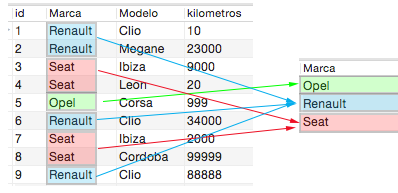
We can see that the table has 3 different car makes, so when we group by them, it tells us which ones they are. In the same way, we can group by more fields; for example, we can see how many different cars there are taking into account both the Marca and the Modelo:
SELECT Marca, Modelo FROM miprimerabasededatos.coches GROUP BY Marca, Modelo;
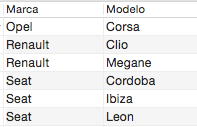
As mentioned in the introduction, we can also apply mathematical functions to the groups. Let’s look at the first and most intuitive one: counting the number of cars for each different Marca. We do this by applying the ‘COUNT()‘ function like this:
SELECT Marca, COUNT(*) FROM miprimerabasededatos.coches GROUP BY Marca;
If we do the math before looking at the result, we’ll find that there are 4 cars of the Renault and Seat makes, and only one car of the Opel make:
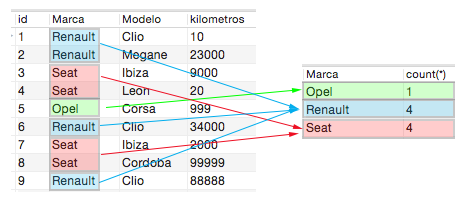
We can also apply an ordering so the result is sorted from highest to lowest. It’s done like this:
SELECT Marca, COUNT(*) AS contador FROM miprimerabasededatos.coches GROUP BY Marca ORDER BY contador DESC;
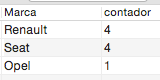
Now that we’ve done a simple operation with the ‘COUNT()’ function, applying the rest of the functions should be more or less intuitive. For example, let’s group by car Marca and add up the kilometers driven by the cars of each Marca. We do this by passing the ‘SUM()’ function the name of the column it should operate on, which in this case is the ‘kilometros’ column:
SELECT Marca, SUM(kilometros) FROM miprimerabasededatos.coches GROUP BY Marca;
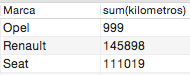
We can also get the car per make with the most or the fewest kilometers driven by applying the ‘MAX()’ and ‘MIN()’ functions
SELECT Marca, MAX(kilometros) FROM miprimerabasededatos.coches GROUP BY Marca;
SELECT Marca, MIN(kilometros) FROM miprimerabasededatos.coches GROUP BY Marca;

This way we could keep applying all the aggregate functions mentioned at the beginning.
CONCLUSIONS:
This tutorial is aimed at people and students who are just starting to learn about database queries. It’s a very simple tutorial whose goal is to show the “GROUP BY” clause so that it’s well understood and can later be applied in much more complex queries, since the examples here are very simple.
“MySQL Database Course – Part V – (Video) “Group By”” by Ricardo Moya at jarroba.com, licensed under Creative Commons Attribution-NonCommercial-ShareAlike 3.0. Registered at Safe Creative.

You may also like
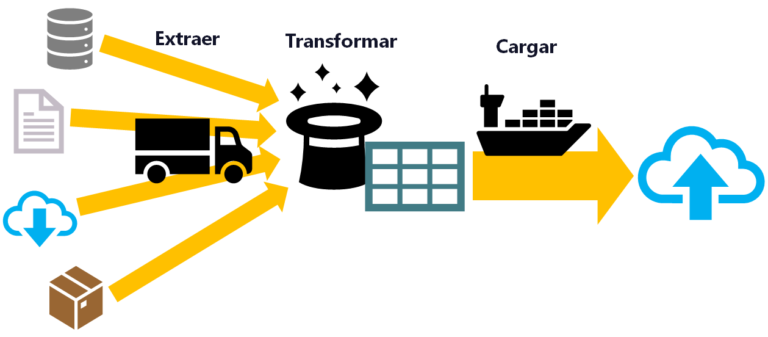
ETL: Extract, Transform, and Load
ETL is used for massive, real-time data processing (Big Data): Extract data from different sources, Transform it into a useful structure, and Load it where you can use it.
Install Apache Spark on Any Operating System and Learn to Program It with Python, Scala or Java
Install and test Apache Spark step by step with Python, Scala and Java, also with Jupyter Notebook and JupyterLab. Work with Big Data the easy way.
Leave a comment