
MySQL Database Course – Part II (Video) – Entity-Relationship
In this second part of the database course, you'll learn how to create tables with MySQL Workbench and how to relate them (1:1, 1:N, N:M).
Series: MySQL Database Course part 2 of 5
Part II: Creating Tables and Relationships Between Tables (Entity-Relationship Model)
In this second part of the database course, we’re going to learn how to create tables with MySQL Workbench and how to relate those tables. The most important thing here is to look at the three types of relationships that can exist between tables and how these relationships "affect" the tables or the Entity-Relationship model you’ve created. In short, in this second part of the course we’ll cover the knowledge you need to model the database you are building.
Below is the video explaining how to create tables and how to build the Entity-Relationship model.
In the video tutorial, the following two tables were created with the following attributes:

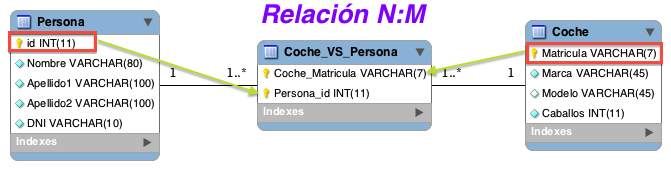
"N:M" relationship: In an N:M relationship, an intermediate table is created with the keys of the tables and of the relationship. If the relationship has attributes, those attributes are added to the table:
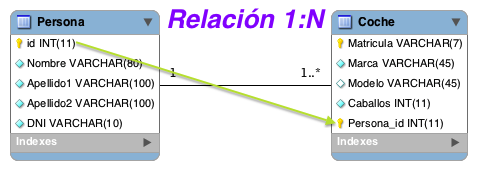
"1:N or N:1" relationship: In this relationship, the key of the "1" table is added to the "N" table. (A person can have from 1 to N cars, and a car belongs to only one person).
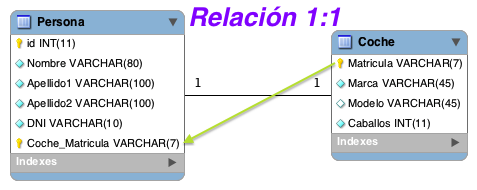
"1:1" relationship: Add the key of either table to the other table.
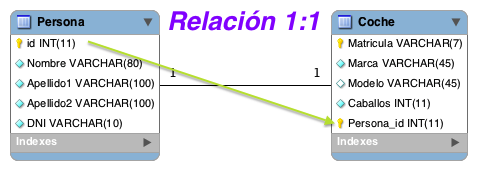
or
To create the "Persona" table, the following had to be run:
CREATE  TABLE `MiPrimeraBaseDeDatos`.`Persona` (
  `id` INT NOT NULL AUTO_INCREMENT ,
  `Nombre` VARCHAR(80) NOT NULL ,
  `Apellido1` VARCHAR(80) NOT NULL ,
  `Apellido2` VARCHAR(80) NOT NULL ,
  `DNI` VARCHAR(9) NOT NULL ,
  PRIMARY KEY (`id`) ,
  UNIQUE INDEX `id_UNIQUE` (`id` ASC) );
Tables can also be created with the following structure:
CREATE  TABLE `nombreBaseDatos`.`nombreTabla` (
  `nombreAtributo1` TIPO CARACTERISTICAS ,
  `nombreAtributo2` TIPO CARACTERISTICAS ,
.......................
  PRIMARY KEY (`nombreAtributoPrimaryKey`);
“MySQL Database Course – Part II (Video) – Entity-Relationship” by Ricardo Moya at jarroba.com, licensed under Creative Commons Attribution-NonCommercial-ShareAlike 3.0. Registered at Safe Creative.

You may also like


MongoDB Course – Part I (Video) – “Introduction”
Start our practical MongoDB course: learn what a document-oriented database is, how MongoDB stores JSON data, and how it compares to relational databases.
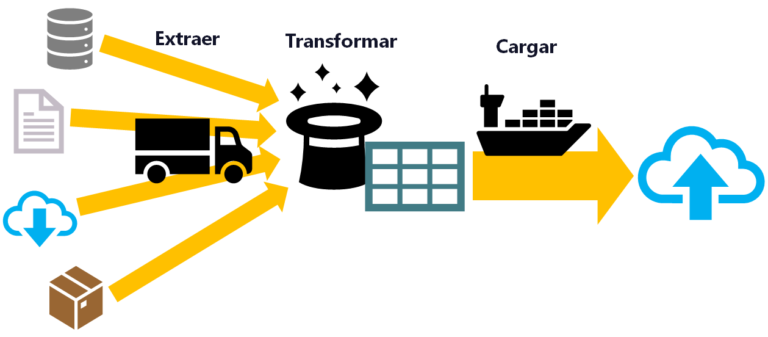
ETL: Extract, Transform, and Load
ETL is used for massive, real-time data processing (Big Data): Extract data from different sources, Transform it into a useful structure, and Load it where you can use it.
Leave a comment