
Python Dictionary Views: keys, values, and items
In Python Views, if you change something in the underlying dictionary (a value or a key), the change is reflected inside the Views. Learn how they work.
The “Views” of the data inside dictionaries (Mapping) in Python are very important. We use them all the time (even if we don’t realize it) and yet we don’t take advantage of their full potential. An optimal flow of our data, with fast processing and minimal resource consumption, requires knowing these secrets.
The main feature of Views is that if we modify something in their associated dictionary (a value or a key), it will be reflected inside the views (examples below).
Code on GitHub (I recommend reading the article first and downloading/cloning the code at the end): View on GitHubInvarato/JarrobaPython / vistas_de_los_diccionarios
To make it easy to understand from the start, for the examples I’ll use the following dictionary, whose key is a fruit (I’ll write the key in UPPERCASE to tell it apart more easily from the value, which I’ll write in lowercase) and whose value is the tree the fruit comes from:
mi_diccionario = {
    "MANZANA": "Manzano",
    "UVA": "Vid",
    "PERA": "Peral",
}
From this dictionary we may want to “view” (get Views in Python 3):
- All the keys with keys(), which returns an object of type KeysView.
vista_claves = mi_diccionario.keys()- All the values with values(), which returns an object of type ValuesView.
vista_valores = mi_diccionario.values()- All the keys paired with their values (as tuples) with items(), which returns an object of type ItemsView.
vista_items = mi_diccionario.items()Note
Views in Python 2
You can also get views in Python 2, but not with the keys(), values() or items() methods, since they return lists (or iteritems(), which returns an “iterator”). In Python 2 these methods do NOT return Views.
To get a View in Python 2 it’s similar, but you need to use these methods:
- viewkeys(): returns an object of type KeysView.
vista_claves = mi_diccionario.viewkeys()
- viewvalues(): returns an object of type ValuesView.
vista_valores = mi_diccionario.viewvalues()
- viewitems(): returns an object of type ItemsView.
vista_items = mi_diccionario.viewitems()
View Classes
As we mentioned, the view classes are:
- Keys view (KeysView)
- Values view (ValuesView)
- Items view (ItemsView)
And these three inherit from the mapping view class (MappingView).
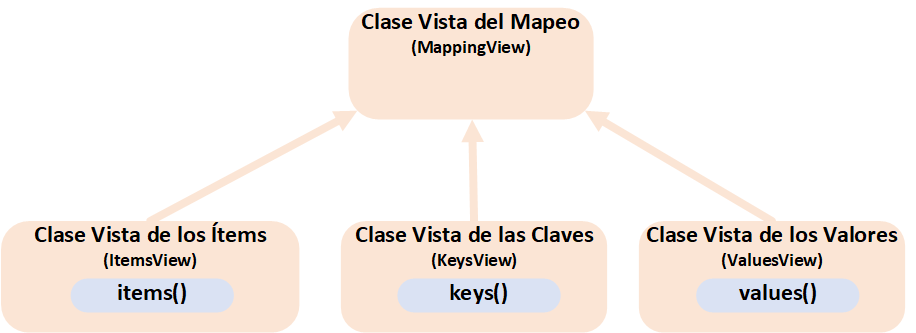
However, the possibilities with Views are a bit richer, as we’ll see (further down I draw a complete diagram of the views; I haven’t put it here because it has quite a few arrows that may be surprising at first glance, yet it’s actually pretty simple. I want you to feel for yourself the reason behind things and see that it’s easy to understand).
They Are Sized
That is, we can use “len()” on each of the Views, which will give us the number of elements inside.
For example, let’s get the number of keys in “vista_claves”, which is a KeysView (the other two views, ValuesView and ItemsView, work the same way):
cantidad_de_claves = len(vista_claves)
print("Cantidad de claves: {}".format(cantidad_de_claves))
It prints:
Cantidad de claves: 3They Are Iterable
Views are Iterable because we can go through their elements in a FOR loop.
For example, we can iterate over each element of “vista_valores” (you can use any of the three views):
for valor in vista_valores:
    print('Valor de mi_diccionario: {}'.format(valor))
It prints:
Valor de mi_diccionario: Manzano
Valor de mi_diccionario: Vid
Valor de mi_diccionario: Peral
Watch out: Views are NOT Iterators; that is, you can’t use next() to go through the “view” element by element.
Reminder about Iterable vs. Iterator: don’t confuse “Iterable”, which implements __iter__, with “Iterator”, which implements __next__, nor with “Iterator-Iterable”, which implements both __iter__ and __next__; this is explained in detail in the article about how to create our own collection https://jarroba.com/nuestra-propia-coleccion-en-python).
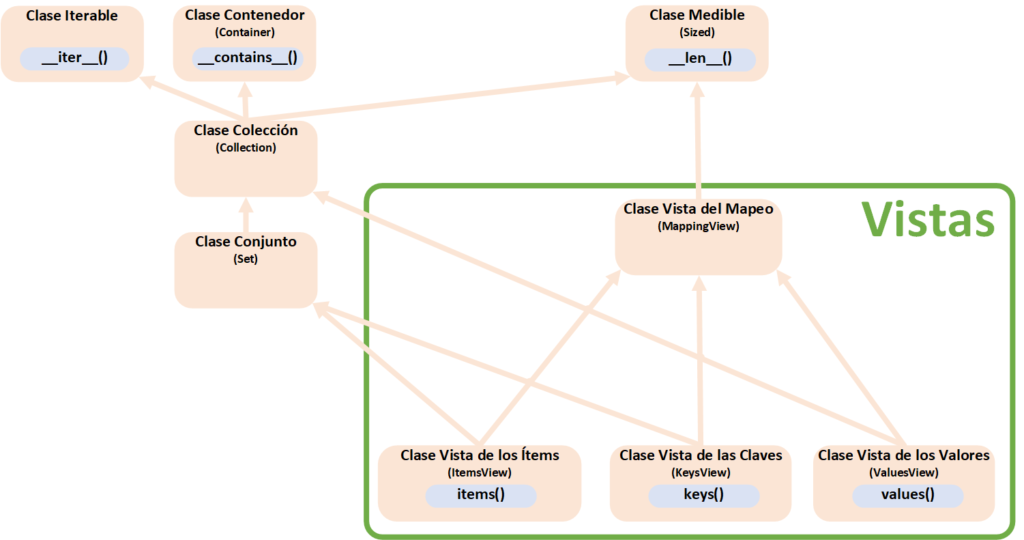
Views with Keys Are Sets
The “views” that have keys, that is, those of type KeysView and ItemsView, are Sets (Set). This means we can perform any set operation on them (and it means dictionaries have directly gained the ability to be “almost” sets).
Suppose we have a set of assorted keys (which I’ll call “conjunto_claves”), some of which also appear among the keys of our dictionary, like:
conjunto_claves = {"MANZANA", "PERA", "TOMATE"}We want to know which keys appear in both “vista_claves” and “conjunto_claves” (by eye you can see that “MANZANA” and “PERA” are in both). Applying the set “intersection” operation (whose symbol is “&”) gives us the result we want by returning the keys common to both:
conjunto_claves_comunes = vista_claves & conjunto_claves
print('Conjunto de claves en ambos: {}'.format(conjunto_claves_comunes))
And we check in the terminal that it correctly returns:
Conjunto de claves en ambos: {'MANZANA', 'PERA'}It works the same with the Items view. We can create a set of tuples, where each tuple holds the key and the value. As an example, let’s say we want the elements that don’t match in both (that is, we want the unique elements of each set, the ones not repeated in conjunto_tuplas_clave_y_valor and in vista_items); for that, the “symmetric difference” set operator (whose symbol is “^”) is useful:
conjunto_tuplas_clave_y_valor = {("MANZANA", "Manzano"), ("TOMATE", "Tomatero")}

conjunto_items_comunes = vista_items ^ conjunto_tuplas_clave_y_valor
print('Conjunto de ítems NO en ambos: {}'.format(conjunto_items_comunes))
We can see that the terminal returns a set that doesn’t include the tuple (“MANZANA”, “Manzano”), since it’s the one repeated in both:
Conjunto de ítems NO en ambos: {('PERA', 'Peral'), ('LIMÓN', 'Limonero'), ('TOMATE', 'Tomatero'), ('UVA', 'Vid')}Although here I’ve only used the “intersection” (&) and “symmetric difference” (^) operations, the KeysView and ItemsView Views really support any set operation (you can find all the set operations at https://docs.python.org/3.7/library/stdtypes.html#set).
ValuesView is NOT a Set (Set) but it is a Collection (Collection). It isn’t a Set because of the hash table behavior of dictionaries (more info about hash tables at https://jarroba.com/tablas-hash-o-tabla-de-dispersion/), since only the keys are pointed to directly (the same thing happens with simple Python sets) and the values are not.
Although ValuesView can’t work with sets directly, you can convert this View to a set and operate on it anyway (this trick is not that efficient, since all the values have to be traversed to create the set; so careful if you work with huge amounts of data, you may need to rethink your data structures).
conjunto_valores = {"Tomatero", "Vid", "Manzano"}

# Convert the view into a set
conjunto_de_vista_valores = set(vista_valores)

conjunto_valores_comunes = conjunto_de_vista_valores & conjunto_valores
print('Conjunto de valores comunes: {}'.format(conjunto_valores_comunes))
And when we run it we see on screen that it works:
Conjunto de valores comunes: {'Vid', 'Manzano'}Extended View Classes
Here is the class diagram with everything we’ve learned so far (both in this article and in the previous one about creating our own collection https://jarroba.com/nuestra-propia-coleccion-en-python/ ):
Views Are Tied to Their Dictionary
As we said at the beginning of the article: the main feature of Views is that if we modify something in their associated dictionary (a value or a key), it will be reflected inside the views.
Let’s check it. We’ll get one of the views of our dictionary, for example the keys view (with keys() we get the KeysView object, which will be stored in the variable “vista_claves”). We’ll go through the view, modify the dictionary, and go through the view again to see the change in the keys inside the view (notice that we get the view only once, at the start of the code):
# We get a view; for example, the keys
vista_claves = mi_diccionario.keys()

# We go through the keys inside the view
for clave in vista_claves:
    print('Clave de mi_diccionario ANTES: {}'.format(clave))

# We add a key and a value that don't exist in the dictionary
mi_diccionario["LIMÓN"] = "Limonero"

# We go through the keys inside the view again to check
for clave in vista_claves:
    print('Clave de mi_diccionario DESPUES: {}'.format(clave))
We can see that the first time we go through the view it gives us some keys (in the following terminal output they appear with the text “ANTES”); we modify the dictionary and go through the view again to check that the view has also been affected:
Clave de mi_diccionario ANTES: MANZANA
Clave de mi_diccionario ANTES: UVA
Clave de mi_diccionario ANTES: PERA

Clave de mi_diccionario DESPUES: MANZANA
Clave de mi_diccionario DESPUES: UVA
Clave de mi_diccionario DESPUES: PERA
Clave de mi_diccionario DESPUES: LIMÓN
Lifecycle of the Methods of a Mapping’s Views
If we want to fully understand how Views work, and above all if we want to build our own Mapping classes, we need to know the lifecycle of Views (obviously you’ll need to know this whenever you want to modify their behavior).
We’ve already seen the lifecycle for getting the keys, although here I go a bit deeper, since you’ll be able to see what each of the View objects (KeysView, ValuesView and ItemsView) returns:
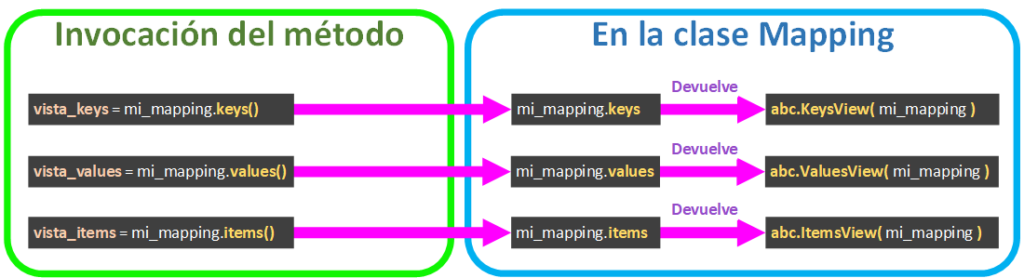
And depending on how we use each of the Views, it will call one thing or another. The lifecycles explained in the following image are:
- IF…IN calls the magic method __contains__. As we saw in the article on how to make “Our own collection in Python” (https://jarroba.com/nuestra-propia-coleccion-en-python), with
- When iterating (in a FOR loop) over a KeysView, it will call __iter__, but when iterating over ValuesView and ItemsView it will also call __iter__, which gets the keys and has to call __getitem__ for each key to get its value.
- When getting the String of a View with str(), the view will call __repr__, which is in charge of showing the representation of that view.
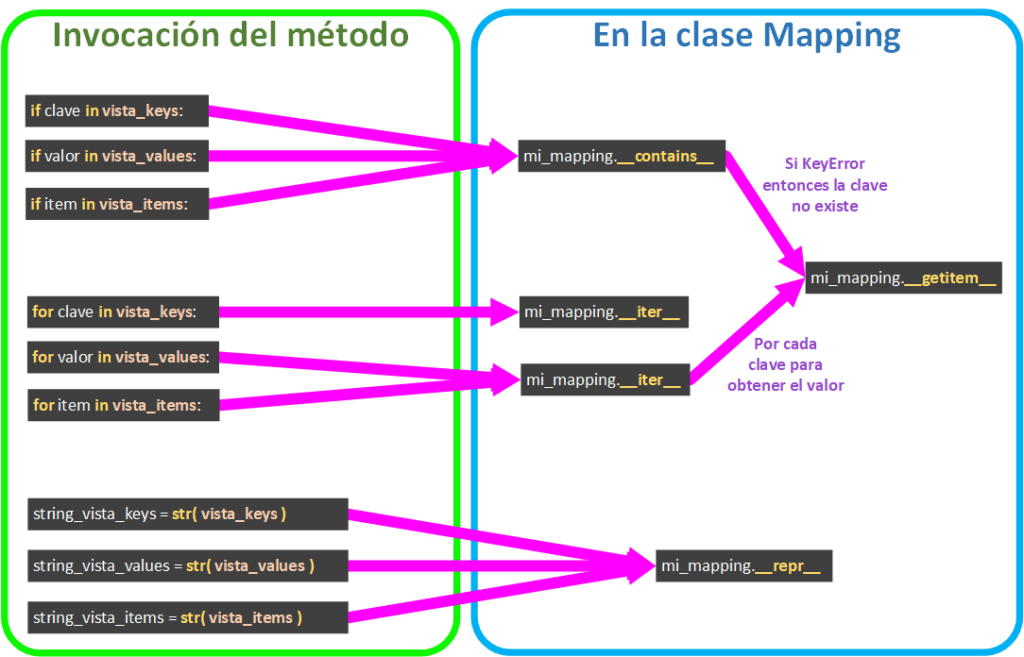
Let’s look at an example with our own Mapping to understand each of these lifecycles.
Working with Views in Our Own Mapping
For this example I want a Mapping that, given a number in hundreds as a key (100, 200, 300), returns its text as the value (“CIEN”, “DOSCIENTOS”, “TRESCIENTOS”).
Steps I’ll take in the code (I recommend skimming the code below for each point you read):
- In the following code I’ll inherit from Mapping because I only want to read from my custom dictionary (from my object of type Mapping).
- I’ll use two lists, one to store the keys and the other for the values; so, for example, position 2 in the list of keys (lista_interna_claves) will be 300 and will match position 2 of its value, which will be “TRESCIENTOS” in the list of values (lista_interna_valores).
- I’ll implement __len__ with a fixed value, since I can’t change the size of my dictionary dynamically, and if in the future I call len() it will return its size.
- __iter__ has to return an “Iterator”, and in a Mapping class it must return the keys. So I want to return the list “lista_interna_claves”, but a list is an “Iterable”, not an “Iterator”, so we can use the iter() method to return its “Iterator”.
from collections import abc


class MiColeccionConVistas(abc.Mapping):

    def __init__(self, *args, **kwargs):
        self.lista_interna_claves = [100, 200, 300]
        self.lista_interna_valores = ["CIEN", "DOSCIENTOS", "TRESCIENTOS"]

    def __len__(self) -> int:
        return 3

    def __iter__(self):
        return iter(self.lista_interna_claves)

    def __getitem__(self, numero: int) -> str:
        try:
            posicion = self.lista_interna_claves.index(numero)
            return self.lista_interna_valores[posicion]
        except ValueError:
            raise KeyError
Some quick basic tests for our code above would be:
mi_coleccion_con_vistas = MiColeccionConVistas()

print('300 se escribe "{}"'.format(mi_coleccion_con_vistas[300]))

print('mi_coleccion_con_vistas tiene {} elementos'.format(len(mi_coleccion_con_vistas)))

if 200 in mi_coleccion_con_vistas:
    print('200 existe en mi_coleccion_con_vistas')
else:
    print('200 NO existe en mi_coleccion_con_vistas')

for valor in mi_coleccion_con_vistas:
    print('Elemento de mi_coleccion_con_vistas: {}'.format(valor))
And we’d see in the terminal:
300 se escribe "TRESCIENTOS"

mi_coleccion_con_vistas tiene 3 elementos

200 existe en mi_coleccion_con_vistas

Elemento de mi_coleccion_con_vistas: 100
Elemento de mi_coleccion_con_vistas: 200
Elemento de mi_coleccion_con_vistas: 300
If we’ve followed the correct way to create a Mapping, we shouldn’t have any problem getting the Views (keys() to get KeysView, values() to get ValuesView and items() to get ItemsView), since they’re already implemented in Mapping:
vista_claves = mi_coleccion_con_vistas.keys()
print("vista_claves: {}".format(vista_claves))
for clave in vista_claves:
    print('Clave de mi_coleccion_con_vistas: {}'.format(clave))

vista_valores = mi_coleccion_con_vistas.values()
print("vista_valores: {}".format(vista_valores))
for valor in vista_valores:
    print('Valor de mi_coleccion_con_vistas: {}'.format(valor))

vista_items = mi_coleccion_con_vistas.items()
print("vista_items: {}".format(vista_items))
for item in vista_items:
    print('Ítem de mi_coleccion_con_vistas: {}'.format(item))
We can see that it prints this for each View:
vista_claves: KeysView(<__main__.MiColeccionConVistas object at 0x000001F8E406E9E8>)
Clave de mi_coleccion_con_vistas: 100
Clave de mi_coleccion_con_vistas: 200
Clave de mi_coleccion_con_vistas: 300

vista_valores: ValuesView(<__main__.MiColeccionConVistas object at 0x000001A8D106BBE8>)
Valor de mi_coleccion_con_vistas: CIEN
Valor de mi_coleccion_con_vistas: DOSCIENTOS
Valor de mi_coleccion_con_vistas: TRESCIENTOS

vista_items: ItemsView(<__main__.MiColeccionConVistas object at 0x000001F7D126B4E8>)
Ítem de mi_coleccion_con_vistas: (100, 'CIEN')
Ítem de mi_coleccion_con_vistas: (200, 'DOSCIENTOS')
Ítem de mi_coleccion_con_vistas: (300, 'TRESCIENTOS')
If we really wanted to implement each of the methods that return a view, we’d have to implement the following (we need to pass the Mapping, which would be “self”, to each class that builds each of the views so it can get the information it needs, for example KeysView(self) ):
class MiColeccionConVistas(abc.Mapping):

    # …

    def keys(self):
        return abc.KeysView(self)

    def values(self):
        return abc.ValuesView(self)

    def items(self):
        return abc.ItemsView(self)
Another detail we’re missing is the representation by overriding __repr__, since Views use it to represent themselves with str(). Otherwise the same thing will happen as before: it returns the object with its memory address:
vista_claves: KeysView(<__main__.MiColeccionConVistas object at 0x000001F8E406E9E8>)We want it to give us complete information. So we want to see a dictionary, which means we have to convert two lists into a dictionary; we know that Python’s dict() method, if we pass it an “Iterable” of (KEY, VALUE) tuples, will create a dictionary just as we want to represent it, and items() provides those tuples, so we can add __repr__ to our Mapping class (more information about __repr__ at https://jarroba.com/repr-y-str-de-python/):
class MiColeccionConVistas(abc.Mapping):

    # …

    def __repr__(self):
        dict_claves_y_valores = dict(self.items())
        return '{self.__class__.__name__}({dict_claves_y_valores})'.format(self=self, dict_claves_y_valores=dict_claves_y_valores)
When you implement __repr__, it’s highly recommended to modify __init__ so it receives the arguments of __repr__ (since it will help us with debugging, and otherwise our debugging tool would raise an error). For example “__init__(self, *args, **kwargs)”. In this example, since it’s a Mapping class that doesn’t allow mutability (new elements can’t be added), you might think it isn’t needed, but it’s a good habit to modify __init__ since you’ll almost always need it.
So our whole class will end up like this (I’m not adding keys(), values() and items() since I haven’t contributed anything beyond what they already did by default):
class MiColeccionConVistas(abc.Mapping):

    def __init__(self, *args, **kwargs):
        self.lista_interna_claves = [100, 200, 300]
        self.lista_interna_valores = ["CIEN", "DOSCIENTOS", "TRESCIENTOS"]

    def __len__(self) -> int:
        return 3

    def __iter__(self):
        return iter(self.lista_interna_claves)

    def __getitem__(self, numero: int) -> str:
        try:
            posicion = self.lista_interna_claves.index(numero)
            return self.lista_interna_valores[posicion]
        except ValueError:
            raise KeyError

    def __repr__(self):
        dict_claves_y_valores = dict(self.items())
        return '{self.__class__.__name__}({dict_claves_y_valores})'.format(self=self, dict_claves_y_valores=dict_claves_y_valores)
Now if we print each of the views, we see they look much better:
vista_claves = mi_coleccion_con_vistas.keys()
print("vista_claves: {}".format(vista_claves))

vista_valores = mi_coleccion_con_vistas.values()
print("vista_valores: {}".format(vista_valores))

vista_items = mi_coleccion_con_vistas.items()
print("vista_items: {}".format(vista_items))
And it shows the representation just as we wanted:
vista_claves: KeysView(MiColeccionConVistas({100: 'CIEN', 200: 'DOSCIENTOS', 300: 'TRESCIENTOS'}))

vista_valores: ValuesView(MiColeccionConVistas({100: 'CIEN', 200: 'DOSCIENTOS', 300: 'TRESCIENTOS'}))

vista_items: ItemsView(MiColeccionConVistas({100: 'CIEN', 200: 'DOSCIENTOS', 300: 'TRESCIENTOS'}))
Converting Views to Lists
It’s pretty easy to convert a view into a list with list().
vista_claves = mi_coleccion_con_vistas.keys()
lista_claves = list(vista_claves)
Remember that creating a list will take up the memory it needs to fill up, so it’s best to do it as a last resort.
References
- Built-in Types (Python docs)
- collections.abc — Abstract Base Classes for Containers (Python docs)
- abc — Abstract Base Classes (Python docs)
- github.com/python/cpython/blob/master/Lib/_collections_abc.py
- github.com/python/cpython/blob/master/Lib/abc.py
- twitter.com/1st1/status/1064572563509121024
- docs.python.org/2/library/collections.html
- docs.python.org/2/library/stdtypes.html
“Python Dictionary Views: keys, values, and items” by Ramón Invarato at jarroba.com, licensed under Creative Commons Attribution-NonCommercial-ShareAlike 3.0. Registered at Safe Creative.

You may also like


Python Dictionary, with Examples
Learn how Python dictionaries work: declaring them, looping over key-value pairs and using methods like get, pop, update and more, with practical examples.

Advanced Dockerfile: Multi-Stage Builds, Registries, and Tricks
Free Docker course. Expert Docker tricks: multi-stage builds, optimizing images, faster build times, and distributing images through Docker registries.
Leave a comment