
Apache Kafka
Apache Kafka is a message broker for Big Data architectures. Brokers, Topics, Partitions, Producers and Consumers. High availability, fault tolerance, scalable.
Apache Kafka, or simply Kafka, is used to queue messages (data) and is widely used in Big Data architectures as a data intermediary between systems (between ETL processes, “Data Lakes”, etc.) thanks to its robustness, high availability, fault tolerance, and the fact that it is distributed, scalable and queues tasks so the system can process them when it needs to and is able to (saving the rest of the data processes from a collapse and avoiding irrecoverable data loss). On top of that, it offers high throughput and low latency.
When people talk about Kafka, they say it is a queue. And what do you picture when you think of a queue? Maybe the typical line of customers with their shopping carts at the supermarket waiting to pay at a cash register. That could be a use for Kafka, but, honestly, for a simple queue it’s not worth using Kafka.
So what kind of queue is Kafka? Kafka is not a queue. It’s much more than a queue! Kafka is a queue manager and it is also the queues it manages.
To get a quick first idea, let’s suppose the following: on one side, we have robotic tractors that pick apples (red and green) from our apple orchard; on the other side, we have several apple-packing machines waiting for apples to pack and send to the warehouse. We could program each tractor to unload its apples into each packer, but what if the packers are slower than the tractors at bringing them apples? We would have a bottleneck. And what if we have many more packers than tractors? We will need a way to distribute the whole set of apples from all our tractors. To act as the apple intermediary, we have Kafka, which will store all the apples the tractors send it (the Kafka Producers) and will take care of distributing the apples to all the packers (the Kafka Consumers).

This is a very quick and basic example with something real: apples. Although Kafka will never receive apples, but messages (perhaps the information gathered by the sensors of our robotic tractors, such as the number of apples picked by the tractors or their color; meanwhile, the consumers could be dashboards with charts about the state of the tractors and the apples they have picked, so that a single operator can control an entire fleet of robotic tractors). Besides, the “real objects” example (the apples) falls short, because Kafka can do much more than you can do with “real objects”, such as copying all the apples that have arrived to another place, so that if one of the copies fails, you have another as a backup and never stop producing or consuming apples (high availability).
Why Kafka
Why use Kafka? When you have a source that sends data as a stream (streaming) that we want to be available temporarily and very fast to be read in real time by someone, then we need Kafka. For example, social networks like LinkedIn (which created Kafka and uses it heavily, as we can see at Kafka Ecosystem at LinkedIn (LinkedIn Engineering)) use the Kafka queue to queue events (such as posts).
And why not use a database? Because connecting to a database is slower (the database stores data “forever”, unlike Kafka, which is “temporary”). Kafka is used as an intermediary between a slow query system such as a “database” (or Hadoop) and the consumer; also to give slow systems time to consume the data so it isn’t lost (imagine you have a million robotic tractors in your fields sending data to your servers: the database may become saturated if they send directly to it, but if the tractors send the data to a Kafka queue, which is very fast, then the database can take as long as it wants to save the data it would get from Kafka).
But who uses Kafka? I won’t name them all, but I’d bet my hand that the vast majority of big companies use software for message queuing (and a reasonably big company that doesn’t use it should seriously consider it, among other things because of the competitive advantage of governing their data). Among all these companies, Kafka has wide adoption because it is open source (and if they don’t use Kafka directly, maybe they use other solutions based on Kafka, such as Confluent). Some of the most popular companies that use Kafka, which you will probably recognize, are: The New York Times, Pinterest, Adidas, Airbnb, Barckays, Cisco, Foursquare, Lindekdin, Twitter, Netflix, Firefox, Oracle, PayPal, OVH, Salseforce, Strava, Spotyfy, Trivago, Tumlr, Wikipedia, etc. And these are just a few that not only use Kafka directly but also sponsor it, since I took them from the official page: Powered By (Apache Kafka).
What goals does Kafka help achieve when transmitting our data? (I say “help” because, although Kafka achieves some of them by itself with a good configuration, others need a well-designed architecture, with Kafka as the enabler):
- Fault tolerance: With Kafka properly configured, if a server fails, the rest of the servers will keep providing the service, with all the data, without losing any.
- Distribution: With resources and a good Kafka configuration, data distributed across different servers reduces the load on any single one and provides robust fault tolerance.
- High availability: if fault tolerance and distribution are good, then we will have high availability of our data.
- Scalable: If we need more resources, it’s enough to spin up more instances and Kafka takes care of the rest, redistributing the data.
- Idempotence: With good programming of the connectors and the code, we can be very confident that the data from the source and the sink will be the same, with no repetitions and no missing data.
- Ordering: With a good understanding of Kafka, data ordering is achieved.
- High throughput: Optimized for fast message passing, without much latency. This is probably what we will have to configure the least at the software level and invest more in at the hardware level, since it will depend on our network if it is distributed, or on processing speed, which depends on the processor, hard drives, etc.
What pattern does it use? Kafka uses the microservices messaging patterns:
- Message queues: connection of distributed and cloud components and services, with loose coupling that maximizes scalability. Asynchronous communication that decouples services (Producer and Consumer with no direct interaction), real-time communication and notification of the communication status.
- Publisher-Subscriber: An application sends messages asynchronously to several Consumers, without coupling Producers to Consumers.
Topic, Partition, Broker
We could think of the Topics on Twitter (the phrases starting with a hash “#”, or maybe the term “trending topic” rings a bell), where each message is classified by its Topic and if we click on a Topic, the messages are filtered by it. A Topic in Kafka is similar, although this Kafka Topic sits before the result is shown to you and also before it is filtered, since it directly holds the messages queued and classified by a given Topic, ready to be consumed by a Consumer (continuing with the Twitter example, we must change the way we think and understand that when you click on a Twitter Topic there is no filter, but rather the messages are consumed directly from the already prepared Kafka Topic; I warn you that this is just an example and I don’t know if Twitter uses Kafka under the hood for this, it’s only to understand it in a way that I hope is simpler). Producers write messages to a Topic and Consumers read the messages from a given Topic. We can have multiple Producers and Consumers writing and reading messages on different Topics.
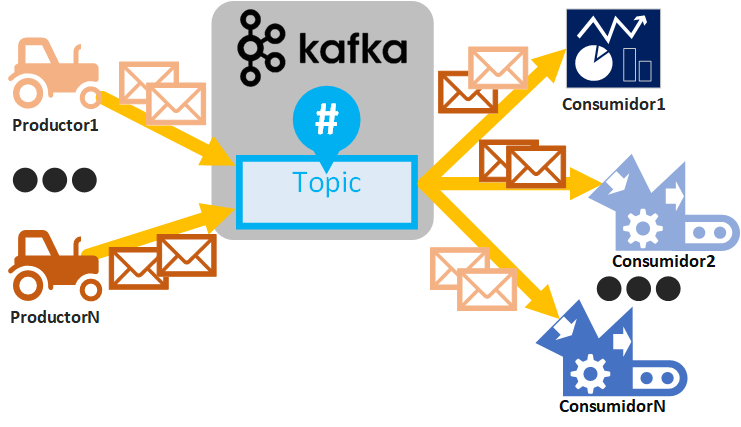
If you are only going to program Kafka Producers and Consumers, you can skip the rest of the Topic explanation (since it is the “black box” where things go in and come out), although I always recommend understanding everything so you can get the most out of its advantages and know how to avoid its limitations.
The Topic is “everything” in Kafka; the rest orbits around it (Consumers, Producers, Brokers, etc.), so before we start explaining how a Topic works we must keep in mind that a Topic:
- Is scalable through Partitions.
- Offers high availability through the “Replication factor”.
Of course, in an enterprise environment we will only achieve the above if we create a Topic correctly and have the necessary architecture (I’ll explain how to do all this easily, step by step). Now, let’s start with the definition of a Kafka Topic.
A Topic is divided into partitions (if no number of partitions is defined, by default a Topic will always have one partition). Different Topics can have different numbers of partitions.
For example, if we create 1 Topic with 2 partitions on 1 Broker:
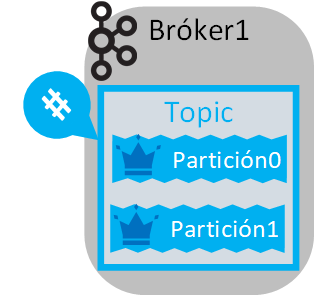
A partition is a message queue of the Topic (after all this talk about the “Kafka queue”, this is the real “queue”). If a Topic has a single partition, that is where all the messages will be queued. If a Topic has several partitions, then all the Topic’s messages will be distributed among the partitions (more or less evenly, according to an algorithm).
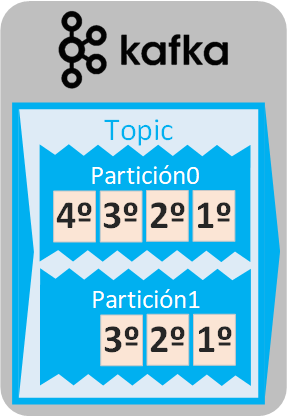
An important concept to understand is that in a queue the messages are ordered as they come in (that is, the first message that enters the queue will be at the head of the queue and will be the first to be read; the rest of the messages line up behind it and are read in order of arrival). Since a partition is a queue, the messages are ordered by their order of arrival in each partition and will be read starting with the first message of each partition, so if there is more than one partition, the delivery (consumption) order of the messages is not guaranteed. If we need to guarantee message order, either our Topic has a single partition or, if we have several partitions, we force all the messages to go to the same partition (this is achieved with the message Key, as we will see).
In the example with two partitions, messages will be queued in each partition in order of arrival, but when the messages are about to be read, any of the messages in the first position will be taken. This matters because in many cases we won’t care which message from which partition is read first; in fact, it will be an advantage for parallel message processing. But in other cases the order of the messages will matter (for example, if the messages are logs with the exact time, we will probably care about their order).
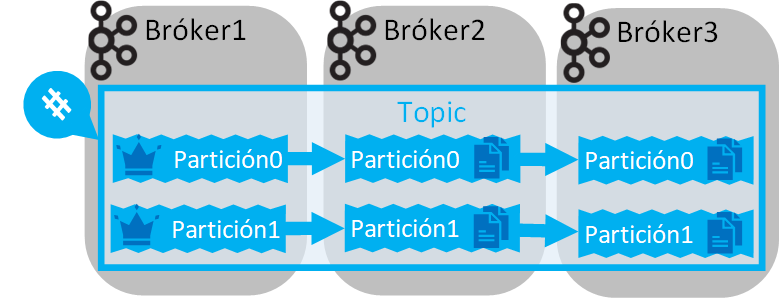
A partition always has a defined “Replication factor” that cannot be greater than the number of Brokers (if no “Replication factor” is defined, it will be 1 by default, meaning that a single partition is created).
For example, 2 Partitions of a Topic, 2 Brokers and a Replication factor of 2:

A “Replication factor” is the number of times we want a partition to be replicated (copying all the messages it holds) on other, different brokers. The main partition is called the “Leader” (in the images I represent it by drawing a crown), which is where Consumers and Producers will connect, and all the replicas will be a mirror copy of the Leader (that is, if a message is added to the Leader, all the replicas automatically get that message, and if a message is removed from the Leader, the replicas remove it too). The Leader partition can change, and a replica can become the new Leader if, for example, the broker where the Leader partition lives goes down (or dies).
For example, if the “Replication factor” is 3, it means we will have “two backup copies of a partition” plus the original partition (2 replicas + 1 leader) on different brokers (we will need a minimum of 3 brokers):
A Topic has to be created on a Broker and Kafka will automatically take care of distributing its partitions and replicating them among different Brokers.
If there are several Brokers, then the Partitions of a Topic will be distributed among all the Brokers (also evenly; that is, it will try to put one partition per Broker if there are enough, or all the partitions on the same Broker if there is only one). However, priority goes to distributing the replicated Partitions.
For example, we could have a “Replication factor” of 2 with 4 Brokers (keeping the Topic’s 2 partitions):
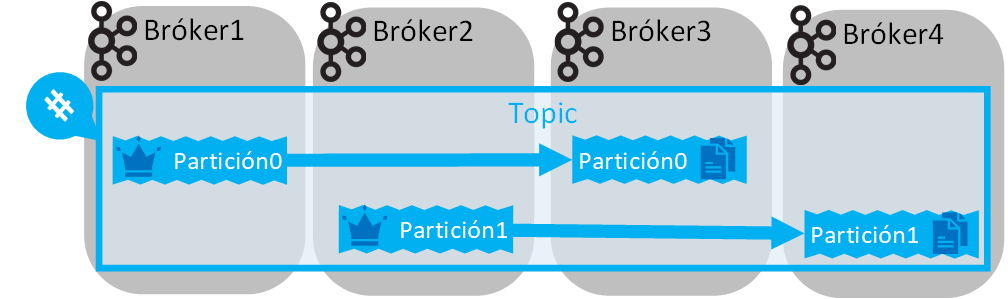
Some questions may come up here:
- How many partitions is it good to have? As few as possible, since splitting messages and managing them takes more processing time; but as many as possible to have multitasking, relieve congestion in the arrival of messages, and allow more Consumers to connect in a “consumer group”. This question is answered according to need, available resources, and testing.
- What is the ideal replication factor? Ideally, for production, no less than 3 (following the “3-2-1” backup rule to bring risk down to almost zero, where 3 is the number of replicated copies of the data, 2 must be different physical machines, and 1 machine located far away from the other 2); but the higher the replication factor, the more disk you will consume (replicas are exact copies of the data, so you will consume as many times the space as the replication factor you set; that is, if a Topic takes up 1GiB, with a replication factor of 3 it will take up 3GiB). For development testing a replication factor of 1 will be plenty, but not for production.
- How many brokers should we have? At least as many Brokers as the maximum replication factor of any of our Topics (if tomorrow we want a Topic with a higher replication factor, we will have to spin up more Brokers). The more Brokers, the more resources are consumed, so it’s good to add more as the need arises. It’s worth having the Brokers distributed across different machines (as mentioned before in the “3-2-1” rule: at least 2 different machines and 1 additional one far away from the other 2, for whatever might happen to the first 2. How far? It depends on the risk we assume; the worst that can happen to our machines is a big natural disaster, and if we want to prevent that, we should have a machine with the data safely stored as far away as possible). The downside of Brokers distributed across different machines is network consumption and a possible bottleneck.
Kafka Producer (Producer or Source in Connectors)
Producers send messages to a Kafka Topic.
A message is always made up of the content we want to send (a text, a JSON, etc. Kafka works at the byte level, so it doesn’t care what we send as the message content) and a key (if no key is assigned, it is null by default, which in practice is as if we assigned a unique key to each message, as we will see next).
A Producer has to connect to a Broker of a Kafka Cluster, so that it gets back the list of Brokers accessible to the Producer that made the connection request. The Topic the Producer wants to write to must be on one of those Brokers. If the Topic doesn’t exist, depending on the restriction, it will be created automatically on the Broker or its creation will not be allowed.
In the following example, the Producer (a robotic tractor that picks green and red apples from our field and sends a message to our Kafka server every hour) sends sequential messages (each with the number of apples picked at that moment, the type of apple, and the time) so they are queued in our Kafka Topic that we have called “Apples” (the Producer doesn’t know how the Kafka cluster is configured, it only knows which Topic to send to):

Although the Producer, at the software level, doesn’t know how the Topic is configured in the Cluster, the developer of the Producer needs to understand how a Topic’s partitions work and, if needed, ask whoever administers the Kafka cluster for more information.
When a Topic receives a message, it queues it in only one of that Topic’s partitions following Round-Robin scheduling (Planificación Round-robin (Wikipedia); in short, it is an even assignment of messages among the different partitions, although another type of scheduling can be configured). Before going on, a reminder that the partitions could be on different Brokers and, in turn, the Brokers could be distributed across different machines. Also remember that each partition is a queue (the first message in will be the first message out).
For example, depending on the configuration, any of the following cases could occur, depending on how many partitions our Topic has:
- 1 partition: Messages are queued as they arrive and we guarantee the output order of the messages when they are consumed by a Consumer.
- 2 partitions: Messages are queued evenly, so we do NOT guarantee the output order (when the Consumer goes to consume from this Topic, it may receive first any of the first messages of any of the partitions).
- 3 partitions: same as with 2 partitions, but with 3.
- Etc.
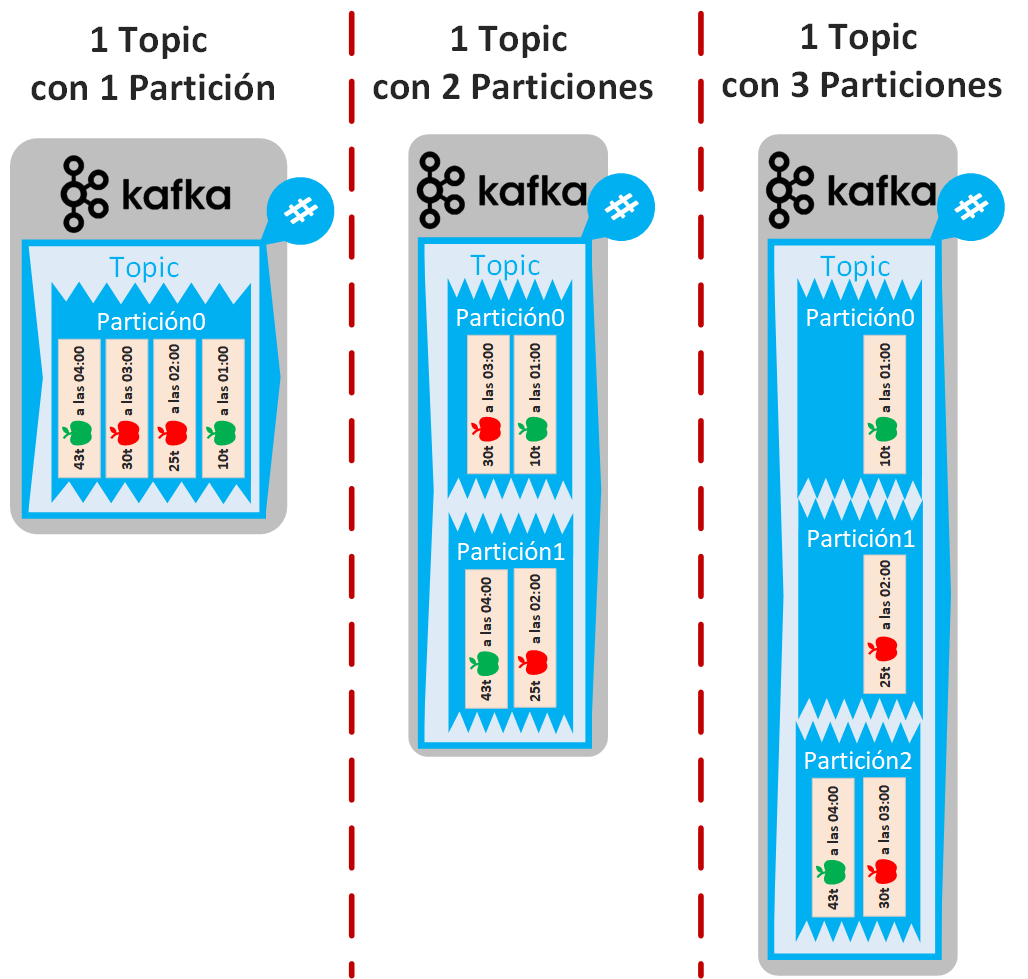
As a Producer we have some control over how messages are sorted among the partitions, and this is done by adding a key to each message. The beauty of this key is that it does NOT have to be unique, since messages with the same key are guaranteed to always be queued in the same partition; this way, when a Consumer gets the messages it will always get them in order. What we won’t know is which partition a given key goes to; Kafka handles that transparently. If there is only one partition, the key is useless. Since as Producer developers we may not know how many partitions there are, it’s best to assume there are several, so we will have to program the Producer with this in mind. For example, if we want apple types (red and green) to always be sorted and ordered by partition, we will add a key to each message (it can be a number or a text; in my example I used “V” for green apples (verdes) and “R” for red ones (rojas)). For my example, I set two partitions, so red apples will always go to one partition and green ones to the other:
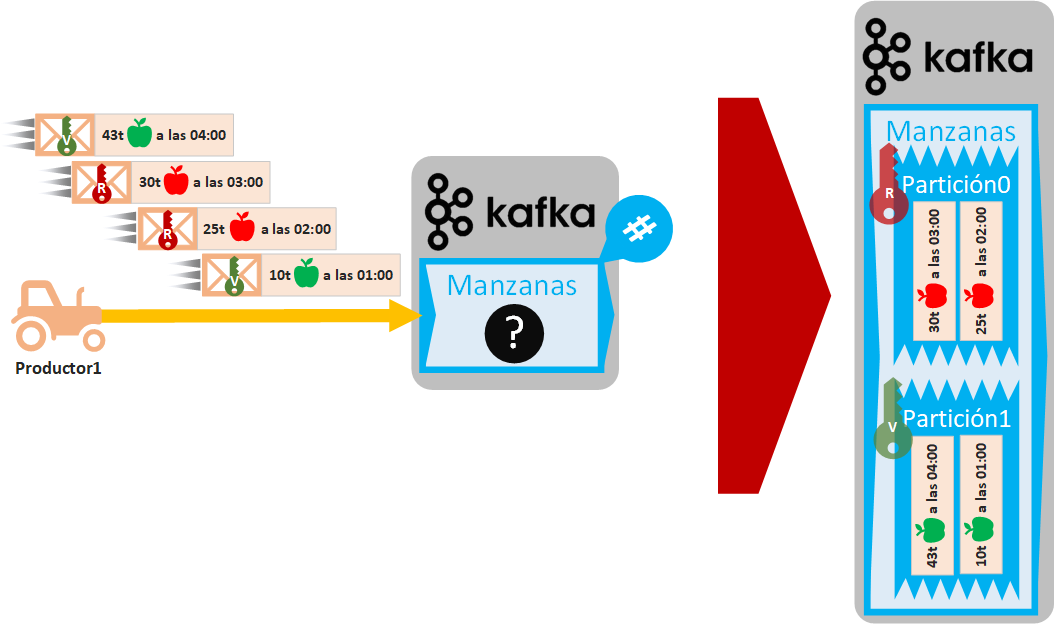
The downside of the key is that it prevents messages from being distributed evenly among partitions (Round-Robin scheduling won’t work at the message level). That is, if we have many partitions in a Topic and we give all the messages the same key, we will end up with a single partition holding all the messages and the rest of the partitions empty.
Several producers can send messages to the same Topic at the same time. If several Producers send messages at once, we can’t guarantee message order per Producer and all the messages will end up mixed together, even with a single partition (perhaps this isn’t as undesirable as other kinds of disorder, but you have to keep it in mind). In the following example, we have bought one more robotic tractor, so we will have 2 Producers sending messages. Those that coincide in time are sent simultaneously, so in our “Apples” Topic the messages sent by both Producers at the same hour will be queued randomly (in the example I use 1 partition so you can see the interleaving, but there could be any number of partitions).
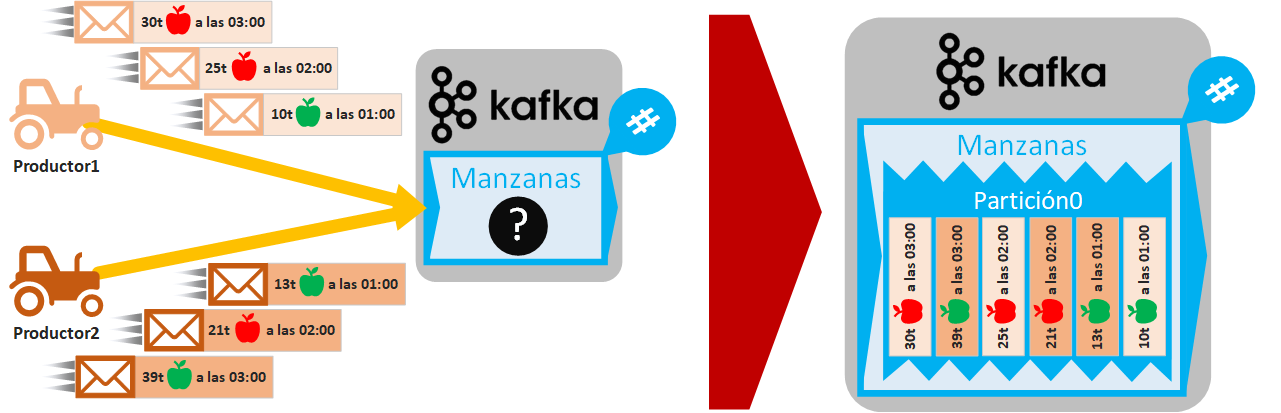
As you can imagine, if we add keys to the messages and there is more than one partition, as before, we can classify by apple type, although if the Producers each send a message with the same key, they will be queued randomly in the same partition. Another example of a different classification is wanting all the messages from each Producer to be separate in each partition; it’s a matter of playing with the keys to get whatever we want.
A Producer always gets messages from a data Source (Source) such as:
- Messages (not Kafka’s): such as those from social networks or for microservice communication.
- Activities: such as web activity tracking or video game tracking.
- Streaming: of real-time data or of processing (such as ETL).
- Metrics: measurements, such as from marketing campaigns (like website traffic) or from sensors.
- Events: such as from IoT (Internet of Things).
- Logs: such as audit or system logs.
- Data: from databases or Data Lakes.
- APIs: for example, we could query the Twitter API to get all the messages of a certain thread.
- A Kafka Topic: Data can be consumed from a Topic, processed, and sent again to another Topic or even to another Kafka cluster.
A Producer can be programmed in different languages such as Java, Python, Shell, etc. (as we will see later). Or you can use a ready-made connector (all the available Kafka connectors can be found at Confluent Connector Portfolio (Confluent)).
Kafka Consumers (Consumer or Sink in Connectors)
Consumers read messages from a Kafka Topic.
Similarly to Producers, a Consumer has to connect to a Broker of a Kafka Cluster, so that it gets back the list of Brokers accessible to the Consumer that made the connection request. The Topic the Consumer wants to read must be on one of those Brokers.
A Consumer will receive messages from one or several partitions of a Topic. In the following example image, Kafka sends messages from a Topic one by one and the Consumer that receives them processes them as they arrive (as soon as it receives a message it processes it, in real time). In the following example image, the Consumer is an industrial packing machine that creates boxes with each of the apples (this is a simplified example of doing ETL on the messages and extracting from each message’s String the numeric value and the color of the apple, discarding the time). Like Producers, the Consumer doesn’t know the Topic’s partitions, since it doesn’t care; it just wants messages to process:
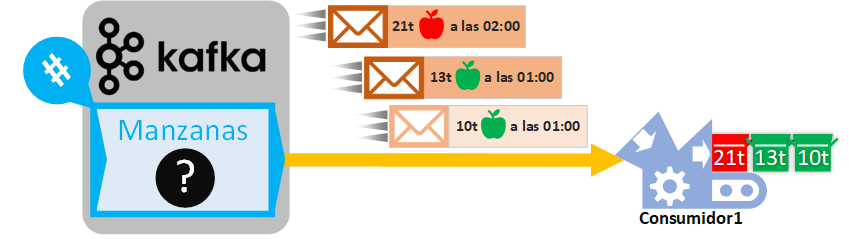
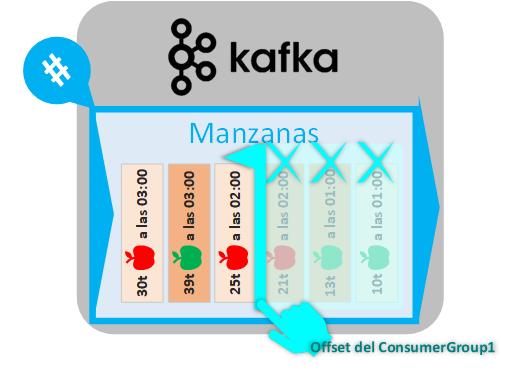
At this point it doesn’t matter whether we stop the Consumer process and start it again a second later or after a long time (as long as the “retention time” isn’t exceeded). Whenever we start our Consumer again, it will read the next messages from Kafka (without repeating the messages it already read), all without saving state, since the one that keeps the state is Kafka, with a pointer called the “Offset”.
The “retention time” is the maximum time a message can stay queued in a Kafka Topic; after that time (which is configurable), the message will be deleted whether it has been read or not. Messages don’t stay in Kafka forever so as not to fill up the hard drives, because they will already have been processed, to remove old messages that are no longer important (for example, if we store today’s weather data in Kafka, by tomorrow we won’t even want to process yesterday’s, since it no longer matters to us), and to lighten the load on Kafka itself.
The “Offset” is a pointer that keeps track of the last message sent from a Topic to a “consumer group” (we’ll look at it a bit later). Put another way, sent messages are marked as sent in the Topic (watch out: it is NOT stored in the Consumers) and they are no longer sent again to the Consumers that belong to the same “consumer group” (since they are assumed to have been consumed previously by some Consumer of the “consumer group”).
This way, in our previous example, there will be an Offset indicating the messages sent to the Consumer from the Topic it is receiving them from:
A Consumer is always grouped within a “consumer group”.
A “consumer group” is a set of Consumers that cooperate to consume data from one or more Topics. If no consumer group is defined, by default all Consumers will belong to the same one.
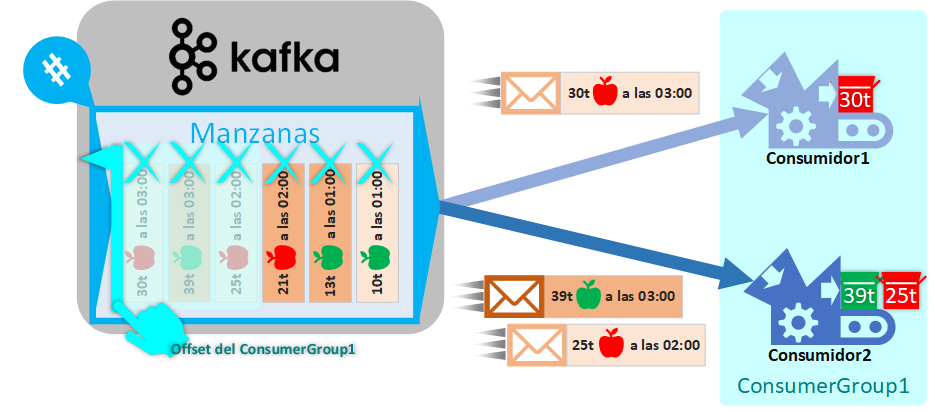
Consumers within the same “consumer group” will always receive different messages from the Topic (that is, two Consumers of the same “consumer group” will not receive the same message).
For our previous example, Consumer1 had always belonged to a “consumer group” that I called ConsumerGroup1, so if we add a new Consumer2 to the same group and Kafka sends us the rest of the messages, the messages will be split evenly among all the Consumers in the group. And, as you would expect, the “consumer group” offset will advance to mark the sent messages.
Each “consumer group” will have its own Offset pointer, so the consumers of different “consumer groups”
For our example, if we add a new “consumer group” ConsumerGroup2 and add a Consumer to it, it will start receiving all the messages of the Topic from the beginning (actually, by default, a Consumer that connects now will start reading new messages as they arrive, not past ones, although this behavior is configurable and for the example it’s clearer if they are consumed from the beginning), since this new group’s Offset will be pointing at the first message and will advance from the start as messages are sent to it.

There are ways to move the Offset of a “consumer group”, although moving the Offset is not recommended except for development purposes, or to reprocess messages that were previously processed and that for some reason have to be consumed and processed again
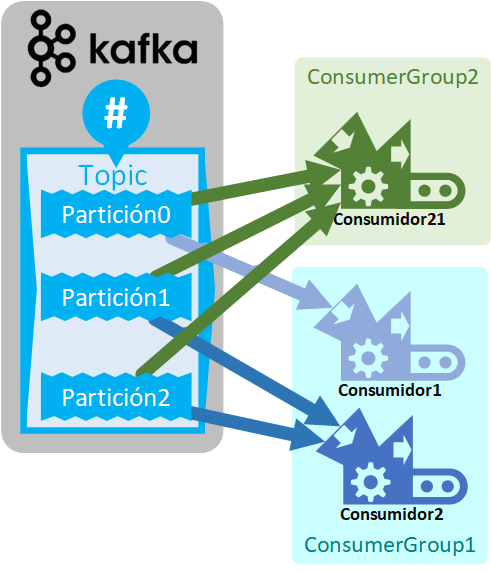
A “consumer group” can have one or several Consumers, but there should not be more Consumers in the “consumer group” than Leader Partitions the Topic we want to read has (the extra Consumers will not receive messages, and replicated partitions don’t count toward this maximum). The Leader partitions of a Topic are assigned to the Consumers of the “consumer group” (evenly).
For example, if the Topic has 3 Partitions, we can have up to a maximum of 3 Consumers within a “consumer group” (no more, since there are no more Partitions to assign to a Consumer). In our example, ConsumerGroup1 had 2 Consumers, so 1 Partition will be assigned to one Consumer and the other 2 to the other Consumer. Whereas ConsumerGroup2, since it has only one Consumer, will be assigned all the partitions:
A “consumer group” can receive messages from different Topics.
Consumers can be scaled easily, so if, for example, we have a Consumer in a “consumer group” that consumes data more slowly than it is produced into the Topic, it is recommended to create another Consumer in the same “consumer group” so they process this Topic’s data in parallel and speed up the processing of the Kafka queue (then, the partitions will be reassigned among all the Consumers in the “consumer group”). If a Consumer fails or is removed from the group, the rest of the Consumers will receive the messages that were meant for it (its partitions are automatically reassigned among the remaining Consumers in the “consumer group”). When partitions are reassigned to the Consumers of a “consumer group”, it is called a Rebalance, and during the rebalance no messages can be consumed.
All Consumers send their messages to a data sink (Sink), such as (which may or may not coincide with the data Source):
- Databases: each queued piece of data could be analyzed to decide whether to persist it in a traditional database (MySQL, MariaDB, Oracle SQL, etc.), a Big Data one (Hbase, Bigtable, Hadoop, HDFS, etc.), or to extract certain data to send to a dedicated one (NeoJ, MongoDB, etc.).
- Analytics and audits: we could generate reports and visualizations (dashboards) with real-time statistics as the Kafka queue returns the data.
- Messaging system (social network posts, Email, notifications, etc.): this would be data queued in Kafka sent from users to the system (like the posts users upload to a social network, which would be passed to a Kafka queue and consumed by the system that processes them for different purposes: filtering spam, detecting keywords, etc.)
- ETL processing: we can have intermediate processes that consume messages from Kafka, process them, and send them somewhere else (or queue them again in the same or another Topic).
- A Kafka Topic: Data can be consumed from a Topic, processed, and sent again to another Topic or even to another Kafka cluster.
Just like Producers, a Consumer can be programmed in different languages such as Java, Python, Shell, etc. (as we will see later). Or you can use a ready-made connector (all the available Kafka connectors can be found at Confluent Connector Portfolio (Confluent))
Semantics
Distributed publish-subscribe messaging systems ensure a high degree of reliability, but they are not perfect; delivering 100% of all existing messages is hard. Kafka ensures high reliability, but Consumers and Producers must be designed carefully to ensure idempotence (no repeated data and no missing data).
Semantics in Kafka:
- At most once: If messages are lost, they are never sent again. If the client is a Producer, it sends each message to Kafka only once; if it is a Consumer, as soon as Kafka sends it the message, the Offset advances.
- At least once: If messages are lost, they are sent again, so the same message may be sent several times. If the client is a Producer, it sends messages to Kafka and receives an acknowledgment of receipt (ACK); if it doesn’t receive the acknowledgment within a certain time, the message is sent again. If it is a Consumer, it is the one that sends the acknowledgment of receipt to Kafka (if Kafka receives the ACK it advances the Offset, otherwise it sends the same message again).
- Exactly once: Ensures the message is sent once and only once. Requires cooperation between Producers, Consumers and Kafka.
More information about semantics at: https://kafka.apache.org/documentation/#semantics
Broker, Zookeper, Quorum and Kafka Cluster
Kafka Topics are created and all their partitions are maintained by a process called a Broker that is started on a machine (this machine can be anything from your computer to a server, a virtual machine, etc.).
Kafka brokers only store byte arrays, since they act as a data buffer. Storing the data as byte arrays gives Kafka versatility, because those byte arrays can be anything (texts, images, songs, Java or Python objects, etc.). Therefore, everything (messages and keys) we send to a broker as Producers we will have to convert (encode) beforehand to byte arrays (encoding any data structure into a byte array is called “serializing”); and the messages we get from a broker as Consumers we will have to convert back (decode) to the data type we want (decoding a byte array into a data structure is called “deserializing”).

We can have one or several Brokers managing the same Topic. If we have more than one Broker, one Broker can hold the Leader Partition and others the copies, so the Topic is considered distributed at the local level.
There is always at least one Broker that is the Coordinator. The coordinator Broker is in charge of listening to the heartbeats (heartbeats) of the clients (Consumers, Producers and the other Brokers) to know whether the clients are still alive. A heartbeat can be an ACK or a Consumer’s request for messages, for example. If a coordinator Broker doesn’t receive heartbeats from a client within a session time, that client is considered dead (if the client was a Consumer, a partition rebalance will start).
As we said, each Broker is a process and all Brokers are managed by another process called Zookeper. Zookeper stores metadata (partition locations and Topic configuration), is the one that decides which partition of a Topic is the Leader, and communicates with other Zookepers (for remotely distributed Kafka). That said, a Broker doesn’t work on its own; a Broker always needs Zookeper to work.
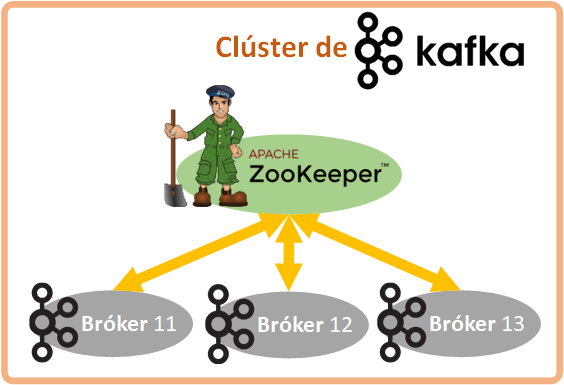
Note about Zookeper: When I was writing this article, Kafka’s creators were working on integrating Zookeper into the Broker, so that you wouldn’t have to depend on two separate processes (that is, so Broker and Zookeper become one) and Kafka would be easier to use. Either way, it’s important to understand the concepts of Broker and Zookeper separately, since we will need them to understand how to configure Kafka and how to work with Kafka well.
All the Brokers communicating with each other through the Zookepers is what is known as a Kafka Cluster.
When a Producer or Consumer connects to a Broker of the Kafka Cluster, it is sent all the Brokers of the cluster so it can connect directly to the one that has the Leader Partition of the Topic it needs. Additionally, a good practice is to specify in the Producer and Consumer a default list of Brokers (all the Brokers of the Cluster, if possible), so that if a Broker is unavailable at some point, the Producer or Consumer can try to connect to the next one.
Having a single machine for our entire Kafka cluster is very risky (everything local), because if that machine is destroyed, the availability of the information is lost (for example, if our website depended on that data, it could no longer serve users), and the data that machine held would be irrecoverably lost. The advantage of having several Brokers on a single machine is the distribution of workload among processes and that if one of the processes dies (for example, because the operating system killed it for lack of memory), the rest of the Brokers keep working.
If we want to properly distribute our Kafka cluster, then we will need to distribute it across several remote machines. So we can have Brokers on different machines, each machine managed by a different Zookeper. At the Kafka level, the different machines communicate through the Zookepers of each machine (with what is called a Quorum). This way, the Leader Partition of a Topic will be on one machine and the copy on another; if one of the machines is destroyed, Zookeper will elect a new Partition as Leader (if the machine hosting the Leader partition was the affected one), Kafka will keep working as if nothing had happened, and as soon as we bring up another machine with its Zookeper connected to the rest and with its Broker, Kafka will redistribute itself (given prior configuration). Similarly to a Topic’s partitions, when we have several Zookepers (each on its own machine), one of the Zookepers is the Leader and the rest are Follower Zookepers of that Leader. All the Zookepers in the cluster know where the rest are, so if a Zookeper fails (for example, the machine catches fire), the Leader is reassigned if necessary and Kafka keeps working as if nothing had happened.
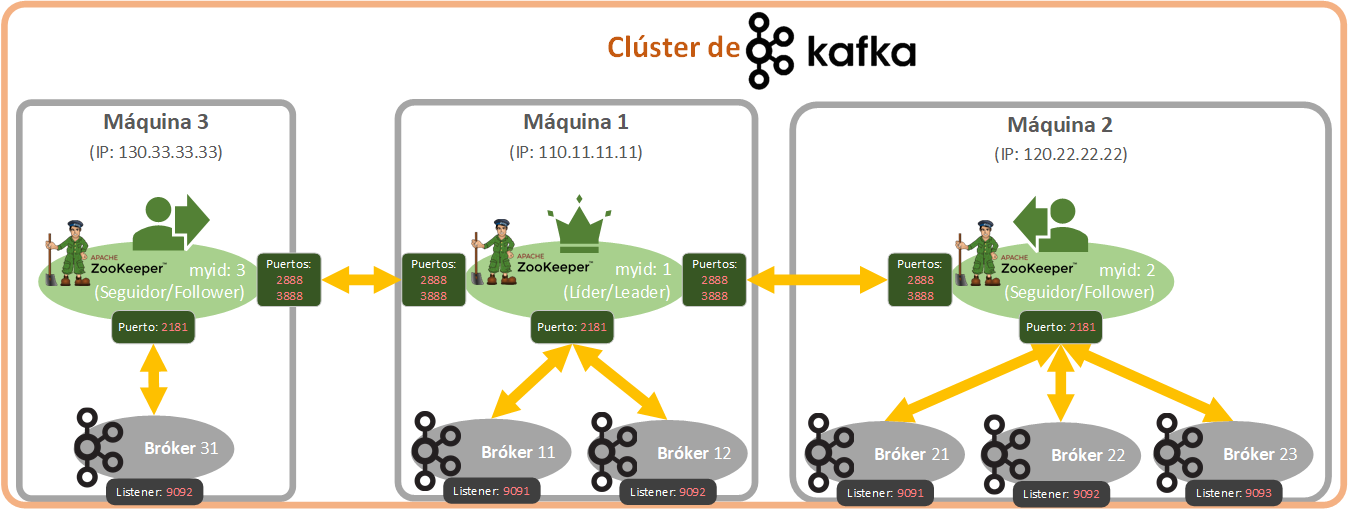
In the previous image I added the ports, since it’s important that we’re at least familiar with the ones that matter: there are ports for communication between Zookepers (by default: 2888 and 3888), for communicating the Brokers with their Zookeper (by default: 2181), and for communicating each Broker with Producers and Consumers (by default: 9092, although each Broker will have its own). If we are programming Consumers and Producers, we are mostly interested in the last port, for communicating with the Brokers. Also, each Zookeper has a unique identifier, as do the Brokers. Every Broker and Zookeper we have will have its own configuration file. Earlier I mentioned Quorum, which is the controller in charge of managing message replication among several brokers, and also of managing which Broker is the Leader (leader) and which are the Followers (followers) using an algorithm. We won’t use it directly, but it comes into play especially when we have several Brokers.
Kafka Connectors
As we have seen, Kafka doesn’t distinguish the data when processing it as bytes, but we do have to differentiate the Platform we connect to with Producers and Consumers, since they will be very different Sources (Source) or Sinks (Sink) of data.
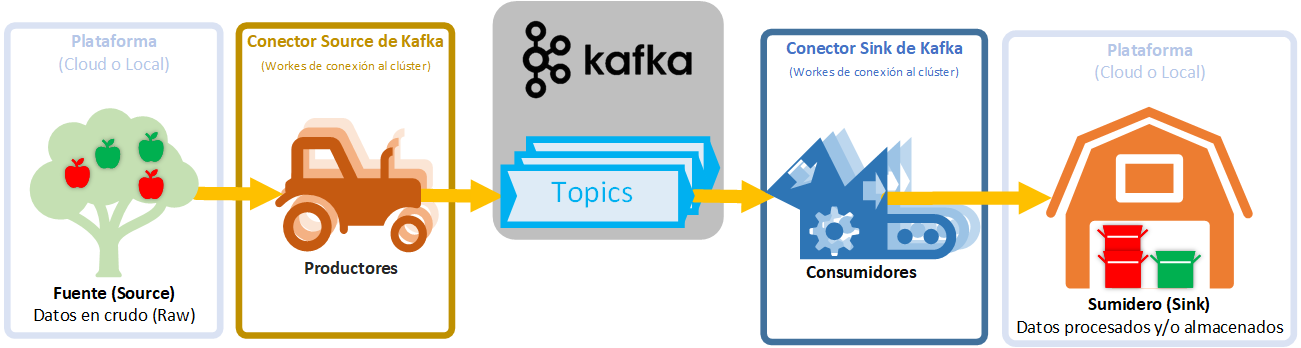
The data Source and Sink may or may not coincide as the input and output of a Kafka Topic. There are many data Sources and Sinks, and they can be: JDBC, SAP, Blockchain, Cassandra, DynamoDB, FTP, IoT (Internet of Things), MongoDB, Salesforce, Solr, Twitter, Amazon S3, Google BigQuery, Azure, Oracle, Datadog, ElasticSearch, ElasticSearch, HDFS, JDBC, SAP, DocumentDB, Cassandra, DynamoDB, HBase, Redis, Splunk, Adobe, Neo4j, etc. Among many others.
To connect to all these Platforms (data Sources/Sinks) there are numerous Connectors already built (Producers and Consumers ready to be used easily and quickly) that can be found (classified by Source/Sink) at Confluent Connector Portfolio (Confluent) or we can also program a solution suited to our needs (hand-coding the Producers and Consumers).
Note about “traditional” databases: there is a universal connector called Debezium that can connect to multiple databases such as MySQL, PostgreSQL, SQL Server, MongoDB, etc.
Advantages and disadvantages of Kafka
They should help you understand what Kafka is good for and what it shouldn’t be used for. Kafka should complement other data structures (such as Data Lakes, Data Warehouses, databases, Hadoop, Elastic Search, etc.), but it doesn’t replace them.
Advantages of Kafka:
- Optimization: It is a system optimized for reading and writing new data (events).
- Unlimited writes: Kafka appends data sequentially to a large file on disk.
- High reliability: fault tolerant, so we won’t lose data.
- Sequential data ordering in each partition: all consumers read the data in the same order.
- Write only once: reduces the load on the consumer side.
Disadvantages of Kafka:
- Data retention is very expensive: between 10 and 100 times more than storing data in the cloud (in a Data Lake), since Kafka stores several copies of the messages on different hard drives of different machines.
- Poor access to specific data: a Kafka consumer has to read a whole record and get a specific piece of data out of it, which is a waste of resources compared to Apache Parquet (which stores data in columns to access specific data quickly).
- More consumers, less performance.
- Data governance per consumer: for each consumer to have good data quality, it requires deduplication (smart compression of the data to eliminate copies of repeated data), schema management and monitoring.
Kafka in action
If you want to understand how Kafka works in an easy and visual way, I recommend taking a look at Kafka Visualization (SoftwareMill), where you can play with several configurations and see in an animation how Kafka works.
For those of us who are more technical, we will need to go into more detail, so in the following articles we will look in detail at how each of the things we have seen in this introductory article about Kafka works.
Keep learning
This article is the first in a series of more technical articles about Apache Kafka. Depending on whether we are interested in installing Apache Kafka, configuring it, or simply programming Producers and Consumers, one article or another will be of interest, or maybe all of them if we want a complete picture:
- Apache Kafka: a deep look at the key points and the theory (current article).
- Install Apache Kafka: Installation and usage from the terminal (recommended to get a general idea).
- Apache Kafka Consumers and Producers with Java and Python: code examples for connecting and handling messages (mainly recommended for developers).
- Fault-tolerant, high-availability Apache Kafka cluster: configuration of several brokers and a system distributed across several machines (mainly recommended for sysadmins).
References
- Apache Kafka website: Apache Kafka
- Apache Kafka documentation: kafka.apache.org/documentation
- Connectors: Confluent Connector Portfolio (Confluent)
- About semantics: Exactly-once Semantics is Possible: Here's How Apache Kafka Does it (Confluent)
“Apache Kafka” by Ramón Invarato at jarroba.com, licensed under Creative Commons Attribution-NonCommercial-ShareAlike 3.0. Registered at Safe Creative.

You may also like
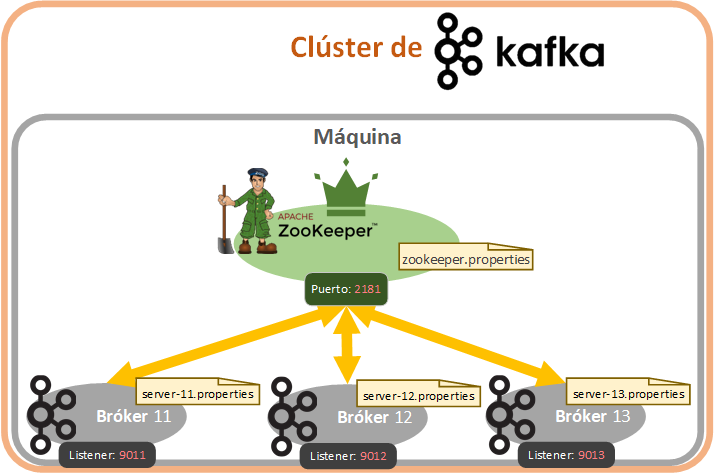
Fault-Tolerant, Highly Available Apache Kafka Cluster
Learn how to set up a Kafka cluster with multiple brokers, distributed across several real cloud servers, step by step.

Apache Kafka Consumers and Producers with Java and Python
Learn step by step how to program Kafka Consumers and Producers in both Java and Python, and test them in a real environment.
Leave a comment