
Client vs Server
Client and Server is an architecture for communicating and splitting up tasks. The Client asks for something and the Provider (Server) offers what was asked.
Client and Server: two terms that many thousands of people work with every day to keep everything running, and that have such a high level of abstraction that they often remain a pending subject because they get confused and mixed up. In this article you’re going to discover the difference and everything it involves, and without writing a single line of code, just by reading and understanding the explanatory images.
“Client and Server” is an architecture for communicating and splitting up tasks. And instead of “Server” I prefer the word “Provider” to understand it in detail and avoid the typical confusions that the word “Server” carries with it (although once we understand it, we’ll always use the word “Server”). So, it would be the “Client and Provider” architecture, where the “Client” is the one who asks for something and the “Provider” is the one who offers what the Client asked for.
On the street, a person is a “Client” in a shop and the shopkeeper is the “Provider”, but outside the shop that person is no longer a “Client” and the shopkeeper is no longer a “Provider”. Why bring this up? Because when the shopkeeper goes shopping at the wholesaler (a store where shops buy in bulk, by the pallet/crate of products), he is no longer a “Provider” but a “Client”, and the person in charge of the wholesale center is his “Provider”. Also, a person at home can ask a second person for a favor (Client), and that person would do it (Provider). As you can see, even at the level of people these terms are a bit tangled (they change hands); and yet the concept is no more complicated in the “Client and Server” computer network architecture.
Let’s go back to calling the “Provider” a “Server”, and we’ll never again call the “Server” a “Provider” in the computing context (since the technical computing word is “Server” and not “Provider”). The term “Server” is a synonym of “Provider”, because a “Server” is the one that serves a “Client”. When working with computers it’s not unusual for the meaning of “Server” to get separated from that of “Provider” within computing itself, and for the word “Server” to be understood as a set of Hardware and Software things that work far away, remotely, to return data over the Internet. However, that’s one part of the truth, but not the whole truth (as you may suspect if you compare it with the previous paragraph about people, shopkeepers and wholesalers).
Note about the following paragraphs and the images that go with them: The paragraph right above each image describes things step by step with numbers in square brackets [N], which refer to the red circle with the matching number in the image (I recommend glancing at the image every time one of these numbers appears in the paragraph).
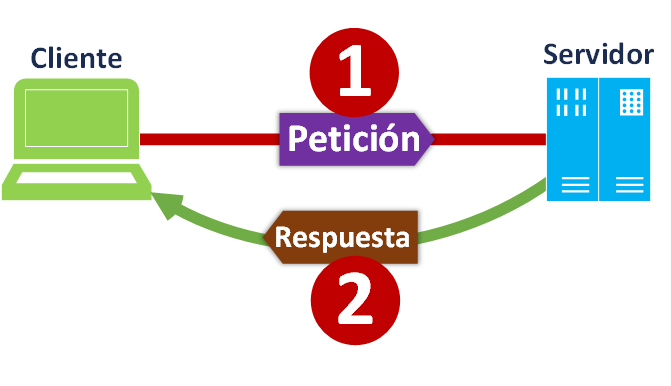
The simplest “Client and Server” architecture we know is the typical one where you have a computer (Smartphone, Tablet, Laptop, etc.) acting as the Client and sending requests [1] (through an app, web browser, email client, etc.) to a Server (a physical server that runs Software Servers), which is on the other side of the “Internet” at the other end of the planet, and which processes this request (an example of a request could be wanting to see the website www.Jarroba.com) and returns a response [2] (for example, the content that makes up the website: text, images, etc.).
The same “Client Server” architecture can get more complicated, and what was a Client can become a Server. For example, imagine you have a Smartphone in your right hand that connects to the Smartwatch on your left wrist. The Smartphone has a messaging app installed (like WhatsApp, Hangout, Telegram, etc.) that as a Client makes requests [1] to a physical Server (over 3G, 4G, 5G, etc.) asking whether there are new messages, the physical Server responds [2] with the new messages that arrive at the Smartphone; then the Smartwatch asks [3] as a client the Smartphone, which now changes roles, as a Server, and since the Smartphone has messages in its memory, it returns them [4] to the Smartwatch.
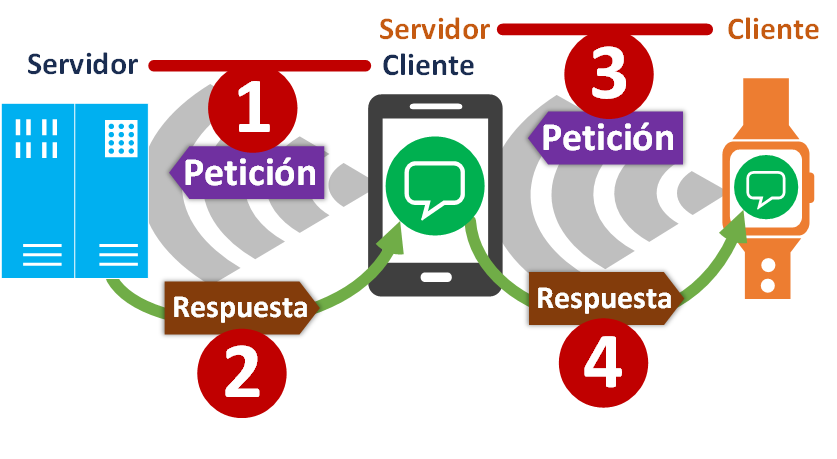
Actually, inside the Smartphone there will be several Software processes, some acting as clients (making requests) and others acting as Servers (processing requests); although there could also be a single process that does it all.
Another change of roles between Client and Server that is very popular right now comes up when talking about: Cloud (data processed in a distributed way, but without you noticing) and Big Data (huge amounts of data that have to be processed as fast as possible).
Let’s take a web search engine as an example, like Google, Bing, Yahoo! or any other. When you run any search in one of these web search engines through a browser (for example, Chrome, Firefox, etc.) acting as the client, it makes a request [1] to the physical Server. But it turns out that this physical Server is not the one that holds the data (there is so much of it that it’s completely impossible to handle, process in a reasonable time and store that much information on a single physical Server); so, it will take care of orchestrating (balancing) the operations by making the request as a Client (Yes, a Server acting as a Client. Crazy!) to many other physical Servers (which will be the “Nodes” of this network of physical Servers) and asks them at the same time [2] to return the data related to the search. Then, the physical Servers acting as Nodes will each process the request (in parallel with the rest of the Node physical Servers), looking for whatever information each one has about the query; when a physical Server Node has its part of the information ready, it immediately returns it [3] to the physical Server that orchestrates (that balances). It turns out that when the orchestrating physical Server (the balancer) gathers all the information from all the Node physical Servers, it puts it back together and sends it [4] to the main Client that was you, searching for something in the web search engine.
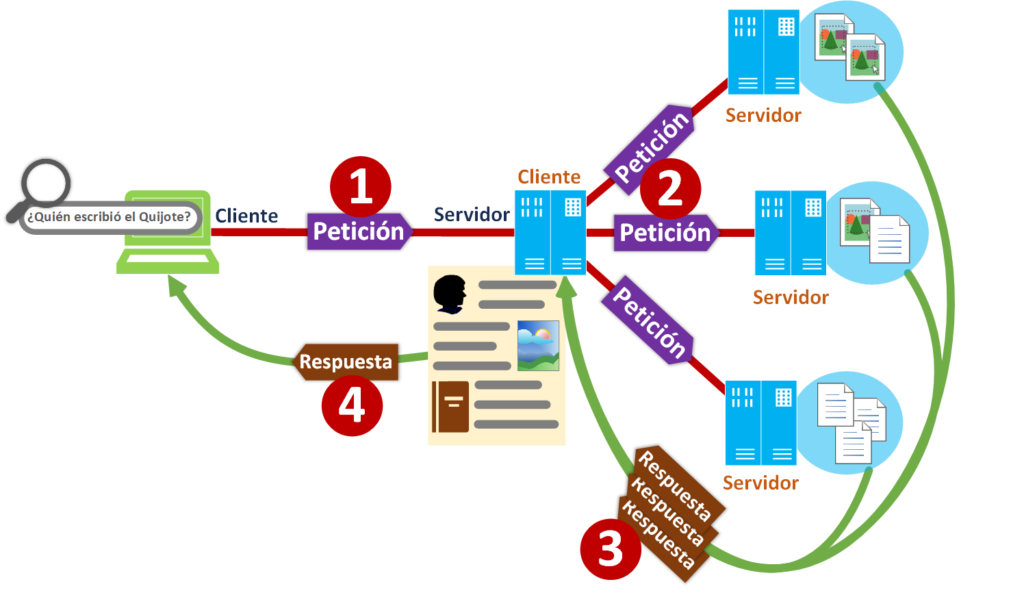
What we just explained is called “load balancing”, because a main Server called the “Balancer” (or “load balancer”) distributes the workload among the secondary Servers called “Nodes” (both when storing the data and when distributing the work).
Note about load balancing: Here I’ve simplified it a lot so the idea is easy to understand. However, a large company like Google or Facebook will have Balancers that distribute the data to store it in the Nodes, other physical servers that analyze the data stored in the Nodes (for example, indexing the information so your search is instant later, running statistical calculations on that information, like getting an idea of your tastes to show you ads, analyzing images to extract their text, or using machine learning to work out what’s in photos so you can search them later; if you’re curious you’ll find more information about data indexing by clicking here and about Machine Learning by clicking here), and other servers in charge of gathering the information to return it.
I have to confess that the crazy claim of a “Server acting as a Client” is a bit of a trick, because it plays with mixed-up definitions and we need to be more specific (similar to what happened with the Smartwatch and the Smartphone; the difference is that here several things grouped together are called “Server”): Actually, it’s a physical server (a computer/machine) with two processes working inside, one acting as a Software Server (which could be a Web server, a Sockets server, etc.) and another process acting as a Client, which is a program that runs when the Software Server gets the user’s question (the Client’s code could also be implemented inside the Software Server’s process, so it would work as a single program that acts as a Server on one side and as a Client on the other), at which point the Client process distributes the question and waits for the answer. And is it right to say “Server acting as a Client”? Yes, if we understand this context. And it doesn’t end here.
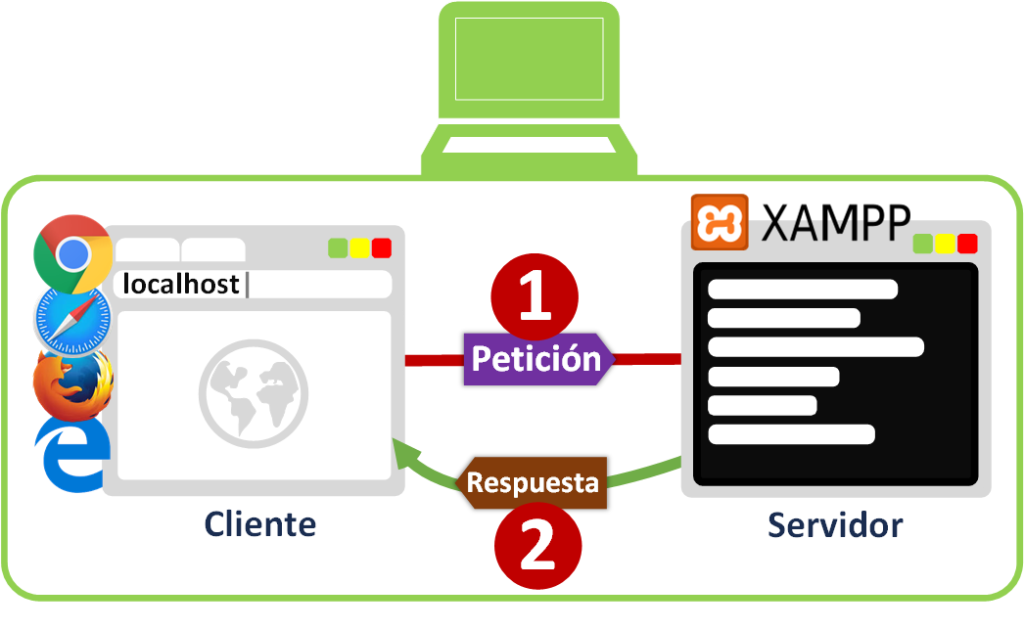
We’ve seen Servers that are on different machines than the client, but it turns out that a Server can be inside the same machine as the Client. For example, if we install an XAMPP server (if you’re curious, here’s how to install XAMPP in this article, click here) on our computer, we’ll have a Web Server that we can call [1] from our Internet browser (any of them, like Chrome, Safari, Firefox, Edge, etc.) acting as the client inside the same machine. And which IP do we call? The localhost one (which is 127.0.0.1), which indicates that we want to make a request to the same machine (this request never goes out to the Internet). And just like a Server at the other end of the planet, but without leaving your computer, XAMPP will return [2] a web page that will be shown in your browser. Which web page? The interesting thing about XAMPP is that it’s used to test locally the website you’re building/designing as if it were published (so only you can see it).
And then there’s the combination of everything. One example is online video games. Imagine you want to host a match with your game console (a computer/Smartphone with the game installed works too) and have several of your friends join through the Internet (in a game where you create the match; for this example a massively multiplayer game doesn’t count). Your console will start a process inside that will be a Software Server for the game in charge of managing the match (each player’s character position, collecting the commands sent by the different players’ controllers, and if some players suffer from lag, the Software Server will act as a judge deciding whether the shot killed another player or whether he had time to dodge it, etc.). Also, inside your console you’ll have the client, which is the game itself (more precisely, a process that collects all the information, packages it and sends it to the Software Server), which will make requests and receive responses [1] from the internal server (just like the XAMPP Software server explained before), without leaving your console. On the other hand, the rest of your friends’ consoles [2] connect over the Internet to your console (which acts as the physical Server; although inside it has a Software Server and a Client running at the same time) so the Server manages the match and all the players can play the same game at the same time, interacting with each other.
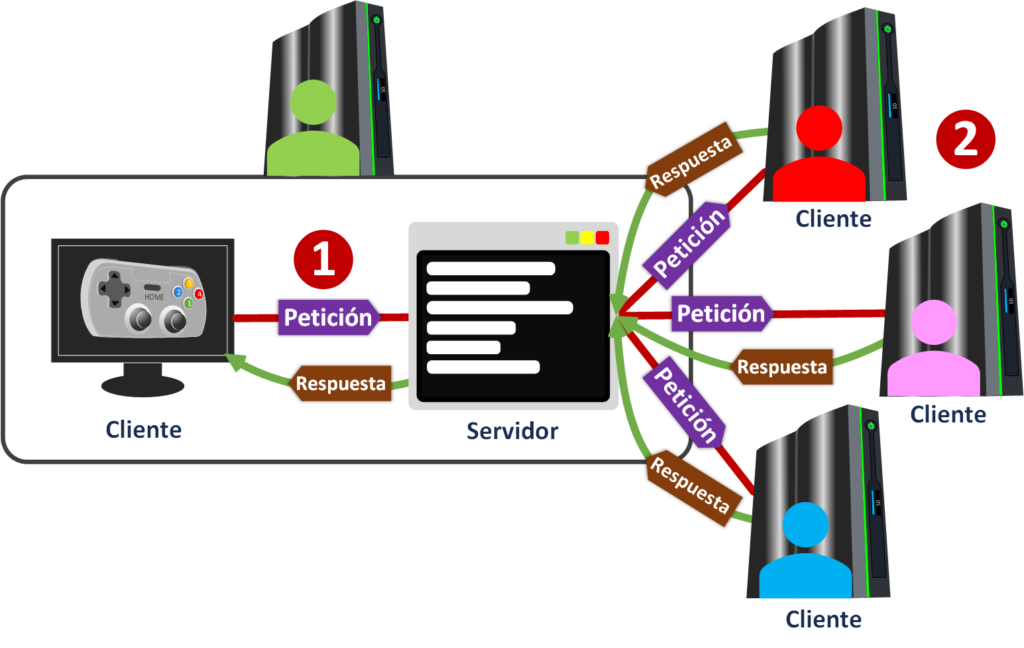
Note if you’re a regular gamer: This explanation is mostly valid when you play on a local network (everyone connected to the same Router), and it used to work this way over the Internet too. Nowadays, just like massively multiplayer games, when you want to create a match it’s usually created on a physical server owned by the company that distributes the game, although there’s a bit of everything.
What runs on the Client and on the Server
More or less all Software servers work in a similar way, and so do clients. Here I’ll use a website with a certain complexity as an example to understand how it works.
As always we’ll have two parts, and for this example they are:
- The Client: it will be the web browser (Chrome, Safari, Firefox, Edge, etc.) installed on our computer.
- The Server: a physical Server whose operating system is Linux and has several files inside directories. The physical Server’s operating system has the Apache web Server installed and also has the MySQL Database Server installed. That is, it will have 2 Software servers running at the same time.
For the Apache web Server to do its job, it will continuously monitor the folder called “www” (when the Apache Server is installed, it creates it inside Linux’s “var” directory by default). So, any file inside the “www” folder will be visible directly from the browser.
On the other hand, the MySQL database Server will create and monitor the database files it creates (these will be files with the “.db” extension in a private folder so that only this database server has access; these files will hold our website’s data, such as users, website content like the text of the article you’re reading right now, etc.). The Apache web server can query the database’s data using SQL queries (the SQL language is used to get data with certain filters, for example in “pseudocode”: “I want to see the users who are of legal age” or “I want to see all the cars that belong to each user as long as the user has a red car”) so that the database Server looks through its files and returns the result to the Apache web server.
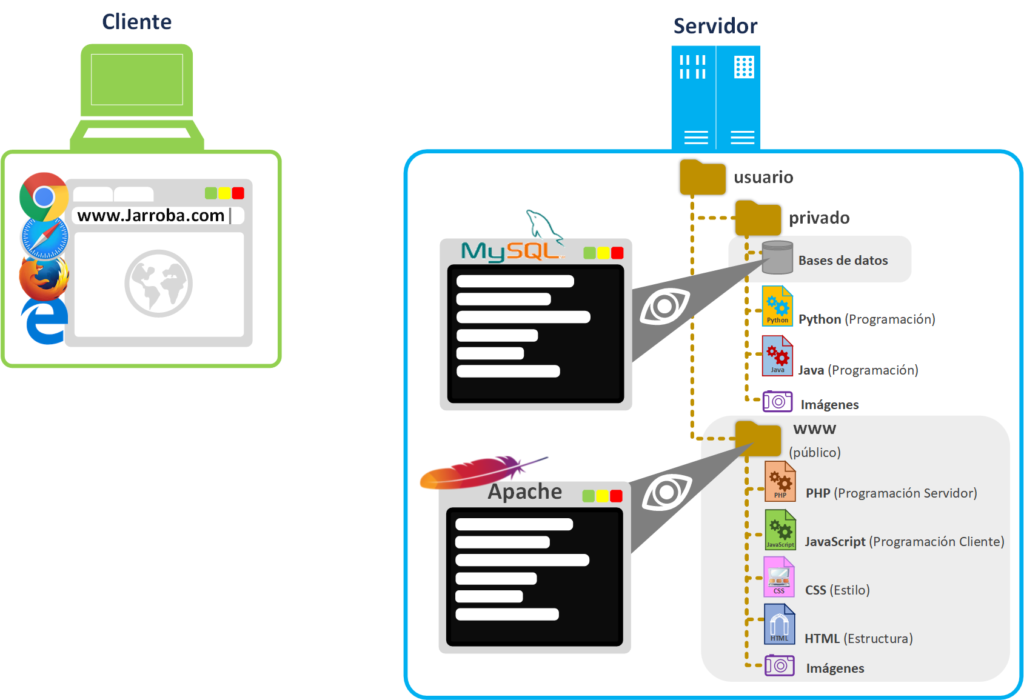
Everything outside the “www” folder will be private (we could also play with permissions so the Apache Server doesn’t have access to certain files in the “www” folder, but be careful with permissions).
Let’s try something that’s public on the Jarroba server. In a separate tab, try typing into your browser’s address bar: https://jarroba.com/images/logos/logo_jarroba.png. You’ll see the logo image of the www.jarroba.com website, which means the web Server got that image from the directory “www/images/logos/logo_jarroba.png” and returned it to you.
Security tip: put everything that should NOT be accessible to the rest of the world outside the “www” folder. And if you can, give those private files more restrictive permissions or have different users with different permissions (for example, one user for the Apache server and the “www” folder); but be careful with permissions and users, I only recommend it if you have experience: with badly set permissions you can give access to private files by accident or block files that the Apache server needs.
As you could see in the previous image, our physical server has two folders:
- www: public folder from which the Apache web server will take the files requested by Clients. For these examples I’ve stored these files inside: PHP, JavaScript, CSS, HTML, Images, etc. (I explain all these files later on).
- private: it actually represents the rest of the physical Server’s folders that the Apache web Server can’t access. I’ve put these files in it: Python, Java, files with the database’s data (for example, for the MySQL database server it’s the “.db” extension), Images, etc.
Although you need to know the address to be able to access the files in “www”. That is, I had to tell you that the image was specifically at https://jarroba.com/images/logos/logo_jarroba.png for you to see it; if I hadn’t told you, you wouldn’t have known that image was there.
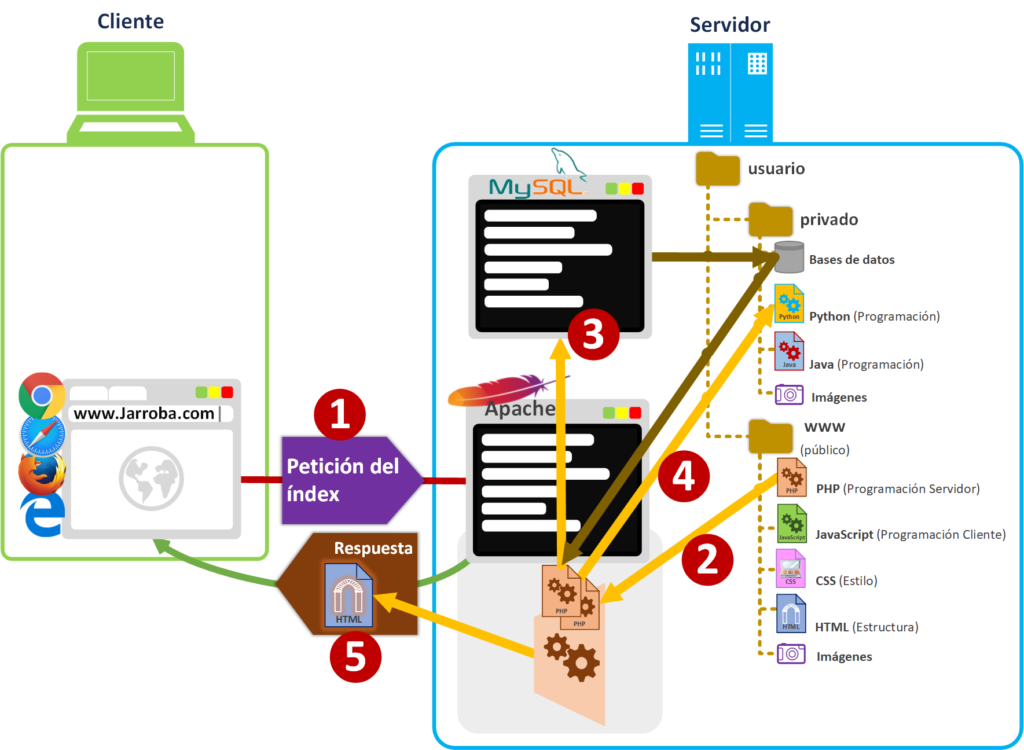
Every website has the “Index” file (“table of contents”) so the browser has an index to start getting to know the files in the physical Server’s “www” folder. That’s why, when we type the domain into our browser’s address bar [1] (for example: https://jarroba.com) the web server will look for the “index” file inside the “www” folder. The “index” file can have any extension depending on the type of file it is (for example “index.html” or “index.php”); if it were an HTML file (“index.html”) it would be returned as is by the web server, but let’s suppose it’s a PHP file (“index.php”) to make it more “fun” (and because most websites with a bit of “fun” work with interpreted files).
When a browser asks the Web Server, absolutely all files will pass through its hands before being delivered to the Client. This means that there’s a series of files it won’t transfer directly, but will interpret (it will run the code inside the file); for the Apache Web Server these will be the PHP [2] files. PHP files will call each other, since one PHP file may take care of searching the database [3] (PHP code doesn’t search the database directly; actually, when the Apache web Server sees a line in the PHP code about “searching the database”, it calls the MySQL database server, which is in charge of searching through the files where it stored the information) and another PHP file may run internal server Scripts [4] (for example, it can request the execution of Java or Python files to do background work; these Scripts can be used, among many other things, to: compress data, process images, work through a heavy calculation, distribute information among Nodes, etc.). The interpreted PHP code will gather the information to create the HTML file that will be sent to the client (this is known as dynamic HTML; for example, a web page that needs information from a database to be completed, such as a user’s profile page or a social network’s wall). Then it sends this created HTML to the client [5] (it hands it to the browser).
Note about trying to see the whole “www” folder: Someone with strange intentions could try to discover all the files in the “www” folder by brute force (trying all the combinations of file and directory names) to snoop around everything inside the “www” folder. If they manage it, could they download all the files in the “www” folder from the browser? Only files that can’t be interpreted by the web Server can be downloaded (and that the web Server has permission to serve); as we said before, if they tried typing the address of a PHP file, the Apache web Server would interpret it and return the processed result, which could be something (an image, text, etc.) or nothing (if that PHP file depends on other PHP files being run first, or if the PHP file requires certain information to be passed in to work), but never the PHP file itself (you can’t see the code written inside a file that the web Server interprets from the browser; the PHP file is run and may return something, but never its own code).
HTML files are used so the browser knows the structure of the web page, both the elements it will have to draw on screen (buttons, text, etc.) and the location of the files it needs within the “www” folder (this location can be on the same physical server or another one; although it’s not recommended to use a different physical server, even less so if it doesn’t belong to us). Then, the browser will request the resources it needs directly using the addresses that came in the HTML file [6] (these files can be, for example: HTML, CSS, JavaScript, Images, etc.). The Apache web Server will look for the requested files in the “www” folder [7] and deliver them directly to the browser for it to use [8].
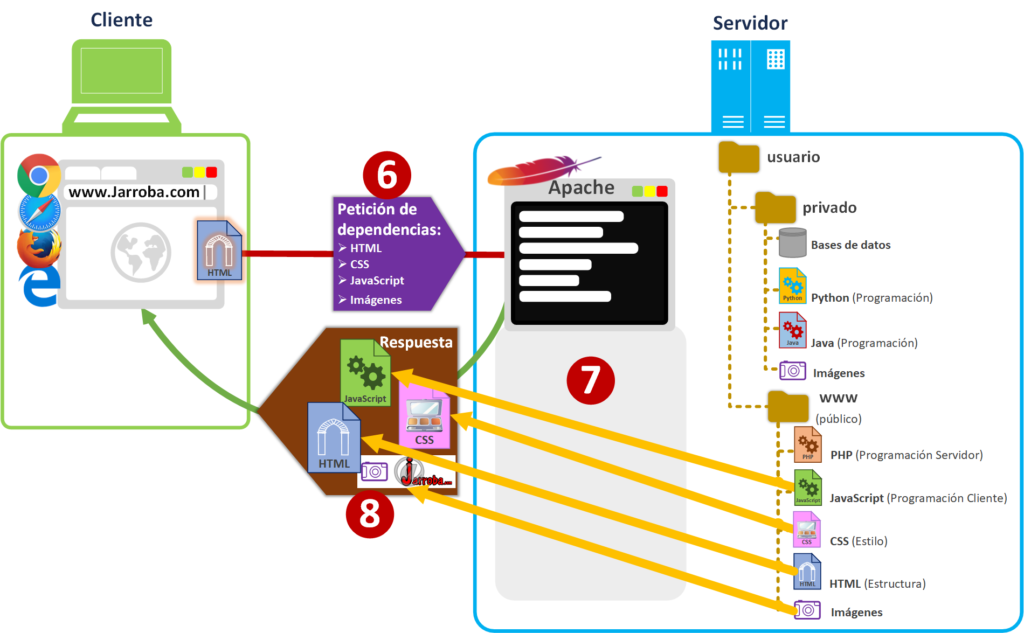
This is when the browser, with all the files in its hands, generates the web page’s content [9]. To generate the web page it will use the main HTML to create the elements (buttons, text, etc.), and it will also use the CSS (the styles of my web page) to color and position the elements nicely; it can also use other static HTML files to complete parts of the page (for example, with the <iframe> tag); meanwhile, it will prepare the JavaScript code to use it when that JavaScript code says so (JavaScript code is code interpreted by the browser, NOT by the web server; although there are web servers that do interpret a different kind of JavaScript code, as I’ll explain later). And it will show you the web page [10] like the one you’re looking at right now in your browser.
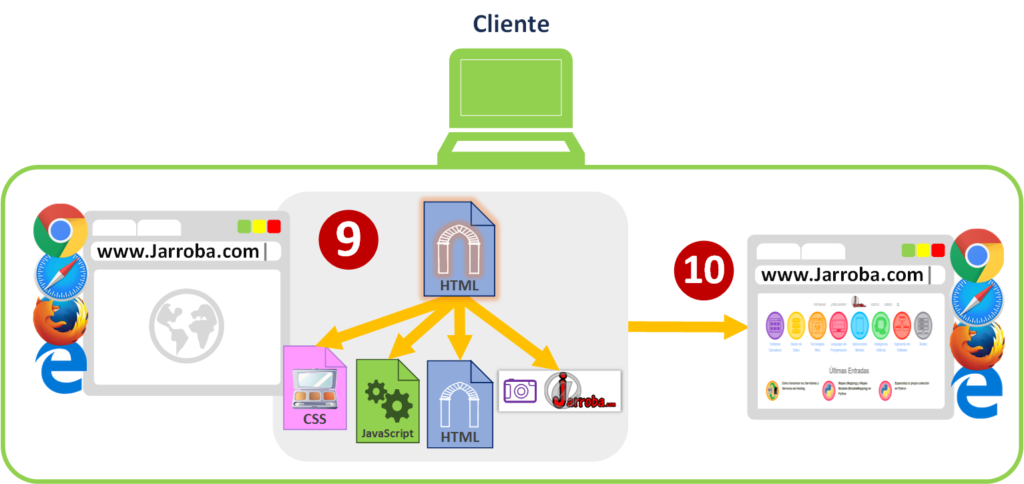
Now the user can use the web page (after all the previous work that has gone on underneath with the “Client Server” architecture, and the user hasn’t even noticed).
Let’s suppose the web page has a form that asks for an email address (it could ask for any data; here I’m using the email as a shorthand). When the user types the requested data into the form on the web page shown in the browser and clicks the “Submit” button [11], the browser will use the JavaScript code that came with that web page to validate that the email has a correct format [12] (mainly checking that it has an “@” in the middle, a dot after the at sign and no more than three letters after the dot; that is, it applies a regular expression so it has a format like “text@text.abc”; if you’re more curious about regular expressions you can learn how they work by clicking here). If the JavaScript determines that the email is incorrect it will warn the user (usually the form turns red and a warning appears; by the way, the browser paints these red warning colors just as the CSS file tells it to); if it determines that the email is correct it will send it (via GET or POST; if you want to dig deeper into this, I recommend reading the article about URL, GET and POST) to the Apache web server [13].
It’s important that when the request is received on the Web Server it gets analyzed again so nothing sneaks past us (later I’ll tell you about some real cases of the dangers of NOT checking what the server receives), since in the browser you can modify the JavaScript so that it validates as correct something that is wrong (or enable a disabled button). That’s why, with the interpreted PHP code on the Apache web Server, it will check (on the Server side, where the Client can’t tamper with the code) not only that it’s an email with the correct format, but also that they’re not sneaking in code that could be executed somewhere [14]; for example, SQL injection (an example of “SQL Injection” is trying to delete the database or get all the information) or PHP code (taking advantage of the chance that there’s an eval() method that happens to be there to run PHP code; that’s why you’ll often hear “it’s better to never use eval() functions” in any programming language, or the wordplay “eval is evil”, which means that “eval is the devil”).
So is there any point in validating with JavaScript on the client side (in the browser)? Yes. Telling the user with JavaScript whether what they entered in a form is correct or not is merely informative, to make things more comfortable for the user (for “user experience” “UX”; that is, so the user says “the website is easy to use” and comes back). So if the browser has validated some data as correct, it doesn’t mean that the data is really correct. On the other hand, it does help a lot to lighten the load on the web Server, since by not allowing wrong things to be sent from the client, we free the web Server from having to deal with “all” the requests, wrong or not; it will only have to deal with the majority of requests, which will be correct, some requests that even though they’re correct can’t be added to the database (for example, if that email already exists in the database) and some wrong requests that someone tries to sneak past us.
If everything has gone well, the PHP will accept the new email value and run the insert query that it will pass to the MySQL database server, which will take care of saving this new information [15].
Finally, the PHP will send a response saying everything went well to the client [16] (or not, if something happened) so that the JavaScript in the browser picks it up and shows the user a message that it was saved successfully (or an error if something failed).
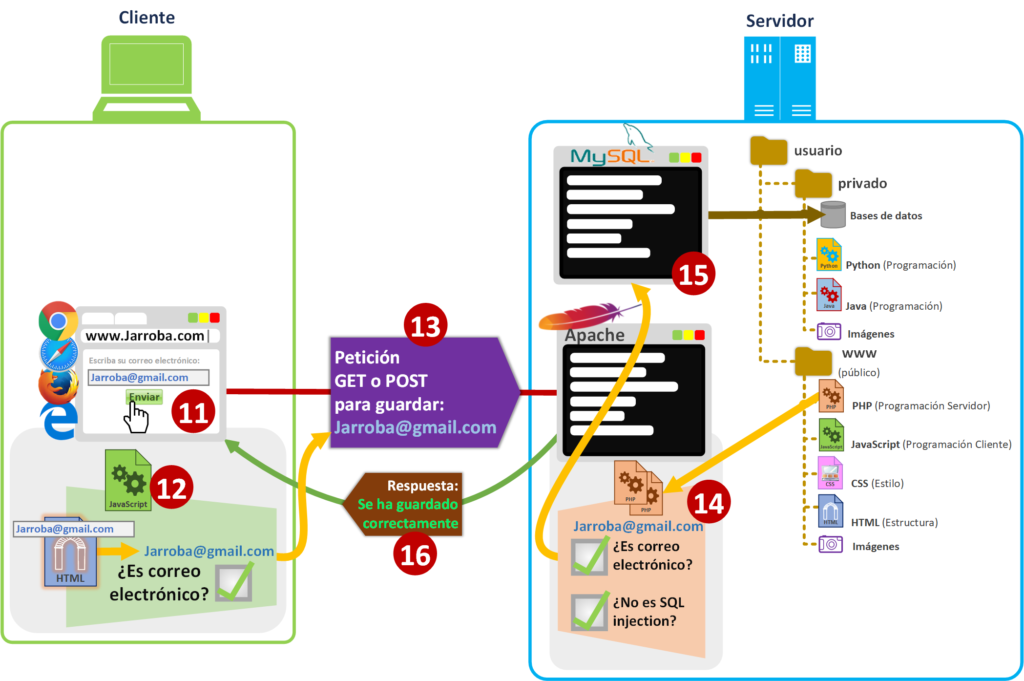
Whether it goes well or badly, it’s always necessary to notify the user with the web server’s response, in case their email couldn’t be saved in the database for whatever reason and the user thinks it was (with an email it may not be very serious if the user doesn’t find out whether there was a problem or not, but imagine what would happen with a money transfer or buying a product from a shop).
Note about server-side and client-side checks: we can save ourselves from writing them by using certain Frameworks that already have them implemented (“Framework” can be translated as “working framework”, or better yet “a bunch of code that’s already written to make our lives easier” 🙂 ; on the client side we have, for example, JQuery, Angular or React; on the server side Symfony or PHP itself has some checking functions). It’s always important to know the journey of data across the network between client and server, with its potential dangers, to assess whether these checks are really being applied and don’t put our server, our data, and least of all our users at risk.
About other types of files interpreted by the web server: JavaScript files could be executed by the Web server (like PHP files are) if we worked with a web server that interpreted them; for example, with the Node.js web server, which interprets JavaScript files (instead of PHP) on the Server side and can return JavaScript files, although the ones that can be delivered to the client are kept separate from those that can’t (the functions used in each JavaScript change a little). The same happens with Java files if you install a Web server like Tomcat, which doesn’t run PHP files but Java (and there are also Frameworks that help us in Java, like Spring). And likewise with Python files with the Nginx web server.
Why it’s important to understand how the Client works together with the Server
I’ve gone on and on writing about the differences between Client and Server for a reason: so you understand where each thing is processed, because it’s very important both for optimization and even more so for security. And what does it matter to learn all this about Client and Server if what I want is to build a website, for example, or have my data uploaded to the Cloud? Well, it matters as much as wanting to cut something without learning how to use a knife, so you end up grabbing it by the blade and trying to cut with the handle; apart from the fact that I don’t think there’s anything less efficient for cutting, it’s quite dangerous 🙁
If you intend to create a website you must be very clear about one thing: assume that whatever you send from your Server to the Client is going to be altered (it’s enough for one person in the whole world with evil intentions to alter it for you to have problems) and the data the Client sends back is, as a rule, NOT trustworthy (again, it’s enough for one person to send untrustworthy data). And it’s not that we don’t trust our users, it’s that we have to do things right in terms of security and communication; it would be the equivalent of trusting that you can leave your wallet full of money on the street and expecting it to still be there tomorrow. It’s not that you don’t trust people, it’s that it only takes one person doing the wrong thing (someone takes the wallet) for things to get out of hand (you lose your wallet).
If you have a Web Server, on the Server side that you control, a series of files will be processed and then sent to the Client side (HTML code, JavaScript, CSS, images, audio, video, etc.). Once those files are on the Client’s computer, that person (or software, like a virus) can do whatever they feel like with all those files. And what might they feel like doing? They could draw over a downloaded image, modify HTML text or change JavaScript code. Can they do anything, like download and sell my creations? Here we’d be entering the territory of intellectual property, which is another more serious matter involving a crime/infringement (someone downloading whatever they want from your Server to then sell what belongs to your intellectual property, with all the nerve in the world, without even asking permission). What I mean is someone (without getting into intellectual property issues) modifying, on their private computer (without leaving their home), what has reached them from the Server (which isn’t illegal); then, the response to the Server will be based on those modifications.
Examples of what not to do, based on real cases
Imagine a person who owns a physical shop but doesn’t know much about networks (without any of the knowledge you’ve learned in this article) and who creates an online store, a website on which to sell their products. This person has programmed the code by copying and pasting chunks from wherever that did what they wanted (without understanding what those chunks of code did). Then they test that their website works as they want: they add items to the cart and when it’s time to pay a correct price shows up; the website works as they wish and they make it public, but there’s a detail that never even crossed their mind (because they didn’t know how everything explained in this article about Client and Server works): that “the only validations were programmed in code that runs on the Client side” (it hurt me even to write that, and if you’re an advanced web developer you’ll have felt it’s worse than reading spelling mistakes; you’ll see how it ends).
Users visit their website and buy without problems. But it turns out that a single user with bad intentions, who has minimal knowledge of HTML (this isn’t sarcasm, minimal knowledge is more than enough to do the following), adds every product in the store to the cart, the total comes out to a lot of money, but he doesn’t care because he’s going to pay zero. All he needs to do is change the total amount to zero in the HTML code that shows the total in the browser (anyone with hardly any knowledge can right-click, choose “view page source” and change some text), so the JavaScript code reads the amount of money from that HTML and sends it to the Server; and the Server issues the paid invoice without any other check.
And now the mess. Okay, the shop owner isn’t stupid, he’ll notice and can cancel the order, but the customer has an invoice saying that the shop agreed to sell certain products for zero. Who is right? Well, it’s complicated. The real-life equivalent would be a shopkeeper in a physical shop trusting customers to put the money in the cash register themselves and take the receipt; one of the customers takes a purchase receipt without putting any money in the register and walks off with the products for free. Would it be theft if he has the invoice? I’m neither a judge nor a lawyer, so I won’t go further into whether it’s legal or not; morally it doesn’t seem to be, but I’m not the one to give an answer, I’m just the one trying to prevent these things from happening (better to prevent by knowing than to have to cure because you didn’t know how to prevent).
Has this really happened? And it keeps happening. Just playing for a few seconds with JavaScript, HTML and SQL injections against the database of some website is enough to find out whether it makes basic checking mistakes on the Server side. Most cases with security problems due to bad checks are based on trusting that JavaScript code is enough to check that everything is correct (which shows that the “Client Server” architecture isn’t understood), or on allowing the execution of any kind of code from the Client side (such as SQL injection or code interpreted by the server, like PHP, Java, Python, JavaScript, etc.).
The websites of big companies are usually more than protected against these problems and many others, since they usually hire people who are very expert in both web and security. Although sometimes they get overconfident, since they aren’t free of vulnerabilities either, and then security problems at big companies show up in news headlines: “database theft with all their users’ data”, “wrong prices on products that weren’t checked”, “password theft”, etc.
And the solution/prevention? It would have been solved if whoever created the website hadn’t trusted what the Server receives from the Client. For the previous example it would have been enough not to send the price to the Server, but the products the user wants to buy (and if somehow the Client did send the price, that value would be ignored), the calculations of what everything will cost would be done on the Server side (where the Client has no access), and an invoice would be created with the prices calculated on the Server side and sent to the Client, for them to accept and keep a copy. This way we make sure the prices can’t be changed and that what the Client wants is sold fairly without any problems.
And what if someone breaks into my Server and changes the prices? That would already be a bigger problem that would go down the legal route: first, whoever got into the Server would be impersonating another person with privileges on that Server (with their username and password); also, they’d be accessing confidential information (the customers’ database), and if the police catch that offender they could be charged with several crimes.
Warning
Note about the legal reliability of this article
I’ve written it several times: I’m neither a judge nor a lawyer, nor the person to ask for advice on legal matters (remember that this website is about technical computing, not legal matters). All the legal parts written in this article shouldn’t be taken any more seriously than as a way to understand the risks, prevent them and deter. Here are some links I find interesting in case you need more information:
Now a question might come up: shouldn’t we show the price or calculate it on the Client side? You do have to show and calculate the price on the Client side, since it’s basic for giving the user a good user experience (as they add items to the shopping cart, the total price shows up). And when it’s time to pay, you have to calculate everything again on the Server side. That is, you have to do the work twice, but with a different approach:
- On the Client side it has to look nice, so the user sees what they’re spending and feels comfortable using our website.
- On the Server side it has to be precise, to make sure everything is correct (so nothing sneaks past us).
And if you come across a website with some security risk (whether the ones explained here or any other risk), the most honorable thing to do is to contact the owner of that website and explain the problem (you’d be considered a White Hat Hacker, one of the good Hackers).
Another real example is online video games and people who cheat using mods (called “Cheats” in online gamers’ slang). Suppose it’s a game in which each player (clients) gets a character that walks around the map (a typical first-person game, like a shooter). If the server receives that the character is at a certain position and has moved forward a certain number of meters, the server has to check that the maximum distance the character can move in a given time is correct. What happens if the player tampers with the code and changes the character’s movement so that it travels hundreds of meters in one second? He’d be cheating, and if the server doesn’t check it he’d have an advantage over the rest of the players, creating a bad experience for all players and also going against the interests of the company that owns the video game (players who play fair get tired of the cheating and leave the game; without players, who are these companies’ clients, there will be no purchases of their product and they’ll get bad reviews). Quite a lot of cheats aren’t checked on video game Servers: characters that fly (when the game’s physics doesn’t allow it), instant aiming of weapons exactly at the head (when that’s impossible, since movement takes time and the odds of hitting the head every single time aren’t 100%), spontaneous increase of virtual money (when it hasn’t been earned in any way), immortality (when it shouldn’t be possible), etc.
It’s necessary to keep these examples of how not to do things in mind so you can do them right and build a good “Client Server” architecture.
Note
It’s easy to create a reasonably secure website without knowing how to program
I also don’t want you to create a website out of fear if you don’t understand much. If you want to make a simple website, like a blog, there are ready-made packages that have several Server-side security systems implemented, such as:
There are even options that let you easily create an online store with Server-side security checks, such as:
Learning at a technical and professional level so you can do whatever you want (like your own website)
You have to start somewhere, so I recommend the following articles to start getting to know both physical and Software Servers and to learn. Let’s say we have a web course spread over several articles:
- This article you’ve just read is meant to be an introduction to the article about how servers and hosting services work, where we’ll explain step by step how to learn to create whatever you want in a fast, effective and professional way
- And as a second part of the previous point we have how to configure Software servers on the physical Server, manage the Firewall, edit code both remotely and locally and create a web page step by step
- If we’re going to create a website, we can create it directly on a Physical Server or have our computer act as a physical server to test our website with the XAMPP web server we mentioned earlier; in this article we explain step by step everything you need to know
- You need to know how the requests between client and server are made, as we explain in this other article
- Knowing how the Hash code works will help us understand how to transfer information between the Client and the Server in a completely secure way and the need for a certificate that makes our website secure (HTTPS), in this other article
- You have other examples of hosting services in this other article too, where we’ll help you configure your server step by step
References
“Client vs Server” by Ramón Invarato at jarroba.com, licensed under Creative Commons Attribution-NonCommercial-ShareAlike 3.0. Registered at Safe Creative.

You may also like

Client-Server: The Client Request
How the Internet works, made easy. Client-Server architecture, the client request, the parts of a URL, and HTTP Request headers explained with examples.

How Servers and Hosting Services Work
Learn how servers and hosting services work, from DNS and ISPs to creating your own cloud VPS server and connecting to it securely over SSH.
Leave a comment