
MySQL Database Course – Part IV – (Video) INNER JOIN
In this fourth part we explain how to "join" tables with the INNER JOIN statement using a foreign key. Watch the video tutorial and follow along.
Series: MySQL Database Course part 4 of 5
Part IV: The INNER JOIN Statement for Joining Tables
In this fourth part we are going to explain how to "join" tables with the INNER JOIN statement using a foreign key (obviously). As explained in the following Video Tutorial, the two tables are joined through the common "key", which in this case is the person’s identifier. Below is the structure of the INNER JOIN statement:
SELECT * FROM Tabla1 INNER JOIN Tabla2
ON Tabla1.identificador = Tabla2.identificador;
The LEFT JOIN and RIGHT JOIN statements, which we will see later, have the same structure.
Here is the Video Tutorial showing how to do it:
You can download all the material you need to follow this tutorial HERE.
This tutorial was done with the following tables and the relationship shown in the following image:
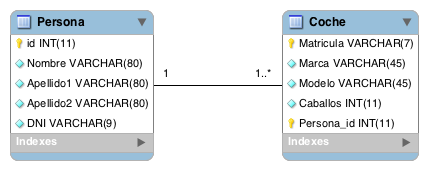
To learn more about relating tables and passing foreign keys from one table to another depending on their relationship, check out database tutorial 2 by clicking HERE.
The script to create the tables and their relationship is the following, and you can run it as shown in the video tutorial:
SET @OLD_UNIQUE_CHECKS=@@UNIQUE_CHECKS, UNIQUE_CHECKS=0;
SET @OLD_FOREIGN_KEY_CHECKS=@@FOREIGN_KEY_CHECKS, FOREIGN_KEY_CHECKS=0;
SET @OLD_SQL_MODE=@@SQL_MODE, SQL_MODE='TRADITIONAL,ALLOW_INVALID_DATES';

CREATE SCHEMA IF NOT EXISTS `miprimerabasededatos` DEFAULT CHARACTER SET utf8 COLLATE utf8_spanish_ci ;
USE `miprimerabasededatos` ;

-- -----------------------------------------------------
-- Table `miprimerabasededatos`.`Persona`
-- -----------------------------------------------------
CREATE  TABLE IF NOT EXISTS `miprimerabasededatos`.`Persona` (
  `id` INT(11) NOT NULL AUTO_INCREMENT ,
  `Nombre` VARCHAR(80) CHARACTER SET 'utf8' COLLATE 'utf8_spanish_ci' NOT NULL ,
  `Apellido1` VARCHAR(80) CHARACTER SET 'utf8' COLLATE 'utf8_spanish_ci' NOT NULL ,
  `Apellido2` VARCHAR(80) CHARACTER SET 'utf8' COLLATE 'utf8_spanish_ci' NOT NULL ,
  `DNI` VARCHAR(9) CHARACTER SET 'utf8' COLLATE 'utf8_spanish_ci' NOT NULL ,
  PRIMARY KEY (`id`) ,
  UNIQUE INDEX `id_UNIQUE` (`id` ASC) )
ENGINE = InnoDB
DEFAULT CHARACTER SET = utf8
COLLATE = utf8_spanish_ci;

-- -----------------------------------------------------
-- Table `miprimerabasededatos`.`Coche`
-- -----------------------------------------------------
CREATE  TABLE IF NOT EXISTS `miprimerabasededatos`.`Coche` (
  `Matricula` VARCHAR(7) CHARACTER SET 'utf8' COLLATE 'utf8_spanish_ci' NOT NULL ,
  `Marca` VARCHAR(45) CHARACTER SET 'utf8' COLLATE 'utf8_spanish_ci' NOT NULL ,
  `Modelo` VARCHAR(45) CHARACTER SET 'utf8' COLLATE 'utf8_spanish_ci' NOT NULL ,
  `Caballos` INT(11) NOT NULL ,
  `Persona_id` INT(11) NOT NULL ,
  PRIMARY KEY (`Matricula`, `Persona_id`) ,
  UNIQUE INDEX `Matricula_UNIQUE` (`Matricula` ASC) ,
  INDEX `fk_Coche_Persona_idx` (`Persona_id` ASC) ,
  CONSTRAINT `fk_Coche_Persona`
    FOREIGN KEY (`Persona_id` )
    REFERENCES `miprimerabasededatos`.`Persona` (`id` )
    ON DELETE NO ACTION
    ON UPDATE NO ACTION)
ENGINE = InnoDB
DEFAULT CHARACTER SET = utf8
COLLATE = utf8_spanish_ci;

SET SQL_MODE=@OLD_SQL_MODE;
SET FOREIGN_KEY_CHECKS=@OLD_FOREIGN_KEY_CHECKS;
SET UNIQUE_CHECKS=@OLD_UNIQUE_CHECKS;
TO SEE THE CHANGES, REMEMBER TO "REFRESH".
To insert data into the two tables, as done in the tutorial, run the following statements:
PERSONA TABLE
INSERT INTO `Persona` (`id`,`Nombre`,`Apellido1`,`Apellido2`,`DNI`) VALUES (1,'Ricardo','Moya','Garcia','30000000A');
INSERT INTO `Persona` (`id`,`Nombre`,`Apellido1`,`Apellido2`,`DNI`) VALUES (2,'Pepe','Garcia','Garcia','23456789F');
INSERT INTO `Persona` (`id`,`Nombre`,`Apellido1`,`Apellido2`,`DNI`) VALUES (3,'Paco','Gonzalez','Gonzalez','76134289Q');
INSERT INTO `Persona` (`id`,`Nombre`,`Apellido1`,`Apellido2`,`DNI`) VALUES (4,'Lola','Perez','Lopez','34872453R');
COCHE TABLE
INSERT INTO `Coche` (`Matricula`,`Marca`,`Modelo`,`Caballos`,`Persona_id`) VALUES ('1234bcb','Citroen','C3',500,1);
INSERT INTO `Coche` (`Matricula`,`Marca`,`Modelo`,`Caballos`,`Persona_id`) VALUES ('5678CDC','Renault','Clio',120,2);
INSERT INTO `Coche` (`Matricula`,`Marca`,`Modelo`,`Caballos`,`Persona_id`) VALUES ('6713bbb','Reanult','Megane',150,2);
INSERT INTO `Coche` (`Matricula`,`Marca`,`Modelo`,`Caballos`,`Persona_id`) VALUES ('8923DDD','Seat','Ibiza',100,3);
INSERT INTO `Coche` (`Matricula`,`Marca`,`Modelo`,`Caballos`,`Persona_id`) VALUES ('9823bbb','Ferrari','F25',900,1);
NOTE: One more tuple has been added to the Persona table to show a clear example with the LEFT JOIN.
The first query in the video tutorial, which does the same thing as the INNER JOIN but without using INNER JOIN, is the following:
SELECT * FROM Coche C ,Persona P
WHERE C.Persona_id = P.id;
The result of the query is the following:
| Matricula | Marca | Modelo | Caballos | Persona_id | id | Nombre | Apellido1 | Apellido2 | DNI |
| 1234bcb | Citroen | C3 | 500 | 1 | 1 | Ricardo | Moya | Garcia | 30000000A |
| 9823bbb | Ferrari | F25 | 900 | 1 | 1 | Ricardo | Moya | Garcia | 30000000A |
| 5678CDC | Renault | Clio | 120 | 2 | 2 | Pepe | Garcia | Garcia | 23456789F |
| 6713bbb | Reanult | Megane | 150 | 2 | 2 | Pepe | Garcia | Garcia | 23456789F |
| 8923DDD | Seat | Ibiza | 100 | 3 | 3 | Paco | Gonzalez | Gonzalez | 76134289Q |
The same query written with the INNER JOIN statement would look like this and would give the same result:
SELECT * FROM Coche INNER JOIN Persona
	ON Coche.Persona_id = Persona.id;
The next query uses the INNER JOIN too, but this time we select specific data for a particular person. Here we select the id and the Nombre of the person with id=2, plus the Marca and Modelo of the cars they own:
SELECT id,Nombre,Marca,Modelo FROM Coche INNER JOIN Persona
	ON Coche.Persona_id = Persona.id
	WHERE Persona.id=2;
The result of the query would be the following:
| id | Nombre | Marca | Modelo |
| 2 | Pepe | Renault | Clio |
| 2 | Pepe | Reanult | Megane |
Now here is an example with the LEFT JOIN, which selects all the "id" values from the left table (the LEFT table) and joins them with the rows of the table we are joining it with. If a row has no relationship with any row on the right, it will still show the data from the left table. To make it easier to see, we run the following query with the LEFT JOIN:
SELECT id,Nombre,Marca,Modelo FROM Persona LEFT JOIN Coche
	ON Coche.Persona_id = Persona.id;
And the result we get from the query is the following:
| id | Nombre | Marca | Modelo |
| 1 | Ricardo | Citroen | C3 |
| 1 | Ricardo | Ferrari | F25 |
| 2 | Pepe | Renault | Clio |
| 2 | Pepe | Reanult | Megane |
| 3 | Paco | Seat | Ibiza |
| 4 | Lola | NULL | NULL |
As you can see, in this case the person with identifier '4' named 'Lola' has no car, but the query still returns her even though she has no associated row in the Coche table of the database. This is a LEFT JOIN because the query is "Persona LEFT JOIN Coche" and Persona is to the left of Coche. As an exercise, try the RIGHT JOIN by writing "Coche RIGHT JOIN Persona" to see the result you get. "Will it be the same or not?" Well, the answer is 'YES' ;). Work out why, and if you have any doubts, leave a comment on the post and we will clear them up.
“MySQL Database Course – Part IV – (Video) INNER JOIN” by Ricardo Moya at jarroba.com, licensed under Creative Commons Attribution-NonCommercial-ShareAlike 3.0. Registered at Safe Creative.

You may also like
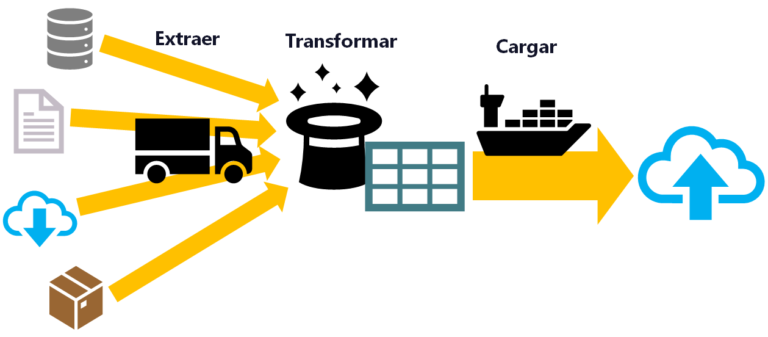
ETL: Extract, Transform, and Load
ETL is used for massive, real-time data processing (Big Data): Extract data from different sources, Transform it into a useful structure, and Load it where you can use it.
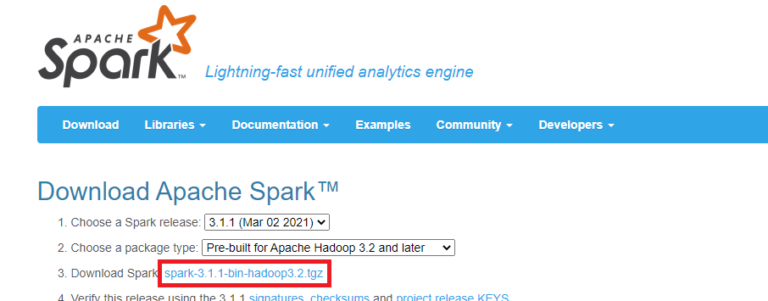
Install Apache Spark on Any Operating System and Learn to Program It with Python, Scala or Java
Install and test Apache Spark step by step with Python, Scala and Java, also with Jupyter Notebook and JupyterLab. Work with Big Data the easy way.
Leave a comment