
Python Course – 6. Libraries/Packages
Learn how to use and create Python packages and modules, install third-party libraries with PIP, and work with Random, Math and Datetime, with exercises.
In programming, there is a lot of code that other people have already written and that works really well. Using it saves us the effort of creating it and ensures that it works, so we can get more functionality with less work. That’s why it’s important to know how to include third-party code in our own code: their packages (libraries).
Theory
Skip to PDF content6.1- Packages and Modules
In Python it’s important to tell Packages and Modules apart. The approach differs depending on whether you want to create a package or use a third-party package.
6.2- Creating and Importing Our Own Packages
Learning to import our own scripts in big projects makes it easier to work with more people on the same project and keeps files smaller, so they’re easier to read.
6.3- PIP – Package Manager
Python has a “free app store” called PIP. With PIP we can install any third-party package we want, quickly and easily.
Download the file called get-pip.py from get-pip.py (script de instalación de pip, PyPA)
You can search for any package to install from the “package store” at PyPI · The Python Package Index
6.4- Random Package
Rolling dice, playing roulette, picking a random location, and so on. If we want to generate random numbers, we use the Random library.
Full documentation for the Random package at: random — Generate pseudo-random numbers (Python docs)
6.5- Math Package
Roots, logarithms, cosine, tangent, and many more mathematical operations can be found in the Math package.
Full documentation for the Math package at: math — Mathematical functions (Python docs)
6.6- Datetime Package
Dates, how much time is left until a given event, different date formats for each country, and whatever else we need to do with dates: the Datetime package has it covered.
Full documentation for the Datetime package at: datetime — Basic date and time types (Python docs)
Exercises
Exercise 6.1-ruleta_casino.py
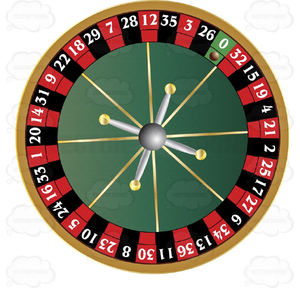
Build a simplified casino roulette game.
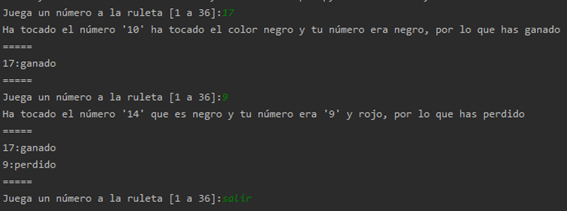
Our terminal will ask us to bet on a number (from 1 to 36; check that no other number is entered), not including 0. When we press Enter, the spin is played and it tells us whether we’ve won anything or not.
- If 0 comes up, we’ve lost
- If our number comes up, we’ve won
- If a color comes up and our number is of that color, we’ve won too (indicate that the color came up, not the number)
After showing the result, it will immediately ask for another number (the program will loop until we type the word “salir”)
Every time the game restarts, it must show a history of the games won and lost (the number played and whether it was won or lost)
Example program:
Exercise 6.2-videojuego.py
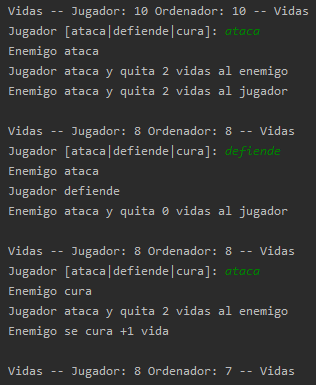
We’ll build a small combat game against the machine where the user decides whether to attack, defend, or heal.
There will be two life counters: ours and the enemy’s. Whoever reaches zero loses.
The enemy randomly chooses whether to attack us, defend, or heal.
In case of:
• If someone defends against an attack, they lose 0 life
• If someone attacks while the other is also attacking, both lose -2 life
• If someone heals while the other attacks, the one who isn’t attacking loses -2 life
• Whoever heals recovers +1 life, whether attacked or not
We’ll create the action methods that update both lives: atacar_jugador, defender_jugador, curar_jugador, atacar_enemigo, defender_enemigo, curar_enemigo. We’ll pass the player’s life and the enemy’s life as arguments to all the methods, which will update them as needed and return both updated; in addition, we’ll pass whatever other arguments we need (hint: “atacar” may need an additional “defensa_contraria” argument).
Extension: add some extra feature to the game (ideas: a strong hit that takes away -4, a spell that steals life, other meters for the players such as mana or fatigue, etc.)
Exercise 6.3-velocidad_de_escape.py
The International Space Agency has hired us. They plan to put some satellites into orbit, and thinking ahead to when we reach Mars and the Moon, they’ll want to launch satellites from there too.
So they want a calculator where we enter the mass of a planet and its radius and it returns the “escape velocity” of that specific planet.
Hints:
- Let’s do some research: Velocidad de escape (Wikipedia)
- We look for the formula we’re asked to build into the calculator
- We identify the variables in the formula (G is the universal gravitational constant, M is the planet’s mass and r is the planet’s radius)
- We program the calculator
Once we have it, we’ll test it with the data of the planets they asked for (look up the data on the Internet): Earth, Mars and the Moon
It’s important to validate what the user enters: that they typed numbers and nothing else, that the input isn’t empty, etc.
Example:

Exercise 6.4-datetime.py
Create a script that asks the user to enter a date of birth in the format “DD/MM/YYYY” and prints the number of days they have lived from birth up to the moment the script runs, and also prints their age in years.
“Python Course – 6. Libraries/Packages” by Ramón Invarato at jarroba.com, licensed under Creative Commons Attribution-NonCommercial-ShareAlike 3.0. Registered at Safe Creative.

You may also like

Advanced Dockerfile: Multi-Stage Builds, Registries, and Tricks
Free Docker course. Expert Docker tricks: multi-stage builds, optimizing images, faster build times, and distributing images through Docker registries.
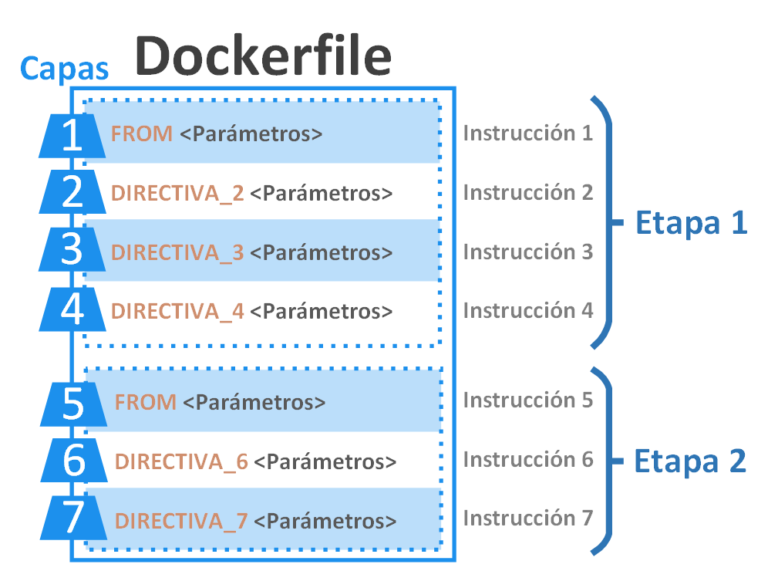
Dockerfile: Directives and Dockerizing Projects
Free Docker course. A Dockerfile is a file of directives for building and deploying custom applications with Docker. Learn how to Dockerize your projects.
Leave a comment