
Python Course – 2. Basic Data Types
Learn the basic Python data types: String, format, Int and Float, arithmetic operators, booleans, comparators and truth tables, with videos and exercises.
Data types come in many varieties because each one is optimized for a specific kind of data. Take addition, for example: <2+3> is not the same as <‘par’+’aguas’>. In the first case we want the result 5, and in the second we want the words concatenated into “paraguas”.
Theory
Skip to PDF content2.1- String
String is used to work with text. In Spanish the word is usually left untranslated, but it’s worth knowing that “String” literally means “chain” (“cadena”), since a String is a chain of characters along with its operations (like counting letters, splitting or concatenating text).
2.2- Format
Nicely presented information not only looks good, it’s also much more readable; and if it can be easy to use and automatic, even better. For that we’ll use format.
2.3- Numbers: Int and Float
We have integers on one side and real numbers on the other. It’s important to understand each one well so you get the most precise result you need.
2.4- Arithmetic Operators
Arithmetic operators in programming look a lot like the ones you learned in school. Doesn’t an operation like <x=2+y> ring a bell? Well, in programming they’re written in a very similar way.
2.5- Booleans and Comparators
If decimal is represented with 10 symbols, boolean uses 2. We usually say one is <True> and the other <False>. Above all, they’ll help us a lot to make decisions and steer a program’s flow down one path or another.
2.6- Truth Tables
Knowing the logic behind a statement will give you one of the possible results of the truth table.
2.7- Example – Logic
Let’s look at an example of using booleans and put truth tables into practice.
Exercises
Exercise 2.1-tienda_ropa.py
- Create a variable “formato” with the text: “{ropa} cuesta {numero} euros”
- Create two variables with items of clothing
- Create two more variables with a number written out
- Create two “formato_aplicado” variables, and apply the format to each of them with a piece of clothing and a number
Hint: if you print the two variables from the previous step, you should see something like this on screen:
Pantalón cuesta cinco euros
Camisa cuesta diez euros- Create one last variable that joins the other two with the format
“Su carro de la compra tiene: {formato_aplicado1} y {formato_aplicado2}”
- Print the last variable to see the result
Hint: in the end you should read something like this:
Su carro de la compra tiene: Pantalón cuesta cinco euros y Camisa cuesta diez eurosExercise 2.2-almacen_vino.py
We work for a wine company that has three types of wine: red, white and rosé. Each type of wine is stored in a different warehouse, and the wine is kept in barrels in each warehouse.
- Create three variables that represent barrel warehouses for each of the three types of wine. The value of each variable will be an integer (any one you like) representing the barrels in each warehouse (example: almacen_barriles_tinto = 123)
- We’ll also create three more variables that will store the name of each warehouse (example: str_almacen_tinto = “Almacén tinto”)
The boss asks us to calculate the total number of barrels our company has (hint: red + white + rosé). Print the result with a template like: “Tenemos un total de {numero_de_barriles} barriles”
He also asks us to calculate the liters of wine in each warehouse, knowing that each barrel of red wine holds 2. liters, each barrel of white wine holds 47 liters and each barrel of rosé wine holds 73 liters (hint: barrels x liters). Print each warehouse with the template: “El {nombre_almacen} tiene {cantidad_litros} litros”
Finally, he asks us to print a table comparing the liters between warehouses, showing whether they’re equal, greater or lesser between each pair (hint for a possible template: “{cantidad_litros_tinto} > {cantidad_litros_rosado} = {resultado_comparacion}” and its possible console output: “100 > 10 = True”)
“Python Course – 2. Basic Data Types” by Ramón Invarato at jarroba.com, licensed under Creative Commons Attribution-NonCommercial-ShareAlike 3.0. Registered at Safe Creative.

You may also like

Advanced Dockerfile: Multi-Stage Builds, Registries, and Tricks
Free Docker course. Expert Docker tricks: multi-stage builds, optimizing images, faster build times, and distributing images through Docker registries.
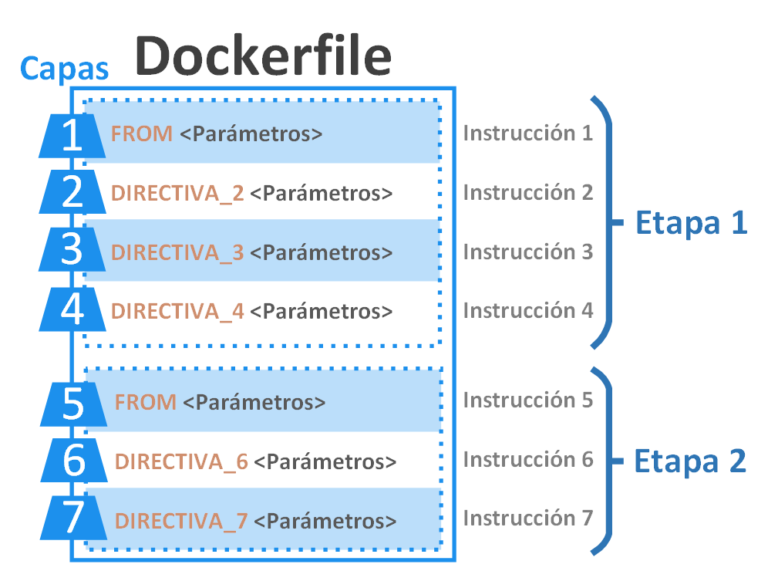
Dockerfile: Directives and Dockerizing Projects
Free Docker course. A Dockerfile is a file of directives for building and deploying custom applications with Docker. Learn how to Dockerize your projects.
Leave a comment